Buy anything from 5,000+ international stores. One checkout price. No surprise fees. Join 2M+ shoppers on Desertcart.
Desertcart purchases this item on your behalf and handles shipping, customs, and support to Iceland.
⌨️ Elevate your workspace comfort and security — type smarter, not harder!
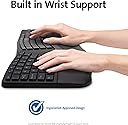
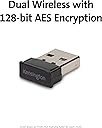
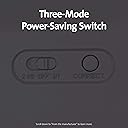
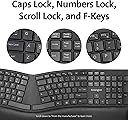
The Pro Fit™ Ergonomic Wireless Bluetooth Keyboard by Kensington combines an ergonomist-approved split and sloped design with a built-in wrist rest to maximize comfort. Featuring dual wireless connectivity (2.4 GHz and Bluetooth 4.0 LE) secured by 128-bit AES encryption, it offers flexible, secure use. Its spill-proof keys meet military-grade fluid resistance standards, ensuring durability and easy maintenance. Quiet keys and power-saving modes enhance productivity and battery life, making it an ideal choice for professionals seeking comfort, security, and efficiency.


| Brand | Kensington |
| Manufacturer | ACCO Brands, ACCO Brands Asia Pte Ltd, 2 International Business Park Tower 2 #05-31/32, The Strategy, Singapore 609930, Contact: +65-67760195, [email protected] |
| Series | Pro Fit |
| Colour | Black |
| Form Factor | ergonomic |
| Item Height | 38 Millimeters |
| Item Width | 48.2 Centimeters |
| Product Dimensions | 25.2 x 48.2 x 3.8 cm; 997.9 g |
| Batteries | 2 AAA batteries required. (included) |
| Item model number | K75401US |
| Power Source | Battery Powered |
| Operating System | Windows 10 |
| Are Batteries Included | Yes |
| Lithium Battery Energy Content | 40 Watt Hours |
| Number of Lithium Ion Cells | 1 |
| Manufacturer | ACCO Brands |
| Country of Origin | China |
| Item Weight | 998 g |
L**A
good enough
surprisingly good, but use the Bluetooth mode as 2.4 has great lag. Size is big enough. Wrist pad is also comfortable
K**K
Annoying sleep mode. One key has become non operational
Why does this keyboard have such a short awake time before going to sleep or hibernate? It tends to miss the 1st keystroke because it has gone into power save mode. Is there any way to disable this? Couldn't find a driver on their website. My system is W10 pro. Edit: About a month ago, approximately beginning of June, the numpad key '8' has stopped working. In about 2 months after purchase.
M**Y
Returned it only because of the tilt
I returned this product, not because of the quality, because it was great, but more because of the backwards tilt it had. It was too weird for me.
C**S
Not that good at all
Long response time when a key is pressed, keys get stuck for no reason and constant double spacing of text. Im not impressed
C**A
Muy buen producto!!
Es un teclado muy cómodo y práctico. Muy fácil de conectar. Incluso lo puedo utilizar con el teléfono.
K**R
Difficult to type on
This keyboard is unresponsive - you need to type with force to ensure that each keystroke is registered. Ergonomically, it is a nice keyboard but if the keystrokes don't register properly when you touch type it is useless.
E**H
Takes a little getting used to, but works great!
I think any time you switch keyboards, particularly from non-split to split, it takes some getting used to. And the first day, my typing speed on this was awful. But as I've adjusted to the keyboard feel and gotten used to a split keyboard again after using the laptop keyboard for a couple months, I really enjoyed this. It's definitely an improvement over the laptop keyboard (shown in photo), even if I do miss the Thinkpad nib in the middle of the laptop keyboard from time to time. I use Bluetooth to connect them, and it's been working great - no issues with idle unless I'm gone for like an hour, and even then it's only the first keypress that is occasionally lost as they reconnect - it's been pretty seamless. I can't speak to battery life yet, but as far as typing goes, all the mistakes are mine and are legitimate, at least now that I'm used to the feel. One minor annoyance - the Fn key and the Ctrl key are opposite of my laptop's setup, which means switching back and forth between the two keyboards drives me a tiny bit crazy. I do sometimes wish the calculator key was a little further away from the backspace, as I seem to hit it a little two often on accident, even after using the keyboard a few weeks. Because of my setup - I use stands to set my laptop screen at a more comfortable height and have it a bit closer, so it actually sticks out over this keyboard - I'm getting a USB-powered light to help see the F keys on this keyboard, as sometimes I miss going by feel, and it's just a bit dark with my configuration. I wouldn't need that if the keys were backlit, but that would add cost and suck battery life, so I'm happy to go without. I doubt too many folks will run into the same problem. I love the ability to raise the front of the keyboard up a little to rest the palms on. I don't always use it, but it's a great option to have. I'm a few weeks in now, I think, and it's comfortable, no sticky or broken keys, and no serious complaints. I prefer it to the Logitech wave keyboard I used at work. UPDATE - JAN, 2020, 5 months later - still using the first pair of AAA batteries, and it's running great. It took some time to get used to the backspace key and the calculator key that's just above it - I still occasionally open the calculator instead of backspacing, but that's pretty rare now. And after not really using my laptop keyboard all this time, I expect the difference between the CTRL and fn keys won't bother me until I go back to using my laptop keyboard some day - perhaps by then I'll need a new laptop? I do notice the bluetooth disconnecting from time to time, but it's always been a fast recovery and I can usually predict when it might be a concern and watch to see if the first key I press shows up. At this point, if this keyboard were to break today, I'd buy another one without hesitation.
Trustpilot
1 month ago
2 days ago