We remain fully operational. Our teams are working around the clock to ensure your deliveries continue safely.

DOWNLOAD THE APP


Copyright © 2025 Desertcart Holdings Limited
DOWNLOAD THE APP


Buy anything from 5,000+ international stores. One checkout price. No surprise fees. Join 2M+ shoppers on Desertcart.
Desertcart purchases this item on your behalf and handles shipping, customs, and support to Iceland.
🚀 Dominate your digital domain with ASUS TUF Gaming AX3000 V2 – where speed meets security!
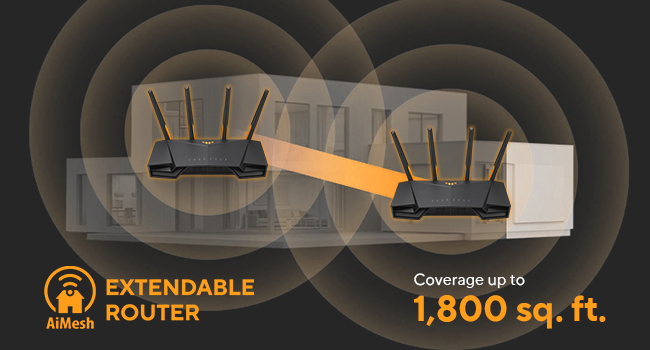
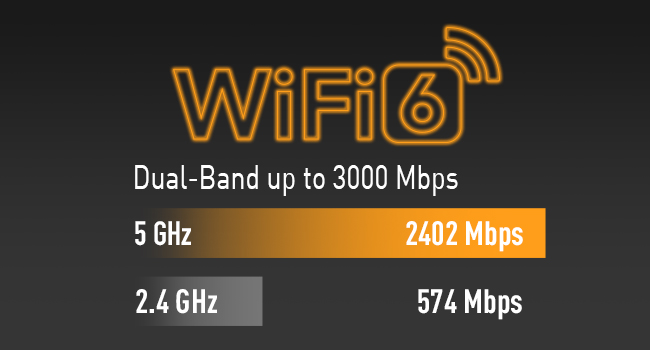
The ASUS TUF Gaming AX3000 V2 is a high-performance dual-band WiFi 6 router delivering up to 3000 Mbps wireless speeds and 2.5 Gbps wired throughput. Designed for device-dense environments, it features Mobile Game Mode for lag-free gaming, advanced security with AiProtection Pro, and flexible VPN options. Its AiMesh compatibility ensures seamless whole-home coverage, making it an ideal upgrade for gamers and professionals seeking reliable, fast, and secure connectivity.


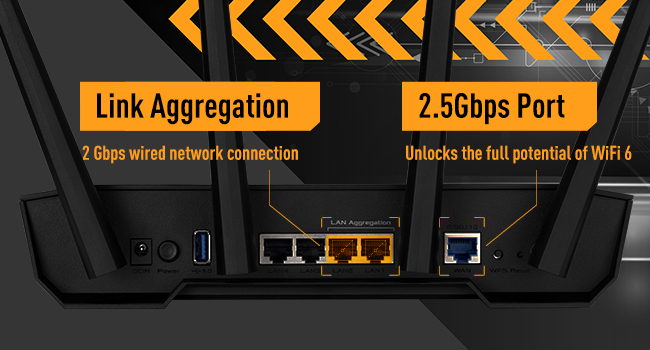



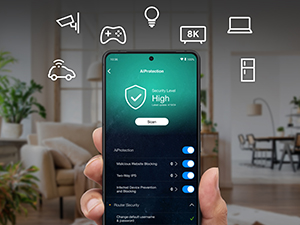

| ASIN | B0B3NCPLY2 |
| Antenna Location | Gaming |
| Antenna Type | Fixed |
| Best Sellers Rank | 10,890 in Computers & Accessories ( See Top 100 in Computers & Accessories ) 83 in Routers |
| Box Contents | AX3000 router, set up guide |
| Brand Name | ASUS |
| Colour | black |
| Compatible Devices | ASUS AiMesh Device |
| Connectivity Protocol | Wi-Fi 6 |
| Connectivity Technology | Ethernet, Wi-Fi |
| Control Method | App |
| Controller Type | Push Button |
| Country of Origin | China |
| Coverage | Home/Office |
| Customer Reviews | 4.0 4.0 out of 5 stars (180) |
| Data Transfer Rate | 3000 Megabits Per Second |
| Frequency | 160 MHz |
| Frequency Band Class | Dual-Band |
| Is Modem Compatible | No |
| Item Dimensions L x W x H | 26.5L x 17.8W x 18.6H centimetres |
| LAN Port Bandwidth | 1000 Mbps |
| Manufacturer | ASUS |
| Manufacturer Part Number | 90IG0790-MU9B00 |
| Maximum Upstream Data Transfer Rate | 3000 Megabits Per Second |
| Model Name | 90IG0790 |
| Model Number | 90IG0790-MU9B00 |
| Number of Antennas | 4 |
| Number of Ports | 4 |
| Operating System | ASUSWRT |
| Other Special Features of the Product | Internet Security, QoS |
| Security Protocol | WPS |
| Wi-Fi Generation | Wi-Fi 6 |
| Wireless Compability | 802.11ax |
M**E
Excellent router at a good price
This is my first ASUS router. I have only used Netgear routers until now (I have about 5 previous ones now unused and gathering dust. I did a lot of research (wasted days) before selecting ASUS. I understand technology very well, with decades of experience; hence have the ability to understand most technical features and aspects. ***** Summary: I like this router very much; it is better than some other brands which cost more than 2-3 times the price. I highly recommend it. I will never be going back to my previous brand mentioned above. ***** The Good: ** No marketing gimmicks; no pushy tactics to buy monthly subscription, and subscription is NOT required. ** Setup with app, or by using the web interface. ASUS does not push their mobile app like other companies; although it has a good app (as an advanced user, I do not use the app) ** Price is excellent; you get a fast CPU and hardware. Connection speeds are good. ** Signal / connectivity at 2.4Ghz and 5Ghz bands is very stable (if using just one router make sure to turn OFF the Roaming Assistant setting in options: (under Advanced Settings) Wireless --> Professional (tab on top) --> set Roaming Assistant = Disable; then you must click Apply yellow button at the bottom of page, to save your setting. Change this setting in BOTH 2.4Ghz and 5Ghz (under Band setting on top of page, and save both) ** Physical construction - very good ** Uses open source base software (a good thing) ** Comes with multiple plugs for UK and Europe (in UK) ** Has LEDs for main functions, so that you can check things at a glance ** For non-technical users, it offers very simple, quick setup ** For people who understand networking or want to learn about networking or are true experts in the inner workings of WiFi standards and TCP/IP protocols, there are an enormous number of advanced settings, far more than most domestic and even SOHO routers. ***** The Bad: I have found nothing bad. ***** Of course everything can be improved. ** Provide a detailed PDF version of the manual (although searching on Google for settings - if needed at all - will work). ** Some options for filtering outbound traffic (e.g. if you have children) should be grouped under one section - NOT separate; and for each option (e.g. URL filtering, MAC filtering, IP filtering, etc) a setting of time/day setting for each item should be offered. So, I should be able to say - e.g. block this URL(s)/IP/MAC, from Mon - Fri, from 9pm to 7am, and Sat/Sun from 10pm to 8am. (VERY important and needed by smart parents!) ** For settings where one needs to enter a MAC address, ASUS needs to offer a drop-down for MAC address, where when clicked, the drop-down must show a list of all devices currently connected, and also connected in the past (separately grouped), AND next to each MAC address it should also show Host Name and IP Address. This will make it easy for users to add filters; no need to remember/note MAC addresses. Make it more point-and-click. ** There should be a setting for DHCP - expire a specific IP/device lease. ** There should be a setting for DHCP lease period. ** In-bound traffic dropped packets should be logged with more clarity. Add more (common) details to log files. ** There should be a setting for exporting log file. ** How about option for emailing an alert message, when a rule is triggered? (e.g. errors, problems, attack detected, etc) As I mentioned, it is a great router (I of course desire options which most people will never need, but are very easy for ASUS to add; which will make the router even more attractive for advanced users who have children (that is a BIG market!) My suggestions require only the software/firmware to be enhanced.
P**K
Replace your ISP's router with this!
I bought this router as I moved to a new house without openreach and either had to pay my new ISP for a router or get my own, I decided to get this one when it was on offer and it was one of my easiest installs! After plugging my ethernet cable from my Fiber box to this router and adding my PPPoE credentials, the router was connected immediately and I could browse the internet right away. It has some neat features built in, such as functioning as a file sharing server if USB's are plugged in, it can host its own VPN if you want to access it remotely or it can connect certain devices to a VPN if you want them separated, or in a different geographic region etc. The UI is response enough and the mobile application works great. I've had no issues with editing any settings or updating the router. The signal on it is great, even where my house has thick floors that usually block all signal.
C**E
Product good but ASUS support is the worst ever
The product works very well once it is set up, but ASUS support is completely and utterly inept. They don’t even know how to speak English or have any communication skills, as well as having is zero IT literacy. Had to get a third-party support company to set up the router for me. Don’t buy unless you know a third party support company that will assist in the setup.
M**E
Excellent, did the job and replaced a powerline adaptor.
Picked this up during the prime sale as had been having issues with the powerline adaptor going from our house to our cabin at the bottom of the garden. Instead placed this in the kitchen (about halfway between the cabin and the main router) and bam, problem sorted. Was previously getting 2mbps up/down on the powerline, now getting 40, outstanding, the streaming from the cabin now works much quicker and has upscaled the quality to fit the faster connection. Setup was very easy with the app, seems the desktop web interface and the app have slightly different options to each other in different places which is a little confusing however with a little bit of poking about I was able to get those items in the cabin to only connect to the new node. The firmware on ASUS routers is all open-source, this means anyone can look at how it all works, ruling out any information gathering that might be going on behind your back with other solutions, working in IT myself this was of utmost importance to me. Don't be put off by the gamer-ness of the routers, they're solid, easy to use, and reliable, even if they do look like somebody has chopped off a bit of a transformer and stuck a router in it.
G**W
Solid add on to a mesh network
This router was used as an extra node for an Asus Mesh network. It was very simple to add because I used hard line cable between each node. Up and running with 5 minutes from unboxing and haven't had a single issue since. Specification list is correct - it's big and relatively cheap.
A**2
Read the all the agreements, before using any product imbedded with `Tread Micro` https://success.trendmicro.com/dcx/s/data-collection-disclosure In short, imbedded in this product (and others a-like) is `Tread Micro`, a micro-chip and software. Whom can download and read everything from your network for "user protection" including website history, personal/business emails, documents, photos, computers usage, and so much more. Without agreeing to their ludicrous bad 'Privacy Terms', you will NOT able to use the main features. They are also partented with Google, IBM, Dropbox, and 213+ more https://www.partnerbase.com/trend-micro Full list of products https://helpcenter.trendmicro.com/en-us/product-support/home-network-security/router-compatibility-list/ https://en.wikipedia.org/wiki/Trend_Micro
A**U
Small to mid-range power user - strong and fast. Great GUI, easy to use and reconfigure. Most recommended for protection, security and stability.
H**3
Working perfectly except for the WAN, which connected devices keep disconnecting for no reason.
I**I
Many devices I have ( XBox Seris X which is compatible with 5GHz) and my MI TV box cannot connect to the 5GHz. It is not not comaptible with many devices. This occured after firmware upgrade. When I returned to my old D-Link 2660 everytiing goes fine with 5GHz. Therfore, I returned the product immediately. I am wondering why the Giant ASUS have such technical issues? I believe in ASUS, and the cat 6 should be compatible with previous connectivity. I d not recommend this product. I will try another model.
S**X
بدأت المشكلة الاولى بضعف الاشارة ثم المشكلة الثانية بدات الاجهزة تفصل من الشبكه فكنت اظن نفس الشركة ونفس الفئه اكيد راح يكون ممتاز لكن للأسف خيب الظن TUF AX5400 سبب الشراء في البداية لان املك (2) موديل
Trustpilot
1 month ago
1 month ago