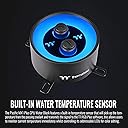
๐ Cool your CPU, light up your rig, own the game.
The Thermaltake Pacific MX1 Plus CPU Water Block combines advanced cooling technology with a premium nickel-plated copper base and built-in temperature sensor. Featuring 16.8 million customizable RGB colors compatible with TT RGB Plus, Alexa, and Razer Chroma, it supports a wide range of Intel and AMD sockets, delivering both high performance and striking aesthetics for professional-grade PC builds.


| ASIN | B08P3XWR6Y |
| Brand | Thermaltake |
| Brand Name | Thermaltake |
| Compatible Devices | Desktop |
| Compatible devices | Desktop |
| Cooling Method | Water |
| Cooling method | Water |
| Customer Reviews | 4.2 out of 5 stars 114 Reviews |
| Item Dimensions L x W x H | 9.3L x 9.3W x 5.2H centimeters |
| Item Type Name | Water Block |
| Manufacturer | Thermaltake |
| Material Type | Copper,Nickel |
| Maximum Rotational Speed | 1600 RPM |
| Model | CL-W299-PL00SW-A |
| Number of Items | 1 |
| Part Number | CL-W299-PL00SW-A |
| Power Connector Type | 4-Pin Molex |
| Power connector type | 4-Pin Molex |
| Product dimensions | 9.3L x 9.3W x 5.2H centimeters |
| UPC | 841163075814 |
| Unit Count | 1 Count |
| Voltage | 12 Volts |
D**K
MX2 replacing my MX1
right out of the box this thing looks awesome. Because I am using this on a mini-ITX motherboard (ASUS ROG Strix z490-i) it is a VERY tight fit, and Since the ITX motherboard doesn't have much room to spare, I was concerned, but I was able to barely fit the mini usb connector into the waterblock. Improvements from the mx1 - TT RGB PLUS software identified it immediately and works great for me. Since the ports for coolant are directional, I had to mount this upside down and initially was really bummed out. However, in the TT software you can flip the display which was awesome! Works great so far
R**H
Review for Thermaltake Pacific MX2 Ultra CPU Waterblock
To be clear, this review is for the Thermaltake Pacific MX2 Ultra CPU Waterblock, 2.1 inch LCS Disaplay, Build in Water Temperature Senser, LGA 1700, CL-W332-CU00SW-A. The majority of the negative reviews are for different ThermalTake products - Look at the pictures included with their reviews. I bought this for my Asus Prime Z590-A motherboard & Intel i9-11900k processor. Installation was relatively easy, programming the software was easy as well. This water-block works well to control the extreme heat generated by the i9-11900k Processor. The information displayed on the LCS display is helpful to quickly monitor critical stats for system performance. It also looks great in the PC. It is a little pricey, but it is well made of premium material and should last the life of the computer.
L**E
Great water block, screen software needs updates
This water block with the screen is a dream come true for my build. The only thing is the software could use text size and color updat for just text, other wise it's very good. So cool looking in any water cool loop.
B**N
NEEDS Better Software!
Thermaltake has been a mainstay in the PC gaming community for so long ~~~~ BECAUSE of their hardware! The software to control the lights, on the other hand, is REALLY lacking support. Mine worked the first month. Now, none of my TT lighting systems work! I'm so bummed out. I paid over $400 on this CPU block and the led water fittings to light up my pipes. I feel so screwed over. The good news is that I can remap the wires for the lighting and connect to my ARGB port on my motherboard, but still... Thermaltake, get some better software developers. Those guys suck. The hardware is still awesome though. UPDATE: I swapped out the controllers for the Razor Chroma ARGB controller. Fixed the problem. Never have to use Thermaltake software again.
J**N
Cools great, screen is nice....can't export water temp data to control fans/pump.
I love this waterblock. It was easy to install, looks great, and cools great. No complaints at all about quality. HOWEVER, any water temp sensor I've ever ran in my systems has been used to control my fan speeds. There's no need to have your fans ramping up and down continuously on a closed water loop, yet here we are with a really killer looking unit that doesn't allow the temperature data to be read by any other software programs! On top of that, you can't do any type of fan control in their proprietary software (unless you have TT fans maybe, but I don't), so besides looking pretty and being able to read it, functionally it's a bit lacking. The other gripe I have is that the thermaltake software just EATS CPU usage. I'm running a 13900K and 4090 and it regularly is showing using upwards of 10% of my GPU. I instead have opted to upload my own image and remove the software. The only problem with this is it will ONLY display WATER temp in this configuration. If you want it to rotate through any other sensor temps such as CPU, GPU, RAM, etc, you have to run their software in the background. All in all I'm really satisfied with the product, but the software design and inability to allow any other fan/motherboard software to access the data from the sensor feels like a huge miss, especially when their own software doesn't do it.
Trustpilot
3 weeks ago
2 months ago