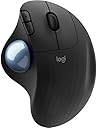
🎯 Master precision and comfort—your workspace’s new MVP.
The Logitech Ergo M575 Wireless Trackball Mouse combines ergonomic design with advanced thumb-controlled precision, offering up to 2000 DPI tracking and dual Bluetooth/USB connectivity. Crafted with sustainability in mind, it features 50% recycled plastic and delivers up to 24 months of battery life, making it the perfect tool for professionals seeking comfort, accuracy, and eco-conscious innovation in compact workspaces.
| ASIN | B095JB3KQ6 |
| Batteries | 1 AA batteries required. (included) |
| Best Sellers Rank | #61 in Computer Trackballs |
| Customer Reviews | 4.5 4.5 out of 5 stars (193) |
| Date First Available | May 20, 2021 |
| Item Weight | 7.8 ounces |
| Item model number | ERGO M575 |
| Manufacturer | CRYSTAL FLASH SALES |
| Package Dimensions | 6.34 x 4.17 x 2.01 inches |
C**S
Still a good unit
My wife has worn several of these out over the last 29 years. This (unlike some of their gear) has remained a solid and durable unit. One caveat: you have to pop the ball out, remove any grunge from the three contact points in the socket, clean the ball and reinsert it about once a month or so (more often if it sticks). The product is designed to be cleaned.
S**R
Love it
I love this thing. Works great for CAD
S**E
Best I've used
I can't talk about the usage and performance of all of you people that want to play with "Microsoft Windows". I'll stop there. To each, his own. For a "Unix", "BSD", "Linux" user, this may be the best trackball out there. With the opensource solaar, you can incorporate this and any other "logitech" device into operation on your PC. The Logitech M575 mouse gives unparalled precision.
B**R
Well designed, easy to connect
I have been a professional trackball user as a desktop publisher for decades. I had four of Microsoft's trackball opticals and loved them. When I saw this Logitech wireless, I decided to try it. WOW! Smooth, application specific programmable buttons (Microsoft dropped this feature) and easy to connect. I opened the box, took out the USB adapter, plugged it in and in seconds it was working. Took a few minutes to get accustomed to the side button positions, but I'm going to put the Microsoft ones on Ebay. Thanks, Logitech!
G**N
Dissapointed..... left button sticks and no extra battery as was advertised!
After several years my old M570 finally kicked the bucket so I decided to go for the new model.....positives the dual wireless dongle/ bluetooth combination is handy the slightly bigger size I like as well! But The left button randomly sticks since day one, the ball is not as smooth as the M570 and not a huge deal but it was advertised as a "Extra Battery Bundle" which simply was not true....makes me wonder if it is truly the newer version of the M575.
L**L
Everything is alright
I just wrote a nasty review that hopefully will get scrubbed. I was upset about the USB dongle missing but after some searching learned that it is in the battery compartment. Apparently you just have to know that because I didn't see it in the instructions. I'm a big fan of Logitech products have been using these trackballs for years. Much better than a standard mouse once you get used to it. I'll continue to recommend them to friends.
B**.
Bluetooth Enabled
Long time M570 user. Worn out my fair share over the years. Moved up to this model when the predecessor was discontinued. At first was a little worried about the change, but have been pleased. As a bonus, it works both with the included dongle as well as BlueTooth.
D**H
Love this track ball
We have multiples of this track ball, and love them. Very comfortable, very accurate, easy to clean, the battery lasts a long time and easy to pair. No issues.
Trustpilot
1 week ago
3 weeks ago