


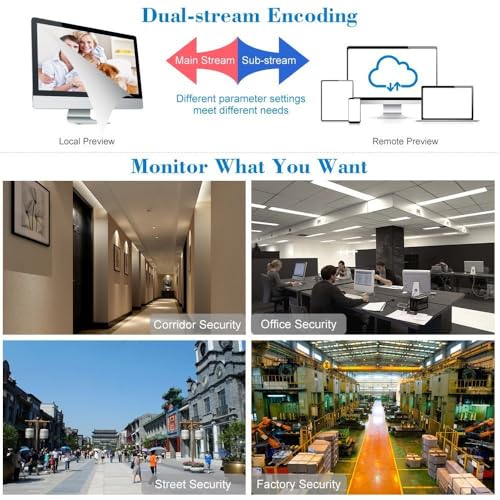


🔒 Elevate your security game with crystal-clear 4K — because every detail counts!
The Seculink 16-Channel 4K/8MP Network Video Recorder delivers ultra HD 3840x2160P video across 16 channels, supporting multiple IP camera resolutions with ONVIF compliance. Featuring H.265+ compression, it optimizes bandwidth and storage efficiency while enabling motion detection-triggered recording to save space. Designed for wired Ethernet setup, it supports up to 6TB HDD and cloud storage options, making it a versatile and powerful solution for professional-grade surveillance needs.









| ASIN | B08Y6SB1WM |
| Batteries Required? | No |
| Batteries included? | No |
| Best Sellers Rank | 101,066 in DIY & Tools ( See Top 100 in DIY & Tools ) 25 in Surveillance Video Recorders |
| Colour | 16CH 4K |
| Customer Reviews | 3.7 3.7 out of 5 stars (202) |
| Date First Available | 12 Mar. 2019 |
| Item Package Quantity | 1 |
| Item Weight | 1.01 kg |
| Item model number | NVR1616PF-4K |
| Manufacturer | SECULINK |
| Part Number | NVR1616PF-4K |
| Product Dimensions | 26.01 x 19 x 4.29 cm; 1.01 kg |
| Voltage | 12 Volts |
M**Y
Perfect for the money
Great unit for the money. 3 x 3mp cameras work almost automatically. I really don't know why people are leaving negative teviews, this unit is great, easy to set up and use. Came from a similar unit that was 1080p. Ptz works great on unit and through EMeye. If people can't set this up, maybe someone else should do it or the caneras are not compliant. Works great on my Onvif cameras.
T**Y
Corrupts camera 1 settings. Would NOT recommend
So this is how it went... Opened box Took lid off unit Installed HD Put lid back on Connected to internal network via Ethernet cable Connected supplied mouse Connected power supply Turned on socket and waited System gives you barcode to download app .... follow app instructions to add dvr device I already had 4 ONVIF cameras connected to my network for testing System booted up Default id and password ( changed later ) Let system do initial setup dialog Formatted HD from menu Displayed multi screen, 4 in this case Clicked + on first screen System automatically searched for cameras .... search button available to manually locate Double clicked on first camera in found list Added camera id and password .... onvif was already detected Clicked apply button .... waited a moment for system to connect to camera Camera video appeared Repeated on each camera screen to add camera .... already added cameras have * next to them in found list It was as simple and easy as that Added blurred screenshot of it working on my sample cams ( not permanently placed, just to test ) . Blurred for security reasons. Time to test and see how it runs over time. —update Only problem I had was it would for some unknown reason only record the first 3 cameras, however after a system restart it seemed to resolve this issue. — update September 2020 Latest update is that this unit appears to randomly report that a camera is not logged in / wrong username or password This happens randomly on one or more cameras It also happens on wired and WiFi cameras The camera name / channel also disappears from the camera channel list The only way to get it back is to reboot the system, often multiple times Added photo of screen where it reports the random “wrong username or password” and looses description of channel too. Several reboots are required to get it back. I am beginning to ask how useful is a 24 hr security nvr/dvr when it randomly corrupts channel information and disconnects from camera, thus no longer recording ??? Camera is hard wired to nvr/dvr network so not a WiFi issue but a nvr/dvr software issue!! Update Nov 2020 No matter what I do it constantly corrupts camera 1 userid and password Restarting multiple times fixes it however a recorder is supposed to be able to be left alone to record, not checked daily to see if it has stopped in the middle of the night! For this reason alone, reduced to 1 star Cannot get help or fix from seller
P**R
Easy to setup
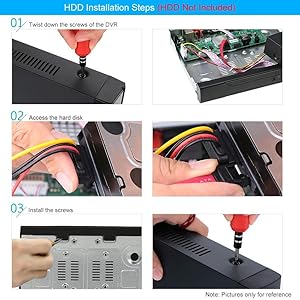
I wanted this to act as a backup NVR to another NVR in a different bulding (that way if someone breaks in and takes the NVR there is still evidence). Buildings had existing LAN connections. I guess it took about 15 mins to fit the HDD (purchased separately), configure the network addresses and it auto-detected all the devices I wanted to backup (4 ONVIF cameras). I turned it on and their setup ran the whole process one step at a time: format HDD, config net, discover cameras. Super easy! Absolute bargain.
R**G
Great little product.
I cant give it much of a review as it sadly didn't work with my Netvue Vigil camera's - well lets say I couldn't get it to connect to them. It could be that my camera's are not for this, but as they connect to my home network I thought they would have. So sadly had to return it as not suitable for my needs. From the setup I did, it seemed all straight forward and would have worked a treat.
A**N
Far better than running Agent on my laptop 24hrs a day
I've got 5 cameras from different companies that all want their own custom software for viewing them. They do all have ONVIF on them however so rather than multiple apps, I installed Agent software on my laptop to use it as a NVR device. Works well but does require my laptop to be on 24hr a day else it wont record anything obviously. I had wanted to get a new system with new cameras and NVR box, however they seem to come with a hefty price tag. This box allowed me to dip my toe in and see if ONVIF cameras would be a better option rather than some proprietary cameras that only work with themselves. I got the bare bones system and put an old 1TB NAS drive in to see if I could the system to work with my cameras. Another persons review mentioned vibration so I used foam pads to mount the drive in the box and must say I can't hear a thing from the device - it sits right by the TV. Putting the drive in was very easy and shows just how little the electronics are to support this device. On powering up it found the drive and formatted it in the way it wanted and started looking for cameras. It found them all easily enough with one needing a port change. Once ID and passwords were entered it seemed to be ready to go. I only connect locally to my system as I'm not comfortable using some external account and server that then has full access to my cameras when ever it wants. This means I can't comment on setting up an account and remote viewing the system. I might at some stage open a port on my router and use that to access directly rather than using a 3rd party. The XMEye software on the phone seems to work okay - I only use the local connection and allows you to do most things on the phone. On a desktop PC the viewing of the device has to be worked around rather than being very easy. The device only supports IE rather than MS Edge, so you have to make Edge open the device in IE mode - and download a small plug in. Once you've done that and connected it works pretty well. Again you can do most things on the web page but there bare some things that only get showing when on the device directly using the TV. With the 1TB drive and the 5 cameras always recording I'm on track to get about 12 days worth of recording. Will have to see when it loops - how it manages that activity. The device interface is a bit clunky and not a great user experience but it works and does the job. You're best off going online and downloading the manual - which isn't for exactly this model but its close enough to see you through. One view you can have on the device but not via the web page is having all cameras visible but focused on one main camera in a large viewing window. Makes it easier to see the front gate for example with all the other views around the edge. On the web view, there are some config options on the right of the screen - one of them in the other tab is called ratio. This changes the camera windows from square to landscape - took me ages to find it and makes the camera views show correctly and not squashed up from the sides. Viewing recording directly on the device works better than on the web view, however it does require you to use the mouse connected to the device. It highlights alarm events in red on the time stream so you can more easily jump to them. It can be quite sensitive on alarm events so you'd need to try out the settings to find one that works for you - and the trigger zones that you can set. As I record 24hr a day I'm not so fussed as its only if something happens I'll go back through the recordings. On the web view you have to select a time slot to view the recording - its not highlighted as an alarm or scheduled recording. You might be able to work out however by the time stamp and length of the recording in the selection window. Alarm recordings tend to be smaller and not on set minute blocks. You can also choose whether to show the HD or SD stream in the window - and which stream to record - again HD or SD or both(why?) There are other options like face detection etc but I've not gone near those as yet. Overall a good little system that seems to hold all the camera info - not lost any settings yet - and even manages to deal with one of my cameras that's a little flakey. One final thing I have noticed is that since moving to this device the network traffic has halved between the cameras and the recording device. I don't know what Agent software was doing but the reduced network traffic is very noticeable. I also now have my laptop back.
S**B
Bon petit enregistreur vidéo, l'application est relativement bien fait. Quelques bugs pour configurer certaines caméras mais sinon fonctionne très bien.
M**O
Lo compré para usarlo con cámaras wifi y la verdad que contento porque metiendo la ip manualmente las detecta y luego si lo conectas el grabador a un ethernet puedes acceder a las cámara desde cualquier sitio con la aplicación que recomiendan va muy bien lo compré hace tiempo
P**.
il prodotto ha soddisfatto le mie attese. unica pecca, spina non europea... ho dovuto mettere un adattatore.
B**E
rewtwe
M**E
Die Einrichtung war unkompliziert, und das Gerät läuft absolut stabil. Alles in allem ein Top-Produkt für Preis, das ich uneingeschränkt weiterempfehlen kann! Alle IP-Cams / Onvif / RTSP verschiedener Marken in meinem Netzwerk wurden gefunden und eingebunden.
Trustpilot
3 weeks ago
1 month ago



