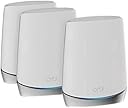


🚀 Elevate your home network to pro-level speed and security—because buffering is so last decade.
The NETGEAR Orbi RBK753 is a premium Tri-Band WiFi 6 mesh system delivering up to 7,500 sq.ft. of seamless coverage and support for 40+ devices. With AX4200 speeds reaching 4.2Gbps, multiple Gigabit Ethernet ports, and advanced NETGEAR Armor security, it’s engineered for high-demand households and professionals seeking reliable, ultra-fast internet with scalable expansion.


| ASIN | B08Z3FGSDH |
| Best Sellers Rank | #1,198 in Computers & Accessories ( See Top 100 in Computers & Accessories ) #36 in Whole Home & Mesh Wi-Fi Systems |
| Brand | NETGEAR |
| Color | White |
| Customer Reviews | 4.2 4.2 out of 5 stars (1,581) |
| Date First Available | April 4, 2022 |
| Item Dimensions LxWxH | 2.8 x 7.2 x 9.1 inches |
| Item Weight | 1.9 pounds |
| Item model number | AX4200 |
| Manufacturer | Netgear |
| Operating System | NETGEAR OS |
| Product Dimensions | 2.8 x 7.2 x 9.1 inches |
| Series | RBK753-100NAS |
| Wireless Type | 802.11ax |
M**E
Fast, easy, effective
This is my third Netgear mesh network, and it’s definitely the best so far. Setup was very easy. I’ve had Orbi systems before so I already had the app and knew the general flow of setup. This network did take longer during the verification of connection, and it does it twice each time you do initial setup, IoT setup, and firmware update, but overall the whole process was some 12-15 minutes long. I love the IoT network. Despite being a sub-net of the main WiFi, it is significantly faster than my last Nighthawk system primary WiFi. Every command arrives faster and the connection is reliable despite my 17 devices on the network. 2.4Ghz devices connected immediately. I left the name and pw the same as my old one and have slowly transferred non-IoT devices out to the primary network, so the switch has been seamless. The LAN port on the back of the satellite was the selling point. My last Nighthawk had a LAN speed of 100Mbps, which was too low for gaming. With this upgrade, I am consistently in the 500-600Mbps range on LAN and am making better use of my 1Gb connection speed service. With the recently release, I feel that security will be good overall. I gave up my last Orbi network for the Nighthawk because it was no longer going to be updated, which posed a security risk, but I feel much better now. I’m using the router with one satélite, whereas I used to have two satellites, yes this handles 4x more devices minimum and performs much better!
A**R
Better than expected.
Works great. Easy to set up. Much better WiFi coverage. Was able to put one in our mother in law’s house. She uses our Internet. Saves her some money!
R**S
Might need firmware update to sync satellite to router
The review from GUANGRONG ZENG under "Top Reviews from Other Countries" saved me. I made the mistake of buying the Orbi router/modem (CBR750) with no satellites, thinking my apartment was so small I wouldn't need a satellite. Big mistake, the wifi signal from the router in the living room did not reach the bedrooms in the back of the apartment. So I purchased the Orbi stand-alone satellite (RBS750). The instructions for syncing the satellite to the router/modem did not work at all (plugging the satellite in to an outlet and then pushing the sync buttons on the satellite and router). I kept getting the magenta light. So I followed the instructions from GUANGRONG ZENG (who got them from another reviewer). The only change I had to make, was that I found the specific IP address of my satellite in the Orbi app after I had connected the satellite via ethernet. I then entered Admin and Password as the username and password. It then took me to the page in the first image. Next step was update the firmware. I found my router's firmware version in the orbi app under router settings. Then I kept uploading the wrong file (CBR750 instead of RBS750). Once I get the right file uploaded, the firmware updated. See the second image. Then I refreshed and saw the third image. I then refreshed the Orbi app, and instead of saying "Satellites: 0 of 1," it now said "Satellites: 1 of 1." I have copied the original review below so that people can see all of the steps. Can not syn my new satellite for 2 hours, After review and tried C&J review, my system work great now, thank you for the help, i repost his post. credit to him. anyone having this problem, follow the step and give this a shot, thank you. 5.0 out of 5 stars Advanced setup may be required. Reviewed in the United States on October 21, 2023 Verified Purchase I've had good luck with my Orbi 750 system but wanted to expand the coverage with this satellite. I spent over 2 hours trying to get this to sync with my system with no luck. This is what I ended up having to do, and I’d assume this will work for whomever runs into this issue. • Start by plugging the new satellite into the Orbi router with an Ethernet cable. Plug the new satellite into power and wait for it to boot up (usually 2 minutes). • Wait for the light on the satellite to turn blue and then turn off. • At this point open a web browser and log into the Orbis interface (192.168.1.1) enter your username and password when prompted, then select attached devices and find the IP address of the new satellite. • Once you've located the new satellites IP address open a new tab and enter the new satellites IP address into the address bar and login (Username:admin/password:password). • Once you've logged into the new satellites web interface look for the firmware version and compare it to your existing Orbi firmware. If it doesn't match you need to manually update the new satellite firmware. • Open a new tab and search RBS750 firmware. Find the firmware version that matches your current system from the Netgear support site only (not 3rd party). • Once you've located the correct firmware download it to your desktop. When it's finished downloading extract the zip file to your desktop. The firmware file will end with .chk . Now go back to the browser tab for the new satellite and select firmware/update Firmware then select browse and navigate to the unzipped folder you downloaded and select the file ending .chk and update. This process can take up to 19 minutes. • Once the satellite is finished and there is no light coming from the new satellite unplug it from your router and place where you want it and plug it back into power. • After the light on the new satellite finishes blinking it should go blue for a moment then off. If the placement is poor you may get an amber light instead of blue and magenta if it's too far from the Orbi router. • This is how I got mine to work, I hope this helps someone in the same situation. After all this it works great for me.
U**S
Glorified paperweight
I don't even know where to start on this review. I bought these three months ago to replace my 7 year old Google WiFi (1st generation). I spent a while researching different mesh systems, talking with friends, and reading input from the community. Ended up settling on this Orbi system. Walk through the various aspects of this mesh system: 1) Setup is reasonable easy. Thankfully seeing as how I have had to do it 4 times in 3 months. I will say, changing the network name is a bit of a hassle. You need to connect to the router WiFi network to set it up. If you change the name, the app will not automatically connect you to the new network, or be smart enough to adjust things automatically. You need to go into your settings, connect to the new network name, and then wait 5 min for the Orbi system to setup. 2) Performance wise, it is okay. Not great. Speeds are definitely higher than they were on my old system. I don't see a lot of dead zones in my house. My biggest issue here is that if the main router loses power, I need to do a factory reset and create the network again. That means going through the entire setup again for anything from a power surge, a power outage because of weather, or needing to manually turn the power off to the room because of electrical work. The routers restart, and only about half of my devices will reconnect. Even within similar apps (one Wyze camera will connect, one will not). I will restart the system, and then other devices will connect and be disconnected. It is absolutely ridiculous that I need to do a factory reset to get the network back working. 3) Customer support is an absolute joke. I forgot how bad it is. First off, everyone you speak too is borderline hard to understand. Guess the overseas connection isn't superb, go figure. Second, they give you 90 days support. So I spent hundreds of dollars on Netgear products, and after 3 months, they will not help unless I spend more money. Did not realize that before I bought the Orbi system otherwise I would. Have never considered them. Thirdly, the support they give is absolutely worthless. Two people I spoke to both told me to factory reset. And when I asked if I will have to do that everytime I lose power, I was told "No! Of course not!". What a joke. Avoid this at all costs. Might be good for some people, but not me. They have become glorified paperweights. Expensive paperweights at that. Should have just gone with the newer Google mesh. Least their customer support is good. And they stand by their products without asking more money for useless help.
D**V
Wow !!!
Easy installation with step by step in app. Best signal ever. My home is 4500 sf with 2 story. I got 2 type unit n it work fast. Thank you.
A**S
Mi casa es de tres niveles y con el sistema se nos acabo el problema de no tener señal. Toda la casa queda cubierta, se mantiene una velocidad estable y buena y acepta varios dispositivos conectados.
G**G
Can not syn my new satellite for 2 hours, After review and tried C&J review, my system work great now, thank you for the help, i repost his post. credit to him. anyone having this problem, follow the step and give this a shot, thank you. 5.0 out of 5 stars Advanced setup may be required. Reviewed in the United States on October 21, 2023 Verified Purchase I've had good luck with my Orbi 750 system but wanted to expand the coverage with this satellite. I spent over 2 hours trying to get this to sync with my system with no luck. This is what I ended up having to do, and id assume this will work for whomever runs into this issue. Start by plugging the new satellite into the Orbi router with an Ethernet cable. Plug the new satellite into power and wait for it to boot up (usually 2 minutes). Wait for the light on the satellite to turn blue and then turn off. At this point open a web browser and log into the Orbis interface (192.168.1.1) enter your username and password when prompted, then select attached devices and find the IP address of the new satellite. Once you've located the new satellites IP address open a new tab and enter the new satellites IP address into the address bar and login (Username:admin/password:password). Once you've logged into the new satellites web interface look for the firmware version and compare it to your existing Orbi firmware. If it doesn't match you need to manually update the new satellite firmware. Open a new tab and search RBS750 firmware. Find the firmware version that matches your current system from the Netgear support site only (not 3rd party). Once you've located the correct firmware download it to your desktop. When it's finished downloading extract the zip file to your desktop. The firmware file will end with .chk . Now go back to the browser tab for the new satellite and select firmware/update Firmware then select browse and navigate to the unzipped folder you downloaded and select the file ending .chk and update. This process can take up to 19 minutes. Once the satellite is finished and there is no light coming from the new satellite unplug it from your router and place where you want it and plug it back into power. After the light on the new satellite finishes blinking it should go blue for a moment then off. If the placement is poor you may get an amber light instead of blue and magenta if it's too far from the Orbi router. This is how I got mine to work, I hope this helps someone in the same situation. After all this it works great for me.
M**S
The description says this is 100-240V, but the unit I got is only 110V. If you live in a place with only 220V, then this unit is NOT usable. I had to request a return, which is not a fun process. It is been three weeks now and the request is still pending...
M**T
Good and fast, but coverage area are limited for each unit and barely leaves the room, you need to be near the unit to enjoy fast connection!
R**A
Funciona perfecto para una casa con muros gruesos y de unas 4 habitación s y sala amplia
Trustpilot
1 week ago
2 weeks ago