Buy anything from 5,000+ international stores. One checkout price. No surprise fees. Join 2M+ shoppers on Desertcart.
Desertcart purchases this item on your behalf and handles shipping, customs, and support to Iceland.
🚀 Elevate your workspace: multi-device mastery meets precision and style.
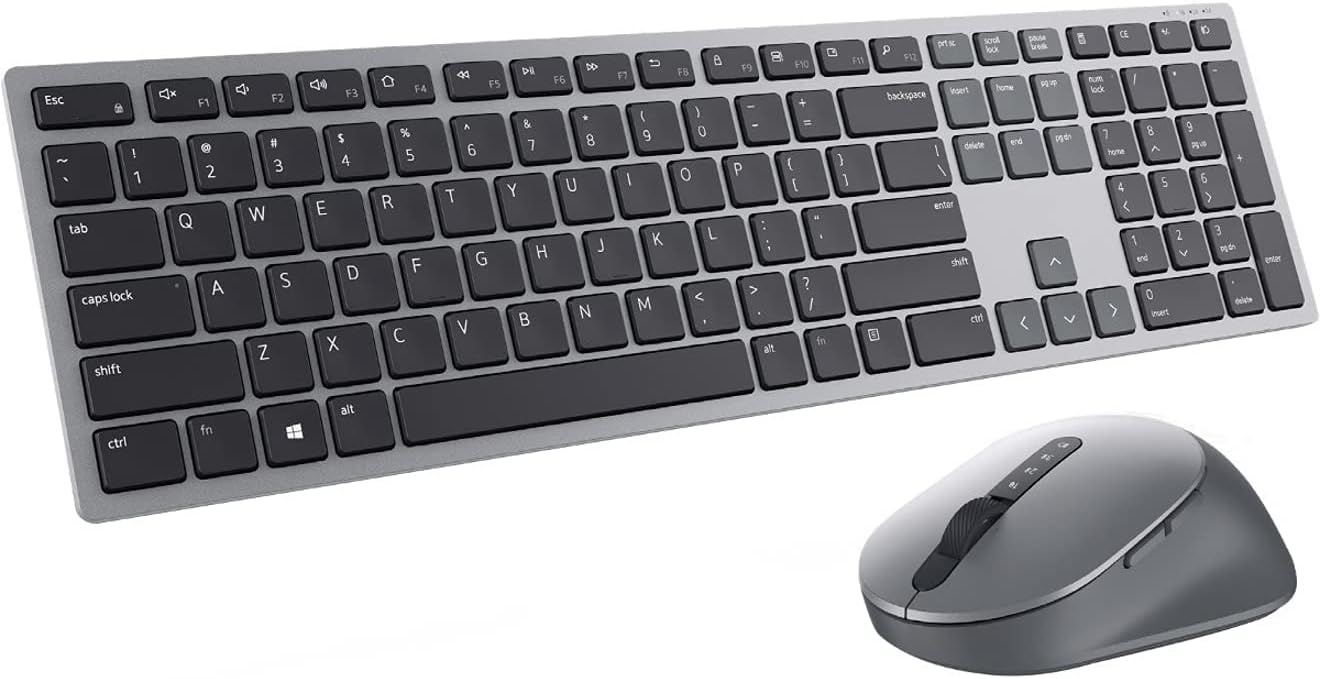
The Dell Premier Multi-Device Wireless Keyboard and Mouse KM7321W is a premium combo designed for professionals who demand seamless multi-device connectivity, precision control with adjustable DPI, and customizable keys. Featuring dual-mode Bluetooth 5.0 and RF 2.4 GHz, it supports up to three devices with instant switching. Its ergonomic design, long-lasting 36-month battery life, and advanced 128-bit AES encryption make it a secure, durable, and stylish choice for modern workspaces.


| ASIN | B08WNWS3HS |
| Antenna Location | Home, Office |
| Are Batteries Required | Yes |
| Best Sellers Rank | #228 in Computer Keyboard & Mouse Combos |
| Brand | Dell |
| Built-In Media | Batteries (Keyboard 2 x AAA / Mouse 1 x AA), Documentation, Premier Multi-Device Wireless Keyboard And Mouse KM7321W, USB Receiver |
| Color | Titan Gray |
| Compatible Devices | Personal Computer |
| Compatible Operating System Family | Windows |
| Connectivity Technology | Bluetooth, Usb |
| Customer Reviews | 4.4 out of 5 stars 1,521 Reviews |
| EU Spare Part Availability Duration | 3 Years |
| Hand Orientation | Ambidextrous |
| Item Type Name | Keyboard & Mouse |
| Item Weight | 0.18 Pounds |
| Keyboard Backlighting Color Support | Single Color |
| Keyboard Description | Gaming |
| Keyboard Layout | QWERTY |
| Manufacturer | Dell |
| Mfr Part Number | KM7321WGY-US |
| Minimum Required Operating System Version | Windows 7 |
| Model Number | KM7321W |
| Movement Detection | Optical |
| Number of Batteries | 2 AAA batteries required. (included) |
| Number of Keys | 104 |
| Operating System | Chrome OS, Linux, Windows 7, Windows 8.1, Windows 10, Windows 11 |
| Other Special Features of the Product | Adjustable Tilt, Battery Indicator, Programmable Keys, Slim |
| Power Source | Battery Powered |
| Special Feature | Adjustable Tilt, Battery Indicator, Programmable Keys, Slim |
| UPC | 884116381945 |
| Unit Count | 1.0 Count |
| Warranty Description | 3 Year |
D**.
Highly recommend based on quality and versatility
We got a few of these at work and I liked it so much that I had to get one for my home computer too. The first thing you'll notice, and what really impressed me, is the weight of the keyboard. It feels like you could hit a burglar in the face and it would stop them in their tracks, then you could still finish your expense reports on it. In short, it feels high quality and built to last. And the mouse is pretty good too. It's smooth, ergonomic, and fully customizable. But here's the real kicker: it's super easy to use on multiple devices. It has a USB dongle for your main computer - just plug it in and you're all set. Then it has two Bluetooth slots you can use for other devices. When I used it at work, I had a work computer for my daily tasks, an admin computer for stuff like expense reports, and a gaming computer for when all my work was done. All I had to do to switch to another computer was click a button on the keyboard and a button on the mouse, and boom - instantly connected. Overall, I can't recommend the Dell Premier Multi-Device Wireless Keyboard and Mouse enough. It's the perfect combo of style, functionality, and durability. And hey, if you ever need to defend yourself against a would-be burglar, you'll be glad you have this bad boy by your side.
S**N
Perfect Choice
I reviewed upwards of a dozen potential keyboard/mouse combinations in the $50-$100 range both packaged together and separately. I eventually landed on the Dell KM7321W and couldn’t be happier. First of all, I love the look. It’s clean with no “extras.” The keyboard is very sturdy - much heavier than the plastic Logitech keyboard my employer provides me at the office. They keys have a satisfying amount of click. Not “silent” but quiet enough for me. The pairing process was very quick (<1 minute) to my computer. It took a few tries to pair it with my phone, but no more than 5 minutes. The mouse is nice. No complaints. It fits my hand well - much better than some of the smaller options that come with the lower end keyboard/mouse pairs. The customizable buttons are an awesome feature, though I found myself sticking with the pre programmed functions.
S**E
I Love This Keyboard
I was having what I thought were computer and or internet issues with my work and personal laptop When I realized the issues were the cheap keyboard I had. IE screens refreshing. Taking forever to type. This keyboard is heavy meaning it doesn’t move. The keys feel great and the mouse is awesome. Being able to set this up on up to 3 devices is nice Con: the set up instructions stink. But if you type in the keyboard model there is a u-tube video for the exact model
B**L
Perfect. Just - perfect.
I needed a solution that would allow me to use my two laptops with a docking station for a desktop experience on both. I tried two different keyboard/mouse combos with an RF USB "button." They did not work with the button connected to the dock's USB ports, and since the dock works perfectly otherwise, I concluded that it was the buttons. I looked for a Bluetooth solution that would allow at least two different devices to connect so that I did not have to pair and unpair endlessly. And this Dell combo fit the bill. BUT - it goes above and beyond because I still have the option to use an RF button if I need to, and the keyboard and mouse are both extremely well-made. Nice, substantial feel. Great typing experience for me, although maybe not for others who like a full-travel keyboard. I am fine with "chicklet" keys, especially because this one DOES have good travel - just not the same as a mechanical keyboard. If you are looking for a good Bluetooth keyboard/mouse solution for your setup, I HIGHLY recommend this one!
S**T
(updated, rating dropped) flawed keys after 1.5 years of use
(update) After 1.5 years of use, I've noticed that the most used keys on the keyboard are indented and their label wearing off. The keys seem to be made of too soft and thin of a plastic.) Additionally, a couple of keys are no longer registered keystrokes reliably. the mouse is still performing quite well. They keyboard isn't built well enough. For this price, both should be solid and not failing in their second year. Battery life has been good, as promised. Because of the short lifespan of the keyboard, I cannot recommend this combo. It isn't worth the money and you can do far better for less. (original) My 10 year old Dell wireless (dongle) keyboard/mouse gave up the ghost (well, the mouse did) and I was in need of a replacement. Ultimately I decided to get this and am, overall, satisfied. I'd recommend this for someone who wants a premium home office solution, prefers a very standard QWERTY chicklet ish design, and isn't especially price sensitive. Pros: The mouse is well weighted and ergonomic (R-handed only though) Mouse is highly response and precise, both for movement and button presses Customization software is useful, if not a bit overdone for the functionality it delivers. Keyboard body is solid and keypress offers pleasant degree of resistance of floor for office work, Keys are uniform and non-wobbly in placement, elevation, and mechanical response (superior quality control). Uses Dell's newer universal USB system meaning you can add additional (Dell) devices to the dongle, or (unlike my older one) swap out the keyboard or mouse if one of them fails. The devices can connect to the provided dongle or via Bluetooth, and independently switch via buttons on each. I especially like this feature as I can leave the dongle in my docking station so that any computer plugged in can use the devices, but if I want to setup somewhere else, or lend out the devices, I can just bring them (or just the mouse) and connect via Bluetooth. Excellent signal strength via Bluetooth and Dongle. (tested blue tooth with distance, no errors at >10ft with no obstructions (about the furthest I use them since I need to see the screen for devices like this). Tested dongle with direct interference, started to miss keystrokes when I placed two active laptops and a Bluetooth headset in between the keyboard and dongle.) Neutral: The plastic for the keyboard keys feels light and unnerving to touch: they subtly vibrate too much, especially when touched by fingernail. The closest I can describe it as it to imagine 5% of the effect of fingernails on a chalkboard, and then put the board on very firm jello (or, as is most probably the case, a silicone pad). That is what it feels like when your fingernails hit, or even brush, they keys. It is very subtle, and might not bother most people. I also think it is likely to lessen as the keys lose some texture. But I wonder what is special about this plastic. Some sort of hardening agent? Carbon fiber? A bit pricey for what it delivers, but it delivers what it promises. It's strongest differentiating value is unknown. Will it last and still feel good in 8-12 years? If not, I think spending less on a similar product from another company would be better. Cons: Mouse is only R-handed No keyboard backlight They keyboard feet are wonky: they fold out sideways, and have a low pressure friction lock holding them in place. This means that if you shift the keyboard sideways, the leg you shift towards may fold in. This is an impressive oversight on design that could be easily avoided with either a higher pressure lock, or a non adjustable design. In fact I am not sure why they provided movable legs at all, instead of having a solid "heel" to angle the keyboard.
U**I
Very nice keyboard but a few problems
I bought the prior version of this keyboard but had to return it because it was clearly designed for mobile. The keyboard was tiny and light. This one is more suitable for a desktop and it is heavy so it stays in place. I think there's too many keys but the layout is very good and the keys feel amazing. My main gripes. The keyboard sits lower than prior ones and so my wrist pad is too high for it now, which is somewhat uncomfortable. I'll need a smaller wrist pad I guess. It's silly that it switches between inputs which haven't been paired, as others have noted. The wireless connection can lag at times but not a big deal so far and I'm a software engineer. Last, you have to change the input on both the keyboard and mouse. Given how smart these devices are and the software it comes with, that really seems like a big oversight. Thankfully, I don't change inputs too often.
J**I
Works Great Switching Between Linux and Windows
A few years ago, when I first started using a Linux machine in addition to my Windows machine I had a Logitech wireless keyboard that could switch between the two with a button. It would be irritating sometimes because the bluetooth connection with Linux would time out after just a few seconds and then, after hitting a key, would take another second or two to reestablish the connection. So, if I'm typing something, pause for a few seconds to look up a word or think about the correct phrasing for something, I would then have to go through the reconnection process. I had several instances of forgetting about this and typing most of a sentence before I glanced up and realized that the first half of my sentence was missing. In contrast, this keyboard takes about 30 seconds to timeout and reconnects as soon as you hit a key. At the most I have missed the first letter of a sentence. This makes sense, since Dell makes hardware to run Linux. I also like the short throw of this keyboard, which isn't identical to a Mac keyboard but very similar. It also looks slim and sleek. It's about half the size of my old Logitech keyboard. I'm very happy with this. My only complaint is that I wish there was a way to tell battery strength.
A**R
Great keyboard
I've had this for about a month now after using a Dell wired keyboard at work for the better part of 15 years. I have the keyboard and mouse connected to laptops (one via Bluetooth and on via the USB dongle). Switching between the two laptops is quick and I've had no connection issues. The mouse has a nice weigh to it and is a good size (not small, not large). The one complaint I have is that the Function keys are used for volume control, etc. Using them for actual F2, F3, etc. requires pressing the fn key. I use the Function keys a lot with AutoCAD so that's frustrating at times. There is software for programming the keyboard but I've been too lazy to see if I can change the Function keys. So apparently not too frustrating after all. UPDATE 03-23-22: I finally took the time to fiddle with the included customization software and easily switched the Fn keys back to being F1, F2, etc. The customizations are separate for each of the three possible connections which is nice. Also, after 40-50 hours of use per week for several months I still haven't had to change the batteries.
A**M
Great set - premium look and feel
Love this set. Premium feel, great to use, and very versatile with the bluetooth and wireless setup that allows you to toggle through 3 connections. I bought 2, one for each setup I have.
S**.
Good Product
The product arrived in good condition and works very well. Took me a little time to figure out how it works but once I did, I was very happy with it. It works well between my two laptops. I have one laptop connected with the USB and the other through bluetooth. Its been only a few weeks since I have been using it, but so far so good. I love the layout of the keys and the smoothness of the mouse. Would recommend this product.
M**E
Brilliant
Awesome product, it worked flawlessly
R**A
Util
Quede impresionado del producto, llegó bien y en excelente estado y lo eh estado usando y marcha a la perfección
P**A
Excelente Combinação de Design e Funcionalidade!
Estou extremamente satisfeito com a compra. Este conjunto superou todas as minhas expectativas em termos de design, conforto e eficiência. Primeiramente, o design elegante e moderno do teclado e do mouse complementa perfeitamente meu espaço de trabalho. É notável o cuidado que a Dell teve em cada detalhe, desde a textura até a ergonomia dos dispositivos. O teclado oferece uma digitação confortável e silenciosa, enquanto o mouse se encaixa perfeitamente na mão, proporcionando uma experiência de uso suave e precisa. Além do mais, a funcionalidade multi-dispositivo é um diferencial incrível. A capacidade de alternar facilmente entre três dispositivos com um simples toque é uma conveniência que agiliza meu trabalho diário. Isso se tornou essencial para a minha rotina, pois trabalho com múltiplos dispositivos simultaneamente. A conexão wireless é estável e confiável, eliminando a desordem dos cabos na minha mesa. A bateria de longa duração também é um ponto alto, proporcionando tranquilidade e menos preocupações com recargas constantes. Em suma, estou extremamente contente com o kit Dell Premier KM7321W. Recomendo fortemente para quem procura um conjunto de teclado e mouse de alta qualidade, tanto para uso profissional quanto pessoal. A Dell realmente entregou um produto que alia estética, conforto e eficiência de maneira excepcional.
Trustpilot
2 months ago
1 month ago