We remain fully operational. Our teams are working around the clock to ensure your deliveries continue safely.

DOWNLOAD THE APP


Customer Services
Copyright © 2025 Desertcart Holdings Limited
DOWNLOAD THE APP
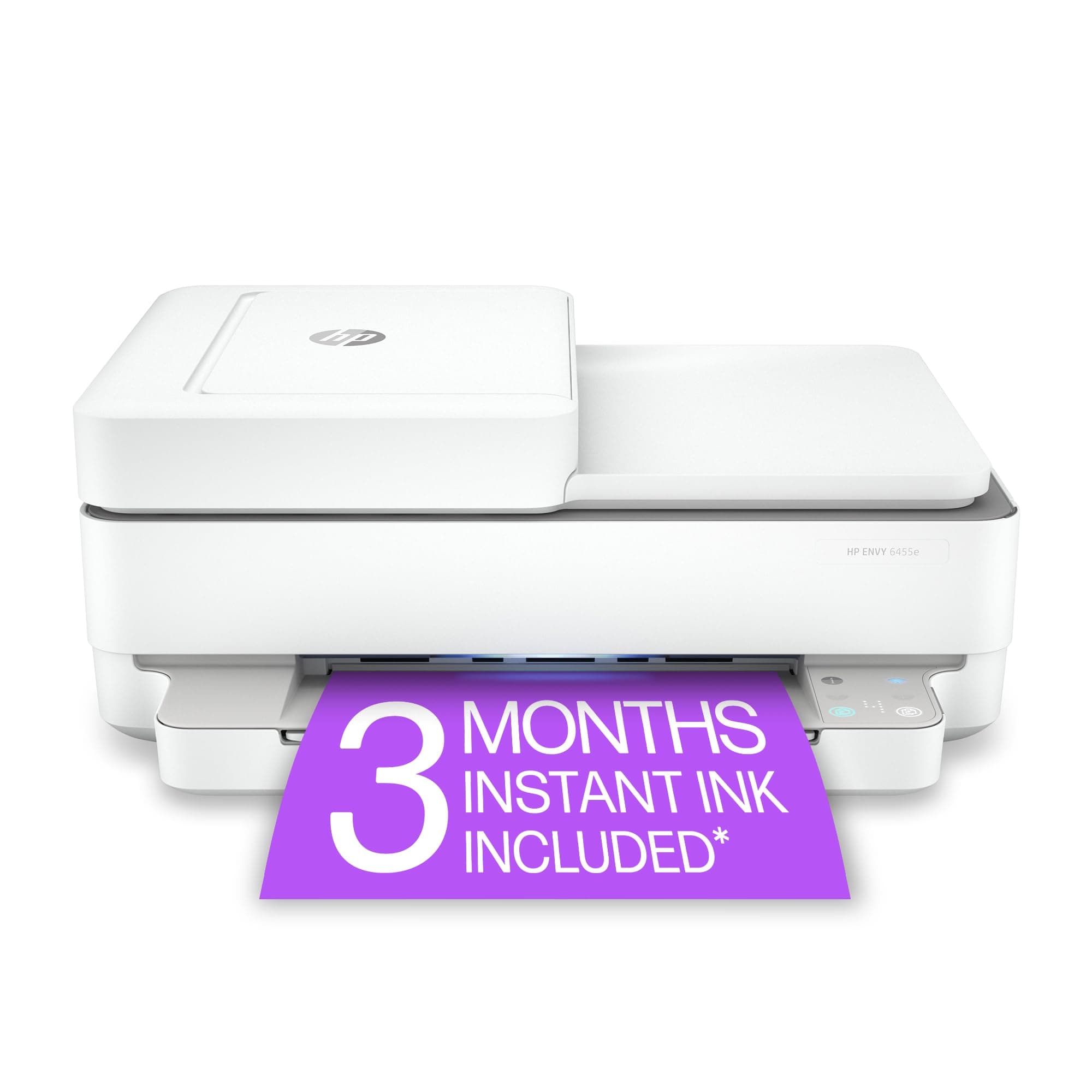
🖨️ Print smarter, live better — your all-in-one creative powerhouse!
The HP Envy 6455e is a versatile wireless inkjet printer designed for home use, offering print, scan, and copy functions with automatic duplexing and borderless printing. It delivers up to 10 pages per minute in black and 7 ppm in color, with a high color resolution of 4800 x 1200 dpi. Featuring mobile printing via the HP Smart app and a 3-month Instant Ink trial with HP+ activation, it combines convenience with vibrant output. Compact and energy-efficient, it supports various media types and includes an auto document feeder for streamlined productivity.


| ASIN | B08XYRDKDV |
| Additional Printer Functions | Copy, Scan |
| B&W Pages per Minute | 10 ppm |
| Best Sellers Rank | #60,790 in Office Products ( See Top 100 in Office Products ) #89 in Inkjet Computer Printers |
| Brand | HP |
| Built-In Media | 223R1A HP ENVY 6455e All-in-One Printer; HP 67 Setup Black Cartridge; HP 67 Setup Tri-Color Cartridge; Regulatory flyer; Setup guide; Reference guide; Power cord [For ink volume and page yield information, visit http://hp.com/go/learnaboutsupplies] |
| Color | white |
| Color Pages per Minute | 7 ppm |
| Compatible Devices | Laptops, PC, Smartphones |
| Control Method | Touch |
| Controller Type | Android |
| Customer Reviews | 3.8 3.8 out of 5 stars (6,954) |
| Dual-sided printing | Yes |
| Duplex | Automatic |
| Hardware Interface | USB 2.0 |
| Ink Color | White |
| Item Dimensions D x W x H | 14.21"D x 17.03"W x 7.64"H |
| Item Type Name | Inkjet Printer |
| Item Weight | 13.6 Pounds |
| Manufacturer | HP Printers |
| Maximum Copy Resolution Black and White | 300 x 300 dpi |
| Maximum Copy Resolution Color | 300 x 300 dpi |
| Maximum Copy Speed Black and White | 7 ppm |
| Maximum Media Size | 8.5 x 14 inch |
| Maximum Print Resolution Black and White | 300 x 300 dpi |
| Maximum Sheet Capacity | 100 |
| Maximum print Resolution Color | 4800 x 1200 dpi |
| Model Name | ENVY 6455e |
| Model Number | ENVY 6455e |
| Model Series | 6450 |
| Number of Trays | 1 |
| Other Special Features of the Product | Auto Document Feeder, Cloud Print Enabled, Energy Star, Network-Ready |
| Paper Size | 3 x 5 to 8.5 x 14 |
| Power Consumption | 4 Watts |
| Print media | Envelopes, Glossy photo paper, Labels, Paper (plain) |
| Printer Connectivity Type | USB, wireless |
| Printer Output Type | Color |
| Printer Type | Inkjet |
| Resolution | 300 x 300 |
| Scanner Type | Flatbed, Auto Document Feeder |
| Specific Uses For Product | Home |
| Total Usb Ports | 1 |
| UPC | 195161625039 |
| Unit Count | 1.0 Count |
| Warranty Description | HP standard 1-year limited warranty, extended to 2 years with HP+ registration |
| Warranty Type | limited warranty |
| Wattage | 4 watts |
L**Y
Must have a paying account to print
I agree with previous users. While i had no problem setting this printer up and printing. As soon as I cancelled my account when the free time period was up my printer would no longer print. I resigned up and it prints like a charm. I cancelled it again a month ago and bang same thing. I cannot print no matter what I do. Signed up again for the 0.99/ month plan and was instantly able to print again . I do not want to be held captive by this company. As soon as I can I will buy another printer. I am not going to pay even 0.99 a month just to keep a printer active and support something that is such a rip off! Update on this —- after much research you can use this printer after you cancel your instant ink or paper membership. You do need to set up an account to set up printer. What they do not make clear is that the ink cartridges included in the box are special.(they say instant ink on them). Once your free 6 months is up you need to either sign up for one of their plans to continue using these cartridges. They communicate with HP as to when to send you more ink. If you cancel the plan the communication stops immediately and the ink cartridges will not print. Its not the printer its the cartridges. If you decide to not pay for an ink membership you must take out the original ink cartridges (throw them out) and replace with regular HP ink cartridges for your specific printer. This was not originally made clear when I bought this printer, but this last time when I cancelled the plan they asked me to confirm that I understood the instant ink cartridges would not work and I would not be able to print with out replacing the cartridges etc. I am no longer on their plan and I am printing fine with this printer.
G**Y
Not worthy of the HP brand
I moved into an apt after 20 years in a beautiful house. I've always used HP computers and printers with very satisfying results. I have a 2022 Chromebook and had a HP 2132 printer less than 4 years old. This printer all in one was nice and compact and worked great using recycled cartridges that were less than $30 for a 2 pk. After moving into the apartment my printer suddenly was not compatible with the Internet service provider? I was able to finagle it for about 2 months by unplugging it, loading new cartridges and re booting my Chromebook. I had to unplug it to attach another device in April and after that I couldn't get it to print anymore. I was forced to buy another printer even though the 2132 worked great. I reluctantly bought one that was on the HP list that conveniently showed up every time my printer failed. The 6450e which I spent 5 hours trying to connect to the Chromebook. Gone are the days of plugging everything in, going into your settings and clicking on "install new printer" in the connect a new device drop down. So I go online to 123.hp.com where I m instructed to go to my cellphone, download the SmartHp app, go back to the computer go to settings, check that my wifi, Bluetooth and Internet were all on, go back to the cell answer all the questions, going through all the steps, back and forth. I get an error code that the printer isn't connected, their system can't make a wifi connection and I should try again later. I did this 4 more times finally getting the cartridges installed, but where there is a piece of cardboard jammed in the end of the the carriage case, taped in. No mention of that in 3 hours while installing on their helpful site. I fixed it and got it to correct and got a congratulations message on nearly completing the install. It was now 2:10pm when I started at 1030am. I continued to go through the entire Smart Hp process again for another hour with no success. At 3:10 decided my time was too valuable to spend on this mindless, infuriating endeavor just to become a slave to HPs locked in for life ink cartridges scam. I read the reviews on Amazon and Office Depot sites, that all had very bad experiences trying to connect new printers. I thought with my fantastic wifi and having windows 11 and an HP Chromebook I would have a better experience, but frankly this is the worst computer related problem I have ever had. I am going to switch brands for the 1 St time in 25 years because this is an absurd waste of time. There must be other printers that are easier to set up, in fact I read that the Brother 104 was the best and easiest for a non business printer. It costs $40 more but I will gladly pay to have my life back and a printer that works.
J**Y
DO NOT BUY
DO NOT BUY! When I first got this it was great. I didn't mind the subscription because we were print more and I hate finding ink. It was handy having it come when it was low. with out even doing anything. Now three years later I spend around an hour every time trying to fix this stupid thing so that it will print. It is always off line and I can't get it to come on line. Even when I check and it says that it is online and ready it still doesn't print. Go by a Brother or something. The Value for the money is not worth it. The quality seems strudy but the Product itself is trash HP has gone way down hill.
L**E
Keep it close, works great!
Liked it so much at home, bought another one for school! Was very easy to hook up...after I moved it closer to my computer. It was only about 2 feet away but Bluetooth would not connect so I moved it right beside the computer and it works fine.
R**N
Printer was easy to setup and use. Instructions were clear for wireless setup.
G**Y
Great printer
A**W
UPDATE: So I wanted to update I called HP today and after 2 hours I was not able to use my printer apparently when you subscribe to instaink , if you choose to cancel your subscription they will LOCK YOUR INK cartridges I had 2 brand new ones to use but wanted to cancel my subscription as I was no using enough to pay each month, when I did they stoped me from using the ink I was already sent. HORRIBLE company and I let them know I feel like it's a gimmick and a scam buyers please be ware of that Ok so this printer was what I thought was a good deal, I have liked HP and thought it would be ok for homeschooling my kids and printing their curriculum. It is always jamming the paper tray, it's always losing connection to the internet, it is NOT user friendly very hard to add printer to devices my husband is a certified network tech and in the past had worked for HP doing tech support for 3 years and he wants to put a hammer to this printer. He spent hours trying to get it connected and working we have only had it since sept of 2022 now only april 2023 and it's junk I have to now find another printer very very unimpressed!
A**R
It’s a basic printer. Doesn’t scan.
J**D
J’adore, j’imprime meme depuis mon telephone. J’ai l’abonnement pour l’encre et ca me coute moins cher qu’avant.
Trustpilot
2 weeks ago
5 days ago