Desertcart purchases this item on your behalf and handles shipping, customs, and support to Iceland.
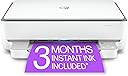
🖨️ Elevate your home office game with HP ENVY 6055e — print smarter, live better!
The HP ENVY 6055e is a versatile wireless inkjet printer designed for busy households, offering high-resolution color printing (up to 4800x1200 dpi), automatic two-sided printing, and seamless mobile connectivity. It includes the HP+ Smart Printing System for enhanced productivity and security, plus 6 months of free Instant Ink and an extended warranty when activated. Compact and user-friendly, it’s perfect for printing photos, homework, and creative projects with professional quality.


| ASIN | B08XYRVSRT |
| Additional Printer Functions | Copy, Scan |
| B&W Pages per Minute | 10 pages_per_minute |
| Best Sellers Rank | #96,905 in Office Products ( See Top 100 in Office Products ) #140 in Inkjet Computer Printers |
| Brand | HP |
| Built-In Media | 223N1A HP ENVY 6055e All-in-One Printer; HP 67 Setup Black Cartridge; HP 67 Setup Tri-Color Cartridge; Regulatory flyer; Setup guide; Reference guide; Power cord [For ink volume and page yield information, visit http://hp.com/go/learnaboutsupplies] |
| Color | white |
| Color Depth | 24 bits |
| Color Pages per Minute | 7 pages_per_minute |
| Compatible Devices | Laptops, PC, Smartphones |
| Connectivity Technology | wired, wireless |
| Control Method | Touch |
| Controller Type | Android |
| Customer Reviews | 3.9 out of 5 stars 13,222 Reviews |
| Display Type | LCD |
| Duplex | Automatic |
| Hardware Interface | USB 2.0 |
| Ink Color | color |
| Item Dimensions D x W x H | 14.21"D x 17.03"W x 5.2"H |
| Item Type Name | Inkjet Printer |
| Item Weight | 11.5 pounds |
| Manufacturer | HP Printers |
| Maximum Copy Resolution Black and White | 600 dpi |
| Maximum Copy Resolution Color | 1200x1200 dpi |
| Maximum Copy Speed Black and White | 10 pages_per_minute |
| Maximum Media Size | 8.5 x 11 inch |
| Maximum Print Resolution Black and White | 600 dpi |
| Maximum Sheet Capacity | 100 |
| Maximum print Resolution Color | 4800 x 1200 dpi |
| Model Name | ENVY 6055e |
| Model Number | ENVY 6055e |
| Model Series | 6050 |
| Number of Trays | 2 |
| Other Special Features of the Product | Auto-Duplex |
| Output sheet capacity | 100 |
| Paper Size | 3 x 5 to 8.5 x 11 |
| Power Consumption | 4 watts |
| Print media | Envelopes, Glossy film, Glossy photo paper, Labels, Paper (plain) |
| Printer Connectivity Type | wired, wireless |
| Printer Output Type | Color |
| Printer Type | Inkjet |
| Printing Technology | Inkjet |
| Resolution | 1200 x 1200 |
| Scanner Type | Flatbed |
| Special Feature | Auto-Duplex |
| Specific Uses For Product | Home |
| Total Usb Ports | 1 |
| UPC | 195161624865 |
| Unit Count | 1 Count |
| Warranty Description | HP standard 1-year limited warranty, extended to 2 years with HP+ registration |
| Warranty Type | limited warranty |
| Wattage | 4 watts |
F**H
HP ENVY 6055e Wireless Color Inkjet Printer is a piece of Junk!
I wrote a glowing review about this printer right after doing Setup which was easy and fast. The Envy 6055e worked well until the return window closed! Since it quit, I've spent way too many hours dealing with HP Customer Service. They had me do everything I had already done. After several hours we suddenly lost the connection. It was late and I had wake up in 4 hours so I went to sleep and thought I could continue getting it fixed the next day.. Instead, I got an email saying the case has been closed, like it was fixed! Just like the last 3 HP Printers I've owned, this one crapped out way too soon and no amount of troubleshooting brings it back! Don't waste your time, money and sanity! You have been warned!
T**N
Never again.
Just a few buyer beware tips before you buy this (and probably any HP printer) printer. If you are just in need of the occasional label, document, or picture printing, you might want to skip this brand. First off even though Amazon (and possibly the seller)encourages you to buy the off brand (and much more affordable ink) don’t. Only HP ink works. Also, the major selling point, for me anyway, that even if one cartridge runs out, you can still print. Nope. And lastly, unless you’re using enough ink to warrant the monthly subscription fee for their service, which automatically sends out ink you definitely want to skip this printer. I bought it, along with the recommended off brand ink that was 3x more printing at a savings. Unfortunately a month after sample in runs out I pop in my off brand, but the ink wouldn’t work the printer just kept saying not HP, buy more ink. Then wanted my cc information for the subscription ink. Long conversation with tech support. They turned off the subscription request and assured me that as long as I buy real HP ink no problem. Fast forward 13 months, I get low/no ink warning and it won’t print a label even though the black shows nearly full and color shows at least half. After waiting a few days for yet more ink to arrive still won’t print and keep getting call to renew subscription. After a good couple of weeks of me, my kid, a friend all running through set up rebooting whatever you can think of it won’t accept the new HP ink I’m guessing because the subscription hasn’t been renewed. I’m done. Over Christmas I’ve ordered a new Canon printer, it might have issues who knows, but I’ll take my chances. At least their ink is inexpensive, available everywhere not just Amazon (oh yeah I should add no where locally to buy the ink, Amazon or the subscription are the *only* options). I. Will. Never. Buy. Another. HP. Product. Again. We’ve had their desktops, laptops, and printers for decades, but never again.
A**E
Run! Get your holy water!
No. Look elsewhere. Run run run. Nightmare machine. It worked well for a bit during the warranty, but now it’s constantly got something wrong. It works just enough to make you think it’s fine and you can just get through it, but it’s literally hours long struggles every single time I go to use it now. It doesn’t connect to the app unless you unplug it and turn it back on a half dozen times, you have to upload it to the app first rather than print straight from the pdf or other app you were using and have to click the steps in a very specific order or close the app and reopen a bunch of times, the “paper low” warning won’t let you print unless the tray is absolutely full and you have to open and close the tray and resituate the paper or turn off and on again, “ink low” won’t let you print but it’s a brand new ink cartridge and possibly just immediately fried the reader connections during the test print, if you can finally get past the “ink low” warning it won’t just try to print with what ink it has but will print super weird (like the text is grey and just has outlines of the letters but it’s consistent ink output throughout like it’s pretending to be low on ink, while it printed a startup info page in strong black ink like normal just two seconds ago and once again after your botched thing that you actually wanted to print). The ink issues are always present and always a fight now (and it doesn’t accept inks that are not HP, it just won’t) and the app either just wastes your paper with cleaning the printer head and diagnostic sheets or harasses you into buying an ink subscription. A printer does NOT need my address and credit card info, seriously!!! Is it too much to ask that the printer just be there, turn on, connect and print directly from the basic print app that every device has built in, and just - and here’s the crazy part - PRINT THE THING YOU NEED AND BE DONE?!?!?! It literally just needs to be that straightforward. If it’s out of paper or ink, just let us figure that out, don’t let the app or the machine itself think it knows better when it doesn’t and go, “nah, I’m not gonna even let you try. There’s no ink to be found anywhere,” when there’s a brand new cartridge in it and it JUST printed the printer info page totally fine. I swear this thing needs you to perform a demonic ritual with your own blood before it will work. I’m so fed up I’m either going to give it away for free to an enemy, defenestrate it, or chuck it at a junk yard as hard as I can. Or maybe I use it for target practice to let out some frustration first, make some entertainment out of it at least and give back some of the pain it’s caused me. Ok, thank you for listening to my rant. If you made it this far, what’re you doing? Go find a different printer, unless you want it to sap your sanity like it did mine. Good luck.
D**N
Good printer, occasional connection issues.
Honestly a really good printer overall but has issues with connection from time to time. The primary issue I have is that it will al have ink cartridge issues and give me an error code which I need to work around, sometimes taking a decent amount of time. When it is working, it works great. The subscription for the HP+ is very cheap if you plan to print and don’t want to go to the store to buy ink. Even has apps for your phone and laptop to do things wirelessly. Sits perfectly in a desk but I have a larger one. I’ve had my printer for about 2 years now and still works fine
A**E
It works great... no frills printing, scanning, and copying. Here's the trick...
I needed a printer for the odd occasional use for a MacBook. I had an old envy 4500 that was about 10 years old that finally tanked. I read the reviews here and at first I was concerned but I decided to go for it because the other printers were way too much for the few print jobs I need to do. The printer was easy to set up, remove the packaging materials and turn it on. (I tend to not print out the alignment sheet because it burns through the color ink). The printer has a cycling glowing purple light and it sleeps in a low blue light with a green light on the side. I just turn the printer off when not in use. It has a button for color copies and a button for black and white copies. A cancel button, and an info button--no display, it's very basic. I purchased a USB printer cable also on Amazon and plugged the printer into my Mac (should work with Windows too). Note, once you plug into the printer cable, it seems that connecting to WiFi is disabled. From there, you can get to the printer's web page which lets you play with all the settings. I turned on web print and disabled blue tooth (which I believe is used by the HP app that I didn't install). That's it. I can still print remotely to the printer from the sofa via web print, or print directly from my plugged in Mac. I didn't install any apps, I didn't get the printer on WiFI to get it talking to HP, and I didn't subscriber to any ink subscription service. Super easy. I hope this is useful for someone to make an informed decision for their printing needs. I would recommend to a friend and I would purchase this again.
T**K
it holds a 100 sheets in the tray at one time
ink is lower cost than other printers paper tray holds up to 100 sheets at a time only had the printer for a couple of weeks now so far so good it took a long time to get the internet up set and working it was not easy task to do that of all the printers i have had in the past this was by far the hardest to setup to the internet to get in it to print. who ever had the bright idea to put the off and on button in the back of this printer have never used this printer . very bad idea. U know how many times i had to use this off and on button the set this printer up. why would u put the off and on button in the back of the printer where it is very hard to reach. very dum idea
J**A
Easy to set up and very quick and quiet when printing.
Reading previous reviewers' comments, I prepared to set up this printer with lots of headaches. The reality could not have been farther from the truth. I followed the included instructions to set up using a computer and was up and running in less than a half hour. When I tried to use the automatic wifi identifier, it did not work to find the password for my wifi, so that did not work. I backed up and manually input the wifi password and the rest was pretty much automatic. This printer is replacing an older HP printer, for which I had the automatic ink refill plan and the HP Smart software (app?) picked up all the information from the old printer and replaced the ink plan for this new machine. My first sample print was the alignment page, which worked properly and quickly. I then tested a few black print pages resulting in very sharp, clear print. Next, I sent a picture from my iPhone SE (2020). The picture formatted quickly and printed quickly and clearly although I was using plain paper. So, I am very happy with this printer. The setup went quickly and well, the printing is sharp and quick and the machine is the quietest printer I have ever owned -- and I've had plenty over the years.
A**D
Oh home printers, where are the good ones?
I switched from a brother printer to this HP. The brother had served well for many years, but we were frequently getting paper jams. This new printer is pretty good with paper jams - they are rare, but the user interface is terrible for other issues like low cartridges, needing to clean printer heads etc. Also, wifi connectivity is all over the place. Sometimes it just goes offline and even the on and off switch doesn't work and I have to unplug and replug it, which is a pain because of where the printer lives in our house. It is also a pain because there are no controls on the printer itself, so without connectivity you can't do anything. The UI really blows. It is very obviously created for HP to try to sell you their ink cartridge plan moreso than to help you use and trouble shoot the printer. Case in point, today, I am trying to run a utility function from the UI to clean the print heads because print jobs are coming out with streaks on them. When I run the clean print head utility, it says cannot run because the printer is busy. Meanwhile, printer status says nothing is printing. And each time you switch between these various windows, its like you lose connectivity with the printer and then the HP Smart UI has to re-find the printer again. I would gladly spend more money for a printer that works reliably. Life is too short to spend fiddling with printers.
P**Y
The BEST printer & soooo easy to hook up!
I am not a computer person. I am a retired senior who finds this sort of thing to be extremely frustrating. Although I try, I have to go somewhere else to have somebody else put it together for me. Life is just too short to live with that level of frustration. I was able to put together this printer together on my own, which is shocking! It was so easy. It came with a very easy to read booklet of instructions that tell you exactly what to do. This booklet also show you what the codes mean when it’s having an issue. That way you don’t have to guess, which in my mind is a really good thing. What I was most surprised about, was the way that it is put together. It’s built unlike any other printer I’ve ever seen, but it seems to work really well. Ie, the paper is fed from a drawer inside of the printer. You basically have to lift up the whole printer itself to get at the paper or envelope drawer. It’s curious, but it works amazingly well! I also didn’t realize that it hasn’t extra bit of warranty which is a treat as well! Extra bonus! I have only had it for a few days and have not had an opportunity to try out it’s other features but for me, given the cost, this HP printer is one of the best.
R**A
So easy and fast to set up
Firstly, I love the look of it. All of the funky different coloured lights are so cool. It’s nice and slim and not bulky. I couldn’t believe how easy it was to set up to my WiFi and to my iPhone. It didn’t need my router password or anything. Super easy to install the paper and ink. It’s really quiet and prints fast with great quality printouts. The instant ink feature is great and so convenient. It has many other wonderful features! Great app and support. Amazing printer especially for the price. I had a Canon Pixma before this one and it was an absolute piece of junk! I got so frustrated with it that I just recycled it. I think HP printers are the best. I’m so glad I chose this printer.
L**T
ne fonctionne qu'a travers hp smart
Une très bonne imprimante ,mais malgré son easy instal pas si facile que sa.
C**S
Not worth the trouble, DON'T BOTHER
I finally had to buy a new printer because my trusty old HP printer (over 11 years of use!) finally started having issues. After much research and wading through several bad reviews on every printer I looked at, I decided to go with this one and crossed my fingers that it would be a good experience. Everything started out fine, going through the process, but when it reached the step to connect to my wifi, it just would not, no matter what I tried, no matter what device I tried it on. I'm not new to technology and this type of thing should have been an easy process for me. Instead it was 6 hours of nothing working and complete frustration! Finally, I decided to just connect it with USB (USB cord doesn't come with the printer btw), grabbed the USB cord from my old printer and gave it a go. After another hour of downloading the driver from HP's website, and going through the lengthy installation, and it was connected via USB. Yay, time to print right? THINK AGAIN. When I put the ink cartridges in, I instantly got an error message stating that the color cartridge was not communicating with the printer and no matter what I did, it would not work. I read page after page of other similar issues (many of those to be found with this printer!!) and finally realized that my brand new cartridge or the cartridge compartment in the brand new printer was defective. Seriously!? So I ordered another ink cartridge from HP for $25 to see if it would work in the ink compartment. With time constraints on needing a working printer ASAP, I then decided to just send the defective printer back and have it replaced with the same model replacement. I was actually still hopeful I could make it work. Thankfully, I read the reviews on the actual ink cartridges for this printer and found out that they run out after 30 to 40 pages, though stating they will print 100 pages (still too low anyway). Since I can't connect to the subscription program through HP, and receive ink monthly, and would need to order my cartridges on an as needed basis, this was the straw that broke the camel's back. I ordered a completely different printer that hopefully will suit my printing needs better and will not arrive defective and unable to connect wirelessly! Would NEVER recommend this printer. Its too costly on ink and not user friendly at all. Don't bother, trust me. Horrible experience.
B**E
Exactly what it promises
I found it extremely easy to set up. I had to re-set it up when my modem/router was replaced. I was irritated because I thought the printer had suddenly forgotten how to print... but it all worked out easily once I realized the prob. I don't print a lot, but I'm very happy with the quality for my home printing. I'm a retired graphic designer, so my standards are high. NOTE: I almost never print photos, so I can't address quality for those. I find the 2-sided printing works well. Printing speed is fine—not fast, but not too slow for me. Scanning is smooth. I like the small footprint and the ease of moving it when I need to.
Trustpilot
3 days ago
1 week ago