🎯 Dominate every game with zero lag and total control!
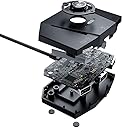
The leadjoy VX2 AimBox is a wired keyboard and mouse adapter designed for top-tier gaming across major consoles including Nintendo Switch, Xbox Series X/S, Xbox One, PS4, and PS5. Featuring advanced Agility Translator technology, it ensures zero input delay and precise 1:1 game accuracy. Its reversible USB ports simplify connection, while the Vlead APP offers customizable keymapping and mouse sensitivity. Integrated 3.5mm audio support enhances immersive gameplay, making it a versatile accessory for competitive gamers seeking an edge.
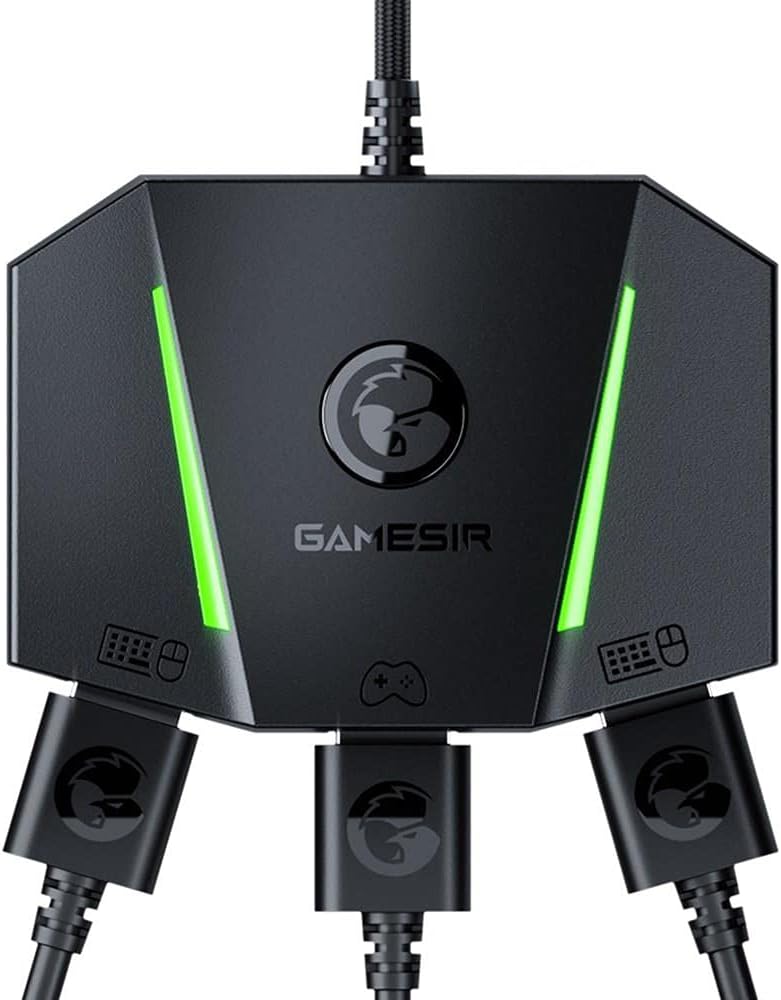




| ASIN | B08TRG9Q6T |
| Best Sellers Rank | #36,327 in Video Games ( See Top 100 in Video Games ) #82 in Xbox One Adapters |
| Brand | GameSir |
| Color | VX AimBox Adapter |
| Compatible Devices | Playstation 4, Xbox One |
| Connector Type | Auxiliary |
| Current Rating | 1 Amps |
| Customer Reviews | 3.7 out of 5 stars 1,465 Reviews |
| External Testing Certification | Não aplicável |
| Finish | Matte |
| Finish Type | Matte |
| Item Dimensions | 5.08 x 4.84 x 1.14 inches |
| Item Height | 2.9 centimeters |
| Item Weight | 0.18 Kilograms |
| Item dimensions L x W x H | 5.08 x 4.84 x 1.14 inches |
| Manufacturer | GameSir |
| Model Number | VX2AIMBOX-BK |
| Number of Items | 1 |
| Number of Ports | 3 |
| Package Quantity | 1 |
| Unit Count | 1 Count |
| Warranty Type | Limited |
A**N
Good, but not the Best
For those who want to buy this, Please do. Things to know before you do however; Its definetly not made or programmed from the U.S., it has chinese letters, and programs and sometimes gives an untranslatable message error. Other than this, it works as intended. There isnt a tutorial thar comes with it, as it kind of throws you out on the streets by yourself without teaching you anything. Other than that, it is a great product and works almost perfectly.
T**R
Dead On Arrival. Does not work even though it lights up.
From day one I wasted money on this. I unfortunately held onto it far to long after buying it hoping that a firmware update or something would come out and fix it. It does not detect any Xbox One controllers, gen one or two. It does not detect PS4 controllers at all. I tried mapping three different keyboards in the app, none worked at all. This is a sham and I have tried everything in my power to put my faith in it. The support is terrible, there is no information on how to use it. Please do not waste your money and do your proper research before buying a input converter, this is not the one.
C**.
Finally a real no laggy solution for keyboard and mouse players on unsupported games.
Good morning, excellent device, Let me share my experience after several days using the Aimbox, first things first, there is nothing that compares in the price-cost relationship at a price of 50 dollars, second, the ease of use is as simple as you connect and use it, Now the really important thing, does it work for what it was created? It is an absolute yes and with an outstanding note, first, this device will allow you to be more efficient in any game that you want to use it where the use of keyboard and mouse is not allowed on the console, the VX works without any delay, I am simply impressed with the work for this to be possible wow, second, the mobile app, uff is simply elegant and perfect although the letters are a bit small, this app works without any type of bugs or crash, it allows you to choose one of the configuration options for the game you want or you can create one yourself, or edit one already downloaded, I am really very happy with my VX Aimbox and being able to enjoy the aiming assistance playing on my mouse and keyboard makes me feel that I am no longer at a disadvantage against the control players and their aim assist, Greetings and I hope it helps if you want to buy one.
E**Y
Please read and get your opinion from my experience
Many things to say about the gamesir aimbox, for starters amazing packaging, get quality for the price and very stylish, very practical and easy to setup the hardware and get organized. As far as the technology setup it can be a little frustrating. GET THE GAMESIR APP IT IS A MUST HAVE!!! Now that you have the app on your smartdevice pair with your wifi and bluetooth to get kbm input FOR YOUR CONTROLLER BUTTONS its awesome that you can configure to have each controller button, i would love if each game you could configure the actions indiviually but nothings perfect. Now if you have trouble pairing your device or with the app itself, DOWNLOAD APP ON DIFFERENT DEVICE and then try again til its useable, once on the different device you should be able to reconfigure and continue working on the aimbox. And while using the app there is an "USE NOW" option so when you make changes you can see how it affect your gameplay in real time. I would love if i could leave my kbm plugged in and use my other games that support the input but i have to unconnect then recoonect the USB to my console, that and if i leave them plugged in even after the console is powered off power still goes to my kbm. Those are my note on the gamesir, I enjoy the hardware very much and appreciate them, its can be tricky but once its setup it works really great to make the best bridge between console and pc inputs So remember if you have trouble with the app on your personal device, try another device it helped me out in moments before total insanity. I hope it can help you too
I**.
Bought For Xbox Series X
Arrived quite faster. Faster then the expected arrival even. Was a bit skeptical about it since this was a for a newer gen console. Wanted to play some games that do not support Keyboard/Mouse. Works very well with Series X. Comes with a Micro USB cable and a Type-C cable, and simple user manual. FIRST OF ALL, DOWNLOAD THE GAMESIR APP AND PLUG YOUR CONTROLLER IN THE BOX. Otherwise nothing will work. The app allows you to keep the box connected to the console and to use your Keyboard/Mouse. It allows to customise the key bindings and sensitivities. Please keep in mind that you need to map the keyboard keys that suit you according to the default controller keys. (Example: R3 thumbstick to sprint to be the classic Shift key). You can map one controller button to be triggered by multiple keyboard keys. You can connect your headphones also if they have a 3.5mm jack only. DOES NOT WORK WITH WIRELESS HEADPHONES. Overall very good item with a decent variety of customisations. Just needs some time to get used to the app. If you cannot find your desired game, you can create your own key bindings for it.
G**L
Cool once you figure out how to use it
Using it on my Xbox X. A little tricky to figure out. Everything must be turned off. It did not say this in the instructions. 1 - everything turned off. 2 - Plug keyboard, mouse and Xbox controller into adaptor. 3 - plug adaptor into Xbox. Xbox may turn on. 4 - (optional) plug power cable into adaptor. I do this, but not necessary. This is fooling the Xbox into thinking the keyboard and mouse is the controller. Mouse movement is slower than right controller stick in BF2042. Struggling to make it move faster
M**N
No delay or sensitivity issues after adjusting the settings
I was on the fence about buying the vx2 because of the reviews that mentioned delay and sensitivity but I figured at this price point it was worth the risk. Out of the box it was slow and it felt like it had delay, but if you max out your sensitivity on the game you’re playing and set the aiming curve to linear on both the vx2 app and in game, there’s no noticeable delay. The app is easy to use and you can change button maps on the fly which is a huge plus for games like DayZ that don’t allow custom keybinding.
E**L
It's bad
Many connectivity issues. wouldn't recommend it
Trustpilot
5 days ago
2 weeks ago