Desertcart purchases this item on your behalf and handles shipping, customs, and support to Iceland.
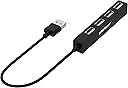
🔗 Unlock your laptop’s full potential with SABRENT’s sleek 4-port USB hub!
The SABRENT 4-Port Portable USB 2.0 Hub (HB-MCRM) is a compact, travel-friendly device that expands your laptop or tablet’s connectivity by adding four USB 2.0 ports. Supporting data transfer speeds up to 480 Mbps and compatible across Windows, Mac, and Linux systems, it’s designed for professionals who demand reliable, high-speed connections for multiple peripherals without the bulk. Its 9.5-inch cable length and lightweight ABS enclosure make it the perfect companion for ultrabooks and tablets, ensuring you stay connected wherever work takes you.


| ASIN | B00L2442H0 |
| Additional Features | 4 port usb hub , extra additional usb ports for laptops mac mini hub usb Sabrent hb-usb30, plugable external multi usb port expander desktop computer hub, jtech, uspeed |
| Best Sellers Rank | #95 in USB Hubs |
| Brand | SABRENT |
| Built-In Media | 4 Port Portable USB 2.0 Hub |
| Color | Black |
| Compatible Devices | Most USB Compatible Devices |
| Customer Reviews | 4.5 out of 5 stars 12,666 Reviews |
| Data Transfer Rate | 480 megabits_per_second |
| Enclosure Material | Acrylonitrile Butadiene Styrene (ABS) |
| Global Trade Identification Number | 00819921011251 |
| Hardware Interface | USB |
| Item Dimensions L x W x H | 3.7"L x 0.5"W x 0.5"H |
| Item Highlight | Compact travel hub; 9.5-inch cable; for Ultrabook, MacBook Air, Windows tablet PC |
| Item Type Name | USB-HUBS |
| Item Weight | 1 ounces |
| Manufacturer | SABRENT |
| Mfr Part Number | HB-MCRM |
| Model Number | HB-MCRM |
| Number of Items | 1 |
| Number of Packs | 1 |
| Number of Ports | 4 |
| Operating System | Mac OS 9.1 |
| Special Feature | 4 port usb hub , extra additional usb ports for laptops mac mini hub usb Sabrent hb-usb30, plugable external multi usb port expander desktop computer hub, jtech, uspeed Special Feature 4 port usb hub , extra additional usb ports for laptops mac mini hub usb Sabrent hb-usb30, plugable external multi usb port expander desktop computer hub, jtech, uspeed See more |
| Total USB Ports | 4 |
| Total Usb Ports | 4 |
| UPC | 819921011251 |
| Warranty Description | 1 year limited |
T**A
Very handy accessory for any laptop or tablet with a USB port
It seems like there are more and more USB devices I need to use with my computer. Just today, I had a USB mouse, a label printer and a Bluetooth adapter plugged into my laptop. That took up all 3 of my USB ports and left no room for my external portable USB speaker. And my Surface Pro only has one USB port! That's why I was delighted to have the opportunity to review this slim, bar-style USB hub. I was surprised to see just how slim and lightweight this hub is! That's a big plus when traveling with my Surface Pro because this will fit into my small carrying case. It plugs into a USB port and gives you three additional ports for a total of 4 ports from one. It doesn't need an external power supply and there are no drivers to install because it's plug and play. The drivers are installed the first time you plug it in. I plugged in 4 different USB devices and all ports worked perfectly however, I did get a message on my Kindle screen that it was plugged into a low power port and therefor wouldn't charge while in use and would charge slowly when not in use. Because the power from one USB port is divided into 4 ports, you should assume that it won't charge any device very quickly, but the devices can be used while plugged into this hub. Although this is USB 2.0 rather than the faster USB 3.0, it will still work in a USB 3.0 port - just not at USB 3.0 speeds. NOTE: Anyone with a computer will find this to be very handy and even though I was provided a sample of this hub for reviewing purposes, I liked it so much I just ordered 3 more for other family members.
M**N
fits the bill if you need A LOT of USB 2.0 ports
I have an embarrassing number of USB MIDI devices in my home studio, and I needed a way to connect all of them to my Mac Mini, which is patchbay central to determine which devices control other devices. I bought this Sabrent because I've had good experiences with some of their other products, and this was an good deal for the sheer number of ports. There are some design elements I'm not thrilled about, but which do not fundamentally detract from the functionality, but which one should be aware of: 1. For reasons unknown, the ports are split into two circuits, with a push-style power button for each. If you enable one circuit, wait more than a few seconds, and then enable the other one, the circuit already enabled resets. This makes no sense, and in my case, it means any work I had done on the powered-up devices is lost as they lose power momentarily. The solution is to power up both circuits, even if you don't plan to immediately use them all. 2. The blue LED surrounds are unnecessarily bright; with all ports powered, this thing really punches out the blue glow. 3. The ports are pretty tight, which is better than being sloppy, but it means I have to exert more force than usual to insert USB cables into them.
D**E
It works ok.
Everything I asked to run on this, Mouse, Keyboard, USB Audio, two printers, a USB NetTalk phone router, my UPS hookup, a corded mouse, webcam, all went in without incident. Pretty remarkable, not one conflict, anywhere, one after another, perfection. Turn it on, connect a USB from the PC into the end connector of the strip. The PC will install the strip as a hub. Then, plug things into the strip one at a time, BTW. Let your PC digest and install one at a time. The Sabrent is very good at all of these and spreads the power demands of all these things out to a strip, Par Excellence'. It's great for all this, but USB data transferring is a joke, transferring is always slower than ATA or network backups, always. This strip is very, very good, but it won't fix USB data transfers. When I I try to back up through USB 2.0, that's 480 MB/S, it's slow, slow, slow, as always, right off the MOBO. I need to move a lousy 80 GB of pics and it was halfway done three hours out. When I hook the drive to the MOBO with serial ATA, it's done in 1 minute. I've resolved to get a network-based backup. They can advertise this or that transfer speed for USB, right into the MOBO-USB all they want, but outside of peripherals, for data moves, USB in general sucks. But the Sabrent can't fix that for you, it is downstream and can't fix stupid. But for all the things on our USB, it's golden.
H**D
Good multi-usb ports but not 3.0 - A "must-have" device
Likes: large number of ports and external power. works great good price Dislike: Bright lights to indicate the ports that are on. Needs to be turned off at night if the computer is used in a bedroom. The 4 star rating is because it is not the most up to date USB 3.0 device. I thought I was buying a USB3 device but when it came it is the older USB2. It is my fault because I clicked on the item and missed the speed in the description. That is not a problem because I cannot tell the difference in use. I don't regularly transfer high numbers of large files so the speed is not an issue. This hub works as intended and I now have a camera, microphone, keyboard and a device to run 2 external monitors (including the laptop I use 3 monitors) plugged in permanently with a line for the iPhone and an external hard drive (not always in use). Still have many ports for USB thumb drives and/or external hard drives, DVD reader, etc. (Yes, I still use DVDs) My new small laptop only has 2 USB ports and a USB-C port, so it was very limited without this hub. I have another 4-port hub in the second USB that has the mouse dongle and the line to charge the mouse when it needs to be. So far, I have had no issues with so many devices at the same time. These hubs are a must for today's smaller laptops with limited ports.
K**L
Using with my flight sim peripherals.
I purchased this USB 2.0 hub for use with flight sim peripherals that I am setting up in a permanent location. So far I have a yoke (Honeycomb), rudder pedals, throttle (both Logitech), and a mouse and keyboard all plugged into this hub, and everything works great. Why pay for a 3.0 hub when all the flight sim peripherals are 2.0 connectors? Plus having 13 ports to plug in more flight peripherals as I buy them is perfect for me. There are two distinct sides to the hub, each controlled by a small button on top, so you can only have half of it 'on' and working if you don't have 13 things plugged in. The blue lights are very bright and stay on even after I power down my computer, so having the buttons to turn off the lights (and the peripherals) is a bonus. It has an AC adapter (which I wanted for my needs) so be aware that you need to be near a power outlet as well as your computer. Also of note is that the connecting USB cable that you plug into your PC is very short (only 12-inches). This would not even reach from the back of my PC to the desk at the side of my PC for placement, so I purchased a 9.8-foot (3-meter) "AmazonBasics USB 2.0 Extension Cable" as well to solve this issue. All in all, this is a great 2.0 hub. I highly recommend it if you need plenty of USB 2.0 ports.
O**C
Worth every penny for mass production of USB flash drives
I did not buy this device to connect multiple USB devices to my laptop. Rather, I bought it for an unusual application: I needed to mass-produce 85 flash drives (8 GB) for a high school reunion. We had created a class photo archive with about 5 GB of data, and then needed to make 250 copies of the master files. The production work was divided between three classmates to lighten the load. This hub allowed me to connect twelve blank drives at a time and copy the 5 GB of files to each drive. The laptop was Win 7 quad core i5 processor with 6 GB RAM. The process took 35-40 minutes per set of twelve drives, with no errors whatsoever. The hub has two switches, each of which controls power to six of the slots. The hub did NOT appear to work without being plugged into its AC power source, as the drives were not visible in My Computer with the switches turned off (but I never had any intention of trying to perform this task with an unpowered hub). Given the large amounts of data being copied/pasted simultaneously to a dozen flash drives, a classmate had suggested making a dozen separate copies of the master file on my hard drive, and then copying/pasting one master file set to one flash drive (i.e. copy #1 to flash drive E, copy #2 to flash drive F, etc.) so that all twelve drives would not be competing to copy information from the same hard drive sector. I tried it both ways (method above, vs. copy/paste from one sector to all twelve drives) and using the multiple sector method shaved off perhaps 5-8 minutes from the process. I encountered no errors at all, regardless of method. I'm aware that most purchasers are trying to connect multiple USB devices rather than mass-record blank flash drives, but this product gets five stars for my intended purpose.
G**H
Works Without Issue
Used this in a project to add multiple usb ports to a keyboard and came out extremely well. The case was easy to open and solder to and the board allows enough power to pass to multiple devices without any issue. It is slow but that's because it's limited to USB 2.0 so just be warned.
C**S
Works very well, sometimes loses connectivity, but probably BEST for price range
I bought two of these Sabrent 4 Port Portable USB 2.0 Hub devices. I use one at home with my laptop and I use the other in my office with the same laptop. My laptop is a Lenovo B570. First, I want to say that I really enjoy having all of the extra ports that the Sabrent 4 Port Portable USB 2.0 Hub provides. All four ports on both of my devices work just fine (which others who have commented on this device or similar products have often commented as being an issue). I've plugged a wide variety of devices into the USB port with little or no problem. These items include: a Dell monitor, a Westinghouse monitor, a gateway monitor, an Asus monitor, a di keyboard, a Microsoft keyboard, 2 separate Microsoft mice, multiple USB phone chargers, a USB lamp, a Brother printer, a bluetooth port, and 2 separate pluggable USB display adapters. Some of these devices did have some problem installing their software through the Hub, however. In all cases I got the installation process towork and my laptop to recognize that they were plugged in. However, at times this did require (strangely) the devices to be switched between the different USB ports on the Hub to find the right 'combo' for them to function properly. Additionally, not all of the USB ports on my laptop seem to recognize the presence of the Hubs. Or at least not consistently (which is not demonstrated with the devices plugged directly into the laptop while bypassing the Hub). Both of these problems were bothersome and did occur with both of my Hub devices. However, once installed and running, they no longer have a problem. So after all that Minus 1 star. The biggest issue is that the Sabrent 4 Port Portable USB 2.0 Hub will disconnect everything connected to it (often just momentarily) if the hub is bumped. this, again, has happened with both of my hubs and has been very annoying. Obviously, this can be avoided by putting the hub out of the ay, but if you tug on a mouse or keyboard wire too hard, or move somethign on your desk and it hits the hub, say goodbye to signal for about 1 sec. This wouldn;t be a huge deal, except I have monitors plugged into my computer via USB monitor adapters , so everytime the Hub's signal is interrupted my screen goes blank, my computer loses recognition of the 2nd screen, and my screen resolution is adjusted. Then when the hub regains signal, I have to go back through that process to return to what I was doing. A job interrupter for sure. So for this issue, I give it an other minus 1 star (though really, the minus 2 stars overall are mainly fueled by this issue). Overall: - Love the Sabrent 4 Port Portable USB 2.0 Hub and the extra USB ports it provides. - Minus 2 stars for some annoying connectivity issues - I would STILL recommend purchasing these ports because, despite the connectivity issues described above, they otherwise work fine and it would be pretty hard to beat the price I paid for these and have them work as well as they do!
R**N
Hervorragender unpowered USB-Hub
Hängt an meiner FritzBox um daran Drucker, 3D-Drucker und einen USB-Stick als Zwischenspeicher zu betreiben. Das ist mein 3. USB-Hub von Sabrent, wie gewohnt erstklassige Qualität und Verarbeitung. Läuft jetzt seit fast einem Jahr problemlos. Klare Kaufempfehlung!
A**A
Produkt zgodny z oczekiwaniami
Urządzenie sprawne i zgodne z opisem - polecam
K**S
Ladestrom nur 0,01A bei 5V, für mich daher unbrauchbar
Ich habe das Teil nun ein paar Tage im Einsatz. Mehrfach ist mir aufgefallen, dass selbst bei Geräten die ich über Nacht zum Laden angeschlossen hatte, diese am nächsten Tag nicht geladen war. Ein paar mal habe ich noch gedacht, ich hätte vlt. den Stecker nicht richtig drin gehabt. Eben habe ich ein USB Messgerät zwischen dem Ladegerät und dem Tablett dazwischengesteckt. Dass zeigt mir an, dass bei einer Spannung von 5V nur mit 0.01A geladen wird. Das Ipad war bis eben schon über 8 Stunden verbunden und hat den Akku immernoch erst zu 46% geladen. In der Beschreibung steht zu lesen, dass es in der Lage sei, mit bis zu 7.5A zu laden. 1A wäre vlt. noch erträglich, aber so ist es für mich unbrauchbar. Entweder es war von Anfang an defekt, oder hier wird ein minderwertigen Produkt versandt. Das Teil geht zurück. Nachtrag: Gerade beim Einpacken zum Zurücksenden habe ich mir das Netzteil noch einmal genauer angeschaut. Das liefert insgesamt bei 12V 7500 mA, das ergäbe bei 0 Verlusten eine maximale Gesamtleistung von 90W. In den Produktbildern steht dabei "every port provides up to 7,5 amps" und "charge up to 20 devices simultaneously" Wenn das Netzteil eine maximale Gesamtleistung von 90W liefert und 20 Geräte angeschlossen sind, bleibt pro Gerät bei gleichmäßiger Leistungsverteilung 4,5W. Bei 5V Spannung am Usb-Port ergäbe dass pro Gerät 0,9A, vorausgesetzt sämtliche Elektronik würde komplett verlustfrei arbeiten. Eine verlustfreie Wandlung der Netzteilspannung von 12V auf die USB-Spannung von 5V ist technisch nicht möglich. Ich hatte verstanden, dass auch wenn ich 20 Geräte anschliesse jedes Gerät mit bis zu 7,5 A geladen werden kann. Die Aussagen sind also für mein Verständnis missverständlich.
M**P
Très bon Hub
Ce hub est excellent, ne produit aucun parasite comme je l'ai déjà vu avec d'autres produit, preuve que l'alimentation est de très bonne facture et que chaque port est correctement filtré.
D**E
Compatto e funzionale
Comodo portatile 2.0
Trustpilot
2 months ago
2 weeks ago