🚀 Upgrade your workflow with the SSD that means business.
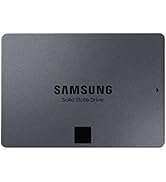
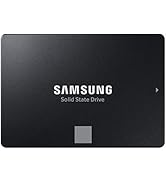
The Samsung 870 EVO 1TB SATA III SSD delivers professional-grade performance with sequential read speeds up to 560 MB/s and write speeds up to 530 MB/s. Designed for IT pros, creators, and everyday users, it offers robust reliability with up to 600 TBW endurance backed by a 5-year warranty. Compatible with a wide range of systems, this 2.5-inch internal drive features AES 256-bit encryption and is supported by Samsung’s Magician 6 software for easy management and optimization. A seamless plug-and-play upgrade that transforms your PC or laptop into a powerhouse of speed and storage.


| ASIN | B08QBJ2YMG |
| Additional Features | MLC V-NAND Technology, SATA III 6 Gb/s Interface, Up to 530 MB/s Sequential Write Speed, Up to 560 MB/s Sequential Read Speed |
| Best Sellers Rank | #4 in Internal Solid State Drives |
| Brand | Samsung |
| Built-In Media | Solid State Drive |
| Cache Memory Installed Size | 1 |
| Color | Black |
| Compatible Devices | Laptop, Mac, PC |
| Connectivity Technology | SATA |
| Customer Reviews | 4.8 out of 5 stars 44,768 Reviews |
| Data Transfer Rate | 6 Megabits Per Second |
| Digital Storage Capacity | 1 TB |
| EU Spare Part Availability Duration | 5 Years |
| Enclosure Material | Nand |
| Form Factor | 2.5-inch |
| Hard Disk Description | Solid State Hard Drive |
| Hard Disk Form Factor | 2.5 Inches |
| Hard Disk Interface | Solid State |
| Hard-Drive Size | 1 TB |
| Hardware Connectivity | SATA 6.0 Gb/s |
| Installation Type | Internal Hard Drive |
| Item Dimensions L x W x Thickness | 3.94"L x 2.76"W x 0.27"Th |
| Item Height | 0.27 inches |
| Item Type Name | SSD Card |
| Item Weight | 3.04 ounces |
| Manufacturer | SAMSUNG |
| Media Speed | 530 |
| Model Name | 870 EVO |
| Model Number | MZ-77E1T0B/AM |
| Number of Items | 1 |
| Read Speed | 560 Megabytes Per Second |
| Special Feature | MLC V-NAND Technology, SATA III 6 Gb/s Interface, Up to 530 MB/s Sequential Write Speed, Up to 560 MB/s Sequential Read Speed Special Feature MLC V-NAND Technology, SATA III 6 Gb/s Interface, Up to 530 MB/s Sequential Write Speed, Up to 560 MB/s Sequential Read Speed See more |
| Specific Uses For Product | business, personal |
| UPC | 887276431970 |
| Warranty Description | 3 Years Manufacturer |
F**D
Great quality/great value. Highly recommended.
I got this Samsung 500gb 2.5" SATA SSD to upgrade from the 512gb HDD in an old HP Pavilion laptop (model HP 15-f233wm). It's a perfect fit and works great. It's made the old device MUCH faster and improved the overall performance immensely. I consider myself a functioning illiterate when it comes to computers. So, when I tell you that this drive was easy to install and get working you can believe it. Once I got the laptop open and ready it was an easy process to swap over the new SSD for the older HDD. With the ongoing phase out of Windows 10 I've decided to better educate myself on computer systems by tinkering around with this older laptop that cannot run the newer system (Windows 11). It was recommended to me that, given the outdated system and limited room for improvement, the best thing I could do to upgrade the old Pavilion was replace the original HDD with a newer SSD to improve overall performance. I was a little nervous as I've never done this type of thing before and I don't really have much tech savvy. I watched a few YouTube videos, ordered this Samsung SSD replacement, and got to work. It was a major improvement. The old laptop runs better than it has in years; faster, quieter, overall better functionality. It's still old and outdated but it works well for basic productivity. BOTTOM LINE: I think this is a great product and a wonderful value. I have no complaints at all and I highly recommend it.
B**T
Typical Samsung quality as I'd expect, it is technically the fastest sata III SSD on the market
its a shame sata III will likely be disappearing in the next 5 to 7 years, the formfactor is so much nicer then nvme and it is still more then fast enough for like 99 percent of people, there are sata III drives available with real ecc error correction and super durable enterprise grade drives, trying to find equivalent in nvme is literally impossible, to say a Kingston DC 600m or the old Samsung 860 pro which used real mlc memory and had real error correction, the Samsung 970 pro was literally the only actual professional nvme ssd and ever since the 980 pro and beyond, they removed ecc error correct and now use inferior tlc memory, much like this drive does, but at least this drive strikes balance of being affordable and pretty reliable, irs certainly more then enough for average work loads. I just wish Samsung didn't cheapen and ruin their pro line with inferior products that normies couldn't appreciate. sure nvme is faster, but in most cases most people hardly notice a difference. Im using the 500 gig version of the Samsung 870 Evo, for Linux mint cinnamon edition 22.2 and it is more then adequate, I also used a 1tb version to rebuild a friends laptop and used workarounds for him to use windows 11, surprise surprise, its still more then enough even for windows 11 and how much of a bloated mess it is, especially when performance mode is selected in Samsung magician and rapid mode driver is installed and it uses 2 gigs of ram as a fast cache pool, on another old desktop running an i7 6700 Skylake cpu with dual channel mode two 8 gig sticks of jdec standard 2133mhz ram which has a 1tb Samsung 860 pro "the best ssd they ever made" with write caching on as well, it gets around 3,500mb per second... Nearly nvme 3.0 speeds and ofc is dependent on how fast your ram is... For a sata III drive which the interface is technically limited to around 600mb per second after that cache pool and the ddr4x one on the drive fill up, I still dont "really miss the extra speed" buy with confidence... If I had the money I'd buy several just to have before they stop making them.
M**E
Quantum Leap in Performance...
I have an older HP Envy, Windows 10 laptop from 2017 that laid down a few weeks ago. I upgraded to Windows 11 from the drop but it always struggled running 11. It finally became so corrupted that the graphics driver was toast. It would boot but dark screen no matter what. So, what's a guy to do? Punt and buy a new rig at todays prices and get a lesser unit for more money or...attempt a fresh install. After the fresh Windows 11 install I decided to update the rig before I loaded the backup. I formatted the EVO, and cloned the drive externally before cracking the case. Once open I replaced the network adapter w/Wi-Fi 6 unit, I removed the optical drive altogether, and using an adapter I moved the OE 1 TB HDD into it's bay and installed the 2TB 870 EVO in the main bay. My thinking was I could mod the boot order in the bios to load from the SSD, then format the HDD for extra storage and change the drive letters. This didn't work. Upon power-up, the bios kept seeing the HDD first and loading from it regardless the boot order in the bios. The fix was to remove the HDD from the optical bay, power-up the laptop, the bios sees the SSD and prioritized it (changed the drive letter to C:) automatically, then hot swapped the old HDD into the former optical bay. Powered down completely, rebooted and all is well. From there I buttoned it up and then formatted the old HDD. It boots as it should from the SSD and man, is it FAST! From power on to desktop is only seconds! The rig is silent! No more, power-on, listen to the drive wind up, and the fan come on and the HP circle going round and round...and the drive spool-up...and the circle go around and round...and...roun...you know the drill...while you age. Now, in spite of it's age, it runs like a new machine. For around $300.00 odd, it offers the performance and capability of an equivalent $1300.00 contemporary machine. If you're thinking of upgrading from a HDD to SSD, you'll be glad you did! So much more efficient, faster by an order of magnitude, more storage, weighs less, quieter and anecdotally is easier on the battery. Good value for the money! Highly recommend!
A**I
Very good SSD, reliable and durable
I bought this 1TB Samsung SATA III SSD in June and it works perfectly. Installation was easy, it's fast, quiet, and has plenty of space for all my files. What I like most is the brand's reliability: I had already purchased a Samsung drive in 2012 for my Asus laptop, and it still works like new. I decided to upgrade my storage to 1TB and am just as satisfied with the performance. Samsung proves it's a durable, quality brand: both drives continue to work flawlessly after several years. Without a doubt, an excellent investment for those looking for a reliable and durable internal drive.
T**Y
Best internal SSD at the price point, cant go wrong.
This Samsung 2TB 870 Evo SSD is a top rated product on pretty much any review site you can find & they are correct. Purchased for video backup for my home security camera's instead of a full paid cloud solution. Samsung does not mess around with the 870 Evo, very fast & reliable even when it comes to "re-write" SSD solutions. Can you buy something cheaper? Absolutely, but if you want a SSD that checks 99% of the boxes for a reliable top tier item while also being reasonable with price in mind the Samsung 970 SSD is it.
D**R
Functions perfectly, great low price.
The SSD was described as used, very good condition. No original box or documentation. But a great low price. I formatted the drive and restored the Linux Mint 21.3 OS, from the HDD I removed from my slow 17 year old laptop, over the SSD's installed Window OS, using Linux Timeshift. The SSD handled the process very well. The laptop is noticeably faster. It also made the heavy laptop lighter. It fit perfectly in the HDD's mounting bracket using the existing screws from the HDD. And the 250GB capacity, even thought less than the 500GB HDD it is replacing, is plenty big enough for my needs.
T**Y
Samsung 870 EVO 2TB Sata3
I installed this drive into a Sata2 based computer to extend the life of a 10+ old desktop computer that is still very functional as a non-gaming work and multimedia computer. My operating system boot drive and additional internal storage drives began to fail so I purchased this SSD to replace the operating system drive. Even though this drive in my situation is running at half speed due to Sata2 motherboard the speed of booting into windows desktop from completely off went from between a minute 40 to 2 minutes just to get to the desktop and then another 7 to 10 minutes for the computer to become usable waiting on all the software to load and startup tasks to complete. Replacing the failing spinning platter hard drive with this SSD it takes around 30 seconds to a usable computer in the desktop, all the background tasks loaded and completed and all the software loaded and running. Writes and Reads are faster than a spinning platter hard drive. All software loads and in general operates faster and in some cases dramatically faster. If you have a SATA 2 based computer and it is working but slow, replace the operating system drive with this SSD and you will get 3 to 5 times speed increase. Even if you have been told that your computer will not support SSD's, you just replace your existing hard drive with this and it will just work. Look at installing the most recent BIOS for your motherboard to give some additional features, possibly, but the drive itself should just work either way. Exceptions to every rule but if Windows 7 or above is running currently on your computer, this SSD WILL WORK. I have the 2 TB drive. Windows 7 and Windows 10 in dual boot. When you format the drive and need to choose between MBR or GPT for the file system and you are running Windows 7 then choose MBR. In BIOS set UEFI AND Legacy Boot OR if you just have Legacy option by itself then choose Legacy or your SSD will not be recognized and will not boot windows. If you have Windows 10 ONLY then choose GPT file format and then UEFI boot in your bios. Windows 10 will also work with MBR and you need to set that if you have less than 2TB of space on your SSD. It depends on the size of the SSD AND the operating system(s) you are running. Samsung Magician Software is GARBAGE and does not work either at all or will randomly stop working and you have to uninstall and reinstall the software. I have tried all versions from 6.3 to 7.1.0 and experienced the same result on my system. You only need it to test to make sure the drive is good and does not have bad sectors and to do a secure erase if you choose to do that. If you have a DUAL BOOT system like I do and use their data migration software to transfer your operating systems to the SSD it will fail or seem to work but the second partition with the additional operating system will be corrupted in some fashion. You MUST test and actually use software and do normal use things in both operating systems before you call it good and working. I had to reformat and reinstall using TWO third party paid software to complete the transfer and have both operating systems working. Even then I had to reinstall several applications that I should not have had to. AND reactivate Windows 7 after a BIOS setting change during testing. Due to the failures of Samsungs Data Migration Software for my unique use case it cost me over 2.3TB of writes to the SSD in less than 60 hours of owning the drive. This comes to less than half a percent of life of the drive for life time writes, but still. Every test I used came back NORMAL. The SMART results for all the SMART log fields that show errors all kept coming back 0 on the raw data column. The speed of the drive over time has actually gotten faster according to CrystalDiskInfo and Mark8. Every test keeps showing Normal, no errors. One of the software I had to purchase to migrate my dual boot disk to the SSD has a backup utility and I have been doing daily and just setup hourly backups but so far there is NO issues at all with the drive in using or test results. I transferred a 1TB disk that was in the process of failing to a 2TB SSD and due to Samsungs crap software I had to do this multiple times, multiple reformatting and alignments which is why the process ate up over 2TB or writes in 60 hours of trying to get a stable dual boot system. Due to custom configuration of both Windows 7 and Windows 10 AND thousands of dollars of PAID software with customizations I did not have the luxury or fresh installs. Also Windows 7 is no longer supported by Microsoft so there are no downloads of that ISO any more. I have paid for BOTH operating systems which are the PRO versions and did not get either one FREE. Eventually I was successful in migrating and stabilizing both operating systems and everything that should work, works. EXCEPT for Samsung Magician which is total CRAP software and has seemingly been very buggy from day one and has never been fixed. It is FREE software but is supposed to be the end all be all for Samsung SSD management. It is not. It is SO buggy they had to role back 7.10 to 7.01 and even that version has issues. Samsung Magician keeps telling me in red letters under the Help Center section that my SSD has Failed LBA. Under the actual Test Logs it shows NO ERRORS and Successful Completion of ALL tests. I called Samsung Support and it was confirmed that the software has a bug that produces this false flag message. As long as the Test Logs show no errors and SMART shows no errors then this is a bug in Magician. After I was satisfied that the tests were showing the SSD was 100% I uninstalled the software. After doing this I opened up a Disk Sector Reader and looked at the Over Provisioning space that Magician setup on the drive and discovered it was NEVER written to. All the sectors were 0's... No data written ever... I just did a speed test and it is showing a few percentage faster than the last test so I am happy with the SSD. Some say this drive fails or that the older drives manufactured before mid 2021 are bad batches. The drive I have was manufactured in December 2021 and was brand new when I received it. SMART is showing '0' for all the Raw Data Columns regarding Failure, CRC Errors, Recovered Sectors and swapping sectors with good - forget the name... it has increased to 3 for Wear Leveling which is the stat that tells you how many times the entire drive has been completely erased. 3 times but this was due to trying to get Samsung Migration to work with my Dual Boot setup and then having to use 3rd party software to successfully migrate my operating systems. 1TB's written and rewritten many times to the 2TB SSD. Through this I discovered that this drive can take a lot of abuse and the end result, the drive has gotten faster. The only thing I am sad about is that the computer this drive is running on is only Sata2 I would like to see what it would be like at full speed. Don't use Samsung's software other than to test the drive is working properly, do a couple weeks of tests on the drive, once or twice a day for a few weeks. If all is 100% and no changes in the ERROR counts in SMART.. uninstall Samsung's software and in the mean time setup daily backups using some software other than windows backup and go until it dies.
T**T
Exactly the Upgrade I Needed
I picked up the Samsung 870 EVO 1TB to breathe some new life into my system, and honestly, it exceeded every expectation. The install was straightforward, and the moment I powered back on, the difference was obvious. My PC boots faster, programs open instantly, and everything just feels smoother and less frustrating. What I appreciate most is the reliability. I don’t have to think about it — it just works, quietly and consistently. For someone who uses their computer every day for a mix of work, streaming, and personal projects, that peace of mind is worth a lot. If you’re on the fence about upgrading, this drive is absolutely worth it. It made my machine feel new again.
Trustpilot
2 weeks ago
4 days ago