We remain fully operational. Our teams are working around the clock to ensure your deliveries continue safely.

DOWNLOAD THE APP


Customer Services
Copyright © 2025 Desertcart Holdings Limited
DOWNLOAD THE APP

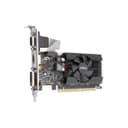
🚀 Elevate your setup with MSI’s sleek GT 710 — small card, big upgrade!
The MSI Gaming GeForce GT 710 is a low-profile, 2GB GDDR3 graphics card featuring a 1600 MHz memory clock and PCI Express 2.0 x16 interface. It supports dual displays with HDMI, DVI, and VGA outputs, delivering up to 2560x1600 resolution and compatibility with DirectX 12 and OpenGL 4.5. Designed for compact builds, it offers up to 10x better performance than integrated graphics, backed by durable solid capacitors and a 3-year warranty.

| ASIN | B01DOFD0G8 |
| Best Sellers Rank | #110 in Computer Graphics Cards |
| Brand | msi |
| Built-In Media | Graphics Card^QIG |
| Compatible Devices | Desktop |
| Customer Reviews | 4.3 out of 5 stars 4,847 Reviews |
| Display Resolution Maximum | 2560x1600 |
| GPU Clock Speed | 1600 MHz |
| Global Trade Identification Number | 00796594538370, 00824142126905 |
| Graphics Card Interface | PCI Express |
| Graphics Card Ram | 2 |
| Graphics Coprocessor | NVIDIA |
| Graphics Description | MSI Gaming NVIDIA GeForce GT 710 with 2GB GDDR3 memory, PCIe 2.0 x16 interface (using x8), supporting HDMI, DVI, and VGA connections |
| Graphics Processor Manufacturer | NVIDIA |
| Graphics Ram Size | 2 |
| Graphics Ram Type | GDDR3 |
| Item Dimensions L x W | 5.75"L x 2.72"W |
| Item Weight | 5.12 ounces |
| Manufacturer | MSI Computer |
| Memory Clock Speed | 1600 MHz |
| Model Name | GT 710 2GB GDRR3 |
| Number of Fans | 1 |
| UPC | 796594538370 824142126905 |
| Unit Count | 1.0 Count |
| Video Output Interface | DVI |
| Video Processor | NVIDIA |
| Warranty Description | 3 year |
A**R
Had a bit of trouble installing, but it works perfectly!
I bought this for an Inspiron 3647 running Windows 10 and it took me ELEVEN hours to figure out how to install it...because I'm a noob. Solution is in last paragraph if you don't want to read about my trials and tribulations. My pc has only VGA and HDMI for monitor output, and the HDMI quit working. I wanted to have a dual monitor setup and I had an empty PCIe slot, so I figured I'd get a graphics card. My main monitor was VGA and I was hoping to get the 2nd (an old monitor I brought from work so I could work from home during the COVID-19 pandemic) into HDMI. Got the card inserted into the slot and powered everything back up. BLACK SCREEN!!! Not even the integrated graphics VGA worked! I had no clue what to do! I powered down, took the graphics card back out and was able to see via the VGA again. The product did not come with a cd for the driver, so I went to the NVIDIA website to download it. Got the .exe going, but it wouldn't let me run the install wizard because it couldn't detect the card. (Nooo duhhh...because I had to take the card out to even SEE how to get to the website to download the driver!!!) Only the integrated graphics showed up under display in Device Manager. I thought that maybe my HDMI cable was bad so I tested them out with the laptop. They worked great. Turns out the old monitor from work was no good. Back to the drawing board. I scoured tons of forums for solutions and pored over them for hours. One solution was to boot up in safe mode and enable the PCIe slot in BIOS. So, I go to BIOS and there is absolutely NOTHING about graphics, video interface, northbound or southbound (or whatever it is) settings...NOTHING. Spent about an hour trying to read up on BIOS and where else it could possibly be. Couldn't find a thing. So I decided to look up if I should update my BIOS. After all, I was running version A04. I got conflicting answers about whether or not I should - this did not really help me at all. I tried to find out how I could even update the BIOS...I didn't know where to go. My search led me to Dell's website, where I input the service code of my pc and it showed me about 11 different updates it needed to do - one of which was a BIOS marked URGENT! Matter of fact, it was wanting to update to BIOS version A11!!! No WONDER I was having trouble! Intel's website told me, if I understood it correctly, that I could not use an external graphics card in addition to the integrated graphics card...that only one would be active. That bummed me out because in order to make the graphics card fit, I had to take off the VGA port and install it with the smallest bracket, which only left me with HDMI and DVI. I was hoping to use the integrated VGA and the HDMI on the new graphics card. Solution: I updated my BIOS to the latest version, enabled Intel Multi-Display in BIOS, and was then able to continue the NVIDIA control panel installation, which enabled my new graphics card. I was also able to use the integrated VGA AND the HDMI on the new graphics card with no trouble! Hopefully, this poor sap is able to help another poor sap out. :) Con: My only con (other than the legwork required for me to install it - but that is most likely due to my pc being old) is that the fan is noisier than I expected.
J**W
Great upgrade for Gateway/Acer SX2110G-UW23 SFF (Purchased 2013)
Read all the reviews and was concerned about compatibility but this video card was the only one that appeared to fit the specifications for the Acer small SFF fit. Observations: used in a Windows 10 Build 1909 desktop. All security and cumulative updates installed. Many reviews (here and other sites) said that the card was not Windows 10 compatible. I purchased and installed to see what would “really” happen. Boot process was nominal but slow due to the hard wired AMD 45 Series Dual Core E1-1500 APU (CPU/GPU combo) on the motherboard and the installation of the generic Windows 10 driver updates. Once it finished loading the Windows 10 Basic Video Driver (2006 version), the computer stabilized nicely and performed within MB specifications (it’s most definitely NOT a gaming rig). The video card also fixed a persistent onboard GPU heat stress problem (95° C/197° F) that used only a passive heat sink (I had previously pulled the sink, applied new thermal paste with absolutely no improvement) by automatically disabling the onboard GPU and automatically enabling the PCIe 2.0 x16 expansion slot as I’d hoped and expected. Then I loaded the latest Nvidia driver for GeForce GT 710 2G3D LP series cards (with fan) from the Nvidia website (per the MSI website directions). There was absolutely no problems installing & running the 64-bit version of the driver. I also updated the Windows 10 basic video driver (2019 version) as backup (for MB GPU; no plans to use it unless there is a catastrophic failure of the MSI card). Conclusion and recommendation: Another quality product from MSI. Don't hesitate to use this card on older desktops that have an onboard fixed GPU as a viable upgrade solution. The low profile (LP) kit comes with the pictured default standard full height bracket (4.2 inches). There are also two LP brackets (3.118 inches) that can be substituted (like I did) requiring two LP slots if you need to use the VGA 15-pin socket. The Dual-link DVI and HDMI connectors are paired to the primary bracket; the VGA connector tied via the ribbon cable to the video card board and is secured on the second bracket using the existing video plug female fasteners. I did not test the DVI or HDMI connectors as the monitor my client uses is VGA only, so I can't comment on usability/compatibility or any issues that may occur.
B**T
Made upgrading a small, underpowered system a breeze.
Very pleased with this purchase. Tweaking an older HP Win 7 system to run Win 10, I found the poorest performing element was the on-board video capability, or rather, lack of it. The microtower chassis had only one slot on the board and two chassis openings for low profile cards. Because the very compact chassis meant that airflow was poor, I wanted active cooling, even though that would take a few watts of additional power from my seriously undersized 240W PSU. Although some specs say this needs a 300W PSU, I finally found that this unit generally draws under 20W and since i had only 1 chassis fan, no lights, an efficient, cool running but not SSD HDD, and no additional add-in cards, it seemed a match. With 2 GB of RAM vs. other 1GB versions, this is the best low power performer I found. Any games played are older, and I have left everything at factory settings. Win 10 drivers were easy to install and rock solid. I have not had a single flicker or resolution hiccup in the well over a month period since purchase. Running the latest win 10 builds without any issues. Far from a barn burner, but fine for general computing and way better than the on-board chipset it replaced. The HDD is now the bottleneck, which I bought for size, not speed. Recommended where low profile, low power, and moderate performance demands are your criteria.
V**3
What A Difference!!! Solid And Affordable Buy for Digital Video Media Playback...
What a difference! Before it burned out, the old secondary video card could barely keep up with a 720P video file. And viewing any 1080P video file was an excercise in frustration and hopelessness. (Compact format micro-tower computer came from factory with audio and video card on one board. Lightning EMP blew things out - yes I was heavily surge protected - and made me install the first similarly priced but video inferior card. The that card burned after a few months of sub-par performance. This is the second, newer and waaay better card installed on that computer.) Bought this on the advice of my computer guy, and I'm glad I did. *Easily* keeps up with 1080P files with no drop-outs, freezing or pixelations. Quite! Very Quiet! (When I shut off the cooling fans in the computer cabinet and open the doors to vent heat, it's so quiet that you don't even know its working.) Spared me from having to drop $600+ on a new media computer. (I'm cheap that way.) A very solid and affordable buy for digital video media playback. You won't be disappointed. Running Win7 dual-core @aprox. 3.5MHz. 300W power supply. 42in monitor with 120 refresh rate. Card supplies data to monitor at 60mMz. Comes complete with plates for installation in small form factor computers + driver software.
R**R
Good For Playing Forge of Empires
I had a similar video card with the same Nvidia chipset from a different company and, as is the case with all video cards with fans in them, the fan started making noise. So I purchased this one and I'll use it until its fan goes out. At $50, you can afford to replace it every couple years. Installing this one was a little tricky, however. I was trying to line it up with the PCIe slot and get it positioned with the back of my tower case but it wasn't going in. It turns out that the stupid bracket was bent, preventing the card from lining up. I used my pliers to bend the bracket back to straight and it slid right into place. The driver was no problem at all. The card I replaced it was the same model Nvidia card and so no new driver was really required. I went out and downloaded the latest driver and it workd fine. I'm very satisfied. Mind you, I'm not doing a first person shoot 'em up with this thing. I play a very calm city building game and this works great for that application. I play Forge Of Empires.
M**S
Works on 2009 Mac Pro in Mojave
I spent a ton of time researching graphics cards that would work with Mojave on my 2009 (upgraded to 2010) Mac Pro. I primarily use my computer for music production with Logic Pro and I’m not gaming or anything like that, so I don’t know how it would work for a gamer. BUT, for typical use I haven’t seen any glitches or ghost trails, etc. THIS IS THE CHEAPEST GRAPHICS CARD TO RUN MOJAVE ON A 4,1 / 5,1 Mac Pro. It is metal supported and a great buy. Hope this helps someone else! Update: I can’t seem to get any output from VGA Update: This card did not work with my RX 560 also installed. Will have to return unfortunately. The main reason being that the vga will not output video meaning I only have 2 monitors. NOW, if you want to run Mojave on just 2 monitors this card will work just fine, and I would actually recommend it.
A**S
Fine card. Not the best but it'll get the job done.
This is an older card of course so I can't recommend it for newer gaming. But It can keep up with maybe 80% of my steam library, which has lots of games pre-2016. Just don't expect to do some seriously high-end gaming and you're probably fine. Always check the game's specs and if a card is still in support when looking for what you need. It was A BUTT to get the screws out to install it into the case because they were in so tight, but everything else about the install went smoothly. We have an HD monitor, and everything looks great. Supports the sound to said monitor as well. NVIDIA drivers are fantastic because they let you know when there's an update unobtrusively and they're very simple to install. Just a few clicks and 1-2 screen flashes and you're done. Supports dual monitors. This went into a half-tower with an offensively small power supply (300w) so I had to unplug the blu-ray drive but it is working fantastically. For the price, I really have no complaints. It's been working great, and since the card is still in support, you'll continue to get drivers so your games don't crash suddenly. Or cook itself to death, like the card it replaced.
A**.
The perfect & inexpensive card for a MacPro (mid-2012, 5.1) upgrade for Mojave, supports 4K!
(Review is for the GT 710 2GD3 LP) ----------------------------------------------------- UPDATE 12/17/2019: I just picked up a new HDTV, the Samsung 43" model UN43NU6900BXZA which offers 4K and UHD. Amazon carries it as does Bestbuy and others locally. It may be a baseline model, but, wow, the pic quality is extremely crisp and clean. The MSI Gaming GeForce GT 710 2GB is working perfectly with my new 4K Samsung, using my Mac Pro running Mojave. This card supports 4K and there was no adjustments in settings needed for setup, the card and my 4K Samsung communicated perfectly and my Mac Pro make the resolution settngs seamlessly in the background upon connecting. The quality of my Mac Pro now (running Mojave for the present) is stellar. Details, fine text, screen fit, contrast, color...etc...it all looks superb. If you are considering a 4K display upgrade, YES, this card will work perfectly with it! --------------------------- I needed an inexpensive card to upgrade my Mac Pro 5.1 mid-2012 and this card works perfectly for that. No power cable needed and a very small profile that won't get in the way of other cards and slots. It is self powered by the PCIe bus so no power cable was needed. Of course there is no boot screen during boot nor a way to select which drive to boot from if you have more than one OS drive. You can easily though, change the "start-up" drive once the OS is booted and loaded in System Preferences, so not a big deal for me. I am using the HDMI output to a Samsung 1080 HDTV and there was no need to tweak screen fit or anything. The card booted right up to a perfect screen display. I've tried a few other Apple recommended cards in the past and honestly, none did any better than this. I returned one at over $150 simply because I decided to wait for a lower priced card to do the same thing and this MSI card does! Additionally, this card seems to wake my Mac out of sleep very quickly. The older cards I tried seemed very sluggish to do that, this card seems much more responsive to wake my Mac. A Win-Win in here! HMDI won't pass the audio, but, no cards out there will do that unless specifically made for a Mac Pro and flashed correctly. I have optical and digital output on my M. Pro so not a biggie. The card seems responsive and fast and at some point I will do a "Geekbench" test. The 1080 on my Samsung HDTV looks crisp and clear output from this card. I would say 1080 looks slightly better on this card than my old OEM one that came installed on my Mac. Small icon seems a bit crisper and clearer. Close to the old card, but, there is definitely a bit of improvement there. The card is fan cooled and since I won't be gaming with this desktop, it should run very cool routinely. 5 Stars all around and a great way to upgrade an older Mac Pro on the cheap.
Trustpilot
4 days ago
1 day ago