Buy anything from 5,000+ international stores. One checkout price. No surprise fees. Join 2M+ shoppers on Desertcart.
Desertcart purchases this item on your behalf and handles shipping, customs, and support to Iceland.
🖨️ Bring your printer back to life — because flawless prints wait for no one!
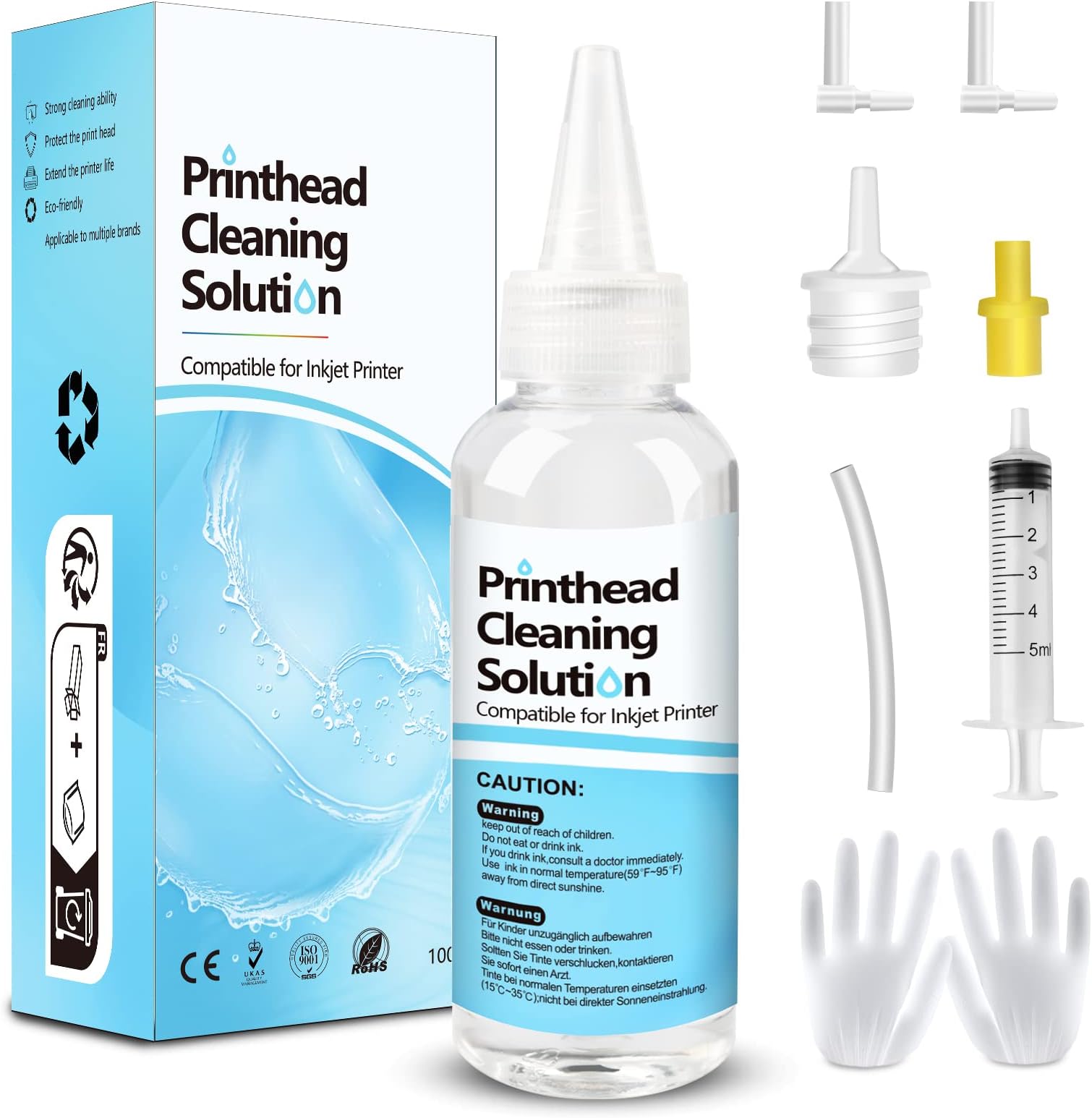
The Fosgoit Printhead Cleaning Kit is a professional-grade solution designed to restore clogged inkjet printer heads across major brands like Epson, HP, and Canon. Featuring a 100mL advanced cleaning fluid, precision nozzles, and all necessary tools, it dissolves hardened ink blockages to extend printer life and improve print quality. Ideal for busy professionals who demand crisp, vibrant prints without the downtime or expense of replacing hardware.


| ASIN | B08P18Q9WV |
| Additional Printer Functions | All In One |
| Best Sellers Rank | #2,092 in Office Products ( See Top 100 in Office Products ) #97 in Inkjet Printer Ink Cartridges |
| Brand | Fosgoit |
| Cartridge Type | Compatible |
| Color | Clear |
| Compatibility Options | Compatible |
| Compatible Devices | Inkjet Printer Cleaning Fluid for Canon G2270 G3270 G7020 G620 MG2525 TS5320a TS9520 TS9521C TR4720 TR7020a TR7620a/Canon Maxify GX3020 GX5020 GX6020 GX6021 GX7021 MB2120 MB2720 MB5120 MB5420/Canon Megatank G1220 GX4020 G4270; Inkjet Printer Flush Kit for Inkjet Printer, Inkjet Printer Nozzle Cleaning Kit for Epson Eco Tank ET-15000 ET-2720 ET-2800 ET-2803 ET-2850 ET-3760 ET-4760 ET-5150 ET-5170 ET-5850 Expression XP-970 XP-4200 XP-8700 XP-15000 Workforce WF-2860 WF-2930 WF-2960 WF-4820 WF-4830 WF-7310 WF-7820 Stylus C88; Inkjet Printer Nozzle Cleaner for HP DeskJet 2755e 3752 3755 3830 4155e Pro 6230 6978 8720 8730 OfficeJet 5255 8015e 8025e 9015e Pro 8035 Envy 6055e 6455e 7855 7858 Smart Tank 6001 7001 7301 7602, Printhead Nozzle Cleaning Kit Printer Head Nozzle Cleaning Kit Print Head Nozzle Cleaning Kit Printhead Nozzle Cleaner Print Head Nozzle Cleaner Printer Head Nozzle Cleaner Print Head Cleaning Fluid Printer Head Cleaning Fluid Printhead Flush Kit Print Head Flush Kit Printer Head Flush Kit Print Head Cleaner Solution Printhead Cleaner Solution Printer Head Cleaner Solution Printer Cleaner Solution Print Head Cleaning Liquid Printhead Cleaning Liquid Compatible Devices Inkjet Printer Cleaning Fluid for Canon G2270 G3270 G7020 G620 MG2525 TS5320a TS9520 TS9521C TR4720 TR7020a TR7620a/Canon Maxify GX3020 GX5020 GX6020 GX6021 GX7021 MB2120 MB2720 MB5120 MB5420/Canon Megatank G1220 GX4020 G4270; Inkjet Printer Flush Kit for Inkjet Printer, Inkjet Printer Nozzle Cleaning Kit for Epson Eco Tank ET-15000 ET-2720 ET-2800 ET-2803 ET-2850 ET-3760 ET-4760 ET-5150 ET-5170 ET-5850 Expression XP-970 XP-4200 XP-8700 XP-15000 Workforce WF-2860 WF-2930 WF-2960 WF-4820 WF-4830 WF-7310 WF-7820 Stylus C88; Inkjet Printer Nozzle Cleaner for HP DeskJet 2755e 3752 3755 3830 4155e Pro 6230 6978 8720 8730 OfficeJet 5255 8015e 8025e 9015e Pro 8035 Envy 6055e 6455e 7855 7858 Smart Tank 6001 7001 7301 7602, Printhead Nozzle Cleaning Kit Printer Head Nozzle Cleaning Kit Print Head Nozzle Cleaning Kit Printhead Nozzle Cleaner Print Head Nozzle Cleaner Printer Head Nozzle Cleaner Print Head Cleaning Fluid Printer Head Cleaning Fluid Printhead Flush Kit Print Head Flush Kit Printer Head Flush Kit Print Head Cleaner Solution Printhead Cleaner Solution Printer Head Cleaner Solution Printer Cleaner Solution Print Head Cleaning Liquid Printhead Cleaning Liquid See more |
| Compatible Printer Models | Inkjet Printer Cleaner Kit for HP Printhead, Print Head Liquid Nozzles for inkjet printer, Printer Cleaning Kit for Epson Ecotank Printer, Printer Head Cleaning Solution for Canon Inkjet |
| Customer Reviews | 4.3 out of 5 stars 2,540 Reviews |
| Ink Base | Water |
| Ink Color | Printer Head Nozzle Cleaner Kit |
| Ink Colour | Printer Head Nozzle Cleaner Kit |
| Item Dimensions D x W x H | 5.91"D x 2.36"W x 1.97"H |
| Item Type Name | Inkjet Printer Cleaner |
| Item Weight | 0.16 Kilograms |
| Manufacturer | NUOK |
| Mfr Part Number | UN-UN100ML-T01-1PACK |
| Model Name | Printer Cleaning Kit |
| Model Number | Inkjet Printer Cleaning Kit |
| Model Series | Universal Printer Cleaning Kit |
| Number of Items | 1 |
| Other Special Features of the Product | Printhead Cleaning Kit |
| Page Yield | 500 |
| Print media | Paper (plain) |
| Printer Model Compatibility | Brother MFC J460DW, Brother MFC J491DW, Canon PIXMA G1200, Canon PIXMA G1220, Canon PIXMA G2260, Canon PIXMA G3260, Canon PIXMA G5020, Canon PIXMA G6020, Canon PIXMA G620, Canon PIXMA G7020, Canon PIXMA MG2420, Canon PIXMA MG2522, Canon PIXMA MG2525, Canon PIXMA MG2900, Canon PIXMA MG2920, Canon PIXMA MG2924, Canon PIXMA MG3020, Canon PIXMA MG3500, Canon PIXMA MG3520, Canon PIXMA MG3620, Canon PIX… |
| Printer Type | inkjet |
| Special Feature | Printhead Cleaning Kit |
| Unit Count | 1.0 Count |
| Warranty Description | Printhead Cleaning Kit |
P**E
Very good investment WOW
I tried printing a copy of a printer purge file that had all colors and check which color was having a clog. Two colors had a 100% clog. I tried printing several times with the same result. Then did a light head cleaning (3 minutes) and that did not work. Stoped doing the 7 minute clean up until I tried this product. I reluctantly purchased it as a last option before I gave up on the printer. Was already looking for new printers. When it arrived, i was ready but my ET-4700 did not readily lifted up to get to the printer heads. You have to remove two little screws right above where the printed page comes out. Then the top part goes up and you have full access to the printer heads. You have to put something to keep the top of the printer opened. The next step is to put paper towel right under the printer heads. You have to fold the paper very tightly as there is not very much clearance between the printer head and the bottom of the printer. The syringe can eject 5mm at a time. This is good so that you don't flood the bottom of the printer. The bottle comes with 100mm and it is recommended to flow no less than 20mm into each color head with a possible clog. After the paper towel is in placed between the printer bottom and the printer head, you have to gently take the soft plastic tubes out of the cassette (a little reservoir box where the ink passes right before it prints to the page) that sits right on top of each printer head. You have a choice to make as to where you plug the tube that comes out of your syringe. 1st Choice: Place the syringe tube on the same place as the soft plastic tubes that flow the ink from the big reservoir. 2nd Choice: Remove the cassette (a little reservoir box where the ink passes right before it prints to the page) that sits right on top of the print head and connect the syringe tube where the cassette makes contact with the print head. I chose the first one as it seemed the most thorough option. The videos I saw stat that it is almost always right on the head but I though why not clean anything in the cassette as well. Plus the syringe connection to the print head did not all that tight (worried about leaks). We did 4 flows (as the syringe has 5mm) for each troubled color (we had Yellow and Cyan with a complete clog). I had to be careful when i replaced the plunger after I filled the syringe with the clear fluid that came with the product. The plunger seems to have a very tight seal and I was afraid of shooting the liquid really fast as I replaced the plunger. After you shoot 10mm of liquid; move the head towards the other side of the paper towel to get that side ready for the other 10mm of clear liquid. If you see the paper towel completely soaked in ink. Then replace it. I recommend using the gloves (plastic bag material) that came with the product of use your own nitrile gloves. The paper towel will be very saturated with a clear solution and remaining ink. Move the head to the left or right and remove the paper towel. Use another paper towel for the next color but if you see too much liquid, clean the printer bottom before moving to the next clogged color. We only had two colors to do so, we used a few more paper towels to clean the bottom of the printer when we were done. Replaced the soft tubes that go to the cassette (gentle and slow proces) the tubes felt pretty delicate. We went ahead and did the full printing head clean regardless (7 minutes). You have to turn the printer off and then hold power button + help button for a few seconds to turn on into full cleaning mode. I had full ink on the tanks before I started this process and then seven minutes later I saw that all had gone down, mostly the black ink for some reason. Test post-product: Printed the head alignment page and surprise!! I SAW ALL FOUR COLORS in all their glory! Then printed a personal document and it was perfect. Very good product and resulted just as intended. Will definitely have this on hand and also use the printer more often from here on. Satisfied Customer.
A**N
Works great once you figure out how to connect everything
The instructions could be better but I found a YouTube video that helped me better understand how to configure the nozzles I needed for my HP printer. I jammed a paper towel under the print-head and flushed the nozzles a couple of times before hooking the printer back up to test. I was presently surprised to find that my printer was now functioning correctly and printing in color again. I had done a dozen or more cleanings from the maintenance menu and could not get a drop of color to flow, but this flush kit brought me right back to life! Like an idiot I did not put on the gloves they provided to keep my hands ink free lol so definately put on a pair of latex gloves or something before you begin. I was left with tons of solutions for future cleanings of other printers if need be. That is all, I hope this product works as well for you as it does for me. For my HP printer I had to use the little yellow rubber tip and don't miss the little L connectors as they are small and easy to loose. You will need one L adapter to attach the clear hose to the syringe and another L adapter to connect the yellow flush nozzle to the hose. I've attached a picture of the configuration I used to clean my HP Officejet Pro 6960.
P**1
Low cost but effective inkjet print head cleaner for my Brother MFC printer.
Low cost but effective inkjet print head cleaner. I have a Brother MFC J491 DW, and the kit worked with just the syringe and none of the attachments that came with it. After removing the cartridges, each color's connection is recessed, but the syringe is long enough to reach and work. I did have to use another yellow cartridge. I removed a star because I experimented with the attachments, and they were very difficult to connect to the extension tube and the syringe. Perhaps the extension tube inner hole diameter could be little larger. Tip: With Brother MFC printers, after opening the printer up, you can free the print head by holding the Stop/Exit button for a few seconds without unplugging the printer.
N**I
Saved my printer!
I was about to throw my eco-tank in the trash! Not wanting to invest in another printer, but needing one... I was saved by a Youtube video and this product. I 'fixed' my printer with this kit. Works great now. There's enough product left over to unclog the nozzles one more time before rebuying. Plus, I learned how to printers actually get clogged. There's more than nozzles to consider. Next time I have printer trouble, I have the confidence to diagnose and correct an issue on my own. This is really just basic printer maintenance that no one tells us about. So simple. I really appreciate the savings! Not being frustrated... and, not adding to my local landfill.
J**Z
10 star product
Amazing product!! So glad I went with this brand out of all of the ones there are on here! Can’t beat the price and comes with everything you need all the supplies worked perfectly my HP printer must have been clogged would not print the black ink I used this product 3 times until it stopped coming out black let dry for 3 hours and then placed the cartridges back did the manual printer head clean and boom it’s working again !! Amazing product definitely recommend
K**L
Probably a good product, but EcoTank printers are notorious for terminally clogging!
Don't do it unless you're a surgeon, and have lots of patience! This product may work just fine, but you'll likely destroy your, already doomed, printer! Way, way too much work disassembling the printer! Throw your printer into the trash, and buy a new one! The concept of an EcoTank printer is very good if you print, at least, a couple of times a week. But, don't go on vacation, EVER, because you will return home to a clogged printer head, and clogged ink delivery tubes. I used my Epson printer a LOT, and NEVER got to the point when I had to buy more ink, because my printer clogged to death. Again, I imagine that this cleaning kit works well, but…
M**R
The Printer That Rage-Baited Me For Three Days Straight.
I didn’t set out to become a printer repair technician. I set out to make stickers. Free stickers, for someone else, out of the goodness of my heart. A volunteer mission. A noble cause. The printer had other plans. It started with a nagging feeling. The prints looked off, streaky, wrong, the kind of quality that makes you squint at it and say “yeah that’s not right” but not quite know why. So I did what any reasonable person does. I ran a head cleaning. Then another. Then a nozzle check, and that’s when I saw it. Cyan was gone. Not low. Not struggling. Gone. A fully filled tank, doing absolutely nothing. I ran more head cleanings. I troubleshot for hours. I questioned my life choices. And then, in what felt like a miracle… cyan came back! Magenta stopped working… I want you to understand that I stared at that nozzle check printout for a long moment in complete silence. The printer had waited. It had let me celebrate. And then it took something else away. This was not a malfunction. This was personal. Google informed me there were likely air bubbles in the feed line and that I would need a syringe to pull them out. I did not own a syringe. I went looking for a solution and found this product, which came with one. I popped out the ink tank, looked inside, and the air bubbles were not subtle. They had moved in. They had furniture. I drew them out with the syringe, reseated everything, ran a nozzle cleaning, and tested… Still nothing. The ET-2400 wasn’t even on the supported printer list for this solution. I was about to give up when I found a YouTube video of someone using it on the exact same model. It looked straightforward. I had nothing to lose. I flushed the head with the cleaning solution, set the printer aside, and waited 24 hours. I ran a nozzle check. Magenta came back, clean as the day the printer was new. And then cyan stopped working again… It was rage baiting me! I won’t describe the noise I made. I will only say that it was not a calm noise. Back to the syringe. Popped out the cyan tank, found the air bubbles had, once again, staged a full occupation. Cleared them out, flushed it, and this time, impatient, battle-hardened, and frankly a little unhinged by this point, I only waited 12 hours instead of 24. The manual says 2. I figured 12 was a reasonable compromise between caution and my rapidly deteriorating sanity. Then, before running the test, something made me check yellow. Just a hunch. The kind of hunch you develop after days of being systematically deceived by a machine. Yellow was practically empty. Full of air. It had been quietly failing in the background the whole time, biding its moment, waiting for me to declare victory so it could make its move. I drew out the air, refilled it with fresh ink, and did not clean it. I had a feeling. I ran the nozzle check. Every single color came back. I sat there staring at a perfect test print, clean lines, full colors, not a gap in sight, and felt the specific exhausted joy of someone who has won a war they never asked to fight. The stickers came out beautifully. The volunteer mission was completed. My sanity was mostly recovered. Check yellow before you think you’re done. The printer is always planning something. 10/10 product. 0/10 printer behavior. Would syringe air bubbles out at midnight again if I had to.
N**S
Worked for me in my Brother MFC-J4710DW
I was prepared for a mess but after having my Brother MFC-J4710DW in storage for over 3 years, the ink was toast. Even with new cartridges and countless cleaning cycles, the print quality was a disaster. I picked up this kit based on the reviews. It was pretty easy to use and made much less of a mess than I thought. It is far from mess-free but it put whatever wonder-juice its made of into the ink system and after many more cleaning cycles, and a week of just ignoring it, my print quality was back. It is not perfect yet, but there is improvement with each print. I'd say its about 99% with only a couple pixel width lines. All in all, i am happy. The kit worked. The fact that I got my printer back without major repairs makes it valuable to me. I can't argue with the cost. Good Value. It did take a bit to get the fluid out of the system and back to good ink, but once there, the print quality was satisfactory and the color accuracy was back to what I expected.
F**S
No Printer Cannon in my trash bin
Fill up the toner waste part and cause more issues. I am done in owning printer
J**S
Buen producto cumple las expectativas
Excelente, cumple con lo ofrecido. Realizar la limpieza con mucho cuidado y siguiendo detalladamente las instrucciones para no dañar tu impresora, pero vale la pena el resultado
J**E
Envío rápido
Cumple con lo esperado
L**S
El precio valio la pena, destapa bien los cabezales
Todo llego a tiempo, el producto funciona a la perfeccion ya lo use y si destapa los cabezales que tienen burbujas de aire.
Trustpilot
3 weeks ago
2 weeks ago