Desertcart purchases this item on your behalf and handles shipping, customs, and support to Iceland.
🎬 Elevate Your Live Stream Game with Pro-Level Precision!
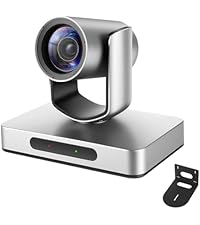
The AVKANS NDI PTZ Camera is a versatile 30x optical zoom live streaming powerhouse featuring 1080p60fps broadcast-quality video, AI auto-tracking, and multi-output support (SDI/HDMI/IP). Designed for professional environments like churches, schools, sports, and events, it offers seamless PoE connectivity and compatibility with major streaming software, making it the ultimate all-in-one solution for remote-controlled, high-quality live production.


| ASIN | B08MZBFZ1Y |
| Antenna Location | live streaming events, video production, broadcasting |
| Best Sellers Rank | #503 in Webcams |
| Brand | AVKANS |
| Built-In Media | Camera Body, Power Supply, IR Remote, RS232 Cable |
| Camcorder Type | Video Camera |
| Color | Light Gray |
| Compatible Devices | Smartphone |
| Connectivity Technology | 3G-SDI, Ethernet, HDMI, NDI HX2/NDI HX3, RS-232, RS485 |
| Customer Reviews | 4.7 out of 5 stars 487 Reviews |
| Digital Zoom | 30 x |
| Display Resolution Maximum | FHD |
| EU Spare Part Availability Duration | 2 years |
| Effective Still Resolution | 2 mp |
| Effective Video Resolution | 2 mp |
| Exposure Control Type | Automatic |
| File Format | MP4 |
| Flash Memory Bus Interface Type | SD bus |
| Flash Memory Speed Class | C10 |
| Flash Memory Type | SDHC |
| Flash Memory Video Speed Class | V90 |
| Focus Type | Auto Focus, Manual Focus |
| Form Factor | Dome |
| Image Aspect Ratio | 16:9 |
| Image stabilization | false |
| Lens Type | Zoom |
| Log Gamma Curve | true |
| Manufacturer | AVKANS |
| Maximum Aperture | 2.3 f_stop |
| Maximum Focal Length | 20 |
| Minimum Aperture | 2.3 f_stop |
| Minimum Focal Length | 6.25 |
| Model Name | SUVELAM |
| Model Number | NDI |
| Number of Speakers | 1 |
| Operating System | Android, iOS |
| Optical Zoom | 30 x |
| Photo Sensor Size | 1/2.7-inch |
| Photo Sensor Technology | CMOS |
| Screen Size | 0.01 inches |
| Sensor Type | CMOS |
| Shooting Modes | [POSSIBLE: Low Light] |
| Special Feature | 30X HDMI SDI PTZ Camera, AI Auto Tracking, NDI, POE, APP Live Stream, OBS, VMIX Partner, SONY-CMOS Sensor |
| Style Name | Modern |
| Supported Audio Format | AAC, MP3 |
| Supported Image Format | JPEG |
| UPC | 631112856881 |
| Unit Count | 1 Count |
| Upper Temperature Rating | 50 °C |
| Video Capture Format | MP4 |
| Video Capture Resolution | 1080p |
| Video Resolution | 1080p |
| Warranty Description | 1 year |
| Water Resistance Level | Not Water Resistant |
| White Balance Settings | Auto |
| Zoom | Optical |
S**M
Great workhorse PTZ for live production..
We use these for live regatta coverage and they've been rock solid. The 30x optical zoom is the standout, we're often shooting boats well down the course and it reaches way farther than you'd expect at this price point. Image holds up nicely even at full zoom. These cameras have held up well in a variety of environments too. We run outdoor events where they're dealing with sun, wind, and early morning humidity, and we haven't had any issues. PoE keeps cabling simple, and it integrates cleanly with vMix over IP. We liked our first one enough that we bought a second. For the money, hard to beat if you need remote-controlled cameras for live streaming or event production.
E**C
Exceptional value and quality for traditional worship applications. Put it at the top of your list.
This NDI camera is a game changer for us given the features and price point. Unless your streaming situation allows for an operator physically controlling a high quality camcorder/dslr on a tripod, this NDI PTZ should be at the top of your list. Our church currently uses a Canon HF G21 with a bescor pan tilt mount that is captured using an Elgato Camlink and brought into OBS. I have two separate remotes to control the zoom and the pan/tilt mount as a result of this setup. As our streaming usage has grown over the years, I've wanted to address three areas of improvement: 1. Have the video directly accessible on the network by multiple devices with low latency since we also broadcast the video locally with our in house audio. Putting the video on the network so it can be accessed by other devices is critical from a redundancy perspective so that our backup computers can stream if needed 2. Save zoom and pan settings for three fixed locations we constantly use. Throughout the service we switch between three different areas. Our operators have to use the remotes to pan and zoom while running the other AV systems. Having preset settings that can be controlled at the push of a button would simplify things for the operator 3. Improve low light quality. While I really wanted to go to a larger sensor device with removable lens, we don't have the man power or the space for someone to be at a camera throughout the service. Plus, we are a traditional worship and are not putting on pseudo concerts. The Avkans NDI camera checks all three boxes. NDI setup was straightforward for me. OBS was able to find the NDI stream once I put it on the network. In full disclosure, I am proficient with managing networks and have configured other NDI encoders and devices so I didn't find any of this particularly difficult. I purchased a huddlecam to use with the camera and it was plug and play. Saving zoom/pan/tilt presets worked right out of the box as did the manual joystick control. The motor is quiet and the pan tilt smoothness is comparable to our Bescor. Surprisingly, even though the sensor size of the Avkans (1/2.7") and the Canon G21 (1/2.84") are similar, and both lens are f1.8-2.8, the Avkans image is brighter and handles low light better. The image is also sharper despite the post-adjustments we do in OBS for the Canon. The cost of the Avkans camera is roughly equivalent to our current setup and is easily half the cost of other comparable PTZs. When you consider the fact that it not only replaces all of our existing functionality but adds NDI AND simplifies things for the operator, I wish we could've had this from the very beginning and used the extra money towards better lighting. Lastly, I did reach out to support when I was mounting the camera as I accidentally damaged the device. They were extremely responsive and worked with me to resolve the issue quickly. A lot of times warranty on products from overseas is useless but in this case the Avkans team aims to please.
L**.
Great NDI Camera - Used For Church Live Streaming
I was specifically in the market for an NDI compatible PTZ camera that supports POE and didn't break the bank (since this was for a small church). This camera checks off those boxes and it also has HDMI and SDI outputs. When compared to other similarly spec'd PTZ cameras that are NDI capable and have optical zoom... this particular brand is a fantastic value. I was nervous to buy something that wasn't from one of the major PTZ manufacturers but I'm happy I went with this Minrray camera in the end. It looks and performs great! One of the awesome things about an NDI-PTZ-POE camera is that you only need one cable (CAT5 or 6) to power the device, view its stream, and control it's zoom/panning. This was also my first time with an NDI camera so there was a slight learning curve. Like all IP-based devices, it requires some knowledge of networking concepts to configure it. The camera ships with a static IP address (that's listed in the manual). In order to access it for the first time, you'll need to connect the camera directly to your computer's Ethernet port (or to a switch on the same network). You'll then need to temporarily set your computer's IPv4 settings to match the subnet of the camera. (One tip, here... disable WiFi on your computer first so Windows doesn't automatically switch to the network adapter that has an active internet connection... if you're directly connecting the camera to your computer's Ethernet port for configuration). Once you've set the IP settings to match the camera's subnet (as specified in manual), you can enter the camera's static IP address into your browser's address bar. That will take you into the camera's configuration page where you can adjust a number of settings. From there, you can change the static IP address to be on same subnet as all the other devices that on your network (if the camera's default subnet was different than your own network). Then, you can put your computer's IPv4 settings back into auto-mode and reconnect to your normal LAN. One other tip regarding the camera's browser-based settings. When you initially log into the camera's WebUI, you may find that it's in Chinese language by default. If you're hasty like me, you may have missed the language toggle on the login screen that allows you to switch the default to English. Once you're logged in, that language toggle isn't present. You'll need to log out and toggle it to English before logging back in. I tested this camera with vMix and a beta version of ManyCam (that now supports NDI cameras). I was initially having an issue with the NDI connection freezing when the camera's feed was sitting inactive in vMix's scene tray (ie, the camera feed wasn't actively set to either the Preview or Program output). It was occurring after about 30 minutes of inactivity. However, the issue may very well be with something in my home network setup (I use power-line Ethernet adapters to extend my network). Once I setup the camera in it's permanent location (on the wall of a church sanctuary with a dedicated LAN), I didn't experience this problem again. I also installed the "NDI Tools" software package (from NewTek) at one point and perhaps that added an addition driver that helped. With vMix, you're able to control the PTZ movement of this camera directly from within the application (with the appropriate version of vMix). However, I was more comfortable with ManyCam so I used that when setting up the camera for the Church's live stream. (Again, the beta version of ManyCam currently needs to be used in order to use NDI). When using ManyCam, I was still able to use the camera's browser-based preview page to control the PTZ functions and set pre-defined zooms/pan shots. With this less expensive camera, I was also pleasantly surprised by their support. I found a contact page on Minrray's website (minriglory) and "Mike" was quick to respond to my questions (Friday evening [EST] into Saturday!). He even went so far as to reach out to his contact at NewTek to help answer a question. I wasn't expecting such responsiveness from a camera manufacturer in this lower price range. Unlike one of the other reviewers, I didn't experience any problems with any NDI licensing errors. I suspect that might have something to do with software that was being used. (This review is regarding the Minrray 20X-NDI Camera)
S**S
Great replacement for Sony BRC-300 in Sony Eco-System.
A little more than eight years ago my company built and implemented a live streaming system for the Parliament of my country. Since then we have not touched the system till now and with plans to go NDI we were looking for a cost-effective alternative to upgrade to. The system would also need to fit into the current eco-system we had (Sony MCS-8M Compact Switcher and the Sony RM-BR300 VISCA Remote Controller) until they were ready for the rest of the upgrade to come online. I came across PTZ Optics but then later found out that AVKANS are providing the exact camera for very cheap. Yesterday we installed them and here is a brief review; Pros: Picture Quality: We got the NDI 20x model and coming off of the old cameras we were very delighted to see the quality we got from this bottom-of-the-line version. The image was bright and clear and the saturation was just right from out of the box. Little to no adjusting is required and allowing the system to stay in auto seems like a great idea for new users; Build Quality: For a cheaper option, AVKANS does feel like a high-quality product. It's about 2kgs in hand and the metal seems like aluminium but does feel properly built, and sturdy. The I/O towards to rear does seem a bit flimsy to the eyes however since we've had a proper brand in Sony to see and feel the difference. Could it possibly be an issue for those working out of the box? Maybe, so if you are that kind of user I'd exercise extra caution while utilising the I/O. Reverse Compatible: The majority of the users might not be looking to add to their old setups like we did but, to know that it was sort of plug and play with our old equipment was quite perfect for us. Tech Support: Finally for the Pros, Tech Support. We made contact with AVKANS to find out if they had tested to see if the cameras would work with the Remote Controller and my e-mail was responded to in less than 24 hours. The representative was very friendly and even advised of the return policy where I'd receive 100% if it didn't work for that simple fact. One of my better experiences with sellers on Amazon for sure. Cons: Usability: It took us some time to get it set up. The manual didn't address the quality options outright and only until we turned the camera underside up that we saw what the options meant. Added to this, the turn-on sequence is long and lacks information. After the camera spins in its power-on self-test, it sits there for approximately 10-15 seconds to give a picture with it flickering once as if it's broken only to come on 5 seconds later with a full picture. A flashing on-screen message to your output source to say it's coming on will fix it. Control: I'm not sure if this is the Sony Controller behaving bad, but there is a lot of lethargic movement in the controlling of these cameras. It seems like there is a delay in the system utilising VISCA RS232C and though, again, it might be the Controller, I think I saw someone else complain about it being slow as well (not sure what controller he's on though). Zoom: The zoom also carries this lethargic feeling but added to this, the camera seems to lose focus while zooming and though it is quick to refocus, I don't think it should lose focus that much while zooming in. Maybe I'll have to review the settings to see if something can be changed here. All in all, we are looking forward to using these cameras in the system. So far, it's looking great, feels slow, but looks very good. We can't wait to get the entire NDI system complete and running, and we are very happy to have one essential item off the list thanks to AVKANS.
W**R
Pretty good camera but.....
We bought this camera for church streaming use. We had already purchased and were using a PTZOptics 30x NDI Camera and were very happy with the performance. The PTZOptics camera was pretty much plug and play. we set it up initially using hdmi and a capture card. Great video quality. Great zoom, very smooth panning and zooming. We wanted a second angle but also to save some money as they are expensive. Enter this camera. It had great reviews so we took a chance to save $1000. The Minrray camera was similar to set up and had a very good picture quality. I must admit it was not as good at the PTZOPTICS side by side. I was able to make adjustments to it to make it closer but it wasn’t that easy. I’m not a camera expert. The one big difference was the smoothness of operation when panning and zooming. The minrray has kind of chugging motion to it. Most of the time you won’t see it and when set to the slowest speed it doesn’t do it. I also find the autofocus is not as fast or reliable as the more expensive camera. Maybe they can fix this in an update. We figured it was still worth keeping it and ordered the PTZOPTICS controller and saved money.
J**S
Great PTZOptics Alternative, Not Easy to Set Up
We got this camera to provide an installed solution for a local Church's livestreaming rig. They are using one camera, uploading to either Facebook or YouTube. This camera is a really solid option, especially given the price. It does come with some challenges, but it's a great answer for a low budget, solid option. First off, the camera is definitely difficult to get configured out of the box. While there is a remote with the camera that can bring up a menu on the camera's output, this menu does not include any network options or ip address. The manual includes this information, but it's pretty tough to decipher. To put it a smidge simpler, connect your computer directly to the camera via ethernet, make sure your wifi is disabled, then change your IP address manually to another address in the same sub group as the camera. Then you'll be able to connect to the camera via web browser with its IP address using admin/admin as user/pass. Once you connect to the dang thing, it's a really solid camera. I was able to accomplish the following with the camera: - stream the camera output straight to YouTube (no OBS involved) - Embed audio through 3.5mm audio jack (I had to put into mono mode for it to be clear) - Stream via NDI to OBS with NDI Module for streaming to Facebook (note: cannot stream straight to Facebook as FB uses RTMPS vs RTMP. - Control via NDI Studio Monitor, PTZOptics Apple Control App, and through an IP Joystick Controller (https://www.amazon.com/gp/product/B07LGSPZFW/ref=ppx_yo_dt_b_asin_title_o03_s01?ie=UTF8&psc=1) The camera image looks pretty good. It's definitely not a blackmagic camera, but definitely a great option for folks. At the price point and given that it is actually In Stock, I think you should consider it. Have plenty of time to configure it and test different settings, because there's not a lot of great info out there today. Bottom line though - it works.
H**E
Works great after connection issues are resolved
We purchased this camera to use in the church, it came in yesterday and i have been messing with it for a few hours figuring out all the ins and outs of it. The camera motion is very smooth and motors are very quiet. The camera shipped dhcp enabled so it came up with no issues on the network, but I couldn't log in to the camera as it was not taking the credentials even though i was able to get to the page. Be the way, the default username and password is set to "admin", no quotes. Had to do a network settings reset to clear out the password, that is done by using ir remote and pushing those 3 buttons one after another: * # manual If done correctly and you have video feed, the display will give a confirmation, something along the lines of "resetting network settings", i don't remember the exact wording but it definitely comes up if you are successful, i had to do it several times for it to take. Once the network settings are reset, the dhcp is shut off as well unfortunately, so i had to set my router to use network 192.168.100.0 and then I was able to access the camera IP of 192.168.100.88 at which point I was able to log in with the default credentials. At any point in time you can always check what IP the camera is using by pressing buttons: * # 4 Only writing this up in case someone else runs into this issue. I've tested rtsp, srt, ndi, and hdmi outputs. Obviously HDMI was best in quality and relatively speaking no latency, very close behind it was ndi protocol, and then rtsp which had about 1.3 seconds latency. If streaming via srt, that was upwards of 2 second latency. I've also noticed that NDI stops working if main rtsp stream is switched from H264 to H265. I'm not planning on using rtsp much so didn't matter to me, but if someone wants to use ndi and rtsp simultaneously, keep that in mind. So far I'm really pleased with the camera but we'll see how it functions once I mount it at the church and use it for a few days, but it definitely looks promising.
M**D
This camera is identical to PTZoptics camera
I have had the Avkans 30X NDI PTZ camera for two weeks. I have put it through it's paces to see how well it preforms. I used differant control proticols, differant lighting situations with strong to low light. I tested it's speed and accuracy with presets. I tested it's ability to adjust white balance correctly and it out preformed all other PTZ cameras in the 1080p class that I use at my church. I have been using five PTZ cameras over the past six years and the Avkans PTZ camera works flawlessly. Picture quality with it's color and image sharpness puts my other cameras to shame. This PTZ camera is identical to the PTZoptics camera accept for one thing...the price! It uses the same 1/2.7 Panasonic CMOS image sensor as the PTZoptics camera. I will be replacing all of my old PTZ cameras soon with this 30x zoom NDI PTZ camera from Avkans. It's great to be able to connect a single Cat5e or Cat6 cable to this camera for power, control, and video. The NDI compressed video over our network works perfect with our NewTek TriCaster. This camera has a lot of differant ways to connect to other equipment with 3G SDI, HDMI, NDI over IP. I also use a Black Magic ATEM mini extreme ISO in our livestream setup. The Avkans camera simultaneously sends video to both the TriCaster and ATEM with no problems. You can mount this camera on a tripod, wall or ceiling, just flip the image in settings. In the photo the Avkans PTZ 30x NDI camera is on the right. The Avkans camera has no problem adjusting white balance and reproducing color and has a sharper image than the camera on the left. Both cameras are 1080p and have the same size image sensor. This Avkans camera is amazing and I am very impressed with it's quality and preformance.
H**N
Great camera!
The camera works great out of the box. Just hook it up with HDMI to get the ip adress display on your monitor. The picture is supersharp and the zoom is amazing. If you want to use it in for example teams as a webcsm install the program called Manycam for macos or windows and set the delay to 100ms. A really great camera with lots of connection options and full SDI support.
M**Y
Had Good experience
We had good experience with device and the support team behind the product
M**O
Equipo altamente recomendado, calidad-costo.beneficio
Es la 3er camara que adquiero de esta marca, al momento ha funcionado todo bien, no incluye NDI pero te puedes contactar con soporte Tecnico y te ayudan a activarlo, Todo en orden
A**H
Excellent PTZ Camera
Just bought two of the Avkans 30x SDI AV-CM30 cameras and WOW! Met and exceeded all expectations! Used them on a show a few days ago and shooting 70' from stage the image on 12' screens was EXCELLENT! I own a Canon G50 4K camera and was getting a better image from the AVkan cameras. They are easy to set up as long as you know basic network routing. Everything works as described and the AI tracking also works very well but have only tested at about 20'. The colour is very good and both cams match perfectly. All the settings you need camera wise are there so you can set manual colour temp, exposure, output, etc.. The PTZ is also very good and was able to follow presenter on stage at 70'. Was also a breeze to set up in OBS. Now I have decided to fully upgrade both cameras with NDI and contacted their support and was responded to within 30mins. Try getting support like that from others ! Being an Audio Visual tech for over 25 years I would recommend these cameras and very happy with my purchase.
A**M
Kamera z mnóstwem rozwiązań
Kamerę testuje od paru tygodni i nie mam nic jej do zarzucenia. Obrazek jest na bardzo przyzwoitym poziomie, nie odbiega od normalnych kamer, za dwa razy większą kwotę. Dodatkowo można go bardzo fajnie ustawić dzięki dużej liczbie ustawień - presety, balans bieli itp. Sterowanie kamerą również odbywa się na parę sposobów, pilotem lub innymi protokołami dso tego dedykowanymi. Osobiście najlepiej sprawuje się opcja sterowaniem kamery po IP - w zewnętrznych aplikacjach, gdzie można sterować kamera np. padem od xbox'a. Wyjścia video - tutaj jest wszystko co trzeba, SDI działa bardzo dobrze - testowane na kablach 100m przy obrazie 60fps. NDI-HX + POE - bardzo fajna opcja jeżeli chcemy kamerę podpiąć do komputera jednym kablem rj45 i przy okazji ją zasilić. Suma sumarum - naprawdę fajny wybór w tym przedziale cenowym. Dla osób ciekawskich - dodam, że kamera ta jest klonem innej znanej marki, posiada wszystkie te same rozwiązania softowe i sprzętowe, a kosztuje 2x mniej.
Trustpilot
2 days ago
3 weeks ago