


Desertcart purchases this item on your behalf and handles shipping, customs, and support to Iceland.
🚀 Unlock speed, security, and space in one sleek drive!
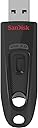
The SanDisk CZ48 Ultra 128GB USB 3.0 Flash Drive delivers lightning-fast data transfers up to 10x faster than USB 2.0, robust password-protected encryption, and massive storage capacity. Lightweight and universally compatible, it also integrates with SanDisk Cloud for seamless online backup and sharing, making it the ultimate portable storage solution for busy professionals.


| Additional Features | Lightweight |
| Asin | B00P8XQPY4 |
| Best Sellers Rank | #15,059 in Computers (See Top 100 in Computers) #159 in USB Flash Drives |
| Brand | SanDisk |
| Built In Media | Flash Drive |
| Color | 128GB |
| Compatible Devices | Any device with a USB port |
| Connectivity Technology | USB |
| Customer Reviews | 4.6 4.6 out of 5 stars (48,848) 4.6 out of 5 stars |
| Flash Memory Type | USB |
| Global Trade Identification Number | 00619659113568 |
| Hardware Connectivity Technology | USB 3.0 Micro A |
| Hardware Interface | USB 3.0 |
| Item Dimensions D X W X H | 11D x 22W x 8H millimeters |
| Item Type Name | SanDisk Cruzer Ultra 128GB USB 3.0 Flash Drive SDCZ48-128G-U46 up to 100MB/s |
| Item Weight | 45 g |
| Manufacturer | Sandisk |
| Memory Storage Capacity | 128 GB |
| Mfr Part Number | SDCZ48-128G-U46 |
| Model Name | Ultra |
| Model Number | SDCZ48-128G-U46 |
| Number Of Items | 1 |
| Number Of Packs | 1 |
| Read Speed | 130 Megabytes Per Second |
| Unit Count | 1 Count |
| Upc | 619659113568 |
| Warranty Description | 2 year |
| Write Speed | 10x |
User
Works well
Works well
User
Value for money
1. Value for money2. Files transfer are not fast as expected3. Vault storage option is very slow (transfer wise)
User
رائع
شركه عندها موثوقيه
User
FAKE
I bought one it say on it 128 gb but when you format it on the pc it shows 32gb only
User
Good...
But shows 114 GB instead of 128 GB.....
User
When I inserted the USB stick it is showing 114 GB, not 128...
User
Great
Absolutely nice!
User
58 GB!!!
HORRIBLE i got 128 gb it has 58 gb!
User
Livraison parfaite
Bon produit aucun problème
User
Kaliteli F/P ürünü.
Alalı 3 seneyi geçti işimi görüyor diğer modellere göre en artısı sürgülü yapısı sayesinde asla kapağı kayboldu mu derdi yok.
User
信頼の Sundisk 製です
信頼の Sundisk 製ですが 何をどうしたのか1/100 程度しか認識しなくなり 数か月、使わずでした. これは Memry Stick ある、ある Partition が消える現象.EaseUS Partition Master の無料版で簡単に復活しました.
User
Very nice
Nice product
User
Best flash drive I've ever had. So so happy with the capacity and power.
I've lived off two 8gb and 16gb flash drives for the past few years. I finally got sick of it, due to rising file sizes.I could not be happier with my 128gb Sandisk flash drive. Using USB 3.0, I transfer 1GB files in 30 seconds flat. That's an average 720p movie or 1080p TV episode. I will never go back to USB 2.0. It's like going from a Corolla to a Lambo (minus looking like a d-bag). I think 128gb is the sweet spot right now, especially as files are getting larger and larger. After all, a high quality movie can be 10gb+ nowadays.I was tempted to buy a 64gb due to my innate cheapness, but the best 64gb that's USB 3.0 is $29. For $11 more, I get literally double the space.Keep in mind, only 116gb total is available. This is not an indictment on the product; that's just how hard drives work. A 64gb, for example, will have something like 52gb available.•• If on PC, Format to NTFS ••This flash drive comes formatted in FAT32. Why does that matter? This is an inferior format because it only accommodates files up to 4gb in size, which does not include BluRays or large programs. Why would we want to limit ourselves? Some devices, like Playstation 4's, don't read anything but FAT32, so some people are stuck with it.However, if you're on PC, there's no reason to stay on FAT32. You'll want to reformat to NTFS, which has unlimited file size capacity. It's super easy, too. I recommend doing this before you add files to your USB, as a format will wipe any existing files.•• Formatting from FAT32 to NTFS for Windows Users ••1) Plug in the USB, and open "This PC" or "My PC."2) Identify the proper USB drive (should be something like Sandisk Media). Right click on the USB drive, and select format.3) Change the "File System" from FAT32 to NTFS.4) Make sure the "Allocation Size" remains on 4096 bytes.5) You can rename the label to whatever you like under the "Volume Label" section.6) Then make sure that "Quick Format" is UNTICKED, and click start. Eazy peazy.
Trustpilot
3 weeks ago
1 month ago