


Desertcart purchases this item on your behalf and handles shipping, customs, and support to Iceland.
๐ Elevate your home WiFi game with seamless speed & coverage
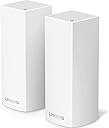
The Linksys WHW0302 Velop Tri-Band Mesh WiFi System delivers ultra-fast AC4400 tri-band speeds and seamless coverage up to 4,000 sq ft, ideal for multi-story homes. Featuring Apple HomeKit compatibility, parental controls, and a user-friendly app, it replaces your existing router to provide reliable, lag-free connectivity for streaming, gaming, and smart home integration.


| ASIN | B01MSSUG2H |
| Antenna Location | Gaming, Home |
| Antenna Type | Internal |
| Best Sellers Rank | #19,860 in Computers ( See Top 100 in Computers ) #381 in Routers |
| Brand | Linksys |
| Built-In Media | Ethernet cable (x1), Linksys Velop (x2), Power adapter (x2), Printed Documentation, Quick Start Guide |
| Color | White |
| Compatible Devices | Laptop, Personal Computer |
| Compatible devices | Laptop, Personal Computer |
| Connectivity Protocol | Wi-Fi, Bluetooth |
| Connectivity Technology | Wireless |
| Control Method | App |
| Controller Type | homekit |
| Coverage | 4,000 Sq. ft |
| Customer Reviews | 4.3 out of 5 stars 1,768 Reviews |
| Data Transfer Rate | 4400 Megabits Per Second |
| Frequency | 2.4 GHz |
| Frequency Band Class | Tri-Band |
| Frequency band class | Tri-Band |
| Global Trade Identification Number | 00745883728183 |
| Has Internet Connectivity | Yes |
| Is Modem Compatible | Yes |
| Item Dimensions L x W x H | 7.9L x 15.8W x 18.5H centimeters |
| Item Type Name | Linksys WHW0302 Velop Wireless Whole Home Wi-Fi AC4400 Tri-band Mesh System |
| Item Weight | 1.08 Pounds |
| LAN Port Bandwidth | 10/100/1000 megabits per second |
| Manufacturer | Linksys |
| Maximum Upstream Data Transfer Rate | 867 Megabits Per Second |
| Mfr Part Number | WHW0302 |
| Model Name | WHW0301 |
| Model Number | WHW0302 |
| Model name | WHW0301 |
| Number of Antennas | 6 |
| Number of Ports | 4 |
| Operating System | [Proprietary router firmware developed by Linksys] |
| Other Special Features of the Product | WPS |
| RAM Memory Installed | 512 MB |
| Router Network Type | wireless |
| Security Protocol | WPA2 |
| Special features | WPS |
| UPC | 745883728190 745883728183 |
| Unit Count | 2 Count |
| Wi-Fi Generation | Wi-Fi 5 |
| Wireless Compability | 2.4 GHz Radio Frequency, 5 GHz Radio Frequency, 802.11b/n/ac, 802.11bgn |
| Wireless communication standard | 2.4 GHz Radio Frequency , 5 GHz Radio Frequency , 802.11b/n/ac, 802.11bgn |
J**H
Easy to set up
Excellent product easy to use and setup
T**N
It just works.
I don't think I've ever experienced such a simple set-up process for a router since my first AirPort Extreme. I always assumed "the other" routers in general would never become as easy to set up and use. I held on to my 5 year old airport for as long as I could, but unfortunately the range wasn't reaching a new and critical part of our house. So I started doing tons and tons of research trying to find the best router replacement. I came across "mesh routers" and discovered how popular they are for people with coverage problems. I then did even more research trying to find the best mesh router that wasn't astronomically expensive. I initially ignored the Velop because of it's high price, but kept it in the back of my head because of the strong performance it offered in comparison to the majority of it's competitors. I started to become dead set on getting the Netgear Orbi, because of it's high performance and the fact that it was on sale during Black Friday. I kept hesitating though because I'm not a fan of Netgear products and became worried that the quality and experience of the product might not live up to my standards. Then I casually looked again at the Velop and was shocked to see the new sale price on Black Friday and immediately pulled the trigger. Set up took no longer than 30 minutes. The companion app did it's job well and everything was up and running like nothing ever changed. (I kept the same wifi name and password as my old router and everything reconnected.) I immediately noticed the speed and range differences throughout the house. I'm now getting between 200-300 mbps throughout all of my house. Even in my backyard. I pay for 300mbps down 20mbps up. I did have to restart the modem and routers once since I've had it because I was getting abnormally slow speeds, but I'm not sure if it was the router or my internet providers fault. We'll see with time how often this occurs. So far though, It's just a set it and forget product. Like how they all should be. I'm a happy camper with better range and faster speeds. I'm definitely happy that I skipped the Orbi and went with the Velop.
A**O
Mejorรณ mi conectividad
Este producto es realmente una mejora para tu red inalรกmbrica, tiene muchos beneficios tales como el alcance de la red, la estabilidad, la red de invitados, la restricciรณn de tiempo conectado a internet (que es ideal para los pequeรฑos de casa), la administraciรณn de los dispositivos desde su app. Creo que fue una muy buena inversiรณn, a partir de quรฉ tengo el equipo, ya no tengo problemas de conectividad
S**A
Solved our slow network issues!
Bought the 2-node system for a house that's just around 4,000 sq ft and am very happy with the results. We had tried range extenders before and just wasted money on those, so finally decided to see if any of the mesh systems will help. I found the set up pretty straight forward and easy. We had a FIOS modem/router combo so i had our old parallel wifi running while installing the Velop which made me more comfortable that we won't be stuck without connection if set up went wrong. It took about 30 minutes or so to set up both nodes, we have one in the upstairs office right next to the modem and the other one downstairs in the kitchen, probably roughly 22-23 feet direct line (through walls) from the modem connected one. Each node is supposed to cover about 2,000 sq ft which is a circle with a 25 ft radius (50ft diameter) around it. We get great and consistent speeds throughout the house, with the exception of our bedroom where we do get connection but it's a bit slower - however, our modem is to the one side of the house, not in the center, so we really need another node to have the full proper coverage there if we wanted it (bedroom is furthest away from the two nodes). This is probably obvious (though not really explained in the set up process), but if you do have a combo modem/router like we did, you should turn off the router part so you are not running two wifi networks which might interfere with each other. I found that pretty easy to do from FIOS's router/modem website. I did call Linksys support to confirm that I am supposed to do that, and found them easy to get through to and helpful. I am also not a techie by any means, though comfortable with technology. Overall, very happy with purchase. UPDATE 12/14: I bought an extra node (so now we have the 3-node system) to complete the coverage of the house. Setting that node up was very easy using their app, I did try initially a location that was a bit too far and the system made me move it to a spot that it links up easily with the 2nd node. The new one has been operating for just over a week and we have full coverage everywhere in our house now. COuldn't be happier with Linksys!
M**Y
Performance A+++, Ease of Install A+, Customization C
30 hours with the Velop. This is surely a mixed review, and one which Linksys could EASILY make an A+, 5-star across the board. I have had a number of wireless routers, APs, and extenders. 2 story home - a LOT of devices, most recently- Uverse router located on one end of second story, connected via cat 5 to AP on other side of 2nd story, delivered strong signals to each end of the house, but handoff's were iffy, and in the middle of the home, sometimes a gap of coverage. Replaced this with Velop - turning off Uverse routing, placing one Velop node at Uverse router, and one on other side of house, and DID NOT Use the CAT 5 15-year old wiring. WOW. 20 minute simple install, and the coverage is consistently strong and fast everywhere in the home. The ease of setup was amazing, and Velop after determining the type of Uverse router, setup the Velop network quickly and reliably. This is the kind of easy network setup that I would recommend to anyone who doesn't understand networks, even my parents. And especially if they have had issues with home wireless in the past. But Customization.. Linksys has chosen to bury this under the covers... even a simple task of changing the DNS servers. If you are trying to provide some limits on the worst of the internet, you might want to use a limited DNS service, like OpenDNS Family Shield. To me, it should be a no-brainer for Linksys and every other manufacturer to let you point and click to using various DNS services, Open DNS, Family Shield, Google DNS, or yout provider's DNS. The Velop DOES allow you to change the DNS, in the same way you would most any other router, but getting to that customization is hidden. There are some ways you can dig in forums to do it, but I chose to call Linksys, late on a Sunday night, and had a great experience (seriously) with the Velop support (a 24-hour dedicated tech team)- and she was prepared to even remote desktop to help me change the DNS, but upon determining my comfort/knowledge level, she just guided me to the customization screen. Now I have full access to change the main settings whenever I want to, but it did take a call. This could have been done easier, without the call though, with going through a series of warnings and consents to let me there without involving tech support. the Velop App on the mobile device could even allow me to set checkpoints/config points and let me roll back changes that did "break my internet", and such functionality would be easy to do. Last point is the family features of the Velop. I think at the most basic for the routers should be to just use an alternate DNS. For any novice, that isn't an easy experience, but one that could be plug and play. It isn't something that you can do from the Velop App, and surely isn't plug and play. Velop allows you to block internet to devices, or to block access up to 10 sites. Seriously, 10 sites. And out of the box, I have to do that on my mobile device, not from a PC. Out of the box there is also no logging of where devices have gone. And out of the box, I can't easily see how to set up access times or to limit times for devices. These are all features which i expected to have in Velop by the description. So surely this is a mixed review. I had multiple reasons for wanting the Velop and for it's features. For performance, the main reason, the two node completely solved issues I have had for years for the couple dozen devices spread across my house, and it solved that in minutes and very easily. For ease of setup, awesome, A+. But in customization and family features, it is customizable- but hard to get to. It is similar to customizing I have seen in other good routers, but it could be easier and more accessible. And I don't think it is delivering on the family features it is promising. It may very well in the coming weeks and months, it upgrades easily, perhaps it was just rushed to market to meet the Orbi and Google devices.
M**L
Amazing in every respect!
Okay. I'll be frank. This is not the product I wanted. I wanted Google WiFi because it had good reviews and was cheaper but it is currently impossible to get. I figured I would need 2 nodes but since Google does not sell a two pack I would buy the 3 pack for $300 which is only $40 more than 2 single packs. When I couldn't get that I decided to spend another $50 bucks and get the Velop based on great reviews and the fact a Velop covers 2000 sf a node while Google covers 1500 sf. The fact that Velop has a dedicated backhaul channel was not important to me since both my nodes would be wired but if you are not planing to do that, this is a big plus for LinkSys. Also, if you have child nodes far from the parent, Velop will relay through a child node if necessary. Not all Mesh products do that. The nodes seem well made, installation was clean and easy although I got interrupted with company during install and missed a step in what was really an idiot proof application that takes you through setup. So I called support, after 5 on a weekend no less, and they were there. Three year free support 24/7 in English! Folks, these babies are powerful. I have an Asus AC68 dual band router that is fairly powerful however I needed an extender even though my house is only 1900 sf. When the extender died I decided to go Mesh as I was tired of switching WiFi channels every time a moved to a different part of the house. I almost could have gotten away with 1 Velop node, which kind of defeats the purpose of Mesh, as this device beats the pants off the Asus when it comes to signal strength. But I am glad I have two as I have a lot of AV equipment on the other side of the house and I get full WiFi throughput in every corner. I'm glad Google WiFi was not available because I can't believe it would be better than the LinkSys system. So now my WiFi is ready for all the new devices I'm sure I will get over the next few years. Right now I am looking at a WiFi dog.
Trustpilot
2 months ago
4 days ago