🚀 Upgrade your rig with the SSD that’s faster than your ambition!
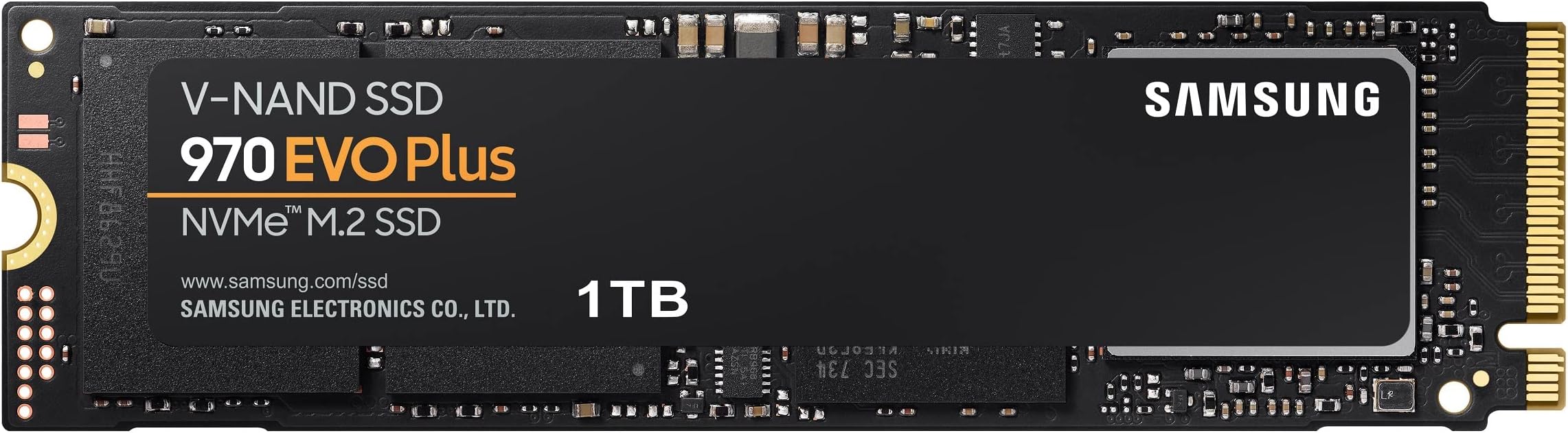
The Samsung 970 EVO Plus 1TB M.2 NVMe SSD delivers industry-leading sequential read/write speeds up to 3,500/3,300 MB/s powered by advanced V-NAND technology. Designed for professionals and gamers, it features dynamic thermal management to maintain peak performance and comes with a 5-year warranty ensuring exceptional endurance and reliability.


| ASIN | B07MFZY2F2 |
| Additional Features | Backward Compatible |
| Best Sellers Rank | #13,974 in Computers ( See Top 100 in Computers ) #133 in Internal Solid State Drives |
| Brand | Samsung |
| Built-In Media | SSD |
| Cache Memory Installed Size | 1 GB |
| Color | Black |
| Compatible Devices | Desktop, Gaming Console |
| Connectivity Technology | PCIe |
| Connectivity technology | PCIe |
| Customer Package Type | FFP |
| Customer Reviews | 4.8 out of 5 stars 58,679 Reviews |
| Data Transfer Rate | 1 Megabits Per Second |
| Digital Storage Capacity | 1 TB |
| Digital storage capacity | 1 TB |
| Enclosure Material | Aluminum |
| Form Factor | M.2 |
| Global Trade Identification Number | 00887276303758 |
| Hard Disk Description | Solid State Hard Drive |
| Hard Disk Form Factor | 22 Millimeters |
| Hard Disk Interface | Solid State |
| Hard disk form factor | 22 Millimeters |
| Hard disk interface | Solid State |
| Hard-Drive Size | 1 TB |
| Hardware Connectivity | PCI Express x4 |
| Hardware Platform | PC |
| Installation Type | Internal Hard Drive |
| Item Dimensions L x W x Thickness | 5.8L x 5.6W x 20.3Th centimeters |
| Item Type Name | SSD |
| Item Weight | 9 g |
| Manufacturer | Samsung |
| Media Speed | 3300 Megabytes Per Second |
| Mfr Part Number | MZ-V7S1T0B/AM |
| Model Name | Samsung 970 EVO Plus Series - 1TB PCIe NVMe |
| Model Number | MZ-V7S1T0B/AM |
| Number of Items | 1 |
| Read Speed | 3500 Megabytes Per Second |
| Special features | Backward Compatible |
| Specific Uses For Product | Gaming |
| UPC | 887276303758 |
| Unit Count | 1.0 Count |
| Warranty Description | 1 year manufacturer |
D**A
quality no issues
quality m.2 been using this for few years now, no issues at all
S**H
Working on Lenovo Yoga 520-14iKB and HP Pavilion 24-r001ne (or any HP series with Klingon -2GF)
I bought this for LENOVO YOGA-520 14iKB which works on perfectly, but i was wondering if this works as well for HP-Pavilion 24-r001ne, which by now i can confirm that it perfectly works with! Many have told me that it would not work on the later PC (the HP ..). That PC has a” Klingon -2GF” Motherboard with an M type socket for 2280 SSDs; which i have confirmed by stripping down the PC and inspecting the socket visually, so what i did is: 1- Installed the SSD on the HP Pavilion (Opened up the pc and placed the ssd into the SSD socket) 2- Booted up the pc, used Samsung Migration Tool” to transfer data into the SSD 3- Now in my case i had to go into Disk Management and Change the SSD status to “Online”, which will give your SSD a different “Letter” other than C which is currently used by your current HDD. (Right click on your SSD and choose —> Online). For some reason the Migration software gave the same Letter to my SSD as to my HDD, and hence conflict has occured when i went to boot from my SSD. BIOS was detecting the SSD, but when i set up the SSD to be in first place as to boot from, it bypassed my option and kept booting from the HDD. Later on i found out it was due to this conflict of drive letters and so i had to do what i mentioned above in the disc management. 4- If you don’t do step 3, Your PC will not be able to boot from the SSD since it would do a conflict with your HDD since both are sharing the same drive “Letter”, and so do step 3 first. 5- Restart, go into BIOS, and change the boot order so that your SSD is in first place to boot from. Enjoy the blazing speed difference by then. Confirmed to he working on BOTH: Lenovo Yoga 520-14iKB HP Pavilion 24-r001ne All In On Desktop (or any other HP series Desktop with Klingon-2GF) as the motherboard
U**L
blazing fast
this drive is probably the fastest among consumer grade SSD NVME, period! easy to install, easy to clone with Samsung's data migration software. Samsung Magician software does an excellent job at monitoring the drive, and garbage collection. Cons: the drive runs hot at 65~70 degrees, and speed throttles down when that happens. i purchased separately a thermal paste, i get 40~47 degrees now, all good. I i wish they'd include a thermal paste with the packaging, or at least mention the need for it in the manual.
M**R
I AM SATISFIED
Actually its not a product review, its a Samsung product no need to say its good. I bought it from Amazon us, in UAE cost is almosy 1K, i got it for 733 which is an amazing price. And it was delivered within a week. As far product is concerned, its Gen 3 SSD, with 5 years Samsung waranty, performs well. Regards, Mazhar
J**N
Works on MacBook Air like a charm
Works like a charm on the MacBook Air 13” (2017) running Mac OS Catalina ...paired with an “ELIATER M.2 NGFF NVMe SSD Adapter” the Samsung 970 evo plus 1TB performs far better than the original nvme shipped with the Mac due to higher read write speed..... strongly recommended for all Mac users who need an upgrade al almost half the original cost of a Mac running 1TB
L**E
Fantastic Experience, lovely product
Honestly, my experience for this product has been great 👍 Reasonably priced, reliable brand! Thank you to the designer, developers, and producers of the product! 🍀
A**R
A great SSD
Samsung makes some amazing SSDs, and this is probably the best Gen 3 SSD on the market.
P**N
Hits the Sweet Spot
After doing a lot of research I settled on the Evo Plus as it appears to be at the sweet spot of price, performance, reliability and longevity. I can’t comment on the last two yet (hence 4 instead of 5 stars), but the Evo Plus definitely boots up my NUC 10 i7FNH in record time and the supporting Samsung software is great. Liked it so much that I upgraded my Acer desktop with a Samsung SATA Evo SSD. Being SATA, not as fast as the M.2 NVME Interface, but definitely a worthwhile upgrade over the old HDD.
C**I
Makes a difference
I got his product just a couple of days ago, so my review would obviously not include how this SSD handles itself after months of use. But for the moment at least, I am entirely satisfied with it even though Lately Samsung is not my favorite company (owing to the fact that my expensive 55" inch Plasma TV developed 4 horizontal lines and 1 vertical line just after my extended warranty expired). Still, I am hoping this product will fare better. It was easy to install and my only con lies in the fact that while the SSD slipped nicely in its slot, the back end rose sharply and necessitated a screw which wasn't supplied with the card to hold it down. There is a screw half moon place on the SSD and a screw hole on my MB just for that purpose. Luckily I had a very tiny screw provided with the left overs from my MB installation. My system (Asus Prime B250M-A Motherboard) recognized the drive without any problems. Just to make sure however I switched the particular Bios option from "Auto" to PCLe. In Windows I used Disk Management to format the drive. After that I used Macrium Reflect (Free version) to clone my C drive to my new SSD. Booted up Windows 10 using the new drive and with some trepidation formatted my old C drive so that the system won't be confused as to which drive it is going to be required to boot up from. All went well. My old bootup into Windows, from when I pressed the power button used to take 1 minute 18 secs. Now boot up is just under 30 secs (up to the time my desktop appears and everything is settled.) My favorite Flight Sim, X-Plane boots up in a quarter of the time it used to. I haven't measured copying speeds to or from the SSD but I am sure they're much faster than normal. (EDIT)Actually copying from and to the SSD to other drives is limited to the speed of the other drives, so no change there. But copying from the SSD to itself (not something I normally would do) is amazingly fast. I copied a 24 GB file from one folder into another on the same SSD in 17 seconds. I am sure these drives will become the norm in less than 5 years and they will be as ubiquitous as the SATA ones and as cheap.
R**N
Kaliteli
Kaliteli hızlı kargo
W**N
منتج كويس
منتج كويس
B**N
Samsung evo ssd
Works fantastic in my new pc. Great price too. Seems fast
E**L
Excelente para tenerlo como unidad de arranque
No hay punto de comparación entre las unidades SATA (sin importar si es disco duro o SSD) y estos nuevos m.2 NVMe, la diferencia se nota bastante, tengo mi sistema operativo instalado en este Samsung 970 EVO Plus y arranca en cuestión de segundos, lo único que lo limita es la pantalla de inicio de sesión de Windows. De igual manera, los programas que más utilizo en mi día a día están instalados en esta unidad y los abre demasiado rápido, no se tarda prácticamente nada. Si tú actualmente cuentas con SSD conectado por SATA, quizá dudes un poco en comprar estas nuevas unidades, pero en realidad considero que sí valen la pena ya que van a acelerar por completo el rendimiento de tu equipo (dejo una imagen adjunta comparando la velocidad de un SSD Kingston con este nuevo m.2).
Trustpilot
2 months ago
2 days ago