🚀 Upgrade your workstation with lightning-fast USB power!
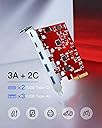
The Inateck PCIe to USB 3.2 Gen 2 Card (RedComets U21) delivers blazing 20 Gbps bandwidth through 5 versatile USB ports (3 Type-A, 2 Type-C). Designed for seamless installation and broad OS compatibility, it powers your devices safely with built-in over-current protection—perfect for professionals demanding speed and reliability.


| ASIN | B08M5YHWFD |
| Best Sellers Rank | #178 in Internal USB Port Cards |
| Brand | Inateck |
| Color | Red |
| Customer Reviews | 4.0 4.0 out of 5 stars (887) |
| Date First Available | October 29, 2020 |
| Item Dimensions LxWxH | 4.13 x 3.17 x 0.43 inches |
| Item Weight | 1.62 ounces |
| Item model number | KU5211-R |
| Manufacturer | Inateck |
| Operating System | Windows 11, Windows 7 |
| Product Dimensions | 4.13 x 3.17 x 0.43 inches |
A**R
Awesome When You Need USB Ports
I use an older MacBook Pro (mid-2012), which has a total of two whole USB3 ports on the side. When at home, I use Thunderbolt to dock to an external PCIe expansion chassis, which I have populated with one of these cards. Inateck has thought about almost everything. Data throughput is amazing: the speed is just {chef's kiss}, and ease of installation is a breeze. It's even bus-powered, so you don't need to worry about about finding a free SATA power cable (if you're in a desktop machine) or try to rig up some Frankenstein-esque power adapter for the Thunderbolt box. The thing just works -- no drivers required -- PC, Mac, and Linux, and has been a lifesaver for me because I've got a metric tonne of USB devices that I need to have plugged in at once, and I don't want to bog down my notebook's internal USB bus with bunch of daisy-chained hubs. I've even gone so far as to get a second card for my gaming PC, and a second Thunderbolt expansion chassis, just so I can add another one of these to my laptop (yes, I have that many USB devices -- see included images). Also, because this card is a USB3.2 gen 2, it offers an upgrade over the built-in, vanilla USB 3.0 ports that my MacBook Pro clings to, which is also nice. If you're using a mid-2011 MacBook Pro, which only has USB 2.0, the upgrade is even more bombastic. The inclusion of two USB-C ports is also a great selling point, even if there are only two. They perform their duties with gusto and grace, and I cannot conjure any complaints at all about this product. All this for forty bucks, mind you, when similar items with far fewer ports can go for twice as much, at least. I definitely recommend this product to anyone that needs more USB ports, be it on your gaming rig, bidness computer, or notebook computer's Thunderbolt box. You cannot beat this for expandability and ease-of-use for the price.
S**H
Card will prevent upgrade to Win11 24H2
As title said, it will not let me upgrade my computer from Win11 23H2 to 24H2 (failed at second boot). Finally discovered this to be the culprit when I did a new build (mobo, cpu, ram, gpu). I thought i would keep this card as it worked nicely in my Win11 23H2 computer and, lo and behold, my Win 24H2 will not boot anymore. Remove the card and it boots. (I kept it for the older 23H2 computer. It works great and add USB ports if you don’t mind not upgrading to Win11 24H2.)
A**R
Easy Installation
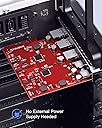
I love this "Inateck PCIe to USB 3.2 Gen 2 Card with 20 Gbps Bandwidth, 3 USB Type-A and 2 USB Type-C Ports." it has three of the USB 3.0 slots, type A and 2 of the USB slots type C. After physical installation, I turned on the computer and it just "works." Maybe because I am using Linux (linux Mint 21 Cinammon desktop), so I did not have to download nor install the firmware for this peripheral. The performance has been excellent. I did not know that USB type A 3.0 is a lot more superior than USB type A 2.0; otherwise I would have bought this PCIe card long ago. I guess I knew but never get around to really role my sleeves and get dirty. Because this PCIe card has only 5 slots, I did NOT have to connect another power cable to this peripheral, and that is another plus. Anyway, I am a happy camper. No this is not an advertainment, and I do not get pay to review this product. Just my 2 cents! Notice: there was NO driver with this PCIe peripheral. Head to the website and search for driver of this product, if you are Windows USER.
B**N
USB. Universal Serial Bus. This should work. Universally. No excuses. Failed 1 month in.
Other reviewers have said this doesn't work with the X570-UD motherboard. This whole time, I've had weird boot issues leading up to UEFI partition corruption - I have no idea if the card caused this, but just as an aside. Ever since switching to legacy boot, boot problems went away. In the mean-time, one of the USB-C ports would report errors with `dmesg`, but none of the others. Until a few days later when the USB card suddenly sputtered out and died when I plugged in a USB 1.1 device that I just yanked from another computer where it worked fine, and now nothing works (not even my mouse). I haven't even bothered to reboot the system and try again, I'm just done with these problems and asking for a refund. Here are my syslogs: Jun 24 19:21:29 user-X570-UD kernel: [32940.114513] xhci_hcd 0000:05:00.0: xHCI host controller not responding, assume dead Jun 24 19:21:29 user-X570-UD kernel: [32940.114544] xhci_hcd 0000:05:00.0: HC died; cleaning up Jun 24 19:21:29 user-X570-UD kernel: [32940.114544] xhci_hcd 0000:05:00.0: Timeout while waiting for stop endpoint command Jun 24 19:21:29 user-X570-UD kernel: [32940.156612] usb 1-2: USB disconnect, device number 2 Jun 24 19:21:29 user-X570-UD kernel: [32940.156615] usb 1-2.3: USB disconnect, device number 3 Jun 24 19:21:29 user-X570-UD kernel: [32940.156714] usb 2-2: USB disconnect, device number 2 Jun 24 19:21:29 user-X570-UD kernel: [32940.114513] xhci_hcd 0000:05:00.0: xHCI host controller not responding, assume dead Jun 24 19:21:29 user-X570-UD kernel: [32940.114544] xhci_hcd 0000:05:00.0: HC died; cleaning up Jun 24 19:21:29 user-X570-UD kernel: [32940.114544] xhci_hcd 0000:05:00.0: Timeout while waiting for stop endpoint command Jun 24 19:21:29 user-X570-UD kernel: [32940.156612] usb 1-2: USB disconnect, device number 2 Jun 24 19:21:29 user-X570-UD kernel: [32940.156615] usb 1-2.3: USB disconnect, device number 3 Jun 24 19:21:29 user-X570-UD kernel: [32940.156714] usb 2-2: USB disconnect, device number 2
S**A
Did what I needed!
I bought a used Steelseries Arena9 5.1 speaker system - well, it seems that streaming 6 channels at 96 KHz for games is a lot of bandwidth and was just swamping my USB, keyboard and mouse were having fits. And I needed more ports anyhow. So I ordered this, stuck it in, moved the Arena9 to one of the ports and everything is working perfectly now. The sound is great and the rest of my USB are responsive again. It's a little weird that you have to screw the endplate to it, but it comes with screws and a little screwdriver, so no problem! It was easy, it worked with no effort, what more could you ask for?
G**.
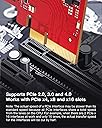
The card works perfectly in Linux Mint 20.3 (kernel 5.13.0.40). Plug and play. Just Installed it and it is also compatible with AMD IOMMU. I was using a crappy VL805 USB3 PCIe to USB card. The problem with that card was that it was not compatible with AMD IOMMU and I had to disable that setting in BIOS resulting in lower performance. The second problem was that I was getting nowhere near USB 3 (5 gbps) speeds. Now, with Red Comet U21 I get full (10gbps) speeds (tested with an external SSD) and there is no problem with AMD IOMMU. Also, I've installed it on a PCIex 2.0 x4 and it still achieves full SATA3 speed (~ 600 MB/s)! If you have a external nvme (greater than 600 MB/s speed) then you need to connect the card on a PCIex 3.0 x4 slot to get speeds greater than 600 MB/s (SATA3). So, unless you need to connect an external nvme, no worries if your motherboard does not have a PCIec 3.0 slot. Make sure that you have a x4 slot. GREAT PRODUCT!!!! I have no usb-c devices to test, but it is a very nice addition for my motherboard which I intend to use for many years.
H**O
va igual de bien en un macbook pro 5.1 de 2010 que en un PC gaming de última generación.
M**E
I was hesitant about which PCIe card to buy, given that there are so many with varying price ranges, features, reputations and most offputtingly, reviews! Originally I was looking at StarTech.com's 2x USB-C PCIe card for around £50. I had never heard about Inateck before, but with the addition of 3 x USB 3.0 (you can never have too many) and for a slightly cheaper price, I felt it was the right choice to make, and so I threw my dice... I'm so happy with the result. Fantastic power for a good price. Just stick it in and off you go. No driver updates necessary! Don't hesitate to buy this if you're umming and ahing; you'll be very pleased with your purchase
U**N
I had been reluctant to add PCI-E Cards to my big I9 computer for fear of 'restricting' its pure grunt. But this new PCI-E Card has more than trebled our data transmission speeds and it was so easy to install. Great result and no problems with Driver Updates either . . . Totally recommended and a great price.
W**R
Perfect for a mac Pro 4,1 / 5,1
Trustpilot
1 month ago
2 days ago