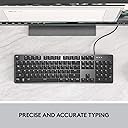
⌨️ Elevate your desk game with precision, style, and comfort.
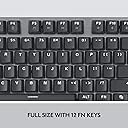
The Logitech K845 Mechanical Illuminated Keyboard features 104 tactile TTC Brown switches housed in a sleek aluminum top case. It offers five white backlighting patterns and adjustable tilt legs (4-8°) for ergonomic typing. Designed for professionals seeking a durable, full-size keyboard with a premium feel, it connects via USB and balances productivity with modern aesthetics.


| ASIN | B089YFHYYS |
| Additional Features | Lighting |
| Antenna Location | Gaming |
| Best Sellers Rank | #69 in Computer Keyboards |
| Brand | Logitech |
| Built-In Media | USB Cable |
| Button Quantity | 104 |
| Color | TTC Brown |
| Compatible Devices | Gaming Console |
| Connectivity Technology | USB |
| Customer Reviews | 4.4 out of 5 stars 3,914 Reviews |
| Enclosure Material | Aluminum |
| Hand Orientation | Ambidextrous |
| Item Dimensions L x W x H | 435"L x 127"W x 27.8"H |
| Item Height | 27.8 inches |
| Item Type Name | Mechanical Wired Keyboard |
| Item Weight | 35.63 Ounces |
| Keyboard Backlighting Color Support | Single Color |
| Keyboard Description | Standalone |
| Keyboard Layout | QWERTY |
| Manufacturer | Logitech |
| Model Name | K845 |
| Model Number | 920-009862 |
| Number of Keys | 104 |
| Power Source | USB power |
| Style Name | TTC |
| Switch Type | Tactile |
| UPC | 097855161642 |
| Unit Count | 1.0 Count |
| Warranty Description | 1 Year Limited Hardware Warranty |
R**E
Logitech K845 Mechanical Illuminated Keyboard
I’ve been using the Logitech K845 for a while now, and it’s easily one of the best keyboards I’ve owned. The mechanical keys feel incredibly satisfying — responsive, smooth, and with just the right amount of feedback. Typing feels fast and effortless, and it’s made a big difference in both comfort and productivity. The backlighting is clean and subtle, perfect for working in the evening without being too bright or flashy. The aluminum top gives it a premium, solid feel that looks great on my desk, and the adjustable tilt legs make it easy to find the most comfortable angle for long typing sessions. I also appreciate that it’s full-size with a number pad — great for work, creative projects, or gaming. It feels sturdy, dependable, and well-built, like it’s meant to last. Overall, the Logitech K845 strikes the perfect balance between design, function, and comfort. If you’re looking for a durable, high-quality keyboard that feels great to use every day, this one’s a winner.
W**D
Works as expected. Good Quality. Good Price.
It's rare you find quality and price in the same item. Usually it's a diametric scale and as you decrease price, you decrease quality, but this keyboard is exactly what I wanted. A decent mechanical feel, shine through backlight so I can "hunt" for keys in the dark (or typical low-light conditions) and a traditional spacious layout, so keys are where my fingers "remember" them, without a significant investment. I didn't feel like that was that big of an ask, but after returning three completely unsuitable keyboards, I can say I am very satisfied with this one.
A**N
Better than other Windows-based mechanical keyboards
UPDATE (Aug. 24, 2025): In my original review I said the Keychron C2 was better but I'm sticking with this Logitech because the keys on the Keychron are labeled for a Mac. But a few weeks ago I've switched to the Keychron (and I already threw away the swappable Win and Alt keys, so I have "option" instead of Win (or the "Start" symbol), and the Command symbol (⌘) instead of Alt. But I'm so used to where these keys are that I don't need them labeled, and it doesn't bother me that they are for Macs). Also Print Screen, Scroll Lock and Pause/Break are labeled with unrelated symbols (like a microphone and brightness symbol), but I only use Print Screen and I know where it is. So while the Logitech is OK, I really like the look, feel and sound of the Keychron better. ORIGINAL REVIEW: I gave this keyboard 5 stars because it is well built, does the job fine and satisfies all my needs. But ideally Keychron would make a keyboard specifically for Windows (they provide replacement keys for Option->Windows and Command->Alt, but they don't for PrintScreen, ScrollLock and PauseBreak. And even though I rarely use those keys, it would bother me not having them properly labeled). I'm typing this review on the Keychron C2 Full Size Wired Mechanical Keyboard for Mac, which also uses red switches, and I like it more in several ways. The keys make a nicer, softer sound than the Logitech's keys. And the secondary functions of the F keys (like media/volume controls) are backlit, which they aren't on the Logitech. Though that's not a big deal because I only use Volume Down (Fn+F10) and Volume Up (Fn+F11). Also the Keychron's NumLock and CapsLock LED indicators are a nice, soft blue color, whereas the Logitech uses very bright, white LEDs (they are so bright & distracting that I covered most of them in black tape). And the Keychron has some nice touches like different colors for the letters & numbers vs. all the other keys, and a nice effect where the LED of each key slowly fades out and back in whenever you press them. So if the lack of proper labeling for the PrintScreen, ScrollLock and PauseBreak keys doesn't bother you, I recommend the Keychron over this keyboard.
A**S
Awesome Keyboard
This is my first mechanical keyboard. I purchased it a month ago. I got the version with the brown switches. I am very happy with this keyboard- it was what I was looking for. What I like: - Keys are easy to see in the day and in the dark - Lights are not tied to scroll lock and can be adjusted with the function keys - Solid feeling construction/ good weight - Good typing feeling What I don't like: - While most keys are lit, the symbols for things like media and volume controls are not. For instance, the little speaker icons under F9-11 are not lit, so if you need to adjust your volume in the dark you need to remember which keys do that. What you might not like: - Your brightness/ light pattern settings are not saved and will need to be reset everytime you reboot your computer. - The light color is white, but when you look at the keys directly it looks a bit yellow. - The key noises when typing can be a bit loud. The lighting is easy to see in the day and in the dark. The brightness can be controlled using the function keys. You can also control the lighting pattern with the function keys. This is not a keyboard where the lights are tied to the scroll lock key (and I love that). The brightness and lighting pattern you set is not saved. Whenever power gets cut to the keyboard that goes away and you will have to reset it. The default setting is solid lighting at the brightest setting. Luckily for me this is my favorite setting, but this may not be the case for everyone. The color of the lights is white, but if you look at the keys square on it looks a bit yellow. This is my first mechanical keyboard. I was expecting more of a clicky feeling when pressing keys (like a mouse click feeling). When typing, I tend to press the keys a bit hard. When I type like that I don't notice any difference in feeling between this and a membrane keyboard. The keypress is registered when the key is pressed about halfway down. If you type lightly then you can feel the switches engaging. I was still hoping for a bit more of a tactile feeling. The keyboard definitely has a "mechanical" sound to it when typing that can be a bit loud. Overall, I am very happy with this product. I hope it will last me many years. I would say if you want a nice backlit keyboard and also want to try a mechanical keyboard that isn't really pricey, this would be a good pick.
B**E
Exceptional Mechanical Keyboard—Built to Last!
Solid keyboard all around. This is my second one, and the first I bought over three years ago still works perfectly—talk about durability! The backlighting is excellent, making it easy to type in any lighting condition. And the tickity-tackity sound of the mechanical keys? Pure joy for anyone who loves a satisfying typing experience. Highly recommended for both performance and longevity.
E**N
Solid Work Horse Keyboard
I recently swapped from a Logitech G413 to this K845 keyboard. The G413 was a good keyboard, slightly quieter than this one, but the key caps kept fading and were too expensive to keep replacing. I chose this keyboard because I wanted the ability to use doubleshot key caps. Doubleshot caps do not fade like the sublimated key caps used on the G413. That said, I did not like the key cap design on the K845 keyboard and swapped them out for easier to read key caps. I also did not like how bright the Num Lock, Caps Lock, and Scroll Lock indicator LEDs are on the keyboard. I colored over them using a silver Sharpie pen. Pros- Solid design Easy setup Standard key caps Light Through Key Caps Cons- Key cap labeling is hard to read Indicator LEDs are too bright
C**A
EXCELLENT KEYBOARD
Life with the new keyboard is really awesome. I mean, I loved my Logitech G510, but it died after many long years of good service. I wasn't sure the keyboard would work, since it wasn't shipped as I would have expected. It was like someone took the keyboard off the shelf (in the product box) and slapped a shipping label on it. No outer packaging and protection other than how the manufacturer boxed it. I do more office related work at home these days and less gaming that requires the cool features and bells and whistles, and wanted to go to the mechanical keyboards for efficience with typing. I like the feel of the keys beneath my fingers, perfectly spaced for fast typing without having to pound the keys. The simple backlighting is perfect as well. No frills, just a simple efficient white light. The characters on the keys are unimportant to me as I don't look at the keys when I type, BUT... looking at the keyboard, I find the "font" of the key characters to be perfectly readable and very attractive looking. As for the "quietness" of the keys, it would depend on your definition of quiet. I chose the red because I'm a fast typist and like the smoothness of flow, so rather than going for the brown and quiet, I'm satisfied with my choice. The sound of the keys is not much louder than my old keyboard. Since I always use a wrist pad regardless of the keyboard, there was no adjustment to the height of the keyboard, which I actually found not as high as many complain that it is. I can use it comfortably without a wrist pad. I've had no issues with the lighting -- yet. So far so good. I couldn't see where to adjust the lighting. It didn't come with a manual so I had to go to the Logitech site to get that information. Not a biggie. For the price? It's well worth it. UPDATE: October 18, 2021. I noticed for the first time this morning when cleaning off my desk that the "M" key and the "ALT" key no longer light up. In fact the text is now dark gray. Not a big deal for me, since I don't need to look at the keyboard to type. I suppose this is what typing 95 wpm does to the keyboard. I'm still loving the keyboard and would definitely recommend! UPDATE: January 26, 2021. I've got a couple of keys that have "died". That is, they still work, but the key itself feels "dead" and you have to pound it with your finger harder to make it type out the letter. I'm going to be doing a good cleaning this weekend and hopefully that will help. Otherwise, I'll be reaching out to the manufacturer on this issue.
M**S
Browns are not really tactile
I already have a keychron mechanical keyboard in red switches, which I really like. I wanted a second keyboard with a more tactile louder quality and the Logitech seemed like an inexpensive option. I originally ordered the brown switches but was vey disappointed in the lack of tactile feel, it's like the worst of all worlds. So I ordered another in cherry blue to see if there was a difference, and I just got it today! First, it's worth mentioning that the Logitech is lower then the keychron, and I like that it has the normal windows layout, the keychron has a few keys that are different. The Logitech font is weird, I barely recognize some of the characters in the first row. I mostly don't type by looking and I will get used to it so it's not a dealbreaker. I'm using these keyboards with my laptop that's perched on a really nice stand that I got on amazon so I can always refer to that keyboard if needed, and there are a few laptop functions I use on my laptop, but mostly I use the mechanical keyboards. Now the Logitech. It doesn't have but two angles, It would be nice if it had one higher angle. I love the cherry blues and am glad I made the exchange. I almost kept it but realized the browns don't do anything my keychron with reds don't do so there was not sense in spending the money. The leds have a vague green hue, the brown switch keyboard was white. I don't know if that's because I now have cherrry mx switches and they come with different leds, I actually like it so far. In summary, this is a nice full function full sized keyboard that is affordable for someone wanting to test out how they like mechanicals. I have an older laptop and didn't want a keyboard that needed extra software so this fit my needs. I hope I don't have the led problems that others have had, time will tell.
Trustpilot
2 weeks ago
2 days ago