We remain fully operational. Our teams are working around the clock to ensure your deliveries continue safely.

DOWNLOAD THE APP


Copyright © 2025 Desertcart Holdings Limited
DOWNLOAD THE APP


Buy anything from 5,000+ international stores. One checkout price. No surprise fees. Join 2M+ shoppers on Desertcart.
Desertcart purchases this item on your behalf and handles shipping, customs, and support to Iceland.
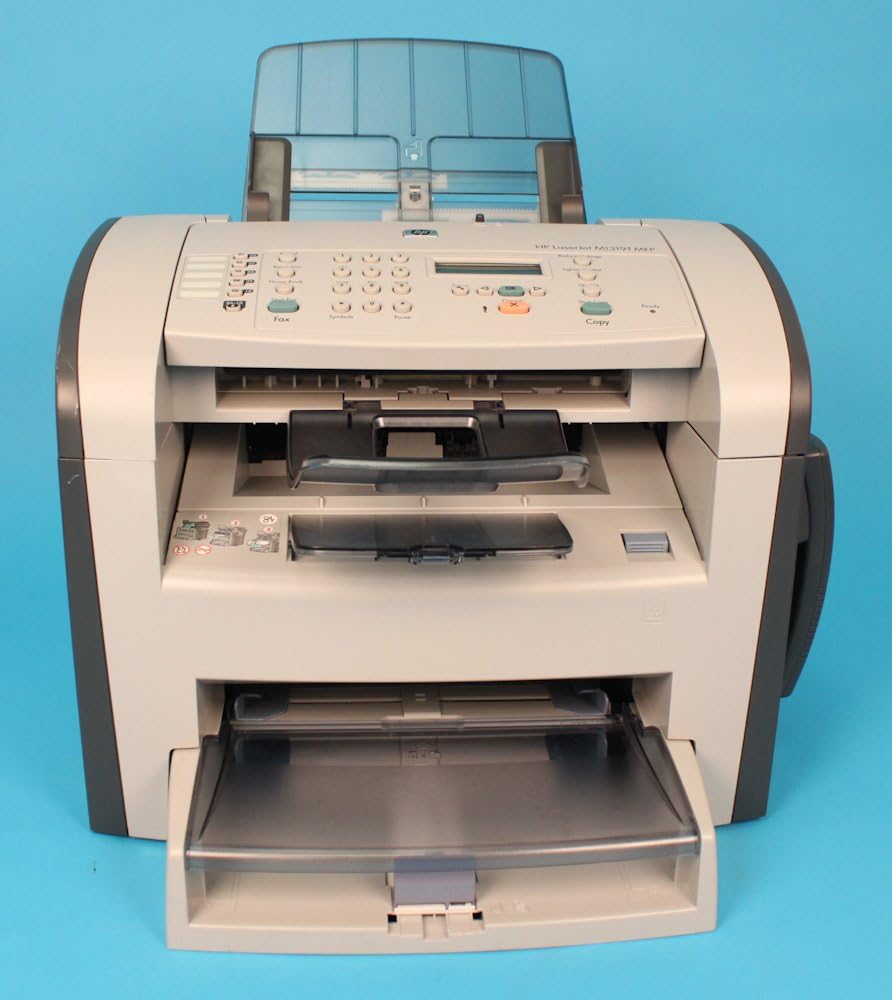
🖨️ Elevate your office game with the all-in-one classic that just won’t quit!
The HP LaserJet M1319F MFP is a robust multifunction laser printer designed for professional environments, delivering fast black-and-white printing and copying at 19 ppm, high-resolution scanning up to 19,200 dpi, and reliable faxing. Equipped with a 240 MHz processor and 32 MB memory, it supports heavy workloads with a 250-sheet input tray, 30-sheet ADF, and 10-sheet priority tray. Though discontinued, its proven durability and versatile features make it a dependable choice for efficient office productivity.
| ASIN | B0016BCZWS |
| Additional Printer functions | All In One |
| Compatible Devices | Laptops |
| Control Method | App |
| Customer Reviews | 4.1 4.1 out of 5 stars (34) |
| Date First Available | March 21, 2008 |
| Dual-sided printing | No |
| Duplex | Manual |
| Global Trade Identification Number | 00883585418947, 00883585419029 |
| Hardware Interface | USB 2.0 |
| Included Components | HP LaserJet M1319f MFP, power cord(s), introductory HP LaserJet black print cartridge, Getting Started Guide, support flyer, software and documentation CDs, control panel overlay, Readiris PRO text recognition software, 250-sheet input tray, output bin support |
| Ink Color | Black |
| Is Discontinued By Manufacturer | Yes |
| Item Weight | 25.6 pounds |
| Item model number | CB536A#ABA |
| Manufacturer | Hewlett Packard |
| Max Copy Speed (Black & White) | 19 ppm |
| Max Input Sheet Capacity | 250 |
| Max copy resolution black-white | 1200 x 1200 dpi |
| Max copy resolution color | 19,200 dpi |
| Maximum Black and White Print Resolution | 1200 x 1200 dpi |
| Maximum Color Print Resolution | 19,200 x 19,200 dpi |
| Maximum copies per run | 30 |
| Memory Storage Capacity | 32 MB |
| Model Series | Laserjet |
| Number of Trays | 3 |
| Output sheet capacity | 250 |
| Print media | Paper (plain) |
| Printer Ink Type | toner |
| Processor Count | 1 |
| Product Dimensions | 24 x 20 x 21 inches |
| Scanner Type | Sheetfed |
| Sheet Size | 8.5 inches |
| Specific Uses For Product | Office |
| Total USB Ports | 1 |
| UPC | 940356513611 883585418947 883585419029 |
| Warranty Type | limited warranty |
A**N
Great All-in-One
If you need one machine that will scan, fax, and print sharp B&W laser. This machine does all these very well and quickly. The drivers that come with it are easy to learn for the scanning also.
R**N
Old Reliable 2.0
This printer is not very promising at first glance. It seems to be bigger than necessary and hanging the phone off the side as they did means it falls off all the time.Now it is no longer in production and you get that sinking feeling thinking about whether HP will keep the drivers current as Microsoft keeps churning out new operating system versions that complicate installation and maintenence of older model printers. But we have two of these now and they just keep working. We get a good deal on the cartridges so that works out well. You can do duplex printing if you really want. And the fax works reliably too. We actually went hunting through the highways and byways of the Internet to snap up one of the last new models of this before they were history. Will I regret the effort? Based on my experience with our first, I don't think so. I have a weakness for printers that just keep pounding the work out year after year without any drama.
N**N
Great, works with Comcast VOIP lines no problem
This printer is great. I had NO trouble installing it and using it on both my iMac and on Windows XP running via VMWare Fusion. I have read you might have trouble with faxing over VOIP, but I've had no trouble at all and we use it a bunch in my office. Comcast installed a "fax/data line" in addition to the regular VOIP phone lines. I guess this special line has the correct settings to work with traditional fax machines. I would highly recommend this fax/printer to anyone, although I don't use it to scan ever. Nate Harrison, TN
L**.
Just like new!
This machine is a work horse and is our 2nd one. The first one we've had for nearly 7 years and is still running strong. We use the scanning, copying & printing functions (we do not fax). This machine was refurbished and arrived extremely clean and had everything we needed to intall it on the computer and be up and running in a matter of minutes. We highly recommend this printer!!
A**R
A Winner in its Day
Bought one refurbished that worked nicely for about 5 years. Just bought a second refurbished machine for $80 because I had $90 of laser cartridges on hand (otherwise I would have bought a newer one). Given the age, I would not recommend buying this one as its cartridges are not presently used by many machines.
D**.
Great Machine!
These are a wonderful machine. I've bought 6 of them used and each one is such an asset to us.
T**A
Laserjet M1319F mfp printer
The HP Laserjet M1319F is very comparable to the HP 3050 all-in-one I was replacing. I had the all-in-one for several years, and with the work I do, I gave it a serious workout. Unfortunately, the 3050 has been discontinued, so I searched Amazon to see if I could find a replacement. I purchased the M1319F because of my familiarity with the product. My only disappointment is that the multiple page portion of the sheet feeder on the fax machine doesn't work as it should; I have to place pages into the sheet feeder one at a time or it will jam. Other than that, the machine is exactly what I wanted.
R**Y
I Got A Lemon
I had an HP Fax 1010 for my home office, and it was a trouper - always worked great. But then HP had a recall due to potential fire hazard, and offered a rebate on several of their faxes and multifunction fax/printer/scanners. So I went for the M1391F MFP. I don't really care about printing - I've got a color duplex laser printer for that. I wanted something that would fax, copy, and scan with an auto-feed. Here's what it's good at: 1. Scanning letter-size pages (although their Mac software could use some work). 2. Copying letter-size pages. 3. Faxing letter-size pages to U.S. recipients. And the document feed works great. Here's what it won't do: 1. Scan legal-sized pages 2. Ring or make any kind of noise when it gets an incoming call, from a fax machine, cell phone, or land line. Even with all the volume settings turned to high. 3. Receive an incoming fax or phone call. At all. From anywhere. The capper tonight was that I had to fax a time-sensitive document to New Zealand, and this piece of work thinks the NZ dial tone is a busy signal and won't connect. I tried to access HP's live chat help desk, but nobody picked up in over a half-hour. So now I'm having an extended, hours-between-installments email correspondence with Nigel from Bangalore, and he's asking me to verify the model number and what version of Windows is on the attached computer and am I using USB. Well, there is no computer attached, Nigel, I'm using this as a detached fax machine. But as someone who's written printer drivers for your own company's printers, and fax software for your competitors, I can assure you that if the attached computer is preventing this unit from receiving faxes or recognizing international dial tones, you need to look for another job. I dug out the old 1010 and it sent the fax just fine. This unit has a wonderful feature set. If only it worked. It's useless to me, and I'm going to have to start looking for a fax machine that works. When I was in grad school over 20 years ago, HP sold the best lab equipment money could buy. You knew if you got an HP gas chromatograph, or infrared spectrometer, or oscilloscope, you had the highest quality available on the planet. Now... I've bought probably a dozen HP laser printers since 1990, and never even looked at another brand, with one costing over $10,000. But after this hunk of junk, I will certainly look at alternatives in the future.
Trustpilot
1 week ago
2 months ago