Buy anything from 5,000+ international stores. One checkout price. No surprise fees. Join 2M+ shoppers on Desertcart.
Desertcart purchases this item on your behalf and handles shipping, customs, and support to Iceland.
🚀 Elevate your outdoor network game with TP-Link CPE710 — where speed meets resilience!
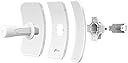
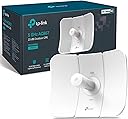
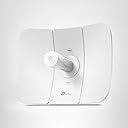
The TP-Link CPE710 is a high-performance 5GHz AC867 outdoor wireless CPE featuring a 23 dBi directional antenna and 2×2 MIMO technology, delivering up to 867 Mbps speeds. Designed for long-range point-to-point and point-to-multipoint transmission, it boasts an IP65 weatherproof rating, passive PoE support with included injector, and centralized management via Pharos Control software. Its robust build and flexible installation options make it ideal for professional-grade outdoor networking solutions.


| ASIN | B08D71HC9L |
| Antenna Location | Business |
| Antenna Type | Fixed |
| Best Sellers Rank | #20 in Computer Networking Wireless Access Points |
| Brand | TP-Link |
| Built-In Media | 24V 0.5A Passive PoE Adapter, AC Power Cord, Installation Guide, Outdoor Wireless CPE, Pole Mounting Kits |
| Color | Metallic |
| Compatible Devices | Networking Switches |
| Connectivity Protocol | Wi-Fi, Ethernet |
| Connectivity Technology | Ethernet, Wi-Fi |
| Control Method | Touch |
| Coverage | up to 30 kilometers with line of sight |
| Customer Reviews | 4.4 out of 5 stars 692 Reviews |
| Data Transfer Rate | 867 Megabits Per Second |
| Frequency | 5 GHz |
| Frequency Band Class | Single-Band |
| Has Internet Connectivity | Yes |
| Is Modem Compatible | No |
| Item Dimensions L x W x H | 14.25"L x 11.02"W x 8.11"H |
| Item Type Name | Outdoor CPE |
| Item Weight | 1 Kilograms |
| LAN Port Bandwidth | 1000 Mbps |
| Manufacturer | TP-Link |
| Maximum Upstream Data Transfer Rate | 867 Megabits Per Second |
| Mfr Part Number | CPE710 |
| Model Name | CPE710 |
| Model Number | CPE710 |
| Number of Antennas | 2 |
| Number of Ports | 1 |
| Other Special Features of the Product | Weatherproof |
| Router Firewall Security Level | Advanced |
| Router Network Type | hybrid |
| Security Protocol | WPA2, WPA3 |
| Smart Home Compatibility | Not Smart Home Compatible |
| Special Feature | Weatherproof |
| UPC | 840460604888 845973089702 |
| Unit Count | 1.0 Count |
| Voltage | 24 Volts |
| Warranty Description | 2 year manufacturer |
| Wireless Communication Standard | 802.11ac |
| Wireless Compability | 802.11ac |
B**L
Works between the house and out-building.
I bought two of these to get a decent network connection to my out-building. My out-building is about 100' away, well within the advertised range of these bridges but there are a few trees in the way and another building well within the Fresnel Zone. Setup was easy, one needs to set one as an access point and the other as a client. Configuration was easy using industry standard terminology. It irritates me when other companies feel the urge to use creative non-standard terminology in what they mistakenly believe will make their products easier to install. Thank You TP-Link for using standard terminology. There is a 23dBi gain on the parabolic antennas to push the serviceable range out to several kilometers. Since I am running them so close, I was able to run the transmit power from 27 dBm down to 15 dBm and still maintain a 50 dB signal to noise ratio. I did not run an Iperf test yet so I'm not sure about the throughput. I do know they are faster than my 100 Mbps rural Internet though. When I get around to running an Iperf I will update this review. Physically they aren't as heavily built as Ubiquiti's bridges, but they are well made and should hold up well. I would buy them again.
Z**R
Great product just works
Works perfectly! I have internet access in the barn and mother in law’s house down the street. Runs 24/7 with no issues.
M**N
Better than I thought.
Worked better than hoped. I Purchased 3 of these to replace and old 2.4Ghz Tycon. I am using and a chain of intermediary routers and repeaters. Configured 1 as the AP and attached it to the roof. The was placed on the workshop some 350 feet away. Both directed at each other. I now get full line rate to the internet at some 360MB which is my rate through my provider. My third was placed as a client 450 feet away through some trees at a 110 degree agle from the way the AP is pointing at the Workshop. Slightly behind it to the right. The roof that the AP is mounted on cuts the line of site and the wood sheething under the shingles is foil wrapped. Surprisingly I get 135Mbits to this Client. Using the wavelink High gain routers to reach the old network I was only receiving about 4-5Mbits. Very pleased as this runs wifi for a remote wireless gate and a Wireless Camera. Just ordered a 4th to place in the barn around 275 feet away. Note: When first installed, I had stability issues. It was bouncing connection where the AP would be seen by the client for a bit then it would not. I decided to upgrade the firmware to the latest on the Client. The upload of the binary file completed but it appears I lost connection during the write. to flash. This corrupted the units software. The unit never came back. After investingations and using the third unit I had bought. I found the 100 ft Cat 6 cable was causing issues. Isolated out and put in a new cable and everything came up clean. The problem was the original CPE710 was corrupted during the image upgrade. I located a firmware upgrade procedure on the TPLINK website for the Pharos equipment and was able to do a reflash of the unit with the newest Binary file. It is revived configured and the unit is back working. Suggestion: TPLINK should add the short procedure to relash a unit if corrupted downloads to their manuals.
D**E
Great Network Extension
This is a great product, from overall quality of construction as well as usability. Virtually no setup to it outside of the initial connection to the network. I use this on my detached shop around 300 feet from my home and connect it directly to my WiFi network in my home. It picks up the signal great and is a much better option than the transmitter and repeater option as far as the money is concerned.
J**S
Powerful, easy to install, good value. Works well.
This thing is a beast it’s bigger than I thought but I still really like it. I am able to now work on my PC at the community pool, which is about 300 feet away from my house. I am getting speeds of about 90 Mbita per second which is perfectly good for either streaming or video zoom calls for work. It was really easy to install. You do have to know your way around a bit of wiring for example power over ethernet, but it comes with all the parts you need. It really is quite simple to do. It doesn’t look too bad mounted on the side of the house and I’m really happy with the results. For the price, I think this works really well, I tried other devices, but none were as powerful as this over the distance I needed. I went for the option to have a new SSID, to be honest this doesn’t really matter because your device or laptop will automatically search for the strongest signal anyway, no issues.
D**.
Rock-Solid Stability
I installed a pair of these last September at my rural home because I had to backhaul my Starlink connection from my pole barn (where I had clear line-of-sight) to the house (which has no view of the sky due to all the trees). One CPE710 is hanging off the side of my barn connected to the Starlink router, and the other is pole-mounted behind the house with some Cat6 running through a conduit to my house router/AP. They've been through snow, rain, and ice storms. Temps have ranged from the low 90's down into sub-zero territory, and reliability has been 100%. If you have zero networking experience then you might struggle a bit as setup is more complex than a wifi router with a phone app. Since I already had access points on both ends of the p2p connection, I used a separate SSID and wifi channel specifically for the pair of CPE710s, and I set the SSID to hidden. Otherwise you can get clients trying to connect to the CPE710 instead of your preferred access point, and the result will be some stability issues. For my use case I connected via ethernet, assigned static IPs, set one to AP mode, one to client mode, punched in the SSIDs/keys, tweaked some settings a little bit, and I was off and running at full-speed. As I type this, they have been up for almost 3 months without a reboot and transferred untold terabytes of data, so I have zero complaints. I do have them both running through a small UPS which is plenty to let them keep going through a moderate power outage.
A**R
Numerous problems >FCC violations >lack of 5 GHz channels >bad ethernet jack
First thing I checked is for a FW update. There is none. The firmware is the latest. The model was a CPE710(US). The HW version was 2.6. (1) Lack of 5 GHz channels. That only channels that can be selected are 149, 153, 157, 161. See attached screenshot. There are of TON of missing 5 GHz channels. This missing channels are: 36, 40, 44, 48, 52, 56, 60, 64, 100, 104, 108, 112, 116, 120, 124, 128, 132, 136, 140, 144. (2) FCC violations: I setup the CPE701 in AP mode. I could not see the SSID. Only after I unchecked "EIRP limit" did I see the SSID. But that means in order to use as intended, that would mean a knowing "FCC violation". (3) Ethernet jack problems. I tried four different Ethernet cables (both ends) and none of them would stay latched in the RJ45 connector of the CPE701. They work and latch in all of my other devices. But not in the CPE701.
K**I
Works per design, delivered live changing speed
I used this product to transport Wi-Fi about 1km to a second house location that only had poor quality DSL availability with speeds of 2 to 6 Meg. We now are enjoying 550 Meg service which now allows us to stream media and use our cell phones (Wi-Fi calling). Prep work: Removed some trees for clear line of sight, ran Cat 6 cable from the fiber source to the soffit of house one, purchase 25’ outdoor cat 6 cable for second house. Mounted the first device under the soffit of house one, pointed antenna to location of house two antenna location, set PC with static IP, connected and configured as access point (ap), used guided config. app. set Wi-Fi SSID name, and manually set distance. Set up second device as client, used app antenna tuning tool to optimize signal from ap. Returned to ap and adjusted antenna using antenna tuning in app, returned to client side and further adjusted antenna to maximize signal from ap. Final result was signal strength of -58/-58, SNR 50, noise -91. Connected client side to existing Google mesh device, power cycled all Google mesh devices, power cycled all Wi-Fi devices connected to the Google mesh network. Notes: My Wi-Fi speed increased when I reduced my manual distance setting from 7KM to closer to my actual distance of 1KM (leaving it on automatic the system was setting it at .5 KM). My initial signal strength was in the -70s, with antenna tuning I was able to get it down to about -58. I had to restart my Google devices a couple of times to get the full speed. Test your transmit speed with your pc hard wired at the cable plugging into the ap and the same at the client side to clearly understand your speeds. I was never able to connect my pc at the client side and tested the speed via the Google home app on the client side mesh network.
M**S
Alta performace
Para planos de dados acima de 100MB/s é uma excelente escolha. Tenho um plano de 300MB/s e ele entrega muito próximo a isso sendo instalado corretamente a uma distância de pouco menos de 1km. A configuração não é difícil, embora demande um pouco de tempo. Se a durabilidade for boa, acredito que não precisarei de um equipamento melhor por um bom tempo.
D**W
setup took a little time.
Bought two of these 5ghz 710 units, set up one as an access point(ap), the other as a client, note there are multiple other methods to use these, as shown in the online documentation. The setup video for 710 doesn't specify that you can only 'align' via the client. set each up while attached to my computer using the fast method, and I enabled WPA protection. Then I attached AP to one of my source asus routers 'Lan' port, and the Client to my other Asus router 'Wan' port, (aprox 300' away) as soon as the routers realized they were paired, they became one network. I was using aiMesh, but the distance was a little too far (even with enhanced antennas on them), These may be overkill for this use, but they sure make my setup provide the same wifi speed in two locations. When my WIFI speed increases, these should handle it. update: 2 years later. These are working flawlessly. They have never been down/lost connection. I am very pleased on what 200 dollars can get. Highly recommend for some distance between 2 points... Bonus. The Sending Unit (which ever you set up connected to the 'Source' internet) broadcasts in a wifi range that you can connect to on your wifi enabled device. when within the radio path from the device. However, I do not use this functionality, as my two routers are close enough, to allow for uninterupted Wifi on a device... i.e. all around my house, and between, and all around the other router(both routers have same wifi Network Names (SSID) so devices auto switch to closest router)... Nice.
M**Z
Excelente producto para enviar wifi de una casa a otra! 8 de 10 de facilidad para instalación
Primero que nada! Yo lo único que se es para mi uso que yo lo utilice. Enviar internet de una casa a otra! Yo lo instale vienedo videos en YouTube & la distancia fue de 1.5 Kma a lo mucho en forma recta, sin obstáculos! Necesitas 2 si es que quieres enviar wifi de una casa a otra. 1 en la casa donde ya tienes internet y otro donde lo quieres enviar. Así mismo necesitas un módem donde vas a recibir el internet y obviamente debes tener módem donde ya tienes internet La instalación requieres ver unos videos en YouTube, al menos así le hice yo. No se mucho en aspectos técnicos de informática pero se algo. Dependerá mucho de que tan bien lo hagas será el resultado. De lo más difícil para mi fue elevar las antenas, subirlas al techo y dejarlas colocadas para que emitieran y recibieran señal de forma directa y libre de obstáculos como árboles y demás, Puede ser que para mi uso de 1.5 Kim’s fue mucho pero quería lo mejor de lo mejor, y en su momento y lo que yo pude obtener y entender estas fueron de las mejores (igual y no pero según mi búsqueda fue esto) por qué si hay unas más económicas muy parecidas a estas que rondan los 1000 pesos en comparación de estas que mal no recuerdo estaban en 1500 peses. Pero estuvo bien creo. Al día de hoy solo 1 ves fallo, pero creo que fue por qué se fue la luz y solo tuve que apagar por un momento y volver a conectar. No tengo imágenes pero si posteriormente puedo editar las agregaré
J**E
Dispositivo non professionale, ma quasi !.
Ho acquistato una coppia di CPE710 per realizzare un link wireless. Debbo dire che è stato abbastanza facile configurarlo come AP - Client. Ottima EIRP ed ottimo throughput attorno ai 320 Mbps ad oltre 850 mt. Vedremo in seguito come si evolveranno stabilità connessione e durata.
R**N
Economical way of bridging two buildings together up to 5 km apart
These units work awesome and may be at lower cost than ubiquiti equilavent. The only advantage the ubuquiti has over this is a wider spread of frequencies to pick from. This one only covers 5 ghz channels 149 to 161 in the upper 5.7 to 5.8 ghz range. Other than that, these are reliable and fast with very low latency. These units will work as an Access Point, a router/access point or a bridge. They will work very well with the TP Link Pharos EAP-225 omni directional, pretty much any ubiquiti 5ghz access point or bridge and will work as a bridge using any 5 ghz router as an access point. The advantage with these units is you can take advantage of the 80 mhz spacing if you have a router, another CPE 710, or an EAP-225 that is brodcasting on channels 151 to 155 on 80 mhz spacing. If you achieve SNR of 40 or better you can get a usable throughput over 500 mbps uplink and downlink with very low latency. Another cool feature is you can use the omada app or smtp features for remote management. I also like the ARP traffic monitoring feature if you use these in large scale WLAN or LAN applications. These units work well but you have to know how to set them up properly, point and fine tune and know all the little settings. I feel the negative reviews come from people who aren't setting them up right. I would also add that these may not work well long range in a noise environment, like setting up a a point to point between houses in an inner city area, The bridge will pick up interference from all the 5Ghz routers in the area. These work very well in rural settings with less noise. The UBIQUITI LBE-5AC-GEN2 Litebeam would be more suitable in noisy situations as you would be able to take advantage of frequencies on the lower 5 ghz spectrum.
Trustpilot
2 weeks ago
1 month ago