Buy anything from 5,000+ international stores. One checkout price. No surprise fees. Join 2M+ shoppers on Desertcart.
Desertcart purchases this item on your behalf and handles shipping, customs, and support to Iceland.
๐ Upgrade your WiFi game โ because buffering is so last decade!
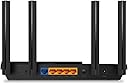
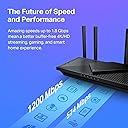
The TP-Link Archer AX21 AX1800 WiFi 6 Router delivers cutting-edge dual-band wireless connectivity with up to 1.8 Gbps speeds, enhanced by four high-gain antennas and Beamforming for extensive coverage. Designed for busy households and smart homes, it supports simultaneous multi-device connections via OFDMA technology, advanced WPA3 security, and VPN server capabilities. Compatible with all major ISPs and Alexa-enabled devices, it offers flexible setup options and expert support, making it a top-tier choice for professionals seeking reliable, high-performance internet.


| ASIN | B08H8ZLKKK |
| Antenna Location | Home |
| Antenna Type | Fixed |
| Best Sellers Rank | #172 in Electronics ( See Top 100 in Electronics ) #1 in Computer Routers |
| Brand | TP-Link |
| Built-In Media | Power Adapter, Quick Installation Guide, RJ45 Ethernet Cable |
| Color | Black |
| Compatible Devices | Gaming Console, Personal Computer, Smartphone, Tablet |
| Connectivity Protocol | ethernet, wi-fi |
| Connectivity Technology | Ethernet, Wi-Fi |
| Control Method | App, Voice |
| Controller Type | amazon_alexa, vera |
| Coverage | Wide and reliable WiFi coverage |
| Customer Reviews | 4.4 out of 5 stars 24,172 Reviews |
| Data Transfer Rate | 1200 Megabits Per Second |
| Frequency | 5 |
| Frequency Band Class | Dual-Band |
| Has Internet Connectivity | Yes |
| Is Modem Compatible | Yes |
| Item Dimensions L x W x H | 10.28"L x 5.3"W x 1.61"H |
| Item Type Name | WiFi Router |
| Item Weight | 1.1 Pounds |
| LAN Port Bandwidth | 10/100/1000 Mbps |
| Manufacturer | TP-Link |
| Maximum Upstream Data Transfer Rate | 1200 Megabits Per Second |
| Mfr Part Number | Archer AX21 |
| Model Name | Archer AX21 |
| Model Number | Archer AX21 |
| Number of Antennas | 4 |
| Number of Ports | 5 |
| Operating System | Internet Explorer 11+, Firefox 12.0+, Chrome 20.0+, Safari 4.0+, or other JavaScript-enabled browserCable or DSL Modem (if needed)Subscription with an internet service provider (for internet access) |
| Other Special Features of the Product | Beamforming |
| Security Protocol | WPA/WPA2, WPA/WPA2-Enterprise (802.1x), WPA3 |
| Smart Home Compatibility | Smart Home Compatible |
| Special Feature | Beamforming |
| UPC | 840460604901 845973072155 |
| Unit Count | 1.0 Count |
| Voltage | 12 Volts |
| Warranty Description | Manufacture's 2-year warranty |
| Wi-Fi Generation | Wi-Fi 6 |
| Wireless Communication Standard | 802.11ac, 802.11ax, 802.11b, 802.11g, 802.11n |
| Wireless Compability | 802.11ac, 802.11ax, 802.11b, 802.11g, 802.11n |
M**E
A Spectrum Internet Customer's Point-Of-View
As A Spectrum Internet Customer I had a Spectrum Advanced WiFi router that does 2G and 5G on the same WiFi network. There is not a way to split the networks in two. If you have a cell phone that is compatible with device steering and you use to connect your 2G devices to, you can call or chat with their Internet Repair support team to set up a feature on your cell phone that may allow the 2G devices to connect but it can be a hit or a miss and it's too much of a hassle to keep calling/chatting to set this up with as the feature is enabled for only sixty minutes. If the 2G device is connected before the hour is over, it will remain connected but if it's not, you'll need to reach back out to try again and you'll also need to reach back out for other new 2G devices only that don't automatically connect to the 2G network. This is a major flaw for an "Advanced" WiFi router. Customers paying a monthly $5 fee to lease their routers should be able to either split the networks in two or leave them as a single network for band steering. Outside of this, the Spectrum routers are fine. However, it's just better to get your own router. It would be great if they offered more advanced routers with more features such as VPN's, hiding network SSID, splitting the 2G and 5G networks, guest network and more. I'd pay $5 more a month on top of the already $5 charge for this. This way customers can select which router they need for their home and still get customer support for it. As A New Customer For Echo Dot's This is the reason why I purchased my own router. I purchased four Echo Dot's, 5th generation, '22 release. All of them connected to the Spectrum WiFi router without issue and individually they operated great. However, the Echo Dot's have a "multi-room audio" feature where you can play music all throughout your home. This was my entire reason for getting these in the first place. This feature was a hit or miss. Sometimes it would work but most of the time only one or two would work and trying to get them all re-paired so I could say, "Alexa, play Discover Weekly from Spotify everywhere," was a huge inconvenience and took too much time. After going online and reviewing forums such as Quora and Reddit, I could see what the issue was. The Spectrum WiFi router would switch them between 2G and 5G based off of interference and signal strength throughout the day and if even just one Echo Dot was on a different network than the others, it would throw off the multi-room audio so that it wouldn't work. So the hunt for a dual band router began. TP-Link AX1800 WiFi 6 Router (Archer AX21) Review The TP-Link AX1800 Router has been amazing so far. It arrived on the same day that I ordered (Thank you Amazon and of course, most of all, the delivery drivers). When it first came in, the first thing I noticed was how ridiculously light it was which kind of made me nervous about the purchase. The router itself came very nicely packaged, nothing was damaged. I followed the instructions to the letter but the router was not showing any lights on there after plugging it in once the Internet modem came back online. I re-read the steps again and re-checked the power connections and tried unplugging from both ends but not luck. I honestly thought I got a dud. I looked on the back of the router and saw a button and pressed it in; all the lights began to show and I could begin the setup process. I use an iPhone and when I pulled up the TP-Link App to set up the router I couldn't help but notice its low star rating so I opted not to download the app and instead login using the IP address (the instructions provide you with this information and how-to as well). This is my first time ever logging into a WiFi router without the use of a mobile app and I have to say, it is significantly better and heavily preferred. I was able to turn off TP-Link Smart Connect so that I could have two separate SSID's for the 2G and 5G network. I could also see there was a whole new host of features that I did not have prior such as hiding your WiFi networks from neighbors and having a guest network. I also did a speed test and they all came back higher than normal and my computer noticeably moves faster when browsing the Internet and streaming video despite being roughly around the same speeds (before it was around 310mbps download/9mbps upload; now it is at around 360mbps/13mbps upload). Maybe the 50mbps DL and 4mbps UL makes a huge difference. I'm not entirely sure. I believe the difference really comes from the router provider a more stable/stronger connection than the Spectrum router. The signals itself are just healthier now. I also like that the TP-Link router has antennas, four of them to be exact, that you can see. The Spectrum routers don't have these and if they do, they're within the router itself. I believe routers with antennas that you can visibly see operate better and send stronger signals. Did This Resolve My Issue With The Echo Dot's? It absolutely did. I re-connected all four Echo Dot's to the 2G network, which was kind of a pain as well to do (but well worth the time and effort; it would've been significantly easier to do if I originally connected them to a dual band router in the first place) and ever since then I have had no issues with multi-room audio. Anytime I want to play music from all four Echo Dot's at the same time, they all play without issue. Which is great because I plan on purchasing more for a more surround system environment. Final Notes If you need a dual band WiFi router that is able to split the networks in two so that you can sign into them separately, this is it. And honestly, if you have a Spectrum router, this is a major upgrade for a fraction of the cost. Just make sure you keep it clean of dust, and keep it in a well-ventilated and cool area of the home and this will easily last you 2+ years. It saves you money and it works better. It's honestly a no-brainer. There is also a common misconception with spotty/slow Internet speeds. The majority of signal issues do not come from cable lines (confirm with your ISP provider first though that the signal levels look healthy coming into and from your Internet modem) but come from the equipment itself (modem and/or router) or from the devices you are using (assuming it is only occurring on one or two devices). Which is why upgrading your WiFi router and/or Internet modem can resolve the issues. I honestly don't have any issues with the Spectrum Internet modems. I think they're fine. They all come pre-built, meaning, you can't change any settings on them. Not a deal breaker for me. However, honestly, if I didn't have a Landline service with them, I would've purchased my own modem as well and long-term wise I will definitely consider it. The Spectrum Internet equipment are fine for the majority of homes. However, there is no one size fits all and if you're having issues with your equipment whether due to the lack of features available or signal issues (and confirmed with their Internet Repair team that there are no signal issues coming from the lines), this TP-Link router is an exceptional purchase.
C**R
Great quality at an affordable price
What an upgrade over WiFi 4! My internet plan got a big speed upgrade so I had to replace my entire home network in order to take advantage of it. All my old stuff worked great all things considered, and I packed it away in the rare circumstance that I need a backup to get back online. Boy what a difference this new router made though! Setup was easy and the administration interface is well designed. There's a TON of options for power users to utilize if they have a more intricate home network. The range is excellent and my web activity is served up quickly and efficiently. I've used TP-Link for YEARS and all their equipment has been excellent: sturdy, visually pleasing, and extremely stable with long uptimes between power cycles. Their prices also tend to be reasonable compared to other brands that all offer the same options and security features. If you need a new router but don't necessarily need the absolute cutting edge most recent WiFi version, then I highly recommend this model. It may not be as fast as WiFi 7, but if you're looking to save a little money with "last year's tech" then this router is the way to go.
U**N
It works and is secure!
I wanted a more secure WiFi router while also saving money on the rental from my cable provider, so I was suggested to purchase this by a very experienced tech and cyber security wiz. Now, I personally don't feel that I know much about anything technical these days, but I have really enjoyed this so far. Performance wise, but more than anything I REALLY love the security of the back-office type of controls the TP-Link gives you. PERFORMANCE Now, my current home is 1500 sq ft and a split level home, so most of the areas I use WiFi at home are never too far from the router. I placed the router right on the TV stand underneath the TV so that certainly is as close as it gets. When I'm upstairs (technically 1.5 levels up from the router) I still seem to get fine enough WiFi when I'm browsing on my phone. I will say that the WiFi randomly cuts out for me, but, this is definitely an issue I had with my previous equipment so I don't blame the router itself, it is my provider. Or the wiring outside my house.. not really sure. I have noticed however that when the service does go out, ever since changing to the TP-Link, the service returns much faster and I never have to reset it. With my old provider-provided router, it would be out for hours and I always seemed to have to manually reset the equipment. So in summary, the service and performance for me has been exemplary! SOFTWARE The primary reason I got this was to make sure nobody could hack into my WiFi. With other routers, I am not sure if the same service is available, but this was the first I've ever seen it. Yes... we all know that WiFi is password protected. BUT. Someone can easily hack into it, right? Well not with the TP-Link! You can access the router security through the routers IP address, and you set a password for that as well. The user interface is pretty simple for even a dolt like myself to understand. You can control who can access your WiFi by using a blacklist or a whitelist. A blacklist means that all who have the login details *except* for specific IP addresses you've blocked can access. A whitelist means that ONLY the IP addresses you have added to your list can access the WiFi. I am using the whitelist, since I do not want anyone random or unwanted accessing my service. Let me tell you, it works perfectly! Sometimes I forget that I have this setup, and I have tried many times with many different devices to try and access the wifi... heck, even the guest network, that I thought was specifically setup for this, doesn't seem to let random users access it. It also shows you who is currently accessing it, although I find that feature doesn't seem to be totally accurate sometimes. I give the software 5 stars for the simple fact that it is so easy to control access through it. SUMMARY Overall I am very happy with this purchase. It does what I want it to do, very securely. Setup was a little confusing because if I recall correctly, nobody could access it until we were able to get into the back-office software and setup password first. Other than that I really have had no issues and enjoy using it. When I need to change a setting it is super easy to get in and make any adjustments.
E**S
Steady Performance, But With Some Quirks
Steady Performance, But With Some Quirks Iโve been using the TP-Link AX1800 WiFi 6 Router (Archer AX21) for a bit, and overall it delivers what it promises: solid coverage and faster speeds than the older WiFi 5 units. Setup was smoothโTP-Linkโs Tether app walks you through the process in minutes, and the router connected cleanly to my ISP. Once running, I noticed noticeably snappier streaming and fewer hiccups when multiple devices were active, which makes a real difference in a busy household. The build is compact and low-profile, which I like since it tucks away neatly on a shelf without looking out of place. Signal strength is good across a mid-sized home, with no major dead zones. It also supports mesh expansion, which is handy if you need to grow coverage later. The router is Alexa-compatible, though I havenโt found much real-world use for voice controls beyond some novelty. That said, there are a couple of things to keep in mind. The interface is a bit basic compared to more advanced routersโif youโre looking for deep customization or advanced QoS, this may feel limited. Also, while speeds are solid, donโt expect it to match higher-end WiFi 6 or 6E models; itโs more of a budget-friendly step up from older gear than a top-tier performer. Bottom line: A reliable, affordable WiFi 6 router that handles everyday streaming, browsing, and smart devices well, though power users may want more advanced controls and top-end speeds.
R**.
Powerful and fully configurable
We have a lot of Amazon smart switches and power strips in our apartment. Their connection with the Comcast/Xfinity gateway was not reliable and I was frequently having to reset the switches/power strips. Since Comcast has locked down the advanced settings I needed to fix this situation, I purchased this TP-Link router and set it up as an access point. Since ALL settings in the TP-Link router can be accessed, it was easy to configure the 2.5 GHz band so that the connection(s) with the smart switches would be stable. The TP-Link router also has better front-end radios and much better antennas, so the communication with my IoT devices is significantly more stable now. I would recommend this very affordable router with great performance to anyone.
I**U
Delivered in 1 hrs 58 mins, live WiFi less than 30 minutes later! WHAT??
I woke up this morning and after 8 years my Linksys wireless router was dead. Bricked. No power. Nothing. I dreaded this because I have 20+ devices, plugs + my home sprinkler system all on my network. Long story short, picked this replacement out, saved 35% and it was delivered in 1 hrs 58 mins on standard Prime delivery. I had it up and running 30 minutes later! Insane. Basic router, install was very easy. No network USB file storage but not the end of world. Supports 150mb download speed. All I need. Great experience.
T**N
Get the Wifi speeds you pay for!
So it been about 5 years since I bought a router. My old Netgear R6020 worked as expected , No issues other than the fact that I was mislead that it would be faster than 100mb. Recently , I added a lot of devices to my home network. Running speed tests I could get as high as 90mb...Research told me that this Netgear router was in fact a 100mb router... I am paying for a 150mb internet speed...I searched many routers and decided on this one. Setup was fairly easy ...And making a TPLINK account lets me control this router from anywhere. That's a pretty awesome feature to have . So , I used the same Network logins as my previous router , Enabled the smart device , and let the router do its job. Some people had issues with the smart network feature , but I updated the firmware , let it boot up , and all 13 of my devices were instantly connected. They are a mix of wired , 2.4 , and 5g devices. All 5g devices connected properly. Now , the test I was waiting for . The speed test...All speed tests now result in over 160mb ...I am a happy camper . The phone. Computer , video cams , are all faster and the signal strength is great. I am so glad I chose this router , and I think you will be happy with it also ! UPDATE : After playing with all the settings for a couple weeks , I chose to disable " smart connect " and run the same name and password SSIDs for the 2.4 and 5g . Enabling Smart with multiple devices let's the router control the network...With it off it lets the device control it . Some of my dual frequency devices were dropping to the 2.4 network ( which my security cameras are on ) with smart connect enabled....A flick of the switch and now that the devices choose the network , 5g devices tend to stay on the 5g network all the time. Performance and range have been perfect so far , any other issues and I will update ! And as Promised , here's my update : After 1 year of using this router with 13 devices connected 24/7 ,I can say this router is a beast ! No issues , great string signal everywhere in my house and yard ....But it , and you won't be disappointed..The APP is fun to play with when you are not home , and is very easy to use. I have stuck with the smartsetting off , and let my device pick the network...My 5g devices stay on 5g then , and my 2.4 network has less traffic this way .... Update : It's been a year since I bought this router and not once has it failed me ...It's a workhouse, and I have 15 devices using it ...You will not be unhappy with this inexpensive long range dual band router !
M**R
Works
So far this router works pretty well. The installation was quick and easy. The app is great, so many settings. I have less internet spikes than I did when I had the Spectrum router so thats a plus. They pair up nice with the TP link extenders and so far Ive had no problems.
Trustpilot
2 weeks ago
1 day ago