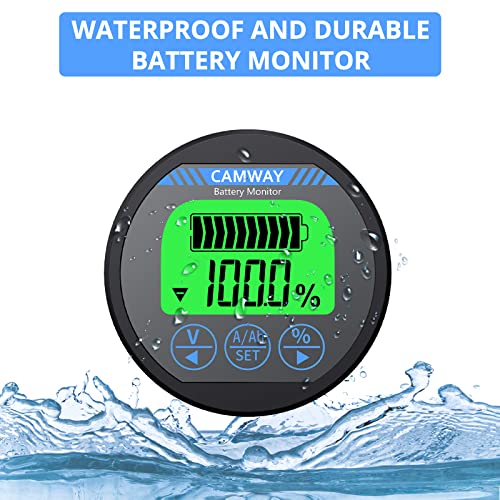



🔋 Stay charged, stay ahead — master your power like a pro!
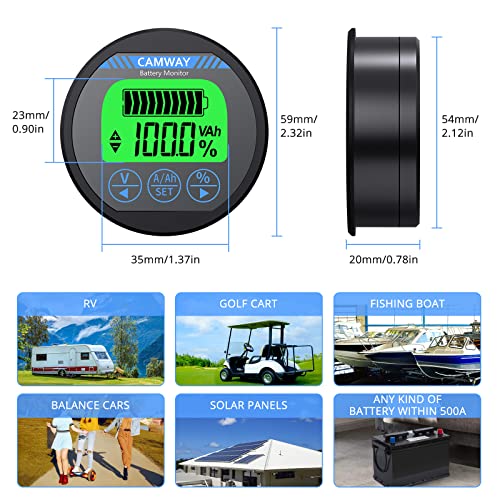
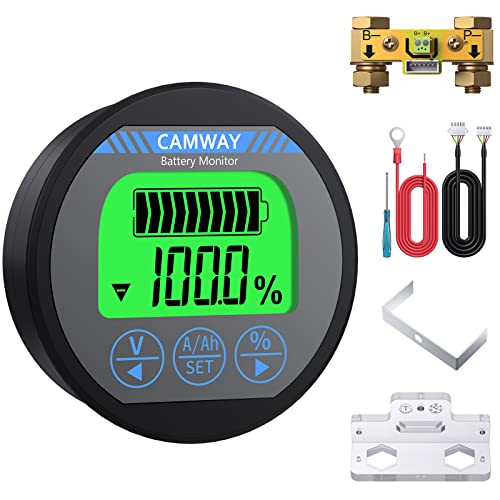
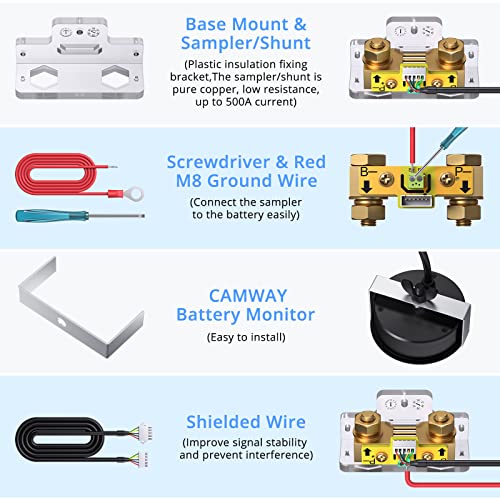
The CAMWAY Battery Monitor is a robust, all-in-one voltmeter and ammeter designed for professional-grade battery management across 8-120V systems and up to 500A current. Featuring a 10ft shielded cable for versatile installation, a crisp backlit display, and smart data storage, it empowers RV, boat, and golf cart owners to optimize battery usage, extend lifespan, and avoid unexpected failures with precision and ease.


| ASIN | B088RG27LS |
| Best Sellers Rank | #501,538 in Automotive ( See Top 100 in Automotive ) #63 in Automotive Replacement Amp Meter Gauges |
| Date First Available | May 18, 2020 |
| Item Weight | 14.1 ounces |
| Manufacturer | CAMWAY |
| Product Dimensions | 2.32 x 2.32 x 0.78 inches |
B**S
BEST METER I'VE EVER USED.
BEST METER I'VE EVER USED. WIRED CORRECTLY SHOWS YOU CHARGING AND DISCHARGING SOC AND AMPS BOTH WAYS. GREAT FOR LEAD ACID BATTS AND LITHIUM. INSTRUCTIONS ARE GREAT TOO. EASY SETUP AND LOW MILLI AMP DRAW AT IDLE. 12 -120 VOLT RANGE AND 500 AMP CAPACITY. 5 YEARS AND STILL WORKING PERFECTLY. KEEP THE INSTRUCTIONS IF YOU CHANGE THE BATTERY SYSTEM FOR MINOR ADJUSTMENTS.
W**B
350 amp unit: Seems to work well / very cost effective ... UPDATED
At one fifth the price of the Victron I think this will likely do a reasonable job. I did an accuracy test as the photo shows. What you have there is a Fluke meter showing a 5.13 amp load, while this meter is measuring that same load and shows a 5.126 amp load. For the test, this was all hooked up to a Duracell AGM running a 55 watt car headlight. I was impressed with the results. The volts came in also well under a 1% difference between the Fluke and this meter. What I don't know is how well it will track the battery SOC over time, that's a math equation using time, voltage, and current. We shall see. To start, I was most concerned about the unit measuring the current properly, and it seems to do that well. I also measured the idle current consumed by the unit itself. That consumed current is not included in the reported battery SOC. While in standby (0 amps through the shunt) the unit appears to be waking up at a 1 hertz rate to sample the current. Because of that sampling, the idle current bounces from between 1ma to what I'm guessing to be about 7ma. Just use 5ma for an average number. So at rest, this unit will consume .005 x 24 = 0.12 amp/hours per day from your battery. Since my system will be on solar this is not a concern. Well that's what I know so far... Update. So I went and bought the Victron BMV-712 for $210 to compare this unit up against. Guess what? I actually like this one better. Yeah the Victron has a bluetooth link to your phone, but honestly that's a bit of a novelty. Once you get used to your loads and battery performance, you know generally where your numbers are. It's not so hard to go look at the display. And on that note, I find the display of this unit far more pleasing that the Victron. Anyway, I was concerned about accuracy of this unit. I have a CBA IV battery capacity tester calibrated to much better than 1%. During 20 hour capacity tests (which are really neat by the way) this unit tracked almost dead nuts to the CBA battery analyzer during the duration of the test. Meanwhile the Victron didn't do as well. To give you an example the test on a 100 Ah battery was pulling 5 amps. The CBA read 4.959 amps, this unit measures 4.977 amps. And the Victron measures 4.89 amps. It always read low. And then on to consumed amp hours, a spot check during the test showed the CBA IV says 21.93, this unit says 21.95, and the victron says 21.3. Bottom line for me is this is a great unit. What I don't know is did I get lucky and get one that was spot on with the calibration. I am going to order another one and find out! For now I can say don't waste your money on the Victron - they ain't worth it!
F**S
works fine if you like the display
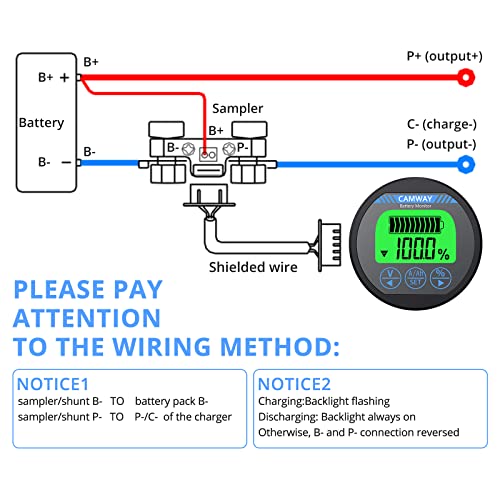
Manual is awful but operation is pretty simple. Nitpicks: * the Aili has a "set to 0% SoC at xx.xx volts" but not "set to 100% SoC at xx.xx volts". The latter is more useful IMO. * this one is a bit unfair since the pics cleared showed what data was on each screen. I think the product would be improved if all the data were shown on the same screen like B0C6T34H8X. I had a Drok that had that kind of display and loved it until my current requirements exceeded its limits. --- Here is my attempt to make sense of the operating instructions in the manual. Not sure how much formatting we are allowed here... The three buttons access 4 screens, described below. Each screen shows a 10-bar battery gauge State of Charge icon at the top and a small charge/discharge icon on the left. When charging the battery gauge icon is animated (present SoC –> 100%) and when discharging it statically shows present SoC. SCREENS the LEFT button is Voltage / left-arrow selecting this button shows the bank voltage at bottom to 2 digits of precision: XX.XXv. If the center SET button is held in this mode you can set the voltage at which the SoC is assumed to be 0%; 10.5v or whatever is correct for the chemistry. Then press SET again to save. the CENTER button is A/Ah/SET pressing the button once shows present current levels in Amps pressing the button again shows remaining Ah holding this button in the Ah display8) allows you to edit the Ah capacity (left - right button to adjust, press set to save. The left or right buttons can be held down in edit mode for rapid change) the RIGHT button is SoC%. On this screen you can reset SoC to either 0% (hold LEFT button) or 100% (hold RIGHT button). BACKLIGHT By default the backlight is ON when discharging and FLASHING9) when charging. The backlight can be toggled OFF/ON by holding the LEFT+RIGHT buttons at the same time. With the backlight disabled charge vs discharge is still displayed by small icons on the left side of the display.
T**H
Accurate
Very accurate. A little eye catching when its working.
A**N
NOT RELIABLE!
I have to recalibrate after every charge. It goes to zero both AH and volt % after golf cart is used a couple of times even though battery has plenty of charge, verified by meter on battery and multimeter. Having to recalibrate after a couple of uses is not practical and makes it unreliable .
C**S
Great monitor for the price.
So far working great. Nice to be able to monitor batteries inside. I had to buy an extension cable to reach the shunt since it was mounted far away. The light flashes when charging and is solid on when discharging. You can turn the light off so it’s not distracting by holding the two buttons down. When installing the shunt install the small cable first, then screw down the bracket, then attach battery cables. Ask me how I know lol
A**R
Only available with one size shunt
The meter itself is fine. It's a standard TR16 gauge available under several brands. It's the only brand that includes the positive lead, which is nice. The problem is, unlike other brands, it's only offered with a 500A shunt. This is too large for most applications. For Ryobi 48V mowers, I recommend the AiLi, QWork, or Coolschmax brands because you can get them with 100A shunts that will bolt directly to the battery terminal.
E**.
This has been a very easy device to add to my battery build. The instructions were readable (some people said it was an awfully translated English; I didn't find this the case at all), the display gives a very good detail on what your SOC is at, the terminals are absolutely huge! I had to find the 17" impact socket I use for my vehicle's lug nuts. I'm very confident those cables aren't moving anywhere. One thing to note is the battery wire going to the shunt; you can use either slots on the green connector, but we needed to wiggle the soldered end quite a bit for it to actually fit inside. I'm guessing a little too much solder was used on this cable, but it will go in and it also maintains a tight securement. I would also recommend to not bend that wire either, as it looks easy to break the soldered piece off. If this happens, strip a little bit of shielding off the wire and re-solder the tip. You should be good to go after that. But other than that, this monitor is surprisingly excellent!
L**N
The CAMWAY is an impressive low cost device that works perfectly. It's far more accurate than a more expensive 'Hall Effect' job I once used. It has a bright at-a-glance display that shows the net charge/discharge percentage so no fiddling about with Bluetooth and a phone. The LED backlight can be turned off if preferred. It was a doddle to initially calibrate to a small 200Ah, 100% charged, battery pack. It's a true set once and forget device. Minor Installation Problems: 1) The wingnut and bolt is cheap plastic so easy to strip the thread by moderate tightening. I used blutack and a strip of nanotape to secure it to an old desk webcam mount. 2) The shunt has M10 terminals so needed to file out the M8 lugs of 2AWG battery cables a little with a round file to fit.
Z**P
スタンドアロンバッテリーにのみ取り付けましたが、インストールはスムーズに進み、メーターは宣伝どおりに動作しています。そして、私は日本語のマニュアルとGoogle翻訳でこれを管理しました。しかし、私は英語のマニュアルが欲しかったので、昨夜売り手にリクエストしました。マニュアルは今朝のメールに含まれていました。素晴らしい製品、素晴らしい価格、優れたカスタマーサポート。
D**G
Mach einen guten Eindruck, ich konnte damit meine 200A Batterie prüfen, ob die Leistung auch stimmt, ich würde aber das nächste mal ein gerät nehmen, das gleichzeitig Strom und Spannung anzeigen kann. Aber für einen schnellen Blick auf die Batterie super geeignet.
H**Z
Après avoir configuré l'écran en indiquant le % de la batterie les indications de charge par le solaire ou l'alternateur sont fiable mais mise a zero dés l'utilisation de chauffage ou du frigo. L'ecran affiche alors zero et plus rien n'est fiable. Inutile pour son usage...
Trustpilot
5 days ago
1 month ago



