Buy anything from 5,000+ international stores. One checkout price. No surprise fees. Join 2M+ shoppers on Desertcart.
Desertcart purchases this item on your behalf and handles shipping, customs, and support to Iceland.
🚀 Upgrade to the future of wireless — speed, range, and power in one sleek card!
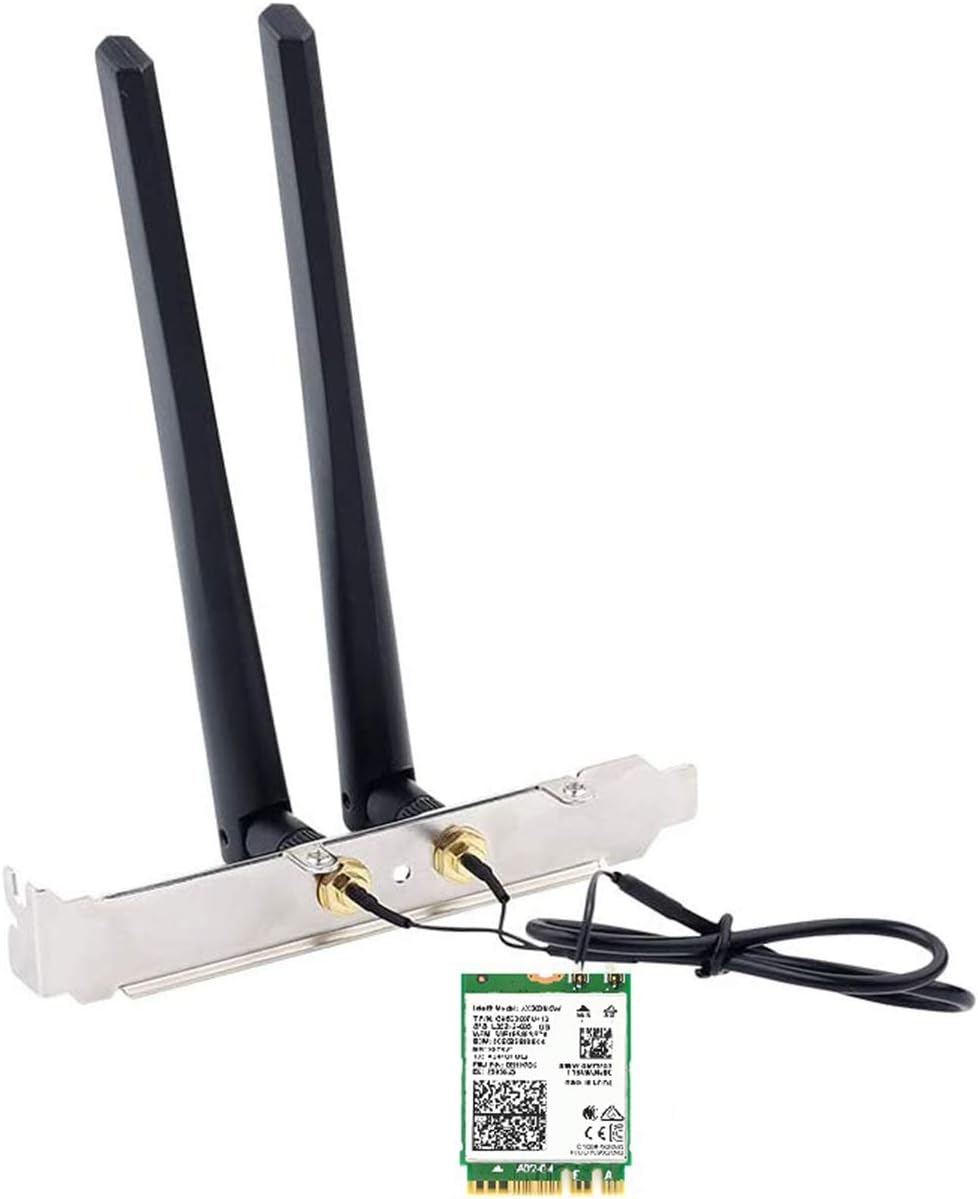
The AX210NGW DTK WiFi Card leverages Intel’s latest WiFi 6E AX210 chipset to deliver tri-band wireless connectivity up to 5400 Mbps, including the new 6 GHz band for ultra-low latency and interference-free performance. It features Bluetooth 5.3 for enhanced device pairing and audio quality, plus Target Wake Time technology to extend laptop battery life. The kit comes complete with high-gain antennas, cables, and mounting brackets for easy installation on compatible Windows 10/11 desktops and laptops, making it a future-proof upgrade for professionals demanding fast, reliable wireless networking.


| ASIN | B088NHCX46 |
| Antenna Location | Home, Gaming, Small Office |
| Best Sellers Rank | #15 in Internal Computer Networking Cards |
| Brand | OKN |
| Built-In Media | 1 x Bluetooth Header Cable, 1 x OKN AX210 WiFi 6E Card, 1 x Quick Installation Guide, 1 x Screwdriver, 1x Low Profile Bracket, 2 x 5dbi High Gain Antenna |
| Color | white, black |
| Compatible Devices | Desktop |
| Connectivity Protocol | WiFi 6 / WiFi 6E / 802.11AX |
| Connectivity Technology | WiFi 6 / WiFi 6E / 802.11AX |
| Coverage | Long Range |
| Customer Reviews | 4.5 out of 5 stars 1,353 Reviews |
| Data Transfer Rate | 5400 Megabits Per Second |
| Frequency | 2.4 GHz |
| Frequency Band Class | Tri-Band |
| Has Internet Connectivity | Yes |
| Is Modem Compatible | No |
| Item Dimensions L x W x H | 4.72"L x 1.18"W x 0.79"H |
| Item Type Name | M.2 WiFi Card AX210NGW.DTK |
| Item Weight | 80 Grams |
| Manufacturer | UFON |
| Maximum Upstream Data Transfer Rate | 5400 Megabits Per Second |
| Mfr Part Number | OKN-AX210D |
| Model Name | AX210 |
| Model Number | OKN-AX200D |
| Operating System | Windows 10 64bit, Windows 11 64bit |
| Other Special Features of the Product | 802.11AX Tri Band, Bluetooth 5.3 |
| Router Network Type | wireless |
| Security Protocol | WPA3 |
| Special Feature | 802.11AX Tri Band, Bluetooth 5.3 |
| UPC | 650728511830 |
| Unit Count | 1.0 Count |
| Wi-Fi Generation | WiFi 6E |
| Wireless Communication Standard | 802.11ax, Bluetooth |
| Wireless Compability | 802.11ax, Bluetooth |
R**H
Better wireless connection
Easy setup. Works great. Good price. Better choice over those that just plug in externally.
L**B
A Complete Solution for Adding Bluetooth and Wi-Fi to a Computer
My first go with an M.2 installed peripheral and it was super simple! Windows 11 detected it and even installed/upgraded the drivers to the most recent versions. I installed this on a Dell Optiplex using the provided holes for the antennas in the case. This required threading the studs a little to ensure they would insert all the way, but after that it was super simple. The nuts are 10mm I believe, so if you have a deep socket or a 10mm wrench you'll be able to tighten the antenna studs. The card came with 2 screws, obviously only needing one to secure the card, which was perfect! I REALLY appreciated that, as well as a small screwdriver and a bracket, which I have no idea what that was intended for. It also includes a full and half height bracket, and a case screw to secure either one of those if used. I didn't for my install. I'll submit an update to my review with the performance of the Bluetooth. The Wi-Fi works perfectly, although I'm less than 20' away from the access point. My signal is strong. I haven't streamed much yet, but there have been no issues with the content I did stream. It wasn't 4K as I don't have a 4K setup. If you're using Windows 10 and use this card, the drivers are not the latest and greatest on the disc. You may have to use Windows Update to download them. If you're using Windows 11 and you have the latest updates to the OS, don't use the disc. Again, what comes in the box is a complete solution for anyone adding Wi-Fi or Bluetooth to their computer. If you're mounting the antennas to the case via an default location on the case, you need nothing. If you're mounting the antennas on a bracket, they provide the brackets. The studs are already connected to the M.2 card. They provide all the screws you may need, even one of the tools you may need. It was worth the money for saving all the hassle I might have encountered had it not come with everything. A great purchase.
W**O
Installs in minutes and works perfectly
Installed this in my Dell Optiplex 7000 with Windows 11. Worked perfectly without any driver installation. Great signal reception and high data rates. Highly recommended.
O**7
Works flawlessly with exceptional speed!
Installed easily and flawlessly in an ASUS D700SC I7. Windows 11 recognized and installed the latest driver without issue. Speed doubled over the USB WIFI adapter to over 600 mb from 250 mb. The Bluetooth works flawlessly, even at 20 feet away as I use this computer as a theater computer in the bedroom and connect my Samsung earbuds to watch TV and not bother my wife. WIFI goes through two walls and is over 30 feet away from ASUS gaming router and still has incredible speed using Wi-Fi 6 (802.11ax), 5GHz connection.
B**8
No more USB dongles needed and plays well with Linux
This card doles out consistent Wi-Fi speeds and offers greater connection stability vs the Realtek 8832BU USB AX Wi-Fi adapter I was using. It greatly enhanced the performance of my PC and no more dongles are needed for Wi-Fi + Bluetooth for my Dell OptiPlex 7070 MT. If you're a Linux Mint/Ubuntu user, drivers for this card are readily available in the software repositories. I deducted 1 star for the Wi-Fi antennas which come loose easily when nudged and the slot plate was also a loose fit in my PC, so I opted for removing the sma connectors from the slot plate and output them to the rear of my PC case and went with an external Tri-Band WiFi 6E Antenna. If you're tired of trying to get your USB Wi-Fi dongles with work with Linux, go for the Intel AX210 instead.
J**R
Soo Much Better
I put this in an older Dell tower unit. Wow! Running both Windows 11 Home and Ununtu Studio. It worked well with Mint also.
A**N
Worked Great in Lenovo Compact Tower Desktop
My Lenovo compact tower desktop computer suddenly had no wifi connectability. I could still connect with an ethernet cable, but it looked as if the computer was never wifi capable. I tried reinstalling the drivers but nothing worked. I bought this wifi card hoping it would fix it. Although it did not look exactly like the card that came with the computer, the product information indicated it would work with an "E" notch and my card had the "E" notch. The new card came with the antennas already installed (thank goodness because you can easily mess up the antenna connector on the antenna and/or the card). It also came with a screwdriver and two different size covers for the cutouts in the desktop case. The smaller one fit perfectly in my Lenovo compact tower. Everything installed very easily. The card also came with a CD with the drivers on it, but I did not need it because as soon as I turned on the computer, the driver was already in Device Manager. When I clicked on the internet connections icon, I found my home wifi and clicked on it. The computer connected immediately and it is acting just as good, if not better, than when I first bought it.
L**X
Works but quality is lacking on components
Item is definitely necessary in today’s day and age and helped revive an older thinkcentre pc I had. The main issue is the antennas they provide. These things are CHEAP. They don’t stay upright and they feel beyond flimsy and concerning. Thankfully they work but you’re definitely getting bottom of the barrel.
H**O
Bluetooth機能が大助かり
問題なく快調に使えています。 パソコン側で行う各認証でスマホ連携によるパスキーにBluetoothが使われますが、これを付けていたお陰で最近とても役に立っています♪
M**R
good
working fine.
A**ー
USB子機とは違うな!
一度PCを組んでからの増設になります。 マザーボードはB760 Pro RS/D4です。他のレビューの方もいたので参考になりました。 取り付けは非常に簡単でした。取り付けてから少し時間が経つと、Wi-FiとBluetoothのドライバーがインストールされるのが、デバイスマネージャーを見ると確認ができました。 取り付けてから今まで、一度だけWi-Fiのマークが消えた事がありましたが、Windows UpdateによるものでPCを再起動したら改善されました。 今までUSB子機タイプを使用していましたが、頻繁に接続が途切れてストレスになっていました。 今回のWi-Fi LAN カードにしてからは満足しています。ただルーターがacまでの対応なので、axの接続スピードが出るか確認できないのが残念です。 Bluetoothは一度も不具合なく使えています。ANKERとSONYのイヤホンです。
H**O
パスキー認証
アンテナ、押え金具、ネジ、拡張スロットカバーがセットになっており、ネジ止めするだけで使用出来ます、 Bluetooth、Wi-Fiが使用出来るようになり、楽天証券等パスキーでスマホから認証出来るようになり、取り付けて良かったです。
C**A
wifi5から6へ。快適です。
デスクトップwin11で取り付け後自動的に認識され快適に使えています。M2スロットに固定するネジも本体同梱で付属されています。取付説明書がなかったので戸惑いましたが、本体と同梱されている小さな長四角の金具は、アンテナ線抜け防止のために固定ネジに通して付けるものでした。あと取付で気をつけるところはアンテナ先端部分の金具をパネルに取り付ける際、取り付けられているボルトを一度外してパネルを挟んでからしっかりボルトで固定しアンテナを取り付けましょう。適当にやると固定せずに同梱の可動する黒色のアンテナと挟んで取り付けて配線を破損してしまうミスもありそうです。機能的には速度もwifi5から6に変えると安定してダウンロード約1.8倍になり満足しています。ブルートゥースも問題なく接続できています。
Trustpilot
1 month ago
3 days ago