Some deliveries may take a little longer than usual due to regional shipping conditions.

DOWNLOAD THE APP


Customer Services
Copyright © 2025 Desertcart Holdings Limited
DOWNLOAD THE APP

📶 Unlock global digital voice freedom with AURSINC’s powerhouse hotspot!
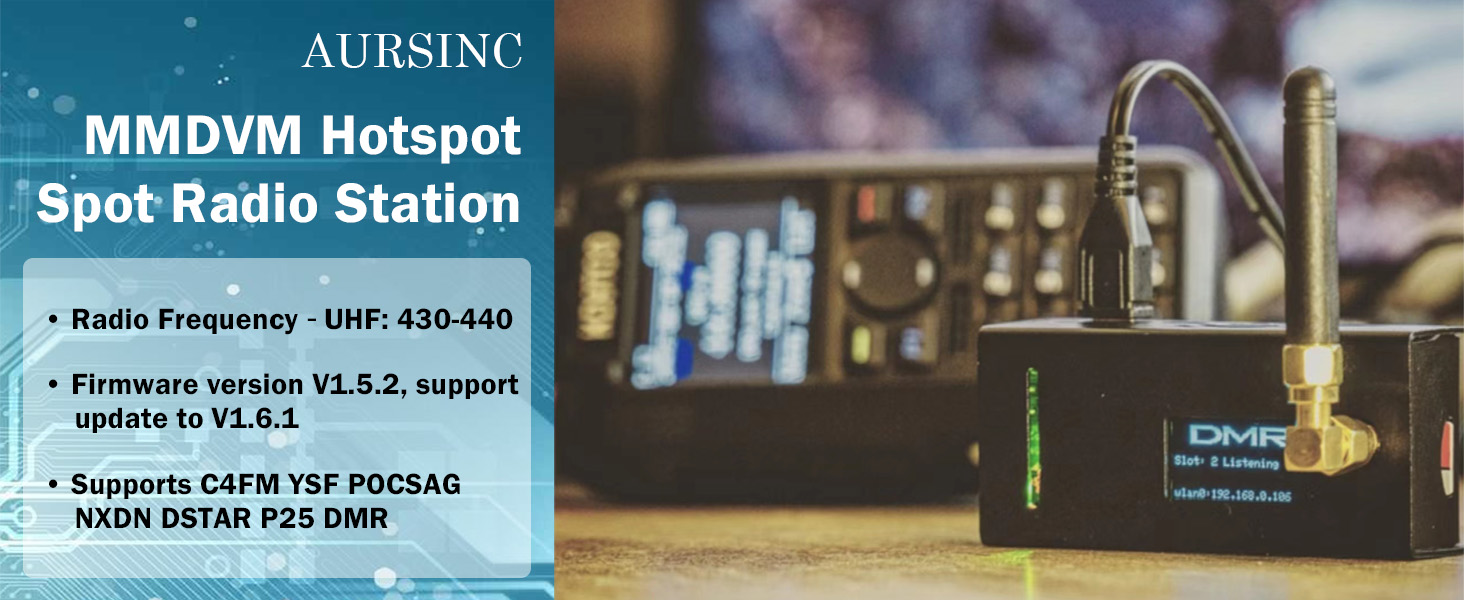
The AURSINC MMDVM Hotspot integrates a Raspberry Pi Zero 2W with preloaded Pi-Star firmware V4.1.5, offering ultra-fast processing and stable 2.4GHz WiFi plus Ethernet connectivity. It supports a wide range of digital voice modes including C4FM, YSF, NXDN, DSTAR, P25, and DMR, enabling seamless worldwide communication. Designed for easy setup and mobile use, it includes a micro USB charging cable and defaults to zero RX/TX offsets for hassle-free operation. Ideal for professional and enthusiast ham radio users seeking reliable, versatile digital voice access.


| ASIN | B088PP3TVR |
| Best Sellers Rank | #147,070 in Electronics ( See Top 100 in Electronics ) #136 in Computer Networking Modems |
| Customer Reviews | 4.0 4.0 out of 5 stars (196) |
| Date First Available | May 16, 2020 |
| Item Weight | 4.6 ounces |
| Manufacturer | AURSINC |
| Product Dimensions | 4 x 4 x 2 inches |
M**E
Definitely does a great job for those with limited digital repeater access
If you are reading this, then you know what a MMDVM hotspot does. This one, jumbospot, zumspot, openspot, they are all pretty much the exact same thing. They take your digital radio and connects you to a reflector/repeater somewhere else in the world via the internet. While local digital repeaters can do this to an extent, a hotspot can connect you anyplace in the world. And this one does a wonderful job at it. I have a Yaesu FT-70DR handheld radio. It does conventional analog as well as C4FM/Fusion/FSY digital. This MMDVM has no problem connecting to it. If you aren't into Yaesu, this MMDVM can also do DMR, DSTAR, P25, and other modes. There's even the capability to cross mode on some modes. Set up was easy. Turn the MMDVM on; wait a couple minutes; look at your tablet, smartphone, pc, or laptop for wifi connections. Besides the WIFI you're expecting to normally see, you'll see a new one called Pistar. Once you know that IP address, you can log into it and set it up to USE YOUR WIFI. I bought this one because it came with a micro-usb to ethernet dongle. I wanted to plug directly into my router and not use wifi. I still set up the wifi to get use to it, but I find ethernet is more stable with all things. If you only want to use wifi, you can buy this same exact MMDVM from the same seller here on amazon for a lower price. NOTE: If you're going to use ethernet, there's two Micro-USB ports on the MMDVM. Looking at them, put your power (Cell phone charger with more than 1.5amp (1500ma) into the RIGHT plug. Most outer Micro-USB. Plug the ethernet dongle into the micro-usb to the LEFT of the power. I had it the other way around (You'd think it wouldn't matter), but then the MMDVM ONLY saw the WIFI. It didn't see the ethernet. When I swapped the plugs, my router saw the ethernet and gave it an IP address and the MMDVM gave priority connection to ethernet over wifi. This is definitely a great device. If you don't need the ethernet, get the $105 one. Same thing. You can always buy the ethernet dongle later if you really want it. I do recommend that you educate yourself on how an MMDVM works, the Pi-Star operating system, and how to get your radio to connect to it. It's not hard. It's not rocket science. But if you don't prepare a little before jumping in, you'll get frustrated. Simply go to youtube and type in MMDVM setup or MMDVM and your radio model; or something similar. You'll find a ton of videos on it. Don't forget to send Al Gore a thank you note for making the internet possible. But after watching a couple videos, it's very easy to set up. There aren't any on the ethernet connection. It should have been plug and play, but I learned through trial and error about the ports and priority to make it work. But I had the wifi connected, and my radio connected, in less than 15 minute. (With prepping by watching some youtube videos). Then go to the pistar.uk site and find all the reflectors, rooms, repeaters, etc. whatever your radio calls them, and you can go to those places and talk away. I've had this for 4 days and have spoken to other hams in about 15 states and 4 countries already. Also, mine came with firmware from March 2019. That's not bad, but there is a newer one out. When you go to pistar.uk there is a download section where you can get the most recent firmware. (Watch a youtube video on that also and you'll be fine). Remember: 1. 5v cell phone or similar Power supply of 1.5amp. Mine is plugged into a usb port in my network router being I'm using ethernet. 2. Make sure the SD Card is class 10. Mine was, but verify it. It came with a 16gb card, but even an 8gb is more than enough. Just hard to find 8gb. 3. Update the firmware if it's not the newest 4.1.2 . When you log into the MMDVM, look at the very top right of the page and you'll see the firmware version. Mine was 3.x.x something or another. 4. Watch videos on how to set it up. 5. Go to pistar.uk for any details about the software. 6. Go to the the "Jumbospot and other mmdvm hotspot" facebook page, join, and ask questions. People are great at helping. Hope I provided enough info. If you know what a hotspot is; know what it's for; definitely want to buy one; then this is a solid choice. No need to spend $280+ on an Openspot 3. Plug, that is completely sealed. These MMDVM have an external antenna jack. So I personally didn't use the 1-2 inch uhf antenna it cam with. I put on one of my spare dual band 15" whip antennas for my portable. 3.5db gain over the little thing it comes with. The stock antenna is fine for around the house. With my whip, I can go about a block away down the street. When you're in the house area, keep your radio transmitting at LOW POWER. But if you go further away, then you can go back to higher power. The MMDVM only puts out 10mw. But you don't want to be 10 feet away in your shack and shove 5 watts down it's throat. Anyway; if you're interested in a hotspot for your ham radio, this is an excellent choice.
C**O
Very happy
If you're interested in digital ham radio, you absolutely need to check out the AURSINC MMDVM Hotspot Spot Radio WiFi Digital Voice Modem! The price point on Amazon is fantastic, making it an incredible value for both newcomers and seasoned operators looking to expand their capabilities. Setup was a breeze; I had it unboxed and connected to my network in under ten minutes. The instructions were straightforward, and the process was smooth from start to finish. There was no complicated configuration—it just worked right out of the box. The performance is truly impressive. The signal is crystal clear, and I've had zero issues connecting to various digital voice modes. It runs reliably and provides excellent range and stability for home use. For anyone looking for a high-quality, easy-to-use, and affordable hotspot solution, this AURSINC model comes highly recommended!
L**G
Almost 100% perfect
Great for the money. Setup was a breeze. I had to take one star away for the occasional lockup I get. It seems after running for about 3 days it has a tendency to lock up. A simple Reboot and I am back up and running. Other than that it works flawlessly.
Y**Y
Last for 5 minutes and died
This would be my second hot spot for my DMR/P25 radios. Just wanted a second hot spot for when I'm traveling or on the go where I can tether to my mobile phone. I'm fully aware on how to setup these hot spot and consider proficient in Linux. Well, this one is a dual band (2m/70cm) and though it's much cheaper than the name brand. It's sill operates in simplex and can't do full duplex like the more expensive one. The size is small and compact, pretty much comes with everything you need to get talking thru DMR/P25 or other digital formats. Received this and again, this would be my second device but in dual band. Plugged it in and let it boot up and setup for around 5 minutes. I keep on waiting and check the wifi and did not see anything pop up on my computer. I popped the case (which is very nicely made) and visually check all the pins and solder joints as I have heard folks been having issues with this particular model as I heard the company has switched manufacture of the main and modem board. Plugged it in again and waited 10 minutes and still nothing. The top lights stopped blinking and I picked up the unit and the underside where the CPU was extremely hot. I didn't know how a USB powered device can get so hot. Well, I then smell something like a capacitor had popped and had your typical electrical burnt smell. I removed the SD card out and double checked the file and everything looks good. At this point, I wasted several hours already have need a hot spot since I'm flying up north in a day. I end up returning this device. Maybe I'll try this brand again later down the road.
J**R
DMR hotspot
No problem with the install. Works flawlessly with my DMR radio
Trustpilot
2 months ago
1 month ago