🚀 Double the speed, half the hassle — your NAS just leveled up!
The Synology E10M20-T1 is a high-performance PCIe adapter card combining a 10GbE RJ-45 port with dual M.2 NVMe SSD slots. Designed to accelerate both network bandwidth and cache I/O on compatible Synology NAS devices, it frees up primary drive bays while delivering up to 10 Gbps transfer speeds. Engineered with enterprise-grade quality and backed by a 5-year warranty, this card is ideal for professionals seeking to maximize their storage and networking efficiency in a single expansion slot.
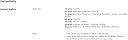
| ASIN | B089RHK7CF |
| Best Sellers Rank | #110 in Internal Computer Networking Cards |
| Brand | Synology |
| Color | RJ-45 |
| Compatible Devices | Desktop |
| Customer Reviews | 4.4 4.4 out of 5 stars (156) |
| Data Link Protocol | Ethernet |
| Data Transfer Rate | 10000 Megabits Per Second |
| External Testing Certification | Não aplicável |
| Hardware Interface | Ethernet |
| Item Dimensions L x W x H | 7.89"L x 2.82"W x 0.7"H |
| Item Weight | 12 Ounces |
| Manufacturer | Synology |
| Mfr Part Number | E10M20-T1 |
| Model Number | E10M20-T1 |
| UPC | 846504003488 |
| Warranty Description | 5 year |
E**H
Work of art, even works great on my z490 Asus Strix motherboard with i9-10900K running Windows 10
I bought this and it didn't work in my particular Synology NAS model, so I thought hmm, let's try this in my Asus z490 Windows 10 PC. And I got very lucky. Here's a hint: with 2 cards, and 4 NVMe, I get 10,000MB/s See the attached AS-SSD and CrystalDiskMark NVMe performance image. Without a driver, the 2 NVMe drive show up fine in Windows 10, but to get the Acquantia NIC chip to function you must use the following driver: Driver: Marvell Acquantia AQC107 driver (v2.1.21.0 in my case) Download: Go to Marvell, Support, Ethernet, Driver Download section and download the Win10 driver for part# AQC107 Note: Marvell purchased Acquantia recently The card has a PCIE 8-lane interface. The 10gbe NIC would use up 1 to 1.2 of those lanes, leaving 7 lanes or so for the 2 NVMe drives. I am not sure if they are using a PCIE switch to balance that out - which would be the most ideal way to do it. Either way, this is magic. With 2 of these E10M20-T1 cards, I finally have 2 10gbe NICs and 4 Samsung 970 Evo Plus NVMe sticks feeding the CPU via 16 PCIE Gen3.0 lanes (My Samsung 980 Pro NVMe runs off slow PCH lanes for my boot drive). Oh...I bet tis works fine in a supported Synology NAS as well. But do not think that it will work if it is not explicitly supported by your NAS model. Synology explicitly stops (perfect compatible) cards from add too much really cool functionality to their NAS units. And at least as of now Synology does not allow NVMe drives for storage, only for cache for SATA HDD and/or SATA SSD. The card is a work of art. I rarely see this level of quality even at the enterprise level. I am sure this works well in the compatible Synology NAS units - read the compatibility list and don't think it is just a suggestion. I can't say if this will work for you in a Windows 10 setup (know the risk) but I can tell you that it worked for me. The toughest part was figuring out what vendor Synology used for the NIC chip as the NVMe just worked. Once I found that is was Acquantia I had to figure out that Marvell recent purchased them. The driver was sitting there say, download me and go for it - and I did. My NAS setup DS1621xs+ (does not support this E10M20-T1 NIC/NVMe card) OS/DSM 6.2.3-25426 Update 3 My Windows 10 x64 setup Motherboard: Asus ROG Strix-E (bought summer of 2020, cheap but effective motherboard, USB 3.1 Gen2x2, but no Thunderbolt) CPU: 10th Gen i9-10900K (stock speed but will do 5.3Ghz, bought summer of 2020) RAM: G.SKILL TridentZ Series 64GB (4 x 16GB) 288-Pin DDR4 SDRAM DDR4 3400 (PC4 27200) Model F4-3400C16Q-64GTZ (running stock at 2133mhz, quite a few years old) PCIE slot usage: Each of the 2 E10M20-T1 [PCIEx8] cards runs in the 2 CPU-wired PCIEx16[physical slots] - so a x8/x8 slot setup (I am a developer, not a gamer) Good luck
V**T
10Gbe AND nvme disk caching -- I've been waiting for this!
I hated the fact that my Synology NAS had only one pcie slot, which until this adapter card was released, had forced me to have to choose between using 10Gbe or ssd disk caching with my NAS. I've wired my house with 10Gbe for a couple of years now, so I was looking to this card being released so I could finally get both 10GBe and SSD caching to max out the speed of my NAS. The card did not dissappoint. It was easy to install -- took less than 10 minutes moving my NVME SSD storage over from the old card to this new one. And the 10GBE connection was automatically recognized by the NAS and immediately boosted the speed of the network connection -- allowing me to use my NAS now as an everyday storage for the computers in my household. Great product, very well built with high-quality components and very well packaged by Synology.
P**7
Hardware ware is perfect. Software need inprovements.
Mixed feeling about this. Hardware is perfect - everything works out of the box with 2 Samsung Enterprise Class 2210 drives however very little performance improvement in day to day usage. Tried both Read-Wright and Read Only setups, Each with "skip sequential I/O" ON or OFF. Very little real life performance improvement over none cache setup. Installed in DS1819+ and mostly use for Plex, Moments, Computer Back Ups and Surveillance station. Didn't notice much improvement in nether of this apps load speeds or less access to HDDs - same constant noise HDDs been accessed even with Read-Wright with "skip sequential I/O" unchecked. Gave time for cashed to be populated and with R-W-SecI/O unchecked my raid filled 750-800G out of 860G or so withing couple of weeks. Hope the improve Cache logic with upcoming DSM7. For home use I wouldn't buy this considering cost (650USD set with 2x 960G NVMe SSDs). Improvement simply is not there. I would rather but 2 more 14-16TB HDD instead and 20$ 10Gbe el-cheapo card.
C**W
A shame this card doesn't come already in the NAS
But it really does work great. NAS is soooo much faster with this card installed. I'm using dual 2TB NVMe for the cache. Really happy with this card. Recommended!
F**O
Easy to install
Equipment 100%, easy to install.
E**N
Good
Fast And Good
J**E
Must have for 10gbe network.
Get the most out of your nas with this speed demon!
A**ー
これが必要な製品はかなり限られるはずなので、購入対象となる人は大変少ない製品だと思いますが、必要な人にとっては大変ありがたい製品です。 SSDキャッシュ自体が大容量のファイルを多数書き込む際に役に立つ形であり、ネットワークが 10G化しているのが前提なので、その意味でも大変ニッチな製品であるということでしょうか。 でも、ネットワーク部分の速度はきっちり出ますし、SSDの方は全速力でなくとも用途において問題なしという感じです。 これを入れる前と後で、一気に送信できるファイルのサイズがかなり変わりましたので、その意味では必須だったかと思います。 ただ、DSMが7に変わってから書き込みSSDキャッシュが有効になる条件が変わったのか書き込み速度がガクンと減っていたので、フルに性能を発揮できていたのはそれまでの間だったのが少し悲しいところです。 まぁ、そうは言っても大変満足していることに変わらず。 とても良い製品です。
I**.
I did bought this one in order to replace the working (for several years already) Synology M2D17 M.2 and to add 10Gb network (Bell has now 3Gb speed, possible 10! in the near future) Didn't accepted the previous two NVMe 500 Gb cards Bough then two M.2 2280 NVMe SSD SNV3410 800GB Neither those worked Unsure if I want to keep-it and go back the cards which actually worked as cache
B**I
Good
済**み
E10M20-T1のSSDキャッシュを使用する場合、SNV3400とSNV3500のみ互換性があります。 表記してください。
Trustpilot
1 month ago
1 week ago