Buy anything from 5,000+ international stores. One checkout price. No surprise fees. Join 2M+ shoppers on Desertcart.
Desertcart purchases this item on your behalf and handles shipping, customs, and support to Iceland.
📸 Print your moments, dock your style — instant memories, no waiting.
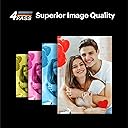
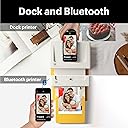
The KODAK Dock Plus is a premium 4x6” photo printer designed for millennials who crave instant, high-quality prints directly from their smartphones. Featuring an integrated docking station that charges your device while printing, advanced 4PASS dye sublimation technology for durable, vibrant photos, and seamless Bluetooth connectivity via the KODAK app, it transforms your home into a creative photo studio. Perfect for preserving memories, gifting, or decorating, this compact printer delivers professional-grade prints in under a minute with effortless operation.


| ASIN | B088PRX3BD |
| Additional Printer Functions | Print Only |
| B&W Pages per Minute | 1 ppm |
| Best Sellers Rank | #1,419 in Office Products ( See Top 100 in Office Products ) #2 in Desktop Photo Printers |
| Brand | KODAK |
| Built-In Media | Inkjet Cartridges, Paper |
| Color | Yellow |
| Color Depth | 36 bpp |
| Color Pages per Minute | 1 ppm |
| Compatible Devices | Smartphones, Tablets |
| Connectivity Technology | Bluetooth, Wireless |
| Control Method | App |
| Controller Type | Android, iOS |
| Customer Reviews | 4.2 out of 5 stars 13,043 Reviews |
| Dual-sided printing | Yes |
| Duplex | simplex |
| Global Trade Identification Number | 00192143002628 |
| Hardware Interface | USB Type C |
| Ink Color | Yellow, Magenta, Cyan, Black |
| Item Dimensions D x W x H | 4.5"D x 8.5"W x 2"H |
| Item Weight | 1366 Grams |
| Manufacturer | Prinics Co., Ltd. |
| Maximum Copies Per Run | 1 |
| Maximum Copy Resolution Black and White | 1200 dpi |
| Maximum Copy Resolution Color | 1200 x 1200 |
| Maximum Copy Speed Black and White | 1 ppm |
| Maximum Media Size | 4 x 6 inches |
| Maximum Print Resolution Black and White | 300 dots_per_inch |
| Maximum Sheet Capacity | 20 |
| Maximum print Resolution Color | 300 Dots Per Inch |
| Model Name | Dock Plus |
| Model Number | CAR-PD460Y |
| Model Series | Kodak Dock Plus |
| Number of Drivers | 2 |
| Number of Trays | 1 |
| Other Special Features of the Product | Borderless Printing, Docking |
| Output sheet capacity | 50 |
| Paper Size | 4 Inches |
| Print media | Glossy photo paper |
| Printer Connectivity Type | Bluetooth, Wireless |
| Printer Output Type | Color |
| Printer Type | 4PASS Dye Sublimation |
| Printing Technology | 4PASS Dye Sublimation |
| Resolution | 300 x 300 |
| Scanner Type | Portable |
| Special Feature | Borderless Printing , Docking |
| Specific Uses For Product | Home decoration, gifts, holiday presents, printing photos, sharing with friends and family, Office, School |
| Total USB 2.0 Ports | 1 |
| Total Usb Ports | 1 |
| UPC | 192143002628 |
| Unit Count | 1.0 Count |
| Warranty Description | 1 year |
| Warranty Type | Limited Warranty |
S**4
Amazing Quality and Fun to Watch!
The KODAK Dock Plus Instant Photo Printer is an absolute game-changer! I’ve always loved the idea of printing photos on the spot, and this printer delivers exceptional results with ease. The quality of the 4x6 prints is fantastic – vibrant colors, sharp details, and the perfect size for framing or creating photo albums. The setup was super simple, and connecting the printer to my phone via the app was a breeze. It prints quickly, and the photos come out dry, smudge-proof, and ready to enjoy immediately. The 90-sheet bundle gives me plenty of paper to print all my favorite memories, and it’s a great value for the price! What makes it even cooler is watching the printer in action! It’s so fun to see the photo gradually appear, and it adds a little extra excitement to the experience. It’s like a mini magic show every time you print! The fact that this printer is compact and portable is a huge bonus. Whether I’m at home or on the go, I can print memories with family and friends wherever I am. This is such a fun addition to any gathering or special event — we’ve already used it for family parties and to create scrapbooks. Overall, I highly recommend the KODAK Dock Plus Instant Photo Printer! It’s perfect for anyone looking to print high-quality photos instantly with minimal hassle. Whether you’re capturing vacation memories or printing your everyday moments, this printer is a fantastic tool!
S**M
Well worth the low price!
I first used this product at work. I was so impressed, I bought one for home. The photos are clear and vibrant. It is so easy to set up and use. Great product!
T**Y
Great Baby Shower Gift!
This is a great baby shower gift!! I have given one to each of my nieces and they love them. So easy to keep your baby book pictures up to date! Great picture quality and easy to use. Highly recommend!
T**S
Very poor instructions. For something so simple, instructions should have been easy.
For something you might think should be simple... print a picture from my phone, Kodak made it incredibly difficult. First, the instructions are so TINY I had to scan them into my computer and enlarge them. Even then, at the largest I was able to clearly make them, they were so small they were difficult to read. I suggest buying a microscope with this product to read the instructions. Then again, the tiniest instructions were just the safety precautions, so I suppose you can get by without reading those. The instructions leave so much out. "Just launch the app, choose photo, select print number, select printer icon." Right. Very little in those steps matched what we experienced on our phone. In the instruction images, step 3 has a hand pointing to the lower right icon that says “copy.” The instructions call that “Select print number.” I can’t imagine how those relate. The instructions just leave it there. There is an extraneous asterisked note: "*Select SNS if you want to print the photo from it." Nothing else about SNS in the instructions, just a random phrase in the "Printing in the App" portion. Nothing in the text above that linked to the asterisk. First, don't download the app until you have the printer connected to your phone through your Bluetooth configuration. Otherwise, on Android, you'll repeatedly be taken to the system app settings page instead of the app. You'll have to uninstall the app, turn off the printer, turn on the printer, connect the phone to the printer through Bluetooth, and reinstall the app to get it to work. In the app, the Bluetooth icon starts red. When the App's Bluetooth icon is YELLOW, it's ready to print. Yellow doesn't indicate to me something is ready. Green or blue would have been more appropriate for "ready" or "go." For some reason, the phone's native photos received a warning about low resolution. So far, only photos received from another phone seem to be full resolution. We didn't notice a difference in print quality, however. If you get a "jam..." good luck. On the second photo we tried to print we received a paper jam. It didn't look crumpled or mutilated, it was just half-way through the printer. We followed the instructions on "Paper jam." The printer made a bunch of noises. The paper stayed in place. We had to remove the paper tray and the ink cartridge and pull very hard to get the paper out. It ruined the paper in the process. It appears we can only load one page into the printer at a time or it "jams." We don't want to waste the paper, so we're hesitant to load more than one sheet at a time. Finally, the printing process is slow and cumbersome. It prints the photo in four SLOW passes. Yellow forward and back, Magenta forward and back, Cyan forward and back, and a clear coat pass called "Protect" forward and back. I expected more advanced technology at this stage in the game. We're very disappointed in this printer. If I had known how poorly designed it is, we'd have paid a bit more money and chosen a better product.
K**0
Comparable to Walgreens or Walmart prints
*tip* If you want to cancel a print before it starts and wastes a sheet (because I was about to print a duplicate on accident), double click the print button. Printer requires the app to use. This is great as it is convenient to print at home and not go somewhere or wait for prints to ship. You can only select and print up to 5 pictures at a time, no photo dumping. Takes a touch over a minute to print each photo. You must have the app open and tap after each print before it will do the next. I found it easier to just do one at a time as it struggled to continue with I selected more than one photo to print at a time. The image quality isn’t great, the color is slightly off and it lacks the same definition as a good quality print (no it’s not my picture, I even did a professional quality phot and it wasn’t printed great). Ink comes with your paper refills, so you get the exact amount of ink for the amount of sheets you order. Overall, it’s better than my regular printer. It is more convenient. Great for printing pictures for my kids to have in their rooms, for around the house, sending to friends and family. Just not for framing.
C**E
Instant quality photo
Very easy to use ,perfect and quality photos
M**N
Great gift
We bought for our 9 year old for Xmas and she LOVED it. Worked out perfectly. Being wireless really helped with ease of usage. Battery lasted longer than I thought it would buy, ink ran out faster than i figured. All- in-all, good purchase
M**Z
"Photos with professional studio quality from the comfort of my home"
This is an excellent option if you are looking for a simple and high quality way to print souvenirs from home. The Kodak Dock Plus is an instant photo printer designed to produce 4x6-inch photos (postage size) directly from your smartphone. The truth is that I loved it and I enjoy it a lot creating beautiful memories
A**R
Problem fixed
Had a defective piece which I got because it was printing some lines. Had contacted the service center replacement is on its way. So upgraded the rating. Hopefully it works fine
A**W
Amazing
This printer is small and compact. Very easy to use. Printer quality is good.
L**E
C’est pratique
Ça fonctionne bien, ça fait des photos un peu pales mais correct pour dépanner à la maison.
J**K
Very easy to set up, good quality pictures.
Easy to set up, great quality prints. No issue, no problems.
C**0
Bon achat
Parfait !
Trustpilot
4 days ago
1 month ago