
DOWNLOAD THE APP


Customer Services
Copyright © 2025 Desertcart Holdings Limited
DOWNLOAD THE APP
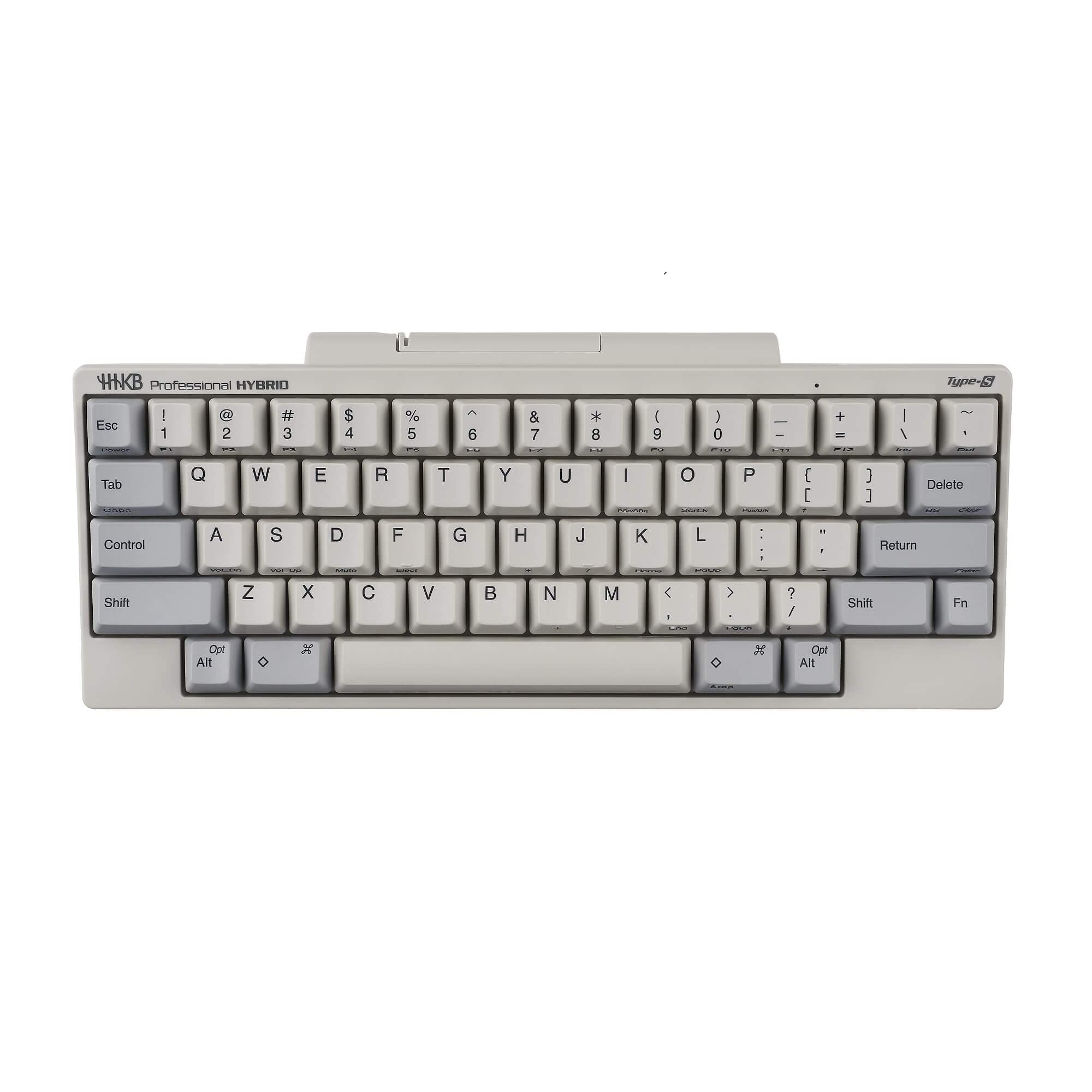
Capacitive non-contact method without chattering, ideal for high-speed input, ideal key touch and long life without getting tired even after long-term use "Type-S" key structure with excellent Bluetooth connection and USB connection (Type-C), key map change function, Speed (high-speed typing) and Silent (quietness). In addition, it is a keyboard with all the functions you can hope for, such as rational keyboard layout and 3-step tilt adjustment. * USB cable (Type-C) is not attached to this product. (Please use a commercially available USB cable.) Review: Grail quest complete - Thanks to a Japanese cult classic, my keyboard grail quest has finally come to conclusion. ☀️ Lubed Topre-switches for the win! It’s such a distinctive feel. I went for throw-back ‘90s colors. I mean sure it's still in the honeymoon phase for me but this is the greatest keyboard I've ever used as of now. ≫ Lubed Topre electro-capacitance switches with dampening O-rings. A rubber dome and spring mechanism makes for the distinctive feel and satisfying thock sound. Review: I'm absolutely LOVING this board! - I never thought I would really like this keyboard. I thought it would simply be a learning experience, and I would end up selling it on eBay or something. Once I got it though, did a couple simple mod's, and spent some time learning the very different layout (from anything I've ever used), I'm now using this as my "daily driver", and REALLY enjoying it. First off was the whole idea of a relatively quiet keyboard. I've had several MX-style keyboards, and have really enjoyed using them. I've always been a tactile switch fan, so at least this keyboard had that going for it. After spending some time typing on the Topre switches, I have found I like the experience over a regular tactile MX-style switch. I did take the board apart and lube the rails on the sliders, and I really notice the difference in smoothness and sound. After the lube, the keys move just a wee bit more smoothly, and even the very tiny amount of rattle is gone. This is a quick mod, and I highly recommend it. Next I would say is the materials. I have owned all-plastic boards in the past, and I just couldn't get beyond the plasticky sound. Given all the unique attributes of the Topre switches, that feel and sound is not an issue in this board at all. Despite no foams in the board at all, nor applying anything mod I would normally do (like the tape mod), I love the sound of this board. I do believe my co-workers appreciate the sound as well. :-) Plastic is plastic, so I can't say the board is made of super-high quality materials. I own boards with aluminum, copper, and carbon fiber, so I am familiar with really premium materials on boards. All that said, despite the basic material being plastic, it does not interfere with the functionality or enjoyment of using this board in any way. When I tried one of the non Type-S boards, I think the plastic material was more obvious there, and I ended up returning that one. This Type-S board with the lubed sliders really sounds great I think, and doesn't feel cheap at all. Finally, the layout. I was a programmer for decades, but I didn't get this board until I had retired from coding. That said, I'm definitely a keyboard nerd, and don't mind the various combinations of keys used to do things other boards do with a single key (e.g., arrow keys, function keys, Home, End, etc.). After having used it now for a couple weeks, things like selecting and copy/pasting text is getting much faster, as is quickly navigating using keys like Home and End. This will undoubtedly continue to improve and get faster over time. So far, they key mapping software has worked without a hitch. The two AA batteries are holding up very nicely. The keyboard has been a joy to commute/travel with. The Bluetooth functionality has worked perfectly between my PC at home and my Mac at work. Bottom line for me: I own four other MX-style keyboards ranging in price from $70 to almost $500. I like them all, but they're all currently sitting in my closet while I use and enjoy this board every day. Yes...$300 is a lot for a board. That's a serious financial commitment. I can only say having spent more on other boards, this was $300 well spent, and I'd do it again. I REALY like this board, and intend on continuing to use it as my daily driver for the foreseeable future! I've never written an desertcart review this long, but that's how enthusiastic I am about this board!
| ASIN | B082TQK2SB |
| Batteries | 2 AA batteries required. (included) |
| Best Sellers Rank | #2,734 in Computer Keyboards |
| Customer Reviews | 4.3 4.3 out of 5 stars (386) |
| Date First Available | December 26, 2019 |
| Item Weight | 1.19 pounds |
| Item model number | PD-KB800WS |
| Manufacturer | PFU |
| Product Dimensions | 1.57 x 4.72 x 1.57 inches |
A**N
Grail quest complete
Thanks to a Japanese cult classic, my keyboard grail quest has finally come to conclusion. ☀️ Lubed Topre-switches for the win! It’s such a distinctive feel. I went for throw-back ‘90s colors. I mean sure it's still in the honeymoon phase for me but this is the greatest keyboard I've ever used as of now. ≫ Lubed Topre electro-capacitance switches with dampening O-rings. A rubber dome and spring mechanism makes for the distinctive feel and satisfying thock sound.
E**N
I'm absolutely LOVING this board!
I never thought I would really like this keyboard. I thought it would simply be a learning experience, and I would end up selling it on eBay or something. Once I got it though, did a couple simple mod's, and spent some time learning the very different layout (from anything I've ever used), I'm now using this as my "daily driver", and REALLY enjoying it. First off was the whole idea of a relatively quiet keyboard. I've had several MX-style keyboards, and have really enjoyed using them. I've always been a tactile switch fan, so at least this keyboard had that going for it. After spending some time typing on the Topre switches, I have found I like the experience over a regular tactile MX-style switch. I did take the board apart and lube the rails on the sliders, and I really notice the difference in smoothness and sound. After the lube, the keys move just a wee bit more smoothly, and even the very tiny amount of rattle is gone. This is a quick mod, and I highly recommend it. Next I would say is the materials. I have owned all-plastic boards in the past, and I just couldn't get beyond the plasticky sound. Given all the unique attributes of the Topre switches, that feel and sound is not an issue in this board at all. Despite no foams in the board at all, nor applying anything mod I would normally do (like the tape mod), I love the sound of this board. I do believe my co-workers appreciate the sound as well. :-) Plastic is plastic, so I can't say the board is made of super-high quality materials. I own boards with aluminum, copper, and carbon fiber, so I am familiar with really premium materials on boards. All that said, despite the basic material being plastic, it does not interfere with the functionality or enjoyment of using this board in any way. When I tried one of the non Type-S boards, I think the plastic material was more obvious there, and I ended up returning that one. This Type-S board with the lubed sliders really sounds great I think, and doesn't feel cheap at all. Finally, the layout. I was a programmer for decades, but I didn't get this board until I had retired from coding. That said, I'm definitely a keyboard nerd, and don't mind the various combinations of keys used to do things other boards do with a single key (e.g., arrow keys, function keys, Home, End, etc.). After having used it now for a couple weeks, things like selecting and copy/pasting text is getting much faster, as is quickly navigating using keys like Home and End. This will undoubtedly continue to improve and get faster over time. So far, they key mapping software has worked without a hitch. The two AA batteries are holding up very nicely. The keyboard has been a joy to commute/travel with. The Bluetooth functionality has worked perfectly between my PC at home and my Mac at work. Bottom line for me: I own four other MX-style keyboards ranging in price from $70 to almost $500. I like them all, but they're all currently sitting in my closet while I use and enjoy this board every day. Yes...$300 is a lot for a board. That's a serious financial commitment. I can only say having spent more on other boards, this was $300 well spent, and I'd do it again. I REALY like this board, and intend on continuing to use it as my daily driver for the foreseeable future! I've never written an Amazon review this long, but that's how enthusiastic I am about this board!
A**N
Great improvement over Pro BT
I have been using HHKB keyboards for a while now, but now that I’m working from home because of Covid-19, the noise level matters. And this Type-S delivers. Much more quiet than my old Pro BT model. Bluetooth is also much improved (Bluetooth 4.2: battery status, paired to 4 devices). Value for money is “only” 4 because although it is the best keyboard every in my opinion, it is not cheap.
A**W
Good, still think it's a tad bit overpriced.
This keyboard is pretty much what you'd expect. Top tier Topre board that feels good to type on. However, is it worth the money? On another website, this keyboard runs for 337; its previous versions sit around 220 and 280. So what's jacked up its price so much? Nothing much changed. Same layout. Same color. Same switches. Silent Topre? BT? These are definitely unimpressive features of a keyboard on this time and age of tech gadgets. We got full BT keyboards that go for $30 dollars. I already own a FC980 Leopold, and I thoroughly enjoy it. HHKB feels a lot lighter than the FC980, and the keypress definitely feels lighter even though they're both 45g. And I know that it's supposed to be silent, but there is hardly a Thocc. Leopold is FAR sturdier and is also lower profile than HHKB. When you hold it up you feel like you're holding a premium keyboard, whereas HHKB is just all plastic. Nothing will change my mind about the price tag. Times are changing and there are cheaper alternatives to Topre that still are as good or better than HHKB like Niz, so HHKB needs to step up their game plan. I've checked multiple sources of polls and people always preferred 660c and Niz over HHKB. Also says something when it's so darn difficult to find an article on HHKB that isn't 4-5 years old. I honestly would go with the Leopold 660C if I could find a BT version of it. So bottom line, at least for me, the only advantage HHKB type-s has to the Leopold 660C is the built-in BT functionality, even though jacking up the price by a 100 bucks still feels excessive. Also, if I'm paying close to 400 dollars for a keyboard, I expect to get at least the cable? If you're a busy person and definitely want a wireless Topre, and an extra 100-150 dollars doesn't bother you, go with this. If you are that same person above but want to save some money and go for what people call a better EC than HHKB, go with Niz. Finally, if you have time and the resources to get the BT kit for the 660C, get the 660C and the BT mod. For now I will continue using it just because I'm cursed with the hobby of collecting keebs. There's a reason why I still gave it 4 stars despite all my whining. The keyboard does not disappoint.
J**A
satisfaction
it keeps happening, on random moments, on random keystrokes I get satisfaction
J**H
Background: - OS: MacOS (95%), Linux (5%) - Main work: A lot of typing needs. Programming, Scientific writing, Browsing, with 5+ desktop windows. - Other keyboards used: FLICO Majestouch MNILA air 68-keys (Cherry blue switch), VARMILO full-size (Cherry brown) Pros: - Typing: Great touching after getting used to it. Softer response compared to the Cherry blue switch FILCO keyboard, so less “rhythmic” when typing, but top-notch typing experience for sure. - Layout: At first it’s frustrating to use the Fn key combination to replace the arrow keys, but after a few weeks of getting used to that, it’s actually more efficient. I use the Control key a lot, it’s perfect for a Unix user to have the Ctrl key on the CapsLock position. - Noise: One of the major reasons I don’t want to use the FLICO in the office is the noise which is enjoyable for me but could be annoying for my office mates. The HHKB type-S is great, of course, it’s not as quiet as a plastic dome keyboard. - Bluetooth connection: I don’t have any problem with the wireless connection until now, but it could be a problem after the Bluetooth protocol updates in the future, so the alternative cable connection is good to have. My FILCO keyboard from 2016 now has a severe wireless connection problem to MacBook 2017 and later. Cons: - Wakeup: It’s the major complaint from my side. The keyboard cannot connect automatically when I resume work after it got to sleep (turned off), and it doesn’t have a light to show the working status. So I cannot know if the keyboard is still connecting when returning to use it, and then I need to manually turn it on by push the bottom for a few seconds. I mean, it’s pretty annoying when this happens many times every day. I love the design of my FLICO keyboard which wakes up automatically if the power switch is turned on. - Price: Well, it’s probably cons of me… Summary: It’s a good purchase if you have a discount, the typing experience is unique. I am expecting to use it for many years, so it doesn’t seem to be so expensive in a long run. I would recommend it to Mac or Linux users but not for Windows users.
M**N
I spent a lot of time going through reviews, while I already have a few great keyboards the Keychron H2 and Epocmaker, Logitech MX Keys, I needed a solution with no internal batteries, and great low noise feel. Also productivity over gaming performance. Watching review the sound of the HHKB Hybrid Type-S it seemed louder than I would prefer, however I'm happy to say that when its in front of you its much quieter than the reviews suggest, and unlikely to annoy people in a Cafe or your co-workers. The feel of the keys are excellent, these are not clicky but are like the hall effect gaterons but with smother bottom and a pleasant bump to give a positive action. Pairing and switching between multiple devices is very easy. I found it quite easy to adapt to the cursor keys and did not find this as big an issue as I thought I might. Additionally I really like the ability to use this without the cable but have to option to switch to USB very easily. The USB-C is mounted flush with the case so there is no worries about having a cable that wont fit. The only con I can think of is the lack of a backlight, I went for the white printed version for this reason, better legibility in low light. On the subject of value for money, its helpful to think about cost and value as two things and a question only you can really answer. A keyboard is a tool I use professionally for many hours a day, on balance I find this has exceeded my expectations so to me I think this offers good value. Like many tools, If it inspires you "that's great" if it "gets out of your way" that's great too. I find it manages to do both.
A**A
The covered dipswitches on the backside enables the most common key bind setup I like. The CTRL in place of the CAPS LOCK is excellent but takes a couple of hours to get used to. Once it is in muscle memory, it just feels optimal. The backspace bound to the [ |\ ] key is more natural than the usual backspace position on normal keyboards. Bluetooth works smoothly without any connection issues for me, and I am most pleased with that. The lightweight minimalistic layout is excellent for bringing this to school/campus/trips. The key switches are Topre, which gives a most excellent experience when typing. This is my default keyboard when I need to travel and working. The only thing that requires some extra hours getting used to is the arrow keys using the FN modifier, but once I got used to it I found it works well. It is a sacrifice I am willing to make for that extra portability and minimalism. Great keyboard for work and traveling because of the clean comfortable minimalism. I think I have a crush on this keyboard.
S**N
J'ai failli renvoyer le clavier : pas de cable en filiaire (incroyable pour le prix), touches manquantes. Mais apres avoir branche mon cable usbc et configurer les connecteurs, c'est une merveille. Attention : - la configuration ne devient active qu'apres avoir debranche rebranche le clavier, il faut le savoir ! - il fonctionne bien sans pile mais il faut votre propre cable ! - Je conseille le mode window pour utiliser les touches speciales autour de l'espace sous win ou linux, et de configurer la touche delete en backspace - Il faut utiliser la touche Fn en bas a droite pour acceder aux fonctions. Il faut changer un peu son habitude, mais c'est une merveille pour voyager avec un support pour le portable, avec un tres bon toucher et plus silencieux que les claviers mecaniques. Au travail je prefere quand meme mon kinesis ergonomique :)
A**N
Do you like a thocky, responsive keyboard? Do you also want the keyboard to be silent? Do you program? (especially in Linux) Do you use Vim? Do you want your keyboard to connect to multiple devices and easily switch in between them? If you answered yes to 2 or more questions, just buy this HHKB.
Trustpilot
5 days ago
1 day ago