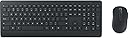
🖥️ Elevate your desk game with secure, sleek, and silent productivity.
The Microsoft Wireless Desktop 900 combo features a full-size wireless keyboard and ambidextrous mouse with AES encryption for secure typing. Designed for professional use, it offers up to 2 years of battery life, quiet chiclet keys, and dedicated Windows media controls, all wrapped in a matte finish that resists fingerprints and dust. Ideal for decluttering your workspace while boosting efficiency and comfort.
| ASIN | B014W20BFA |
| Antenna Location | Security |
| Are Batteries Required | Yes |
| Best Sellers Rank | #1,580 in Computer Keyboard & Mouse Combos |
| Brand | Microsoft |
| Built-In Media | Keyboard and mouse set - wireless, Software, USB wireless receiver |
| Color | Black |
| Compatible Devices | PC, Mac |
| Compatible Operating System Family | Windows |
| Connectivity Technology | wireless |
| Customer Reviews | 4.4 out of 5 stars 2,287 Reviews |
| Global Trade Identification Number | 00889842002669 |
| Hand Orientation | Ambidextrous |
| Item Type Name | Microsoft Wireless Desktop 900 - Keyboard & mouse set - English - North America, Black (PT3-00001) |
| Item Weight | 2.1 Pounds |
| Keyboard Description | Indoor |
| Keyboard Layout | QWERTY |
| Manufacturer | Microsoft Input |
| Mfr Part Number | PT3-00001 |
| Model Number | PT3-00001 |
| Movement Detection | Optical |
| Number of Batteries | 4 AA batteries required. (included) |
| Number of Keys | 104 |
| Operating System | Windows |
| Other Special Features of the Product | Wireless |
| Power Source | Battery Powered |
| Special Feature | Wireless |
| UPC | 889842002669 |
| Warranty Description | PT3-00001 |
B**Y
Great Wireless Keyboard/Mouse at a Low Price - Microsoft 900
I purchased this Microsoft 900 wireless keyboard and mouse about a week ago and have been using it my office in place of a Logitech wired K120. I had two reasons for purchasing this: 1) I bought the mouse separately a few months ago and really like it, but it has a glossy finish so I wanted to try the matte finish version that comes with the keyboard and 2) wanted to try a different keyboard for home use than my Microsoft Sculpt Bluetooth keyboard-which works really well, but pairing to my main computer and back to my tablet is getting old. First off, I really like the matte finish on both the mouse and the keyboard, feels great. There’s no fingerprinting/smudging, so that’s nice. Not a huge deal on the other mouse, but it did bother me a little. Also, the glossy finish made my palm feel a little clammy until I got used to it. This mouse is essentially the exact same as the glossy version with the exception of the finish. It’s solid, pretty quiet, fairly lightweight (with ability to run on one battery, if you prefer a lighter mouse), has typical Microsoft high quality left/right click buttons and a light press center wheel button. Most mice have a stiff center wheel button and that can really matter if you use it all day. It does only have 3 buttons, no forward/back, so if that’s what you’re looking for, this may not be for you. The keyboard really surprised me. I don’t typically like the chiclet style keys on laptops, but after trying a Surface Pro 4 keyboard out at Staples, I decided maybe I can get used to one. The keys on this are well spaced and were easy for me to adjust to. The big surprise to me was the sound it makes, WAY less. This is a nice change from typical keyboards because I tend to pound out emails and probably sound like I’m typing angry! The buttons have just the right amount of travel, in my opinion, a little less travel than standard keyboards have. There’s no indicator light for numbers lock or caps lock, not a big deal for me. I look at the screen while I type, so it’s obvious if either is turned off and that’s quickly corrected! There are five dedicated buttons and they worked fine with the standard Windows 7 driver: calculator, play/pause, mute, volume down and volume up. There’s also a right-click button by the windows button. I suppose that might come in handy if you’re trying not to use your mouse or just don’t want to. I didn’t download the keyboard center as everything was working with the basic driver and I don’t care much for overcomplicating and unnecessary programs that may fail or get screwed up with a system update. The keys aren’t backlit, doesn’t matter to me as I don’t type in the dark. My only complaint on the keyboard is the function buttons are a little short, again not a big deal as I don’t use them that much. Overall, this is a very nice keyboard/mouse combination that really compliments my workspace well. It frees me from some wires and looks/sounds/feels premium. I intend to get a second set to keep in my office permanently. It’ll be interesting to see if the batteries last much over a year, Microsoft says they’re supposed to last up to two years.
B**X
Great Keyboard and Mouse Combination
Keyboard: The keyboard has a great matte plastic finish which is textured, and should do a good job of rejecting dust and debris. One of my big problems with nice keyboards is how they are generally glossy plastic, which is fingerprint and dust prone. The keys feel great, and if you've ever used one of the new Surface Pro 4 TypeCovers, the chic-let type keys should feel comfortable to you. I work in an open floor environment (trading floor), and now I don't feel self conscience typing for hours as others have to hear me clicking away. I also love how every key, all the way across the board is evenly spaced, and I'd estimate key travel at about 2mm which is perfect for me. There is also a dedicated calculator button (which is awesome), along with media buttons (play/pause, mute, volume up, volume down) above the keypad. All of these buttons worked just fine without configuration on my Windows 7 desktop. Mouse: When it comes to desktop mice, there really isn't much to compare. This mouse and keyboard set are clearly meant for office or home office use, and not die-hard gamers. With that said, I really love the weight of the mouse with two AA batteries in it (it can hold two, but only one is required). The manual also says that the batteries could last up to two years, which is a nice change for wireless mice. I am 6' tall with large hands, and the mouse is large enough to hold comfortably, without being too unwieldy. It was nearly identical in size to the corded Dell mouse that I am replacing on my work computer. I am right-handed but also noticed that the mouse is ambidextrous, which I imagine the lefties of the world would appreciate. Bundle: Overall I couldn't be happier with my purchase. Microsoft is also known to have amazing return policies when it comes to their hardware, so I have piece of mind that even know these weren't priced to break the wallet, that I can and will likely use these for years to come. They are a perfect set for anyone looking to clear a bit of clutter from their work desks. I'm not sure you will find a better looking, and better functioning set in the $35.00 price range. Other great desktop items seen in my photos: - Jabra PRO 9470 Mono Wireless Headset with Touchscreen http://amzn.to/2aDK6oy - Surface Pro 4 http://amzn.to/2aDJ9gg - Surface Pro 4 TypeCover (Red) http://amzn.to/2aT0rGx - DecoBros Desk Supplies Organizer Caddy Pen Pencil Holder http://amzn.to/2bcsdjj - iMBAPrice USB-MFAN USB Mini Desktop Fan http://amzn.to/2aDHV4B - iGotTech Cable Clips & Cord Management System http://amzn.to/2aDIeMR
J**N
Great set BUT don't damage the dongle...
Purchased the set originally from Microsoft back in April 2018 - absolutely loved it. Quiet keys, smooth typing, mouse is smooth and works great BUT the dongle is a little less than to be desired. If it's being used in a PC where it will be stationary, this will be great. Although, with a laptop (which is my case), be VERY CAREFUL. In my office, I dock my laptop and have a couple of monitors connected to the docking station, so I need the keyboard & mouse, but I take my laptop home in the evening and only use mouse. In transit, my laptop still has dongle attached, the laptop is placed into a backpack made to carry a laptop & other devices so it's a durable carrying unit. One day when going home, the dongle (which protrudes about 1/2" - 3/4") was banged and felt a little loose, so it wasn't making a connection. SeeOnce dongle gets damaged, it's over. Per Microsoft, the dongle is programmed directly with the particular keyboard & mouse that it's packaged with - you cannot purchase another dongle for the set since it will NOT be programmed for that particular set. I was unaware of this originally and purchased the 1461 dongle from eBay, which worked for 5 minutes then never again - "buyer beware", right? So now, I purchased another one from Amazon, which I should have done originally, and received the new set but now I will remove the dongle when transporting laptop.
C**N
Modern yet Classic Wireless Keyboard-Mouse Set
This is a modern yet classic keyboard-mouse set. The keyboard has standard key layout (full size) and the mouse is well-designed (not too small, comfortable curve). - A Classic Wireless Keyboard: Its main layout (except F1 to F12 which are smaller) is exactly the same as the traditional keyboard that I used back in 10 years ago. It doesn't have the fancy function key (the "fn" keys) at the bottom, so you won't accidentally hit the wrong button. Yet, it has dedicated "Volume Up", "Volume Down", "Mute" and "Play/Pause" buttons at the upper right corner. To me, what's really important is that it has independent "Delete", "Home", "End", "Page Up", and "Page Down" keys (which are handy for programmers). However, the feeling of the keystroke is no conventional. It's pretty much like how you feel when you type on an Apple's wireless keyboard (or 2015 Macbook Pro). I personally love it and appreciate that I can get this keystroke feeling on a full sized wireless keyboard. - A Not-too-bad Wireless Mouse The mouse weighs about 2 AA batteries - the batteries it uses. It doesn't have weird curve. Nevertheless, it's comfortable to hold it in my hands. - Complimentary Batteries This set comes with 2 AA and 2 AAA batteries. Interestingly, the mouse uses 2 bigger batteries (AA) while the keyboard uses smaller (AAA) batteries. It is reasonable as a mouse normally consumes more power. - Easy Setup No configuration is needed. It works right out of box. I just plug in the USB receiver, and both the keyboard and the mouse work instantly.
N**K
Been using for 4 years!
This keyboard combo has been great. I have been using it daily for over 4 years now. I have to change the 2 AAA batteries in the board and the 2 AA in the mouse once a year. I like having 1 USB dongle to cover both a mouse and keyboard. Also has the number keypad to the right, this is very nice for quick calculations. The other thing I really like about this is the soft key noise when typing. There is no loud plastic click noise when you’re jamming away. Mouse is nice and smooth, and I expect it to last a long time. If I ever need to replace, I will replace with the same setup. If you are looking for something similar, you will not be disappointed with this purchase.
X**I
not as good as razer, but no synapse or other software needed!
I bought this to replace my Razer Blackwidow X TE and Mamba 16,000 wireless keyboard and mouse. I upgraded my computer to Mojave and Synapse 2 had a lot of issues. Razer support simply said to buy a new keyboard and mouse as the old equipment ($300 in 2016) was not supported and will not be added to Synapse 3. So I bought this kit. Keep in mind that I work most of the day on a computer. I use extensively solidworks and autocad, as well as a lot of emails typing, spreadsheets, and coding (using BBedit of course). I am not a PC gamer (I have a wii U and switch for that) but I have found in the past the gaming mice and keyboards are the most comfortable for extensive use. Purchasing this microsoft set has only further cemented my beliefs. The good: -Battery life is outrageously good so far. However, it uses non rechargeable batteries. -works simply as basic HID devices on both PC and Mac. No setup, pairing, or drivers necessary. - neither keyboard nor mouse need to be "woken up" before use. They always start working immediately unlike most other wireless sets I've used in the past. - keyboard is very quiet. The bad: Keyboard: - not backlit (not an issue for me in a well-lit office space) - no option to use with a cable. Wireless only. - the keys feel slightly gummy and harder to press than they should. - the keys are perfectly flat on top, making it hard to hit the correct key sometimes - I can type very quickly on this keyboard but I am still hitting the wrong key sometimes. It is also hard to press twice or more of the same key in a row because of the key action (such as the "s" in "press", or moving the cursor with the arrow keys) - like almost every keyboard except for the awful ones from apple, the cmd and alt key are switched for mac users. This can be fixed in system settings so it's a very minor issue. Mouse: - no option to use with a cable. Wireless only. - acceleration is not adjustable and has a slightly "drunken" feel to it. I've tried it for several weeks and it still feels funny. - liftoff is not adjustable, but seems to be OK from the factory. I am using a razer kabuto pad. - the buttons are too stiff and not adjustable. This should loosen up with time but for now they are too hard to press. - way too small to be held for long periods of time. I think the evil robots at microsoft need to at least look at a human hand once in a while. I understand it's not fair to compare a $300+ kb+m set to a $30 set, but in the past I have used the FREE kb+m included with PCs from Dell or Silicon Graphics and while the kbs may have been mushy, at least the keys were curved on top, and the mice fit into my hand. It wouldn't cost MS any extra in materials to shape the key tops correctly, or mold the mouse into a nicer shape. One other thing that is very nice is that the receiver can be stored inside the mouse. The wireless range also seems to be very good. They will work from down the hall, even. Both pieces seem very sturdy and well made, but for my needs I'm only giving them 3 stars. I went back to using my old keyboard and mouse after completely wiping out synapse from my computer, and they work just fine. I can live without being able to turn the flashy lights off and having the default color set to green. Turns out synapse isn't really all that necessary after all. But I'm going to keep this set because it is just so convenient to have a wireless set that doesn't need any drivers around (as a nerd with a bunch of PC's everywhere). It works on android and although I haven't tried it yet, it should also work with iOS and game consoles as well. For a more casual user it would absolutely be a 5***** set.
B**P
Great keyboard. Mouse feels cheap though.
I bought this combo, just for the keyboard as it was cheaper in a combo. Keyboard works great. Has a great feel to the keys and isn't noisy when you are typing. I don't notice any delay in what I am typing. Keyboard is 5 stars. Not one complaint. Seems very durable and high quality. I didn't like the feel of the mouse that came with it. Very light way and didn't feel very durable, so I kept my logitch wireless moue. I have noticed a slight stutter on occasion using my logitch mouse with this keyboard. It isn't bad though and doesn't stop me from using it. I would still recommend this product!
M**T
Loving This Keyboard RIght Out of the Box So Far - Time will tell...
I've tried about a dozen different wireless keyboards from different brands on amazon so far this year trying to find "the one" and after having issues and tons of problems with most of them, several returns and refunds, I have gotta say so far, right out of the box that I am really liking this keyboard from Microsoft. It is quiet, the keys are low profile, easy to type with, very responsive, and install was fast and effortless. It doesn't have a lot of frills and bells and whistles, which I didn't want those anyway… only two things I slightly do not like are that it doesn't have a light showing CAPS or NUM lock to be on, I can live without those, but after having it for years with most of my Logitech keyboards I've become a little used to having it, and the other thing is a dedicated calculator button, again, Logitech has given me one for years so I've become spoiled to having it if I needed it, and this keyboard does have one too, but oddly Microsoft chose to place it above the "backspace" key rather than over the top of the number pad where it would have kinda made more sense, but that's just my opinion. I rarely use this feature so it'll just take a little adjusting and it isn't worth me complaining about. After having used Logitech keyboards for so long, I just got used to having it right there in a place that made perfect sense to me. I still love my Logitech keyboard too, I just wanted something with a thinner profile and with quieter keys, and so my search began…As for the long run, only time will tell how long the batteries will last or how durable the keyboard will be, but for now at least, I'm very happy with it, right out of the box and already using it to type this review. One thing I do find VERY ODD…there is no on/off switch on the keyboard! What were they thinking!?! If the battery life really is as good as they claim then I could see why this would never need an off switch…time will tell I suppose, but they did put an on/off switch on the mouse oddly enough though…that just seems really strange to me, and seems like it would make cleaning the keyboard kind of annoying if wiping it down and pressing on the keys causes unwanted tasks to occur while the PC is turned on...but ok, moving on…Yes this keyboard does come with a mouse, but I can't really give an honest review of it, because I have a Logitech wireless m525 mouse that I'm very happy with the shape, feel, color, and function of, so I'll continue to use it. What I can say about the mouse is this…it's bigger than my m525 mouse, longer, taller, and wider so it has a lot more mouse to rest your hand on, the clicks are slightly louder than my m525, but not by much at all, it's solid black and has a matte finish, so it's not too glossy or shiny. If you like a bigger sized mouse then you're probably going to be happy with it. Well I guess that just about does it for my review. I wish I could say that I got paid or compensated in some way for giving this review, or that my keyboard was given to me free for my review, but it was not. I paid full amazon price of $34.99, and my review was just my honest first impression opinions after my first use straight out of the box. Thank you for reading!
M**Y
Couch convenience
This wireless combo let's me sit on my couch and control my laptop while it's plugged into my HDTV. I love it.
S**R
Finalmente
Un teclado completo pero a la vez compacto, con teclas que parecen más las de una MacBook que las típicas teclas concavas y huecas de otros teclados, planas, ni muy grandes ni muy pequeñas. Con una sensación de que se escribe en algo de calidad y probablemetne duradero. El Mouse, es demasiado simple para lo bien logrado del teclado, pero presiento que me iré acostumbrando. Actualización, Definitivamente estoy muy cómodo con el teclado pero hay dos detalles, que no me terminaron de gustar, no hay botón de encendido / apagado. Para evitar clics accidentales mientras se hace limpieza hay que tener cuidado extra o de plano remover las baterías. Segundo, la tecla de Caps Lock no tienen ningún indicador, por lo que cada vez que tengo que ingresar una contraseña tengo que revisar escribiendo en algún otro lado para saber en que modo está. Vamos Microsoft no podías poner ni un pequeño foquito? Actualización 2: Si existe un software de MSFT para el indicador de CAPS. https://go.microsoft.com/fwlink/?linkid=849754
ع**ف
100 مية حاجة نضيفة مرة انصح بية
I**N
Best bang for buck!
I use this everyday and would totally recommend it. I bought it based on price.
C**R
Excelente producto
Un excelente producto. Llegó empaquetado en perfectas condiciones y justo el día marcado. Me gusto el teclado, ya que es muy silencioso, es de buen material y las baterías vienen incluidas. Un combo de lujo y simplicidad. Un punto negativo es, cuando está inactivo el mouse y lo reactivas tiene un ligero delay, pero no es nada de que preocuparse. -El teclado es en ingles, así que no esperen las Ñ -El Mouse tiene un excelente peso y es cómodo a la palma. Creo yo que si tuviera retroiluminación fuera de lo mejor, aun así, considero que cumple con mis expectativas.
Trustpilot
1 day ago
2 weeks ago