Buy anything from 5,000+ international stores. One checkout price. No surprise fees. Join 2M+ shoppers on Desertcart.
Desertcart purchases this item on your behalf and handles shipping, customs, and support to Iceland.
🔋 Power up your productivity—never miss a beat with Tripp Lite SMART1500LCD!
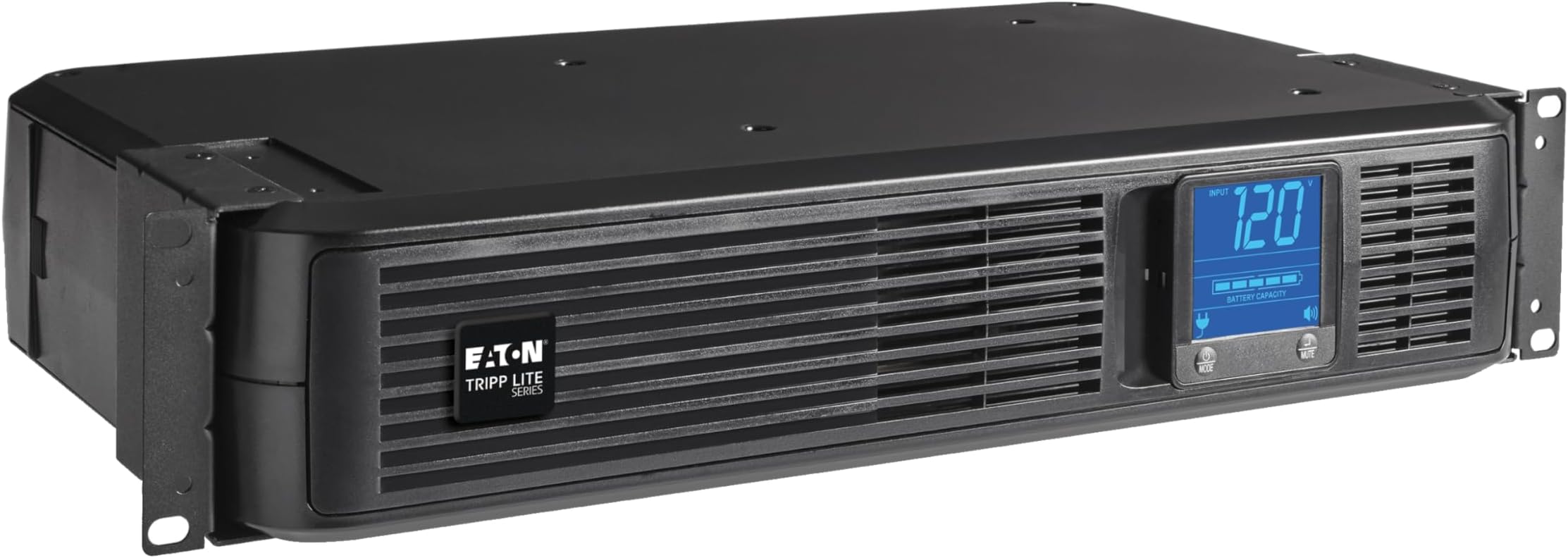
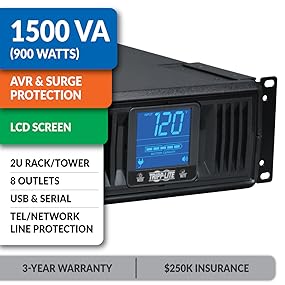
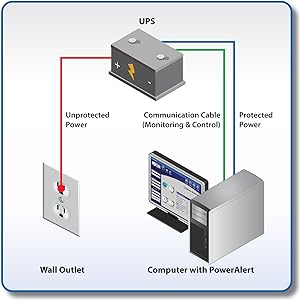
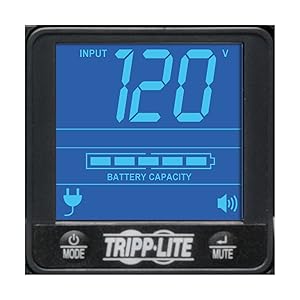
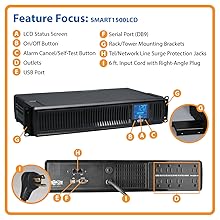
The Tripp Lite SMART1500LCD is a high-performance 1500VA/900W UPS designed for professional environments, offering 8 surge-protected outlets, automatic voltage regulation, and a rotatable LCD for real-time monitoring. Its versatile 2U rackmount or tower form factor fits seamlessly into any setup, while user-replaceable batteries and comprehensive warranty coverage ensure long-term reliability and protection for your critical electronics.


| ASIN | B000DZRY9C |
| Amperage | 12 |
| Battery Cell Composition | Lead Acid |
| Battery Cell Type | Lead Acid |
| Battery Charge Time | 4.5 Hours |
| Best Sellers Rank | #11 in Computer Uninterruptible Power Supply Units |
| Brand | TRIPP LITE |
| Built-In Media | USB Cable, DB9 Cable, Network (RJ45) Cord, Mounting Hardware, Owner's Manual |
| Color | Black |
| Connector Type | HD15 |
| Customer Reviews | 4.2 out of 5 stars 3,892 Reviews |
| Enclosure Material | Acrylonitrile Butadiene Styrene |
| Form Factor | Rack |
| Global Trade Identification Number | 00037332126146 |
| Input Voltage | 120 Volts |
| Item Dimensions | 10.5 x 17.25 x 3.5 inches |
| Item Dimensions D x W x H | 10.5"D x 17.25"W x 3.5"H |
| Item Weight | 29 Pounds |
| Manufacturer | Tripp Lite |
| Material | Acrylonitrile Butadiene Styrene |
| Maximum Power | 900 Watts |
| Mfr Part Number | SMART1500LCD |
| Model Number | SMART1500LCD |
| Number of Outlets | 8 |
| Output Current | 7.5 Amps |
| Output Voltage | 120 Volts (AC) |
| Output Wattage | 900 |
| Power Plug Type | Type A - 2 pin (North American) |
| Product Dimensions | 10.5"D x 17.25"W x 3.5"H |
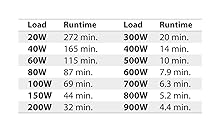
| Runtime | 4 minutes |
| Specification Met | No |
| Surge Protection Rating | 480 Joules |
| UPC | 037332126146 |
| Unit Count | 1 Count |
| Voltage | 120 Volts |
| Warranty Description | Three years |
| Wattage | 900 watts |
P**2
Huge 2 battery Unit I love it so much I bought it again!
Huge. I will update in a few months. I received today and wanted to share my experience and provide tips. First, I did not notice ANY odor upon opening the box. Second, It is huge in comparison to APC units I have bought in the past. I was an APC fan until the unit internal systems broke down and would not work with new batteries. I Wanted to try different and narrowed this down to Tripp-Lite and Cyber-Power 1500. Tripp-Lite is 900 watts. I am running: -Intel I-7 core processor -power supply is dynamic 850 WATTS -32 GBs Ram -Windows 10 -DELL 24 inch LED monitor -Yamaha Quad speaker with subwoofer Output is at 10% Out Watts 90, which is minimal Estimate backup is roughly 56-60 minutes, which is plenty, given I have a Kohler 20RES 20,000 K (with 200 watt entire house transformer) Generator. I live in Ohio in the country and my local company just randomly tested power and disconnected several homes without warning. I was on the computer when everything when dark. Not good. Then recently, our transform caught on fire. again without warning, and yes, I was computer. I am lucky my computer works at all, hence, reason for generator and buying this unit. Tips: -I recommend before installing, to look at batteries. just unscrew bottom and gingerly pull the front cover off but not too far because wires are connected. You will noticed TWO batteries are required. The support page for Tripp Lite will suggest (as well as in the manual), RBC 51 (two batteries). I suggest you search for RBC 5 battery set. Much cheaper (less than a single RBC 51). Also, I recommend you attempt to pull out batteries to experience the difficulty to replace these batteries. Not bad, but a little tricky. -the surge/battery protect outlets are on the right side (if you are facing the back side of unit), the non-battery outlets with surge protection only are on left side of unit. -Inside the box, the Smart 1500 comes with power (3 prong ground non-brick) cord, a 6 foot USB communication Port cord which needs to be longer (like 8-10 foot). Also, I attempted to use the existing USB port cord from my old APC unit and the computer did not recognize the Trip-Lite unit. This could have been fluke but when I used the 6 foot USB Port cord, it worked and showed in tool bar right side icon, charging. Keep in mind it also would show red x as though battery was not recognized. There is no software and no warranty card in English (it was Española). -when you test the unit, it will drop to 86% battery after testing. Just hold the test button for two seconds. Use mute button to cycle screen like output voltage, output load percent, Etc. when you unit test itself, it automatically will show estimated runtime. It will take about 8 hours to fully restore battery after plugged in so no worries. -Instead of installing software, use Windows, Linux, Mac power manager. Go to Control Panel or equivalent, go to hardware, go to power options go to ;change plan;. Look close and find: Change Advance Power Settings.; Now, scroll all the way to bottom until you see battery;. Click on the plus sign and make sure you set critical battery warning or equivalent if using other operating systems, to &shut down. The battery will charge in about 8-10 hours after you plug in. I will update when the next outage occurs and I will update in terms of when the batteries need replaced (supposedly not for 3 years). I hope this helps for now. Update: 6/19/20. I bought the Tripp lite UPS almost 5 years ago. I replaced the batteries once after about 3 years. The unit recently died. I was downloading Windows V2004 when everything shut off. I freaked out. The unit showed it had full battery charge but the unit would not turn on. So I unplugged everything and plug the PC and Accessories into a surge. Windows, thank God, kept downloading the huge update. I am grateful it did not shut off during install. OMG. I called Tripp*Lite and talked to a human being, which is nice. He was very helpful. He said the unit died and replacement of batteries would not help. So I purchased another 1500 LCDT. This unit works great during power outage. I mean i have had others that did not switch over fast enough. This unit has worked like a charm for 5 years. I have had several power outages and it just works. I know this is expensive but worth it. When I called the company I talked to a human being who was quite helpful. I love Tripp-Lite!
T**.
Solid Battery Back-Up Units - I Recommend!
These battery back-up units are sold and work like a champ. I have two small network racks connecting my house to my shop with minimal hardware in each, so I have excellent "up time" in the event of an extended power outage. I just purchased a third one that I will be connecting to my surveillance camera and home automation servers. One nice feature about these units is that they have the hardware needed to let you choose from either rack mount or floor standing.
L**2
Failed at 3 years 1 month old
I bought the tower version. Worked great for 3 years and 1 month exactly! Failed suddenly, all power on battery (ups) protected plugs cut off, there was a loud “pop” noise and some smoke out a rear vent. Power on surge protected plugs continued to work but that’s no help for my computer systems as they were plugged in to the ups plugs. My pc and all peripherals lost power without warning—lost my work since last backup. Very disappointed. Not a battery failure. Seems likely a filter capacitor failure. If so, doubly disappointing since such failure modes can/should be screened out and/or provisions made in design to prevent sudden failure. Won’t buy this brand again.
R**E
Rock-Solid Rackmount UPS — Reliable Protection for Network and Server Gear
I picked up the Tripp Lite SMART1500LCD 1500VA Rack Mount UPS to protect my rack equipment, and after running it in a real network environment, I can confidently say this is a dependable, professional-grade UPS for home labs and SMB deployments. 🔧 Build Quality & Form Factor Right out of the box, this unit feels substantial and purpose-built for rack environments. The short-depth 2U design is especially useful if you’re working with shallow racks or wall-mount cabinets. Mounting hardware was included and installation into the rack was straightforward. You can also run it in tower mode if needed, which adds nice flexibility for mixed environments. ⚡ Power Protection Performance From a technical standpoint, this UPS delivers exactly what you want: 1500VA / 900W capacity suitable for network stacks and small servers Automatic Voltage Regulation (AVR) that corrects brownouts without switching to battery Battery backup + surge protection across eight outlets Clean line-interactive operation In real use, the unit transitions cleanly during power events with no noticeable interruption to connected equipment. 🖥️ LCD Monitoring & Management The front LCD is genuinely useful — not just a gimmick. It provides quick visibility into: Input/output voltage Load level Battery status Estimated runtime Operating mode For anyone managing network gear (especially in a rack), this at-a-glance telemetry is extremely helpful. 🌐 Real-World Use Case (Where It Shines) This unit is ideal for protecting: ✅ Firewalls and routers ✅ PoE switches ✅ Small servers/NAS ✅ Home lab racks ✅ Edge network closets In my setup, it easily supports typical networking loads and provides enough runtime for graceful shutdowns during outages. 🔋 Serviceability (Big Plus) One thing I always look for: maintainability. User-replaceable internal batteries USB/serial connectivity for shutdown automation Data line surge protection included The ability to replace batteries without replacing the entire UPS is a major long-term value win. ⚠️ Minor Notes (Keeping It Balanced) It is fairly heavy (expected for a lead-acid UPS) Fan noise is noticeable in very quiet rooms Modified sine wave on battery (fine for most networking gear) None of these impacted my rating for its intended use case. 🏁 Final Verdict If you’re running a rack — whether for a serious home lab, small business network, or edge deployment — this UPS delivers: dependable power protection solid rack integration useful monitoring and long-term serviceability Bottom line: Reliable, professional, and worth the investment. I would absolutely deploy this again in future racks.
R**R
starting with 4/5 and will reduce or increase depending on my experience with the unit over time
I bought this to replace a CyberPower 1000PFCLCD which died after under 5 years of use. When I first plugged the Tripp Lite SMART1500LCD in it had 93% as far as how much the battery was charged. The screen had a bunch of lines in it that looked kind of like digital cracks, it's hard to explain. I pressed on it lightly and they went away. These are lighter presses than removing pixel issues from an LCD screen. There was no stupid plastic all over it, unlike my previous cyberpower one. Tested a vornado fan and it makes a weird noise when it goes on battery backup. The fan is making the noise, not the backup. Also when I turn the fan up it uses less wattage according to the battery backup. And when I turn it all the way up it says 0 watts. I contacted support and they did a great job. They just explained that because of the modified sine wave on battery I'm going to hear that noise on the fan. I asked about if I would hear something like that with the computer and they said no and explained why. The answers check out and make sense. I tried to stay on the line afterwards to participate in the survey and it asked me on a scale of 1-10 how much would i reccommend eaton and I said 10. It never told me to press or speak, so I just spoke. It claimed to not hear me so I tried again multiple times, but it never detected speech. I pressed "1-0" on the phone and the line immediately disconnected. When turning the unit on after connecting to the wall, pressing power does not turn it on. It goes on briefly, then shuts off. You need to hold the button for a few seconds, just like when shutting it off before unplugging it, in order to prevent it from going into battery mode when unplugging it from the wall. The unit shows full charge and 30 min available when it's connected to the wall socket. I unplug it and it says 9 minutes. I would think it shouldn't go down in available runtime because the power consumption has remained the same. It's difficult to push the buttons because u either need to reach out and hold the unit, or hold it with the same hand and block the display, or the unit will slide. This is in a configuration where it's standing on it's side on the desk. I noticed when grabbing the USB cable there are soft dome things that look like feet. These may stop that issue, but I'm going to leave them off for now as this is temporary because I'll be moving this year. I'm not sure how I want the unit oriented once I get everything setup in my new place. The wattage ouput updates much faster than on the cyberpower unit I had. It's not easy to find out which software is applicable to this unit. I first found software that said it was for XP and later, and on the same page there was software for win 8 through 11. so which one is it for 10? That's a contradiction. They used totally different versions and the XP and later one seemed like a newer version. I eventually found PAEM and it took forever to install. PAEM required an IP, which makes no sense because the unit is connected via USB. This must be for some other purpose. I went back to the original downloads page and fonud a downloads section. instead of clicking "software donwloads" you should click "downloads". that led me to a much more obvious list of options. There were 3, and I chose the latest build. The poweralert office installer also took a long time, and failed to install. it said it was interrupted before it could finish, but I never interrupted it. I ran installer again. I double-clicked the poweralert icon in the task tray after installation. It popped up a message saying "poweralert is not ready". The message box was really far away from the bottom right corner where I think it was meant to be. I right clicked the icon and chose "PowerAlert Web Interface" and was given this message: "A system administrator has made changes to this device that requires PowerAlert to reboot. This will not disrupt power to connected equipment and devices. The login screen will appear when the reboot is complete and the system is ready for access." It then took me to a login screen, to which I found the default login credentials by searching online are "localadmin" for both the username and password. It immediately had me set a new password. The password was saved by LastPass and it immediately failed to login because they use localhost and I have other credentials saved for other things. The interface is unable to find firmware updates, but I found them online and found my unit shipped in late July 2023 with version 20.0.0.979. I found out the unit can send SMS or emails, but the SMS fails to send when I try it. Emails also don't send. As I continued to dig around I did find an SMTP server settings page. I may work on that later. When trying to update firmware I ran into the issue of not knowing how to update it. I noticed a tarball was included and I figured this entire package must need to be uploaded using the interface, but couldn't find a place to do this. I took a look at the manual and it shows ues of PuTTy, and apparently has extensive features. I may look into that later, as well. I have too much on my plate right now, and I only bought this unit to replace my CyberPower unit which failed. I'm hoping I don't need to go install this software on my work system via the admin account, since it seems to be managed via a web interface and have commercial features associated with it and I would think this would be a good indication that settings are not saved on the system, but on the unit itself, once modified. However, there were things during the installation phase that make me doubt this presumption. The reasons for reducing the stars from 5 to 4 for the initial review are: 1. The unit indicates a runtime when connected to AC power, but once I unplug the unit, it indicates a runtime which is about 4x lower. 2. It was a hassle getting software installed and the firmware was never updated because it was also a hassle. As stated in the title, if I have more issues or an even better experience, I will come back and update this.
W**E
Batteries are VERY difficult to change
This is my 2nd purchase because I broke something in the first one while installing replacement batteries. The batteries only seem to last about 5 years because this was the 3rd time I had tried replacing them. Because of the difficulty, I damaged the insulation on the Red connection wire and used electrical tape to repair it. After putting the panel back on and plugging it in, the display showed fully charged batteries but wouldn't turn on. Other than the battery installation, the UPS works great. I have all my electronics plugged into it. Whenever the power to the RV goes out, it immediately switches to battery backup. It's so fast that none of my electronics even know the power went out. It's especially useful for running the cable tv and internet router/modem. TV recordings are not interrupted unless the power stays out for more than what the batteries can handle. My cable tv box literally takes 10 minutes to reboot, but battery backup keeps that from happening 95% of the time.
M**I
Failed right after the warranty expired; replaced batteries to no avail
How ironic is to have a UPS failure just a couple of months after the warranty expires? The self test suggested that the batteries had to be replaced. I went through the process of replacing the batteries. at first it tested ok with the new batteries but a few days after it failed the test again and the unit once again displayed the replace batteries symbol. When it was working properly I was happy with the UPS. The LCD is a little bright but the unit worked well. One big drawback is that the unit doesn't self-restart. if the power goes away and the UPS turns off, you have to manually push the start button to restart it. meanwhile all the connected devices stay shut down, un-powered.
R**.
Won't last
I purchased this Tripp-lite Smart 1500LCDT UPS in 2016 after doing much research, it appeared to me to be a quality choice. After 4 years it developed problems shutting down and I could not link it to the battery as the charge was not showing to be depleted. The software didn't help much. After contacting customer service and running tests they suggested new batteries. I thought I would try it, and return the batteries if it won't work. The issue was fixed I thought I will be a happy camper for at least two years after spending $100. In less than two years the unit started acting up again. It will start an alarm in the middle of the night even if the power was not out. It will shut down randomly taking my WiFi router down. Finally, it will power off when switched to offline mode (on battery) even with nothing connected. I disconnected it for about two weeks, and today came back to trouble shutting it. Now, when plugged in, it gives an F04 error (bad or discharged battery) and constant clicks from the switch. The software reports contradicting information, battery 0%, then 100%, then 0% again in 2 minutes. I especially liked the minimum Input voltage of 4915.6V. I will not use Tripp-lite for a while.
A**A
El mejor guardian de tus equipos
Compré este No Break (1500VA) para proteger mi PC, Monitor, Pantalla y Xbox One. Sin ningún problema soporta lo antes mencionando tomando en cuenta que XBOX Y PC Juntos consumen gran cantidad de energía. Hasta 40 minutos de energía teniendo conectada la PC con fuente de alimentación de 750 watts, Pantalla Samsung 40 "LCD, Monitor Asus 27 ", Xbox One y el módem para la conexión de internet. El proveedor da 3 años de garantía para las baterias , algo que es muy aceptable. Soporta conexión USB que es una función muy útil para controlar el No Break. Viene con una entrada coaxial que protege los equipos conectados al módem del servicio de internet. Lo recomiendo ampliamente ya que con 3,500 de inversión en este aparato seguramente no compro más que la fuente de poder de mi PC. No duden en que es una buena opción para proteger y prevenir daños por falla eléctrica y tormentas eléctricas. Yo vivo en la ciudad de México y por las tormentas eléctricas se me ha dañado una Xbox 360 y los puertos Ethernet y usb de una PC. El envió es por parte de amazon así que no hay nada que decir más que rápido como siempre.
A**N
Bien por la tienda de PCEL y por ofrecer equipos como este
Súper servicio el de PCEL, me llegó rápido y son muy atentos. Un excelente precio, el equipo cumple con lo detallado. Me agrada que a través del display se conozca el estado y rendimiento del equipo. Lo uso en casa para el centro de entretenimiento y ha ido muy bien. En posición vertical luce perfecto. Actualización: es 2021 y no ha requerido mantenimiento ni cambio en la batería. Entra exacto al momento de corte eléctrico. Para que tengamos una idea, están conectados a este UPS, pantalla 55”, home theater 5.1, subwoofer adicional de piso, PS4, blu-ray player, teléfono inalámbrico, disco duro externo. Todo ello probado y funcionando al mismo tiempo. A veces con un portátil también. Sigo muy satisfecho con el producto.
O**.
I have 4 of them
Great in the server rack ! The best ones.
S**Z
Excelente producto, gran relación costo-beneficio.
El producto llego en excelentes condiciones, buen embalaje y funcionó sin problemas. Mi única sugerencia seria que tuviera un cable de alimentación ligeramente mas largo, pero en terminos generales es un excelente producto. Si te molesta el ruido del ventilador probablemente este aparato no es para ti. El ruido es perceptible en especial cuando ya es de noche y esta todo en silencio excepto el ventilador de este aparato.
J**D
Perfect
Hooked up and will see what happens the next time the power goes out as computers and server hooked up to it as backup power
Trustpilot
1 week ago
1 month ago