Desertcart purchases this item on your behalf and handles shipping, customs, and support to Iceland.
🚀 Unlock PCIe 4.0 Hyperdrive: Quad NVMe RAID, No Limits!
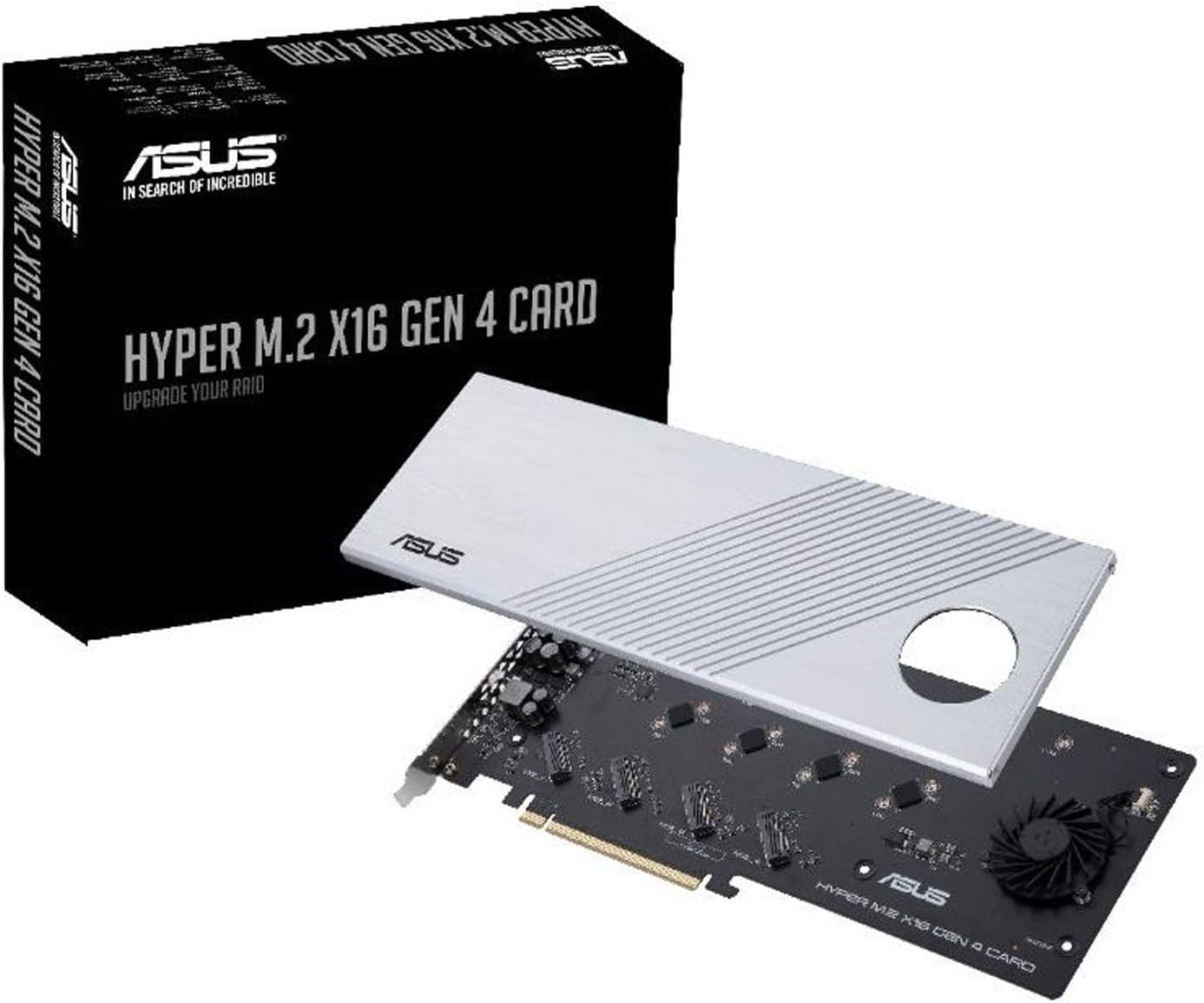
The ASUS Hyper M.2 X16 PCIe 4.0 Expansion Card transforms your workstation or server with four NVMe M.2 slots delivering up to 256Gbps transfer speeds via a PCIe 4.0 x16 interface. Designed for AMD 3rd Gen Ryzen sTRX40, AM4 sockets, and Intel VROC NVMe RAID, it supports power-hungry next-gen SSDs up to 14W. Its premium server-grade PCB and active cooling system ensure stable, throttling-free performance, making it the ultimate upgrade for professionals demanding blazing fast, reliable storage expansion.


| ASIN | B084HMHGSP |
| Best Sellers Rank | #140 in Computer Motherboards #1,219 in Data Storage |
| Brand | ASUS |
| Compatible Devices | Motherboards with AMD TRX40/X570 Series PCIe 4.0 support and Intel VROC NVMe Raid |
| Customer Reviews | 4.3 out of 5 stars 760 Reviews |
| Hardware Interface | PCI Express 4.0 |
| Item Dimensions L x W x H | 1.04"L x 1.2"W x 0.2"H |
| Item Type Name | ASUS Hyper M.2 X16 PCIe 4.0 X4 Expansion Card Supports 4 NVMe M.2 (2242/2260/2280/22110) up to 256Gbps for AMD 3rd Ryzen sTRX40, AM4 Socket and Intel VROC NVMe Raid |
| Item Weight | 2 pounds |
| Manufacturer | ASUS |
| Mfr Part Number | HYPER M.2 X16 GEN 4 Card |
| Model Number | HYPER M.2 X16 GEN 4 Card |
| Number of Items | 1 |
| Operating System | Windows, macOS, Linux |
| Product Dimensions | 1.04"L x 1.2"W x 0.2"H |
| Style | Music |
| Style Name | Music |
| UPC | 192876624920 |
| Warranty Description | 1 Year |
C**N
Absolutely Scorching Speeds If Setup Properly
Absolutely rock solid integration with the TRX40 chipset on an ASUS motherboard that has the PCI-e bifurcation option (PCIe RAID mode) that you can activate on a lot via BIOS. Disassembly and re-assembly was a breeze, the correct amount of screws was included, each slot has a full size thermal pad inside ready to go and the fan seems to work wonders even with four SN850X running in RAID0. It's setting up the AMD RAID drivers properly that is the wild card and can be a complete buzzkill if you do one step wrong. You have to navigate to (for AMD processors) to the support page specific to your CHIPSET, not the processor, and download whatever RAID software package they have there for your AM4 or TRX40 board. You have to enable both SATA and NVMe RAID modes in the BIOS before you can even install the RAID package you just grabbed and once that is on properly, you will see some unrecognized storage controllers in your Device Manager. From there you right click each unrecognized item and point it toward the folder with drivers that came with that package or that you grabbed separately and manually update each of them one by one. Then go back into the BIOS and delete the legacy array housing your single NVMe drives and create whatever RAID array you want there and if all is well it should show up as one single drive in Windows that you can then format as a Simple Volume and manage through AMD RAID Xpert. At each step you might require a few restarts or a full shutodown/power down in order for the changes to fully take. Once you clear this hurdle though, it never reverts and is insanely easy to manage as long as you don't flip back to non-RAID mode in BIOS. Highly recommend sticking with the 256K allocation size recommended in the BIOS when creating the array and the Windows default value when formatting it in Windows, any other tweaks yielded lesser or spottier performance. As other readers have stated, you must make sure that you have a free x8 or x16 slot for two or four SSDs respectively and you must be able to split the 16 into four siloed lanes for each drive in the BIOS and you must make sure that whatever slot you're using isn't sharing lanes with your processor or RAM or another NVMe slot on your mobo. Threadripper platforms are worry free in this department because of the gross amount of PCIe lanes they have. As long as you're not running two 5090s in parallel and maxing out every RAM, NVMe slot and with some SATA drives thrown in, this should not be a concern. Even I didn't expect quite the eye watering results I got with four of the fastest 1TB Gen4 drives on the market running in a striped RAID0 setup. The screenshots speak for themselves. That's basically brushing right up against the theoretical limits of Gen 4 NVMe 1.4 drives and what it should look like when those drives are striped and running free of bottlenecks. For $50 (Used - Like New...came in perfect condition) plus less than $100 each for the drives, this is an absolute no brainer in terms of bang for buck value and will give you performance exceeding that of current Gen5 SSDs by another 8GB/sec. For reference this is a hair shy of the 2400 MT/s base, non XMP clock speed of my 3600 mhz RAM. This is madness. If you do video editing, hosting off your main rig or are looking to trim any possible other system bottlenecks to max out a current gen graphics card, what are you doing still reading??
D**.
Solves AER issues on AMD boards with Gen4 NVMe drives
Preface: This card is NOT intended to just be dropped in to a commodity PC motherboard. This is a card you install in a server or high-end workstation that has more x16 slots than the number of graphics cards you have. Reviewers complaining that their BIOS doesn't recognize all 4 slots probably plugged it into an x4 or x8 slot on their motherboard. Make sure to check your motherboard specifications before you buy! Background of why I got this: I have an ASRock Rack ROMED8-2T with an AMD EPYC 7443P processor and 128GB of ECC PC4-25600. I have a pair of Samsung 980 PRO 500GB NVMe drives installed which are used for the root filesystem (RAID1), ZFS L2ARC and ZFS secondary log (SLOG/ZIL) device. Since completing the initial build, I noticed frequent correctable PCIe bus errors in dmesg (see 1st and 2nd screenshots). Communication with the NVMe drive would shut down for second or two after each AER event, which got *really* bad when I enabled the ZIL on them. Approximately once every 3 months I'd also get a hard lockup necessitating a hard reset of the server over IPMI, which I strongly suspect was related to this. The hard lockups became less frequent with the 6.1 LTS kernel and P3.50 firmware but I was still able to upset it under heavy write workloads. The PCI device implicated in these messages was "AMD Starship/Matisse GPP Bridge" at 0000:40:01.1, the only child device of which was the NVMe drive at 41:00.0. The other bridge device and NVMe drive did not experience the issue. Research online indicated that an NVMe riser card such as this one would resolve the issue. There are numerous alphabet-soup brand cards for a half or third of the price here on Amazon, but to me $80 is cheap insurance to protect my NVMe drives and the data on them by using a card with a hefty heatsink, a high quality fan and a warranty. I had two hiccups during installation, which were: - This card is quite long, and will interfere with the fan connectors on the ROMED8-2T in PCIE slots 1-4. It will fit in slots 5-7, although 5 and 6 will bring the card quite close to the SAS connectors. - The NVMe drives were not detected until I manually changed the link speed on the slot to "x4x4x4x4" in the BIOS setup. After setting everything correctly I confirmed that both drives are running at full gen4 speed of 16GT/s (see 3rd screenshot).
W**Y
Works beautifully on Gigabyte TRX50 AI Top
I’m impressed how easy these were to setup for such a low price. The fact that provided an extra pad for each single side drive to ensure pressure on the thermal pads was a nice touch. I put 2 with 8 drives total in slots 3 and 4 of a Gigabyte TRX50 AI Top to run a raidz2 ZFS zpool and it’s a noticeable speed improvement from the previous sonnet card these were on. I will point out for this board auto detection is not sufficient and will cause it to only see 1 drive. You must specify the slot to run at PCIe4 and the bifurcation to be x4x4x4x4 in the bios. Once you do it is smooth sailing. No noticeable additional fan noise compared to existing components.
P**G
Works with Asus TUF Gaming X570 Plus Motherboard......BUT
Contrary to some reviews, I have used this board with Asus TUF Gaming X570 Plus motherboard and it works! 1. It worked with 4 NVMEs, but you have to use PCIEx16_1 slot and set BIOS to AMD RAID on for the slot. 2. You can mix both PCIE3 and PCIE4 NVMEs and both run at their proper speed. The PCIE4 NVMEs will not get downgraded when used with PCIE 3 NVMEs. I tried two PCIE 4(Samsung 980 Pro 1& 2 TB) and two PCIE 3 (Intel 660P and WD SN550) and all runs fine. A side note: to reach PCIE 4 speed, the entire chain from NVME to adapter to motherboard to chipset and to CPU have to be all PCIE4 capable. Even with X570 MB, if your CPU does not support PCIE4, you will still only getting PCIE3 speed. 3. The cooling fan can be switched off and even without it, the Samsung runs mid 30 deg C at low disk access to mid 40s during disk cloning. Even under stress test, they ran just over 50s. the large heatsink block works fine without the fan. 4. Price is reasonable for a PCIE4 adapter that can host 4 NVMEs. 5. The heatsink is well machined and the PCB is of good quality. If this card works so well, why I only give it a 4 stars? Because there are BUT and lots of them. Actually, I really tempted to give it a THREE stars! 1. This card while works with Asus's own X570 motherboard, it ONLY works on PCIEX16_1 slot! It will NOT run on PCIEX16_2 slot! Not only this is NOT clear on the manual, this is a lousy design of Asus engineers! the PCIE X16_1 slot is typically used for GPU card and with most of the decent performance GPU are double wide, the MB typically made the next slot space vacant for the GPU, not so for the PCIEx16_2 slot. If this card have to use slot 1 and unless you use APU, the GPU on slot 2 will cover a PCIEx1 slot! They should have design this card to use either slots! Even assume this is due to some chipset limit, both MB and this card are Asus products, they should have layout the MB accordingly, but their engineers are just lazy. 2. Speaking of poor engineering, this card is HUGE and unnecessary so. Again, it shows Asus's engineers are very lazy. They could and should have rearrange the layout to make this is much shorter board. As result, you need to evaluate this size of this card BEFORE you buy it to make sure you have enough clearance for it. 3. Instead of design something that is toolless, just like their MB's NVME slot, Asus engineers insists the user to handle with small screws. Lots them! Just to remove the heatsink, you have to remove 6 small screws and then one more for each NMVE. It should not be that difficult to design it to be toolless abut again Asus's engineers are too lazy or no one cares. Some people may think this is not a big deal you only have to do it once and be done with it. Wrong, I plan to use this card to do backup and frequent swap. I have been using toolless USB adapter for NVME but even with USB 3.2, it is no where near the speed of PCIE interface. Bottom line, it works. But instead of a great product, the laziness or careless of Asus's engineers and product managers made this a just ok for me, may be not usable to others.
A**.
Works fantastically, as long as your computer’s BIOS supports it.
I tried to use this to add a ton of extra storage to my gaming computer. I was unfortunately only able to add one drive. Any extras would not be detected at all. For them to be detected, I’d have to remove my GPU and put this NVME card into the top x16 slot, and enable PCI bifurcation, to allow those 16 lanes to be split into individual 4 lane channels for each of the 4 NVMEs in the card. But then I have no graphics! No display output! You really need a server or enthusiast grade processor and motherboard like an AMD Threadripper to make use of this. However, while it’s impractical, it does work to add one more drive to any computer, with the ability to add more with a motherboard upgrade later down the line. Activity indicator lights and a fixed speed cooling fan that can be turned on and off with a switch rounds out the feature set and makes this a powerful tool……if you can use it.
T**T
Critical information to know
ASUS just released some detailed guidance on this card in July 2020. Amazon deleted my first review for putting links in it but I'll try to put them in the comments. In this review I'll also try my best to walk you through the most important things to know: 1) You need a compatible motherboard. Specific ASUS series like my Prime A-II are your best bet, but at the very least the motherboard needs to support PCI Bifurcation. Long story short, that's the ability for, say, a 16x PCIe slot to allow the hardware to divvy up those 16x lanes into 4x chunks and self-manage. You'll also need to tell the motherboard in the BIOS which slot the card is in. 2) The SSDs *must* be M.2 NVME *and* "M". Not "B", not "B + M" but absolutely "M". Even some manufacturer's sites don't bother to mention the specs. You're probably best off confirming that the drive supports PCIe 3.0 x4 as well. 3) ASUS has a very specific Qualified Vendor List (QVL) of supported hard drives. All are 512GB or smaller, but if you don't specifically use one of those, all bets are off as to whether it works. Amusingly, no Intel drives are listed on the QVL, so I have no idea what that means for Intel Virtual Raid on CPU (VROC). 4) Did you want to use VROC? You need to have a processor that supports it. You need to have a motherboard that supports it. You need to buy a special key from Intel (approx. US $150) to "unlock" it. I get varying answers as to whether you also must use Intel SSDs that support VROC, but I'd bet that's your most likely option for support. 5) ASUS support is truly terrible. They say they've been hit hard by COVID-19 so that may be part of it, but... - two phone calls both had terrible quality and disconnected before the ticket could be set up. - I was calling because the website support kept redirecting to the main support page - The mobile app got me through to a person who said the request was routed wrong...and told me to follow the exact same steps that I'd followed to get routed there - ASUS lost all my information and made me re-enter it. - ASUS lost all my information again and made me fill out a form and send that to them. - Random people jump in and out of my ticket, don't read the information, and ask me to try things I've already tried. When I point this out, someone else replies and asks me the exact same thing, ignoring the fact that I just said I tried it and it didn't work. Right now I have two questions in my ticket that I've asked twice and they're still not answering. I've never run across a product with this high of a level of complexity to it, but the tech support has made this experience much harder. I hope this information helps you ahead of time and saves you trouble. If I get it to work I will update this review with any new information I learn.
T**Z
Pretty good!
It's a pretty darn good purchase for Threadripper owners. Decent combo with Raid Xpert 2. Few things you HAVE TO KNOW: 1) This is just a PCIe 4.0 x16 to 4x4 carrier board. Nothing more. In other words, translates a single physical x16 slot to 4 x4 M.2 slots. It's really that simple - it's as if you had 4 additional M.2 slots on your motherboard. USE THE MOTHERBOARD SLOTS FIRST, this just splits x16 slot to add a few extra. Literally. 2) For this carrier board to work, your motherboard MUST SUPPORT BIFURCATION. The splitting (1x16 -> 4x4) is done by your motherboard, not the card. The card is, again, just a carrier. If your motherboard does not support bifurcation, you will only see a single drive. 3) Your CPU must offer enough PCIe lanes that are appropriately represented by your motherboard. READ THE MANUAL. If your motherboard supports a SINGLE x16 slot (that can be split to 4x4), you will have to decide whether to put a GPU or this thing there. POPULAR MISCONCEPTIONS: - This is not a RAID card. This is just a carrier board. - This does not improve M.2 performance compared to native M.2 slots. It only adds 4 extra M.2 slots to your motherboard. - There's no benefit of using this card compared to your motherboard's M.2 slots. - This card won't work with just about any motherboard. This only works with motherboards capable of splitting the x16 slot to 4x4. - Not every full size slot is a x16 slot. Read your motherboard's manual, check what BIOS permits. - RAID is offered directly by motherboard. Whether RaidXpert2 or VROC, this is a BIOS/Motherboard feature, not something that comes with this card.
B**N
Think twice before you buy
The first time I knew about this product, I was so excited. I have got an ASUS X570 Motherboard and have installed it with the AMD 5950X CPU, AMD 6900XT display, Samsung 980 Pro and 64GB RAM, hoping the PC to be fast and good for many duties. When I knew this hyper expansion card is custom made for the X570 and TRX4 chipsets for 4 nos. of M.2 in RAID mode at PCIe 4.0, I was guessing how fast the SSD memory can be! Without much thought, I quickly check a bit of the requirement of the expansion card and then I placed my order. The card was received quickly and I could say it was of excellent built quality. The whole card was as long as my 6900XT display in a full length thick and heavy aluminum heat sink which certainly will be able to spread the heat among the 4 nos. M2 SSDs. I tried to follow the instructions to amend my BIOS setting, and here comes the problem! ASUS X570 Motherboards usually have a one to three PCIe 4.0 X16 slots, but nearly all of the X570 MBs can only run the first slot at X16 mode (for the graphics card) or dual X8 mode. The third PCIe X16 slot (if any) will run X4 mode. My X570 MB has two PCIe X16 slots with the only options of X16 + X4 or dual X8 modes. In the BIOS setting, the only option provided is to set the first X16 slot for RAID setting in order to use this expansion card. We all know the first X16 slot is for the graphics card, so the only choice is to physically insert this expansion card in the second PCIe X16 slot which actually cannot run at X8 or X16 mode when the graphics card is inserted. This leaves the expansion card not useful at all because it has to work at X8 or X16 mode to allow for RAID mode to be set properly. ASUS designed and sell this card which it claims suitable for X570 Motherboards. Yet, it will not work for most X570 MBs considering the amount of PCIe lanes available for the second X16 slot is only X4 once the graphics card is inserted. That is so disappointing! Before I finally decided to return the card, I double check on ASUS FAQ: https://www.asus.com/support/FAQ/1037507. If the expansion card is inserted at the first PCIe X16 slot, it can install 4 M2 SSDs, but if it is installed in the second PCIe X16 slot, it can only install one M2 SSD. What is the purpose of buying this but only allowing me to install ONE SSD? Is ASUS thinking we shall not install a graphics card? My final recommendation: check your BIOS to see which slot can do the setting for RAID and read the FAQ as I show above. If you want to install 4 SSDs to boost maximum power for this expansion card, I think only a TRX4 Motherboard that has sufficient PCIe lanes is the only choice.
C**T
Check your Mobo before use
Not all Mobo's will support this. Make sure you get one that supports "Gen 4" Also you will need to reconfigure your PCIE lanes in Bios to 4*4*4*4*, if you leave them at default/16x this won't work
S**R
Works Great
Works great on a Asus Motherboard. 4TB M.2 SSD's with no SATA cables needed. Great help on you tube to set it up & running
G**E
Great product for those who understand
I almost didn’t buy this product due to negative ratings and that would have been a mistake. After use and re-reading it is clear all negative reviews on this product simply don’t understand the technical limitations of the environment, to wit: Each NVME requires x4 PCIE lanes, and many motherboards have a single x16 slot (which furthermore requires firmware support for 4x4x4x4 bifurcation). Simply check the support and know that to use all four slots on this card you likely will need to move your graphics card to an x4/x8 slot and/or update BIOS and/or make configuration changes. These options might not be called “bifurcation” and may be “pcie raid” … these firmware and hardware inconsistencies are not Asus’ fault. Just because your PCIE slot looks like a full-sized x16 slot does not mean this product will work. No, this is not an active raid controller. That said, this product for those with the technical aptitude to understand the limitations and requirements is fantastic. There are power filtering capacitors on the board, and other passive components populated to protect our expensive PCIE4-era NVMEs. There is a huge solid block of machined aluminium and the correct riser rubbers/thermal adhesives/risers/screws to mount four single- or double-sided NVMEs. The fan isn’t super useful in a system with above average cooling, and you can simply turn it off. My NVMEs went from circa 90 degrees (on motherboard with no heat sinks, in the random access RW work I use them for) to barely above ambient. The maximum theoretical throughput of x4 PCIE is approaching 8Gb/sec and I see RW speeds at random access approaching 16Gb across 4 drives, I don’t know if sequential RW is at full x16 speed, but with the 4x 980 Pros I use I see ever-so-slightly more than double speed of 2x 980 Pros, so it definitely scales in a linear fashion IF YOU USE x16 IN 4x4x4x4 BIFURCATION!
T**G
Works as advertised.
The expansion card is well made. I added 4 more NVME. Now trying to workout how to configure it as RAID10..
A**R
شغال100%
شغال100%
Trustpilot
1 month ago
2 weeks ago