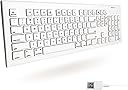
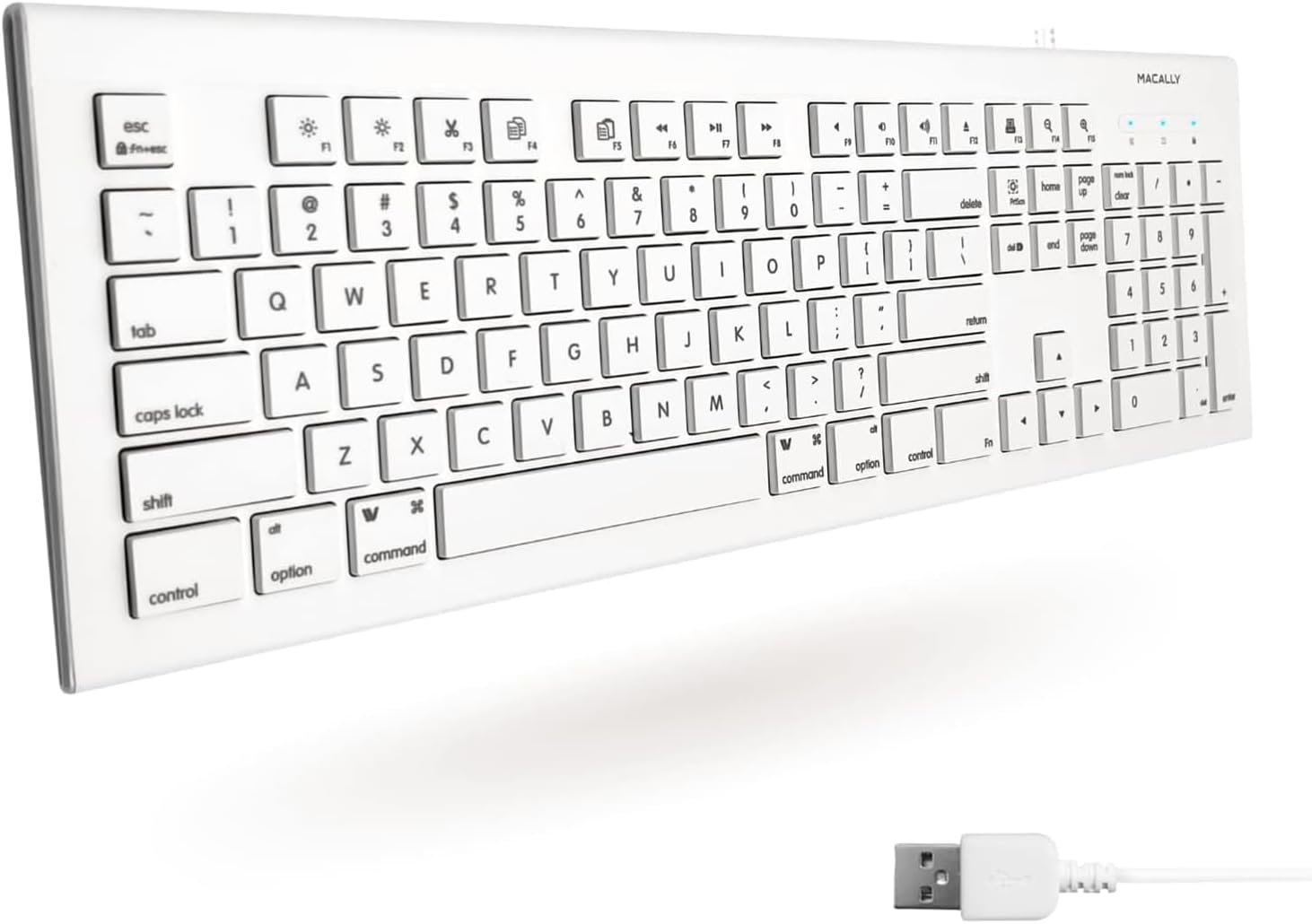
⌨️ Upgrade your desk game with Macally — where Mac meets mastery!
The Macally Full Size USB Wired Keyboard is a versatile, budget-friendly alternative to official Apple keyboards, featuring a full 104-key layout with numeric keypad, 15 dedicated Mac shortcut keys, and a slim, quiet design. Compatible with both Mac and PC, it offers plug-and-play USB connectivity and durable key printing, making it an ideal choice for professionals seeking reliable, efficient typing and seamless Mac integration without the premium price tag.


| ASIN | B00A7Z0WQ0 |
| Additional Features | Compatible Apple Keyboard with Numeric Keypad, Hotkeys and Media Keys, Mac Keyboard, Macbook Keyboard, Macbook Pro Keyboard, Macbook Air Keyboard, iMac Keyboard |
| Antenna Location | Business, Education, Everyday Use, Home, Multimedia, Office, Personal, Student |
| Best Sellers Rank | #371 in Computer Keyboards |
| Brand | Macally |
| Button Quantity | 104 |
| Color | White |
| Compatible Devices | Laptop, PC |
| Connectivity Technology | Wired |
| Customer Reviews | 4.3 out of 5 stars 5,178 Reviews |
| Enclosure Material | Acrylonitrile Butadiene Styrene |
| Global Trade Identification Number | 00701107491394 |
| Hand Orientation | Ambidextrous |
| Item Dimensions L x W x H | 17.7"L x 6"W x 0.81"H |
| Item Type Name | USB-A Keyboard US Layout for MKEYE Mac and PC |
| Item Weight | 1.4 Pounds |
| Keyboard Backlighting Color Support | Single Color |
| Keyboard Description | QWERTY |
| Keyboard Layout | QWERTY |
| Language | English |
| Manufacturer | Macally |
| Model Name | 701107491394 |
| Model Number | MKEYE |
| Number of Keys | 104 |
| Power Source | USB |
| Recommended Uses For Product | Business, Education, Everyday Use, Home, Multimedia, Office, Personal, Student |
| Special Feature | Compatible Apple Keyboard with Numeric Keypad, Hotkeys and Media Keys, Mac Keyboard, Macbook Keyboard, Macbook Pro Keyboard, Macbook Air Keyboard, iMac Keyboard Special Feature Compatible Apple Keyboard with Numeric Keypad, Hotkeys and Media Keys, Mac Keyboard, Macbook Keyboard, Macbook Pro Keyboard, Macbook Air Keyboard, iMac Keyboard See more |
| Style Name | Wired USB |
| Switch Type | Tactile |
| Theme | Computing |
| UPC | 801947293384 892652340517 701107491394 770993287015 |
| Unit Count | 1.0 Count |
| Warranty Description | 1 year |
T**K
So far it's sturdy and works well with my Mac and the key letters are not rubbing off.
A basic but so far reliable keyboard where the keys are printed on well enough that they haven't begun to rub off like another keyboard that claimed it had keys that won't wear off the letters/numbers/symbols but did within the first year. This is much more reliable so far and the brighter white color will be useful if the keys eventually ever did wear down as then I could easily mark them with a pen and then seal that over with some kind of stickers to mark the keys if needed. The keys are responsive and the layout seems well suited for a Mac computer too. Very good.
W**S
Fixed the other keyboard
Using this off-brand keyboard for a few days fixed the official name-brand keyboard. I know this is a ridiculous claim, but here's what happened: At work we have an iMac for secondary purposes (such as making sure stuff also works on iOS and watching Netflix). It doesn't get used much, but it is beyond its warranty. The $50+ official Macintosh keyboard that came with it one day suddenly stopped responding to presses of the spacebar. (Everything else still worked.) I removed, cleaned, and reattached the spacebar a few times, and also rebooted the machine several times, but the spacebar would not start working again. (Apparently spacebar failure is very common in official Macintosh keyboards.) For the sake of typing the space character, I hooked up a for-Windows PC USB keyboard that I bought at the second-hand thrift store for a whole dollar. I also reattached the original Mac keyboard for the usefulness of its extra buttons such as the volume controls. This was an acceptable arrangement for a while, but then the Mac spacebar started to get and remain "stuck," even after I fully removed the physical key. (The experienced effect was that web pages would scroll all the way down, because that's what typically happens when you hammer the spacebar when no input field has focus. Netflix playback also experienced seizures because the spacebar pauses and resumes videos.) I detached the fancy-pants aluminum keyboard because of its latest malfunction, leaving us with just the plain ol' PC keyboard. Again, this was a mostly acceptable solution, but we eventually decided we should get an operating-system-appropriate keyboard since the Windows key doesn't behave like the Quatrefoil key and the PC F[unction] keys don't do any of the extra stuff that the Mac F[unction] keys do, so we ordered this one for $20. After a few days of use, I was about to put away the old Mac keyboard when I thought of trying one more test: I went to keyboardtester-dot-com, plugged in the old keyboard and started mashing keys. To my surprise, the spacebar was working properly again! We put this new keyboard back in its box and we're holding on to it as an emergency backup, but unless the official Mac keyboard craps out again, we'll probably never ever use it again (for lack of need). By the way, this "Macally 103 Key Full-Size USB Keyboard with Short-Cut Keys for Mac" isn't really full-size; it's about an inch narrower than an actual "full-size" keyboard, which is achieved by smooshing the arrow keys and the six above between the main keys and the num pad, so its actually a "compact keyboard (with num pad)." The keys are comfortable to press, but one person said she kept getting confused by the compact arrangement of the arrows and the six above. I should knock a star off for this, but this product earns an extra 10 stars for A) having a functioning spacebar, B) fixing the other keyboard, and C) not being *incredibly* overpriced like everything else for Mac is.
A**Y
It is a bit Cheap . . .
If you don't look too closely at this keyboard it looks reasonably like an official Mac keyboard to take a chance. It has a similar style to the aluminum keyboards that you say "What the Hey!" and perhaps buy it. It is less than 20 dollars, after all! And you would be half right. As other reviews said this is a cheap keyboard. It feels and sounds cheap. It is very noisy when typing. It doesn't bother me that much, but hey! Maybe it would bother you. It doesn't bother me. It is reasonably enough like the aluminum keyboards that you will feel at home. It is a lot cheaper in construction than those aluminum models, but it is comfortable to use. I am typing up this review with the keyboard right now. The keys are all where you expect them to be and it doesn't feel too small or too big. The special keys do work at the top of the keyboard. Although several of them are very different from a official keyboard. They seem to provide little purpose. Which is annoying because all the FN buttons have a special function on it. So that means if you need to use any button from F1 to F15, you'll be pushing the FN button first. Num lock doesn't appear to work but the keypad works anyway. It is a mac style keyboard, so that's cool. That means that Option and Command buttons are in the places that you need them to be and at the right size. That was one of the most important reasons why I bought this keyboard - was so that I had that set up like that. My only real complaint is the fact that it is missing USB ports. True Mac keyboards all have them (save the bluetooth ones) and I expected it here. Don't. They are not here. So, I ended up buying a USB hub to extend the ports on my mac. Since I no longer have a port to plug my mouse into. That really annoys me, but it is not enough for me to return the sucker. Overall, I like the size, shape, and placement of the buttons. It is comfortable to use. Even if it is loud. Yeah it's cheap, but considering the price of a new "wired" Mac Keyboard - I'll stick with this one. That is until it breaks!
K**E
Cheap solution to dead laptop keyboard!
There are so few true bargains on Amazon - this, though, is one of them. We've got an older Macbook that has been working well, but was recently replaced and this one handed down to the kids. Needless to say, there was an 'accident' with a can of soda on the keyboard, and half the keys were destroyed. There is no way the value of the computer would've been worth replacing the keyboard (which had always been problematic in this particular mac), so I figured adios. Well, at least one last try before adios, which was the purchase of this keyboard. It's cheap, so how could we go wrong? The keyboard is full sized (as in very full sized) and hangs over the edge of the Macbook, which is a 15 incher. Plugged it into the USB port, had a pop-up menu that recognized the keyboard, and viola...instant new keyboard for old mac computer! We don't need a mouse since the touch pad still works fine. I'm typing on it right now, in fact, and the keys are light. They don't feel cheap at all; in fact, it's a lot more pleasant to type on this vs. the laptop's original keyboard (that particular keyboard for the model of Macbook has been a huge pain and was replaced once before.) There are very few things you can buy for $15 that solve a problem as well as this keyboard. The kayboard is nice, but sure, it's not lovely to look at, hanging over the edge of the laptop. But so what? It works great! And the kids like sitting back with the keyboard in their laps (it's got a nice length to it) and doing video games. This was an inexpensive solution that will enable us to get at least another year out of an old laptop. I couldn't be more pleased!
H**E
A "it has to work" person--
I just bought the third one of this model keyboard. A few years ago I bought an early IKEYSLIM version, which is really the same thing with different cosmetics, and used it on the secondary computer for about a year, pulled that computer from use, set the keyboard aside, and six months later loaned it to a friend who used it on her Windows machine. In the meanwhile I had a series of malfunctions on a five year old Apple keyboard, pulled it and used another well loved but very discontinued and unsupported keyboard for a month or so, and immediately got this MKEYE keyboard. The old and unsupported keyboard croaked (USB contact issue) and since the keyboard was in the "emergency backup" slot, put the MKEYE onto the machine. Worked like a charm, so I ordered number three. It arrived, is still in the box, but number one was given back to me as the girl I loaned it too was going laptop only and traveling. All it is boils down to a good working keyboard from a company that has a good warranty-- that I have never used, because they work. Okay, I am biased, I go Mac because it works better, and while I would have prefered the long number keypad Apple keyboard, it was both more money and out of stock. Since it was to be an emergency backup, I felt this was good keyboard, and with three on hand at the moment will wait until there is a really good deal on the Apple. This has the advantage of working, being inexpensive, and while you have to type a bit harder-- thus slower-- it does the job right, and that is what I want. And I do not do any gaming, so I have no idea what the ramifications of that use might be. Having a backup keyboard on the shelf is my way of coping with reality, and while not the world's prettiest or most fun keyboard, four minutes to pull out the box, plug it in, have the machine recognize it, and go back to work-- it is bargain. .
T**G
Great keyboard
My wireless keyboard was dropping the connection too often so I needed something more stable and this works really well.
S**T
Could have been a contender - keys in weird order & minor hardware issues
Good parts of the keyboard: - $14 is quite a good price for a basic keyboard. At that price, it's fine that it's just a USB connection. - It does have Mac keys on it (albeit not in the right order anymore). - Fullsize num-pad - Normal size arrow keys (many mac keyboards will make Up/Down arrow keys only half height since vertical navigation is only half as important ;)). - It has media keys so you can control music right from the keyboard. Huge timesaver & a relatively hard feature to find on an entry-level Mac keyboard. The problems with this keyboard are: - The keys don't always fire an event, you really have to type hard (I'm already a hard typer so that's saying a lot). You will often have to hit a key twice (seems to mostly be the case with the function keys on top). This is fairly rare though, so it's not awful. - The caps-lock and num-lock lights do not light up. The caps-lock key actually works to toggle it, you just don't get to see the light. The num-lock button doesn't actually serve any purpose on this keyboard as far as I can tell because with the light off, the number-pad is supposed to work like arrows and that is not the case on this keyboard. - The whole reason to use a "Mac" keyboard is the different special keys... but if you look closely, they're not in the same order as a Macbook or "Magic Keyboard". I don't know if Apple has recently changed the order, but the current (2017) Macbook Pro and Magic Keyboard are: "fn", "control", "alt/option", "command" [SPACE BAR] "command", "alt/option". This keyboard is "control", "alt/option", "command [SPACE BAR] "command", "alt/option", "control", "fn" so this isn't that much closer than just a normal Windows keyboard (Windows key functions like "command"). If the keys on the bottom were in the right order to match current Macbook/Magic-Keyboards, I'd overlook all of the other drawbacks in a heartbeat. The way it is, I get all of the drawbacks above and I don't get the benefit of the keys matching what I use at the office, so I'll keep looking for a different keyboard. Seriously disappointed... I wanted a cheap keyboard for a Macbook (this is almost as inexpensive as a basic Windows or Linux keyboard). While the USB connection needs an additional adapter to connect to the new USB-C ports on the Macbook Pro (thanks Apple ;)), that was manageable. Wish this could have worked. Thanks for the effort Macally!
J**L
Reliable, Budget-Friendly Mac Keyboard for M1 MacBook Air and M4 Mac Mini
I picked up the Macally Full Size USB Wired Keyboard for my 2020 MacBook Air M1 (16GB/256GB) and 2024 Mac mini M4 (16GB/256GB) about five months ago, and it’s been a solid workhorse for my coding and productivity needs at under $25. As a web dev student diving into Python and AI on macOS Sequoia, I needed an affordable, Mac-friendly keyboard with a familiar layout. This one delivers, though its wired nature pushed me to Bluetooth mice for port flexibility. Here’s my take after daily use. Pros: The Mac-specific layout with 15 shortcut keys (Mission Control, Spotlight, media) is a lifesaver, making navigation in VS Code, Xcode, and iTerm2 a breeze on both Macs. It’s plug-and-play—no drivers needed. On my Mac mini, it connects directly to a USB-A port, leaving plenty of ports (3x USB-C, 1x USB-A, HDMI) for other gear. For the MacBook Air, I use it with a UGREEN Revodok 105 USB-C hub, which also handles 4K HDMI and charging, keeping my second USB-C free. The full-size design with a numeric keypad feels great for long coding sessions, and the low-profile keys are quiet yet tactile, mimicking Apple’s pricier keyboards. Transferring data or managing virtual environments? The shortcuts speed things up. It’s sturdy, lightweight (under 2 lbs), and works with my old Windows PC too, which is handy for dual-boot testing. Cons: The USB-A cable occupies a port, which isn’t ideal for the MacBook Air’s limited setup—I’m now using a Bluetooth mouse to free up my hub’s USB-A ports for drives. A USB-C or wireless version would future-proof it. The cable’s a bit short (5 ft), so desk placement matters. No backlighting, but I don’t code in the dark much. It’s not as sleek as Apple’s Magic Keyboard, but for the price, I can’t complain. Tip: Pair it with a USB-C hub like UGREEN’s for the MacBook Air to keep ports open (use the hub’s PD for charging). On the Mac mini, plug directly into USB-A and consider a Bluetooth mouse to max out port availability for SSDs or extra monitors. This keyboard’s a steal for M1/M4 users needing a no-fuss, Mac-ready typing solution. It’s not wireless, but it’s reliable and comfy for coding marathons. Highly recommend for budget-conscious Mac fans!
Trustpilot
2 months ago
4 days ago