Buy anything from 5,000+ international stores. One checkout price. No surprise fees. Join 2M+ shoppers on Desertcart.
Desertcart purchases this item on your behalf and handles shipping, customs, and support to Iceland.
🎯 Level up your multi-monitor game with bezel-free precision!
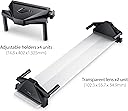
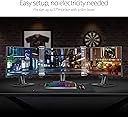
The ASUS ROG Bezel-Free Kit is a clear, easy-to-install accessory designed to create a seamless triple-monitor setup for flat monitors under 27 inches. Featuring optical micro-structures that visually eliminate bezels and quick-release clips for flexible mounting, it optimizes a 120-130° viewing angle to deliver an immersive gaming experience, especially for FPS, racing, and flight simulators.


| ASIN | B082XZG3HM |
| Adaptive Sync | FreeSync |
| Additional Features | Anti Glare Screen, Wall Mountable |
| Aspect Ratio | 16:9 |
| Best Sellers Rank | #156 in Computer Monitor Stands #467 in Computer Monitors |
| Brand | ASUS |
| Built-In Media | Item |
| Color | CLEAR |
| Compatible Devices | ASUS Monitors (under 27 inches, four-sided frameless or slim-bezel design) |
| Connectivity Technology | VGA |
| Customer Reviews | 4.0 out of 5 stars 582 Reviews |
| Display Resolution Maximum | 640 x 480 |
| Display Technology | CRT |
| Display Type | flat |
| Global Trade Identification Number | 00192876528983 |
| Hardware Connectivity | VGA |
| Has Color Screen | Yes |
| Is Electric | No |
| Item Dimensions D x W x H | 16"D x 5"W x 2.9"H |
| Item Type Name | ASUS ROG Bezel-Free Kit ABF01 Universal Multi-Monitor Setup with Optical Micro-structures Easy Assembly (Set of 2) |
| Manufacturer | ASUS |
| Model Name | ABF01 |
| Model Number | ABF01 |
| Mounting Type | Wall Mount |
| Native Resolution | 1920x1080 |
| Number of Component Outputs | 1 |
| Picture Quality Enhancement Technology | Optical micro-structures, FreeSync |
| Refresh Rate | 240 |
| Resolution | 2K DCI 1080p |
| Response Time | 5 Milliseconds |
| Screen Finish | flat |
| Screen Size | 4.3 Inches |
| Screen Surface Description | flat |
| Shape | Rectangular |
| Specific Uses For Product | Personal |
| UPC | 192876528983 |
| Unit Count | 2.0 Count |
| Viewing Angle | 130 Degrees |
| Voltage | 100240 Volts |
| Warranty Description | 1 Year Warranty with ARR |
| Warranty Type | 1 Year Manufacturer Warranty |
J**Y
curved monitor compatibility
they do work on curved monitors and you can get them to flawlessly mesh two screens together but the stock brackets are not that strong for holding the glass in place so i 3d printed clips to force them to grab the glass tighter and to get it to show no lines in the middle when using this only worked flawlessly because i 3d printed a monitor support for the bottom and back of the monitors to hold them perfectly together at the correct angle so i basically paid a hundred dollars for the glass lol which to me was worth it because the end result is what i wanted but if i didn't have a 3d printer for supports i would've returned them because its a pain trying to install it and get monitors to be perfectly together so splitting and warping effects don't show from them not being perfectly together and its probably my ocd talking about that but yeah, if you have a 3d printer the effect can be perfect for use on curved monitors that is but they do say that they’re made to be used on flat monitors so maybe that way they’re a-lot easier🤓🤘
R**N
Works SHOCKINGLY well!
I use these with a triple 27" display setup for sim racing, it is SHOCKING how well they work. Yes, you can see a slight distortion at the edges of the strips but it completely and totally hides/removes the monitor bezels, when setup properly it really is like magic how it removes them and makes the setup feel like one giant monitor. I did modify mine by cutting them down to the exact high/length I needed (I think they support up to 32" display) and created custom 3D printed mounts for them as the included mounts are rather large. They work fine but add noticeable bulk at the top/bottom of the monitors hurting the illusion of one large display so I just made my own small mounts and used some mounting tape to hold them on.
C**S
Potentially a good sim racing solution
This is some bleeding edge technology that you should probably avoid if you’re not one to tinker. I can’t see there being many applications for this outside of simulator gaming such as sim racing and flight sims. It also has a premium price tag considering what all comes with the kit. That being said, it actual does the job very well given the right application and can add in extra immersion to a simulator. Here are a few things that might be worth consider before purchase, * If the top and bottom of your monitor’s bezel are a different thickness, the clear plastic will bow and create an inconsistent amount of distortion. The flex might also push the clear plastic against your screen which may lead to a permanent mark on your monitor over time. * A smaller gap between the display screen and clear plastic will result in less distortion where the clear plastic starts. So basically, thicker monitor bezels will have more distortion between edges because they create a larger gap. * 32” screens are incompatible be default, but people have been able to create custom solutions to make them work. * There isn't a whole lot of information or examples available for them, so they do take a little bit of work for those that want a fine-tuned setup, but other than that they should work right out of the box for most setups.
A**Y
Not worth you investment
Conclusion: Just buy an altra wide screen for yourself. Pros: 1. Fantastic idea on this product 2. It does significantly eliminates the bezel (the reason you can see mine with some bezel left is total because of my fault. My triple monitor stand's arms are not long enough to make 130 degree of angle as indicated in the manual. Based on what I have here, I am sure it can fully eliminates the bezels) cons: 1.As you can see from my game play screen shot, although it some how reduce the bezel, it add two large strips of dark area which cannot be ignored. This is the main reason why I cannot recommand this product to anybody. 2. THIS ONLY WORKS ON FLAT SURFACE! Note they works fine with curved monitor. What I mean is that the monitors must have a flat back and no pop up bottom. The 3 monitors I am using are optix mag214c from msi. They have a round back and the front bottom is poped out. As a result, you may can tell that the center part of the bezel is wider than the top and bottom part. Just keep this in mind, check you monitor's compatibility first! Eventually, you have to choose between whether you want to see the bezels, or you want to see two huge chunks of dark zone on your screen.
L**W
Perfect.
Perfect.
8**8
10/10
Amazing for sim rigs. It removes the bezels on my sim rig perfectly, it’s very unnoticeable during racing and drifting.
M**K
This is so bad, I don't know where to start.
The idea of cutting the gap between monitors for gaming purposes is such an appealing idea especially now that wide screen gaming is much more popular especially in the racing gaming arena. The idea that you can use your three monitor setup without gaps is just too good to miss out on. Unfortunately this product does not solve the issue. First and foremost, the plastic fresnel lenses are very fragile, I wasn't being rough with them but the slightest movement with the bracket caused the first crack to appear. Another crack has appeared through later tiny adjustments. Please bear this in mind as it becomes more important later. Assuming the gap between monitors is about an inch then these lenses will require you to put a huge angle to get rid of that gap. It is not a comfortable angle at all and seems to have been designed with no day to day function in mind. This means that once you have finished gaming you have to take these off. Yup, the two hours you spent trying to make it work is now undone, because you need to reposition your monitors to be useful for none multi monitor gaming. You then have to refit it, mess around trying to get rid of the gap, off on, off on, crack. These things will last about a month tops when used this way. The Fresnel lens causes all sorts of distortion and ghosting of the image behind it. The cursor doesn't appear and things are duplicated. About 4 inch of monitor real estate becomes the badlands on each side of the center monitor. You can't leave these things on if you use your monitors for more serious work or business. They just ruin the experience and you lose so much screen real estate avoiding the badlands. So I do think it deserves one star. If you are a driving game nut and you really want that experience without the gap then this thing will do that for you. But for everyone else, avoid this like the plague.
J**E
Less compatible than you would think
This kit requires that you can arrange your monitors at a specific angle (imo far too acute for comfort), so if you have your monitors on a mount, you may be unable to use this product. It also requires that the casing for your monitor be somewhat thick, the arms on the clips stretch out very wide which is nice but they don't hug all the way in so if you have a very thin monitor this will not work for you (mine were maybe .3" and the unit was loose). If you have a setup with either of these the image will end up looking TERRIBLE and effectively unplayable as the material has to be at specific angles or the image will distort. That being said, when you get some normal monitors attached to stands together it works exactly as the product picture shows. The material is wide and noticeable but I would consider it a fair improvement over bezels. The cost is what it is, but I can only recommend this to people who are very passionate about their multi-monitor setup. TL;DR make sure your setup looks exactly like the product picture or you may be in for a bad time
M**R
Trusted
Quality product and fast delivery
N**N
Muy caro para 2 trozos de plastico
Funciona en lo que cabe bien pero solicita que el ángulo de los monitores quede algo cerrado, da su función, pero si se pasan con dar tan caro 2 trozos de plástico
G**F
Works great.
It not perfect, but it’s a lot better than two 1/2” black bars in the view. With 32” curve screens it took a while to get it right. On my other rig with 25” screens put them on, a little bit of adjustments under five minutes bingo. Wish I didn’t wait so long to get them.
L**A
Free kit bezel
Super 👍 bien régler la magie fonctionne 💯 avec des écrans 32 pouces good jobs juste prévoir un adaptateur gratuit sur le net j'ai trouvé cela en 3d rapide et fonctionnel merci Asus 👍
I**H
Something is weared about such a product.
A piece of cheap plastic designed a decade ago for monitors that are a decade or two old tech. The principal is great but those plastic pieces are of poor quality and have design issue. The kit assumes the monitors bezels are around 10mm so when you place the units on the screens it converge the displays 1CM from right and 1 CM from left. So what happens if your monitors have bezels that are only 6mm? 8mm will be erased from the display There is no fix for that unless you take the screens apart by around 12mm. I did that and yes, everything aligned well. So they are in 2025 selling a junk piece of plastic designed for monitors of two decades back. Instead of having multiple versions for each bezel size they just have one product. Worse then that they do not mention anything and there are no documentation. So, buy those if you have monitors with bezels of 1.1cm in each side. Or expect weared behavior. One more aspect is the quality. Very poor plastic. We are in 2025 and we know the material used in screens like phones how hard such glass to scratch. Those junk scratch it you touch them with your nail. Mine had minor scratches directly from the box. So paying $120 for junk is not recommended.
Trustpilot
2 months ago
1 month ago