Buy anything from 5,000+ international stores. One checkout price. No surprise fees. Join 2M+ shoppers on Desertcart.
Desertcart purchases this item on your behalf and handles shipping, customs, and support to Iceland.
⌨️ Elevate your workspace, protect your wrists, and type like a pro!
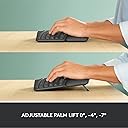
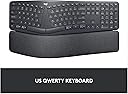
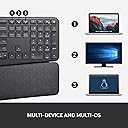
The Logitech Ergo K860 is a premium wireless ergonomic keyboard featuring a curved, split keyframe and a memory foam wrist rest that reduces wrist bending by 25% and increases wrist support by 54%. Compatible with multiple OS platforms, it offers Bluetooth and USB connectivity, a full-size layout with perfect stroke keys, and customizable function keys via Logitech Options software. Designed for professionals seeking comfort and productivity, it boasts a 2-year battery life and sustainable materials, making it a top-tier choice for long-term ergonomic typing.


| ASIN | B07ZWK2TQT |
| Additional Features | Customizable Display Keys |
| Antenna Location | Everyday Use |
| Best Sellers Rank | #9 in Computer Keyboards |
| Brand | Logitech |
| Built-In Media | 2 x AAA Alkaline Batteries, K860 Ergonomic Keyboard |
| Button Quantity | 78 |
| Color | Graphite |
| Compatible Amazon Tablet Models | Amazon Fire HD 10 11th Generation, Amazon Fire HD 8 12th Generation, Amazon Fire Max 11 13th Generation |
| Compatible Devices | Compatible on Windows, macOS, Linux and Chrome OS |
| Compatible Operating System Family | MacOS, Windows |
| Compatible Tablet Computer Models | AAUB P30 |
| Connectivity Technology | Bluetooth, USB |
| Customer Reviews | 4.5 out of 5 stars 7,905 Reviews |
| Enclosure Material | Paper, Plastic |
| Global Trade Identification Number | 00097855151667 |
| Hand Orientation | Ambidextrous |
| Is Electric | No |
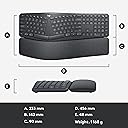
| Item Dimensions L x W x H | 17.95"L x 9.17"W x 1.89"H |
| Item Type Name | Ergonomic Split Keyboard |
| Item Weight | 40.92 Ounces |
| Keyboard Backlighting Color Support | Single Color |
| Keyboard Description | Ergonomic, QWERTY |
| Keyboard Layout | QWERTY |
| Manufacturer | Logitech |
| Mfr Part Number | 920-009166 |
| Minimum Required Operating System Version | Windows 10 |
| Model Name | Logitech K860 |
| Model Number | 920-009166 |
| Number of Batteries Required | 2 |
| Number of Keys | 105 |
| Number of Sections | 1 |
| Power Source | Battery Powered |
| Recommended Uses For Product | Everyday Use |
| Special Feature | Customizable Display Keys |
| Style Name | Keyboard Only |
| UPC | 097855151667 |
| Warranty Description | Manufacturer’s warranty can be requested from customer service. |
| Water Resistance Level | Waterproof |
A**Z
Finally something competitive from Logitech
Although I've had a number of Logitech mice over the years, this is the first Logitech keyboard that I can recall ever buying for myself. It's replacing a Microsoft Sculpt wireless keyboard that I really liked. I loved the simplicity of the Sculpt and have been used to that split design after many years with MS's natural keyboards. Logitech, for as long as I can recall, has never had a good competitor in that basic, split layout ergo space. They've always had something like the K350 that was sort of a warped or stretched layout but wasn't much different from a normal, if a bit distorted layout. And that one always seemed a bit cheap and clunky. I think it's safe to say the K860 finally fills that gap. And so far it seems to be doing it well. I think there is a little bit of a difference in the spacing from one side to the other when comparing to the Sculpt but the overall layout is basically the same. So while I'm still getting a feel for where the differences are between the two (delete key, number pad, pg up/down, etc), the overall transition is easy. The Good Keys are comfortable and quiet. I'm far from a keyboard expert or connoisseur, but the typing action is fine (if not a tad firm). I do tend to only use the left side of the spacebar and I think that particular key makes a little more noise than the others - but otherwise it's pretty quiet. I also like having a number pad again (the Sculpt has a separate/external one which I usually kept in a drawer). Actual ergonomic feet. I'm happy to see that they got the feet in the right place for actual improved ergonomics. The lower of the two feet settings feels about right to me when comparing to what I'm used to with the Sculpt (I did use the riser on the Sculpt for max comfort) - but I like that there are two options and might try the taller one just to see if I notice a difference. There's a power switch. It seems dumb, but I like that there's actually a power switch. This will be handy when I want to give it a quick wipe down and cleaning. MS's Sculpt did not have one and that just meant I had to pull the batteries or turn off my laptop if I wanted to clean it. Not the worst but not exactly convenient. Dual connection methods. Just like my M720 mouse, I like that there's a USB receiver and it can do Bluetooth (and multi-device BT even!). I like using BT on my own computer to keep USB ports free but it's nice to be able to pull the receiver out if I'm working on another system temporarily. The Meh Palm rest is not as fancy as it looks. The palm rest is comfortable but I was surprised there isn't really a texture to it. It's just a pattern on the material made to look like a texture. It's otherwise just as smooth as any other palm rest I've used. From the images, I expected maybe it would be some sort of microfiber or other soft textile. I am also surprised that the palm rest doesn't detach from the keyboard. It kind of looked like it would from the photos but it's all one piece. It's fine though, since I'd probably only ever use it with it attached - it just gave that impression from the design. Feet are a little too rubbery? While I appreciate grippy feet to keep things in place, I tend to push my keyboard around my desk during the day depending on what else I'm working on and these feet are pretty grippy out of the box. Though that honestly might be a plus for a lot of other people. I've only been using it for a short time, so I don't really have any negatives to put into this - but I'll update if anything comes up. Otherwise it's nice to see Logitech finally making a decent, modern, split layout keyboard.
N**!
Finally a suitable replacement....MS 7000 you have been replaced.
I have finally found it! I have been using Microsoft’s wireless keyboard 7000 for years and have bought so many replacements for frozen keys, non reactive keys etc. I even stocked up when I could find decently priced ones on eBay. Every other style that I bought that claimed to be ergonomic was an epic fail until now. Getting tired of repainting letters on my existing Microsoft 7000, I saw a Logitech one at Staples and thought maybe. But after getting it home and finding my wrists bumping and bent because the layout was too straight, I decided to look here. I read review after review, looked at the pictures and thought, why not? I couldn’t be any more happier with this purchase! Right out of the box I liked the feel and look of it but was concerned about the height of the keys themselves as I’ve never really like laptop keyboards and liked to hear the “click” of they key. But after a week of use, I am ecstatic with this keyboard. I have found a new favorite. Granted the test of time isn’t met yet, but so far it is great. I am so glad i took the chance with it. I had both of my wrists for carpal tunnel repaired a few years ago and the layout of the true ergonomic keyboard was a must. I can’t type with any other. i give this 5 stars without hesitation! Possibly it’s a bit high in price, but when you need it and must have it, you’ll pay for it. If you look at pricing for the classic Microsoft 7000 then you’ll see what demand can charge for popularity. The more I use it, the more I love it. If you’re not a must have user of the split style keyboard, you probably won’t like this. But for those of you out there that do, I don’t think you will be disappointed. Thank you Logitech for having this unit. I wish I had found this long ago. MAY 28, 2020 update: I have used this keyboard for a few months now and still maintain that it is a great replacement for the old Microsoft 4000 or 7000 (un-wired). Over time I have noticed that I have an issue with my right hand wanting to go just a bit more to the right so I am off a key or I reach to back space and am hitting the print screen button. The J key does have it's marker so I know it's the home key by touch, but my initial reach is wider and I start tying and then realize I put my hand down incorrectly. That coupled with the Dash Key (-) on the Keypad having the logoff button right above it has makes me logoff up to several times a workday. So I am looking around for another suitable unit. Don't get me wrong, I think most of you will love the layout of this keyboard and like it very much. It's just problematic for "me". So don't hesitate, but if you have the so called "fat fingers" you might have the same issues I am having. I still give this keyboard a "5" as it is a great keyboard but just a bit too short for my liking. After using this for awhile I still haven't been able to retrain my position. The logoff key is the most problematic issue for me as I over-reach the dash key on the keypad A LOT. I use the keypad all the time so that one key is just in the way for me. Being logged off is irritating. However, I did get used to the low profile of the keys and the typing is very soft and fluid. Had the keyboard been .5 to 1" wider where the keys could have been a bit larger, it would have not felt so pinched and I probably wouldn't have the right hand issues I am having. It's still a great keyboard. In the absence of another one with a better layout, I will still continue using this one.
M**T
Really nice ergo keyboard!
I'm in IT - I'm at a computer all day, every day. I had a boss early in my career who had severe carpal tunnel issues and he always preached ergonomics. Due to that I've been using an ergonomic keyboard for the last 17 years, specifically the Microsoft Ergonomic 4000. That keyboard is no longer produced but I've loved it, it's held up well, and I've never had any issues with my wrists from typing all day. I recently got a new job and decided to upgrade my keyboard for the first time since 2007. The Logitech ERGO K860 came up in most searches for the best ergo keyboard in 2024 so I decided to give it a shot. I couldn't be happier with it. The shape and key placement is very similar to my beloved MSE 4000. They keys are much quieter and very pleasant to type on. I was a little concerned that the "scooped keys" in the product description would be deep divots like I've seen on some keyboards and don't care for, but I needn't have worried. These are just ever-so-slightly scooped, in a way that's barely noticeable until you focus on it, but enough that it does make a positive impact on typing. It's well constructed and feels like it'll hold up for a long time (we'll see if I can get another 17 years!). The wrist rest is really comfy, nice and wide, and not a material that seems like it will wear out or get gross over time. It connected easily to two laptops and my phone, one laptop with the USB receiver and the other two via Bluetooth. Typing is nice and responsive and I don't detect any delay with typing. I like that the function keys can be customized via the Logi Options+ app, although the default functions are pretty good right out of the box. I already had the Logi Options+ app for my MX Master 3 mouse (best mouse I've ever used!) but it wouldn't recognize the keyboard until I updated it to the latest version, not a big deal though. The only change I'd make to it is the batteries. It runs on two AAA batteries. That's fine I suppose, I do have rechargable AAAs I can use. I'd prefer that the keyboard be USB rechargeable like the MX Master 3 mouse - charge it once every few months and then don't worry about it. Now when the batteries on this keyboard run low I'll have to go searching for batteries to replace them instead of just plugging it in for a bit. Not my favorite, but it's not huge deal. Overall incredibly happy with this keyboard! It's definitely a good successor to my Microsoft Ergonomic 4000!
B**R
Very nice but a few flaws.
Alright after two months of heavy use: It's weighted nicely, much heavier/sturdier than I thought it would be. It feels like a $100+ keyboard. I thought the palm rest was made of fabric in the pictures, and worried because that would surely get filthy quickly and be difficult to clean. It's plastic, just looks like fabric, it's a bit soft so it feels good. Plastic is a good thing, easy to clean, hoping it doesn't crack or fade with use. Somehow even though it's a relatively new logi product, it doesn't use logi's new bolt receiver like my new logi mouse does. So I have two receivers taking up two usb ports. Bluetooth doesn't work as well, unifying is more stable, has less lag, and uses less battery. The corporate version of this keyboard uses the bolt receiver. Wasn't sure I would like the keys because I don't particularly like these on laptops, but they are well done on this keyboard. Keys are a little concave so they feel nice, throw is short but not too short. Makes me feel like I'm typing faster. The downside of this keyboard are the media controls, they are the F7-F12. You press a button that changes the function from F keys to media controls. If I want to turn up the volume without looking at it, I have to feel for the bigger button above backspace, which is print screen, then feel two keys to the left. One key to the left of that is down, another to the left is skip forward. Or I can feel for the space in between F6 and F7, then feel 6 keys to the right and that's volume up. If you accidentally press the key just to the right of volume up, it changes the function back to the F keys, so pressing the volume up button no longer turns the volume up, it performs the F12 function of whatever app you're using. F12 can really screw up whatever you're doing in some programs. Just a ridiculous functionality decision on their part that I suspect is more cost cutting than anything else. As a person who uses this keyboard on a PC that's used as part of a living room entertainment center, it's especially frustrating. I knew what I was getting with that, I knew it would be annoying, but it's even more annoying because the key that changes the functionality is RIGHT NEXT TO ONE OF THE MEDIA CONTROLS. Everything else is great, knowing what I know now I would have still purchased it.
Z**D
Great key action, but: (1) locks up, (2) toggling media vs. F keys sucks, (3) no right-mouse menu
UPDATE 2 (7 Aug 2021, ~7 months into ownership). I found the Microsoft context-sensitive menu pop-up key -- equivalent to the right mouse button -- of the MS EP4000. See picture. I don't love this location. But at least it exists. I'm moderately used to it's weird inaccessible placement. But I do have to always look to find it, instead of knowing it's location by muscle memory, like most keys. I probably should put one of those raised gummy circles (like on my delete key and fn key here in the pic) on it. Also, I like this keyboard now so much that I bought one for the office too. It's outside office standards, so I paid for it myself. (This really helps avoid the constant disorientation of working on two different keyboard between home and work.) UPDATE (7 Apr 2021, a few months into ownership). The problems I wrote about below, seem to have miraculously evaporated. I have no idea why. Now this keyboard only spams the volume-up (or down) signal to my PC maybe once a month. And I’ve found that just taking the USB fob out for a second, and cycling the power button on the keyboard clears that every time, and takes maybe 5 second. For something that happens maybe once a month, I can live with it. It is otherwise a very comfortable, fast, easy, quiet keyboard. I’ve even become accustomed to toggling between F-keys and media keys. All in all, this is my new favorite keyboard. ORIGINAL REVIEW This seems the best option for users who loved their Microsoft Ergonomic Pro 4000. Same split layout, and the other keys are more nearly where muscle memory expects them to be (INS, Home, pg up, DEL, end, pg down). And the key action is awesome: actually way faster than the MS EP4000. ... BUT: WARNING #1: Around 1-4 times a week, the communication between my PC and this keyboard locks in some weird setting, like increasing the volume. I can unintentionally get max volume this way in <1 second, with zero forewarning. Happens when I haven't even touched the associated media key. At that time, no other inputs are possible, since the keyboard is busy spamming that one keystroke to the PC. The only solution is (after ripping my headphones off) to remove the USB fob from my PC, wait a minute, plug it back, and hope for the best. Usually that works. But sometimes it's just more of the same, and I have to manually restart my PC. At least that (a reset) always fixes it. But it's a terrible interruption to workflow. You can lose important work that way! This happens on both my self-built PC (keyboard drivers installed), and on my HP laptop (keyboard drivers not installed). So, it's not a problem with my PC. It's not a mechanical sticking (no key is physically wedged): it's a logical sticking. To be clear, it's not just "volume up" that gets locked active. Other keys too. Volume down. And toggles between apps. And stuff I can't really explain/describe: I just see a lot of fibrillation on my monitor, as the various apps go nuts - so far without editing content, but long term who knows? I should RMA this keyboard, but the key action is so damn fluid - I type a lot faster on it - that I'm dragging my feet on the RMA. That, and it's otherwise the prefect replacement for my beloved Microsoft Ergonmic Pro 4000. WARNING #2: I HATE that I have to toggle between the F-keys between F-functions and media key functions. I am not used to that. My old keyboard -- like many who buy this, I bet -- was a Microsoft Ergonmonic Pro 4000 (before Microsoft ruined that line with their terrible 7000 update). It had physically distinct media keys vs. F-keys. So I'm used to adjusting sound volume instinctively, without thinking about it, and ditto hitting F2 to edit a cell entry (e.g., in Excel), or hit F11 to enlarge my browser (to remove navigation bar shrubbery). But on this Little Compromise of a keyboard, I have to constantly recover from hitting an F-key/media with the toggle set to the wrong usage. Aarg! I am slowly learning to press the F/media key toggle, while watching my monitor for the brief flash that tells which mode it's in, then deciding whether to repress the F/media key toggle again, before trying to get either an F-key or a media key to perform some function. I'm Not loving that! I would REALLY prefer a keyboard set-up like the MS Ergonomic Pro 4000, but that is probably tied up in a patent, that MS won't release or reasonably license, but neither will they manufacture them anymore. Oh, you may still find one on eBay, used, for $300. Ugh. WARNING #3: The Microsoft context-sensitive menu pop-up key -- equivalent to the right mouse button -- of the MS EP4000, is missing. Replaced by a second key: "opt/ctrl". You'd think the driver software would let you program this key to do different things. I have not found how to make it act like the awesome key that it replaced (the Microsoft context-sensitive pop-up menu key). I'm still mourning the loss of that little key of wonder. Slows me way down to have to take hands off keyboard to fiddle around to right-mouse click every time.
R**.
BEST ergo keyboard out there! ! ! !
ABSOLUTELY LOVE this keyboard! Bought one for work AND for home. It's quiet, it's low-profile but most important it's COMFORTABLE while typing! It's the most natural fit for your wrists, the hand rest that is part of the keyboard is supportive but not squishy. #1 keyboard on the market IMO.
P**W
I love this keyboard!
As a long time user of the now largely discontinued Microsoft Elite-branded keyboards (the Natural and larger models for business) since the 90s, I have not found a suitable ergonomic replacement among several different brands I've tried- until now, that is. The K860 is a super solid keyboard. You can tell a lot of thought- and dare I say- customer input (chortle)- went in to this masterpiece. I love the versatility of being able to bind to multiple devices, as well as compatibility with Microsoft and Apple products. The natural key position, curved, raised keyboard layout, and comfortable palm-rest are as close to ideal as can be imagined. The function keys are customizable, though that is entirely optional. The LogiOptions+ software that you can install offers some nice configuration options. The software provides little, temporary pop-up windows that remind you when you use the number, cap, and function lock keys. I can now escape my desk by quickly typing the "lock" button to lock Windows, rather than the longer, three keystroke method. The biggest hurdle for me (if you can call it that) is getting used to the shorter travel chicklet-style keys which work best with a lighter touch than the traditional, longer travel keys like Cherry. MX One concern from the beginning was that the keyboard itself only has support legs at the bottom that allows you to tilt the keyboard so the palm rest is in a raised position (two positions are available). Unfortunately, for people that don't stand at their desk or taller people that work in a seated position, the opposite (function key side side raised) might be preferred. To that end, I searched online for possible solutions. In the end, I picked up two of these fancy 2" speaker isolation pads (https://www.amazon.com/gp/product/B07RNB7BYP/ref=ppx_yo_dt_b_search_asin_title?ie=UTF8&th=1) and stuck them under the front of the keyboard in just such a way to get the perfect tilt-back without any wobble. Works great! The bottom line is you can't go wrong with this excellent keyboard from Logitech. Way to innovate, Logitech!
A**S
Premium Logitech Ergo K860 Keyboard – Comfortable, High-Quality, Great for Windows & Mac Users
• Premium build quality: Solid, high-end feel; slightly heavier than budget keyboards, giving a luxurious and durable impression. • Ergonomic design: Wide, pronounced curve reduces shoulder and wrist strain; encourages natural, open posture. • Key comfort: Height and layout feel great for both Windows and Mac users. • Better than cheap keyboards: The curve and overall design are noticeably superior; you can really see where the quality and factory level difference comes through. • Stable connection: No lag, even during long typing sessions. • Consider desk space: it’s big. Larger size may take some adjustment if used to smaller keyboards, but the comfort is worth it. Overall: If you want a premium ergonomic keyboard with excellent comfort and build quality, the Logitech Ergo K860 is a fantastic choice after I tried a few keyboards. This Logitech and APPLE Magic Keyboard are best so far.
Trustpilot
1 month ago
2 weeks ago