Buy anything from 5,000+ international stores. One checkout price. No surprise fees. Join 2M+ shoppers on Desertcart.
Desertcart purchases this item on your behalf and handles shipping, customs, and support to Iceland.
🚀 Unlock Next-Level Storage Speed & Capacity — Because Your Data Deserves the Fast Lane
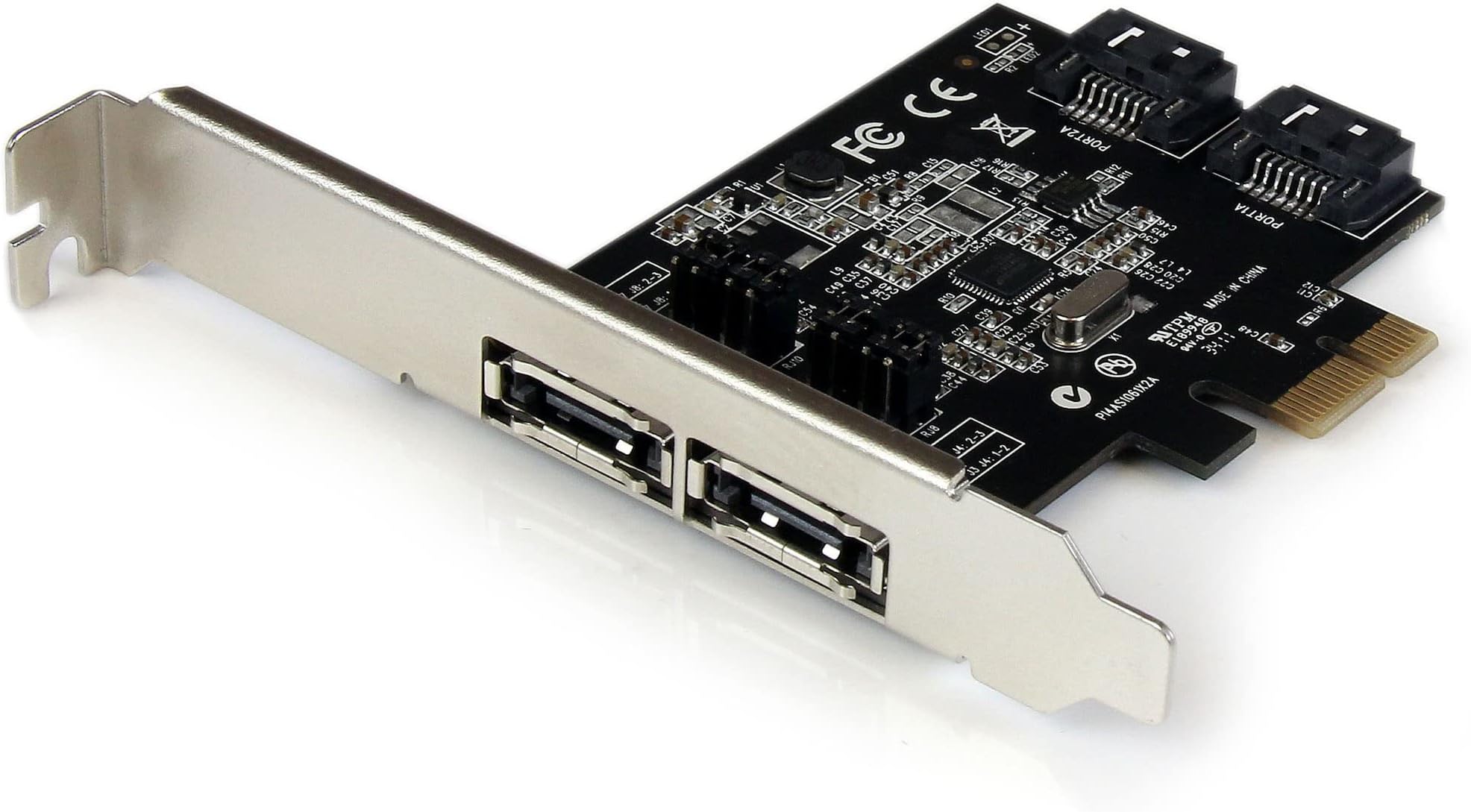
The PEXESAT322I is a professional-grade 2-port PCIe SATA III controller card delivering 6Gbps transfer speeds. It supports both internal SATA and external eSATA drives, compatible with Windows and SATA SSDs/HDDs. Featuring the ASM1061 chipset, it offers advanced features like NCQ and Port Multiplier for optimized performance. Designed for easy installation with full and low-profile brackets, it’s backed by a 2-year warranty and lifetime tech support, making it the go-to choice for IT professionals seeking reliable storage expansion.


| ASIN | B00952N2DQ |
| Best Sellers Rank | #52 in Internal Computer Networking Cards |
| Brand | StarTech.com |
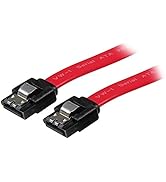
| Built-In Media | PCIe SATA Controller, SATA Cable, Low Profile Bracket, Driver CD, Manual |
| Compatible Devices | Personal Computers, Laptops |
| Customer Reviews | 4.1 out of 5 stars 434 Reviews |
| Global Trade Identification Number | 00065030848428 |
| Hardware Interface | ATA, PCI, eSATA |
| Item Weight | 0.05 Kilograms |
| Manufacturer | StarTech.com |
| Mfr Part Number | PEXESAT322I |
| Model Number | PEXESAT322I |
| Operating System | Windows |
| Style | 2x eSATA | 2x SATA |
| Style Name | 2x eSATA | 2x SATA |
| UPC | 065030848428 |
| Unit Count | 1.0 Count |
| Warranty Description | 2 Years |
P**Y
Works Great on Windows 11 25H2 with included Driver - Easy Install.
Working Great on ASRock B450M Steel Legend with Windows 11 25H2 fully updated. I needed a PCIe card with an external Esata and an internal SATA connection for a Blu-ray R/W Drive. I have several older Esata PCIe cards and none of them will work on any of my Windows 11 machines and I have 7 of those machines. So I had to find a new solution. This one’s a little pricey but it’s gotta work. So I went for it. Note: Because I did not have a working optical drive on the machine receiving this card I copied all the folders on the include CD to a folder on flash drive and then to the new machine / Desktop. How it went…”Set The Jumpers” Shut down-unplug. Put in the card-boot up / Device manager / IDE ATA/ATAPI controllers did show a new entry but it was labeled same as the other 3 “Standard SATA ACHI Controller”. Plugged in and turned on my external drive via Esata = No Go. Unplugged the external / Rebooted and installed the driver that came on the included CD per the instructions in the included manual, Rebooted, Device Manager / IDE ATA/ATAPI now only showing 3 Controllers – BUT…Device Manager / Storage controllers now shows an Asmedia SATA controller device. Connected the external drive via Esata – BOOM there it is. Shut down, unplugged, - connected internal Blu-ray R/W drive. Booted up, put a disc in the drive, - BOOM there it is. Yes I can see, read and write to the internal Blu-ray R/W drive and the external Esata connected drive at the same time…The drivers on the included CD work fine and If it aint broke I aint fixin it.
S**M
Good product
I used this to hook up two external SATA drive enclosures to my new computer. The card fit perfectly in my computer. I installed it and plugged in my drives and started up my machine. I then installed the latest driver from the startech.com site (nice site, BTW). Some of my drives were not recognized. I had to go into Windows Disk Management, where they were listed as Foreign Disks. Once they were "imported" Windows read the disks just fine. Everything seemed to work fine. But then, after working on the computer for about 15 minutes, got a blue screen of death. The error shown as DRIVER_POWER_STATE_FAILURE. After rebooting, got another BSOD, and another, and another. Every 15 minutes or so. This on a brand new computer. So I figured it must have something to do with the card since that was the only thing I had changed about the computer. I decided to walk it backwards one step at a time. I didn't want to uninstall the whole thing and start all over. So I went to the driver in Device Manger and just disabled it, then rebooted. Hmm, no more BSOD! What happens if I re-enable the driver now. Will the BSOD come back? It did not. So it seems like disable/enable the driver solved the issue. In retrospect, I should have installed the card, turned on the computer, installed the driver, then reboot. Then, shut down the computer, hook up the drives, and turn the computer on. I did these two steps as one. I highly recommend that you take it one small step at a time. Easier to sleuth problems that way. Other than that, this card has worked perfectly.
D**D
It does support Linux better than windows
Here's the thing. This product is supposed to be compatible with Windows. And it is, just not the way it should be. Port multiplier which is the main reason I imagine most people by this product is flawed in Windows 10 and 11. By flawed meaning several of the drives refused to show. I've tried every configuration you can think of in the drives are just not present. And I know it's not the card It's the driver for Windows. That's right The driver is flawed How do I know it's the driver for windows? Because when the computer boots up all drives show. I have mine configured to use one external port, one internal port. After reading I came to learn that when it comes to the esada each side supports and eight drive Bay, each The external port is for an 8-Bay eSATA enclosure. The internal is for a internal drive. However and oddly enough The operating system that it claims to not support is the one operating system that port multiplier operates perfectly in, in fact all features of the device operate perfectly in this operating system and that operating system is Linux. That's right in Linux the driver is installed automatically no need for the CD or nothing additionally all drives in my media Sonic 8 Bay enclosure loads right up via eSata and internal. No fuss no muss. So perhaps StarTech needs to update their data to reflect that this card is indeed proper for Linux. They may not support it for Linux, But it works so perfectly What support does it need for Linux. I am using mine to power a plex media server, and might I say it runs solid as a rock in Linux that is
Z**O
Supports PMP on *both* eSATA ports!
This is one of the few eSATA cards I have been able to find that supports having multi-bay eSATA docks connected to *both* eSATA ports simultaneously. These docks use SATA port multipliers (PMPs), and most motherboard chipsets do not support the PMP functionality well, even if they support eSATA. Even a lot of generic PCIe eSATA cards using this same Asmedia 1061 chipset don't always work well with PMPs, especially multiple ones attached to the same card. But this card works great! It's a little pricey compared to the generic alternatives, but worth every penny when you consider that it's a component that *needs* to be reliable. I am using it with a pair of Startech's SDOCK2U33RE dual-bay duplicator docks under Debian Linux 13, and it performs flawlessly. Seems to have no problem with big SATA disks (tested with disks up to 18 TB). You'll want to ensure the kernel limits the speed of the SATA link to 3.0 G, especially if you are using longer eSATA cables, like I am. But this combination is working flawlessly and I highly recommend this eSATA card.
D**R
Does NOT work with Asus ROG STRIX X470-F Gaming Motherboard
Just finished my new Build: Thermaltake Tower 900 Case Asus ROG STRIX X470-F Gaming Motherboard AMD Ryzen 2700X CPU Corsair RGB 32GB DDR4 kit (2x16GB sticks) I am bringing all of my hard drives, 2 SSD SATA drives, and installing an Asus DVDRW drive so I had used all of the available SATA ports on the motherboard. My old system, I had 2 external hard drive enclosures and with all the room in the Tower 900 case, I was hoping to put the 2 extra drives within the case (With still an extra spot inside in one of the HD caddies, the case is Huge) and use this StarTech 2 Port PCI Express SATA 6 Gbps eSATA Controller Card to connect the 2 extra hard drives. Yes, I have a lot of hard drives, I have a LOT of games, and backups :) Problem is, with my particular Motherboard, with NO drives connected to the card, and with the card installed in a PCIE slot, the PC boots just fine, and the BIOS screen for the card comes up indicating NO Drives found, which is expected because there are no drives connected. However, once I connected drives to the card, the system would hang at the Motherboard logo screen, the one where you can hit the Del key to enter the Motherboard BIOS. I tried changing a few settings in BIOS, tried 2 different PCIE slots (One X16 and one X1, others are filled/blocked by my 2 Graphics cards) and nothing would work. I have since found a different PCIE SATA card that is installed and is working flawlessly. I have filed for a return of this item, it may work in other Motherboards, but does NOT work in an Asus ROG STRIX X470-F Gaming Motherboard.
J**O
May not be able to get the speed you expect. Easy to install.
I bought this for my Samsung SSD in my Dell desktop, but when I tested it using Samsung Magician, the drive was slower in all respects than using the SATA v.2 connection on the motherboard. In chatting with the helpful StarTech person, it turns out that, generally speaking, PCIe based controllers will always be a little slower as there is quite a bit more overhead required to run them and the data is passing through a different BUS. Also other devices like PMVideo cards and sound cards and other controllers can slow down the PCIe Bus 6Gbps is a theoretical max. in reality the speed is quite a bit lower. So I went back to the motherboard SATA connection. The SSD is noticeably faster than my old HD, but I was hoping to get closer to its maximum capability. I installed the driver first, and the board itself was easy to install. There were no problems with the computer finding the device. It seems to be a good product. But it is not right for my situation. Others may find it useful.
C**S
Worked Flawlessly
Needed to add a PCIe interface to my PC to connect an external drive docking station ... any USB is just to slow. Didn't have any issues with it.
A**R
Plugged it in and it works!
I added this to a PC that had 3 SATA ports on the motherboard, but I needed one more for an external HDD dock. I've had this adapter plugged in and in use for about 5-1/2 months, so this is not an "out of the box" review. This adapter has 4 SATA ports, two that can be internal (or perhaps brought to a front panel), and 2 more on the PC back panel. I've only plugged in to one of them - which met my needs. Summary: There's not really a lot to say. The PC made installation tool-free and simple. The adapter was detected and so was my external HDD in the dock. It has been completely trouble free, and I can easily recommend it to others.
M**I
内蔵・外部(ESATA)両方使えて便利
内蔵SATAとしても、外付けのeSATAとしても使えるのが便利だと思って買いました。 とはいえ、eSATAでの使用に関しては現在(2024年初頭)では対応機器が手に入りにくいので試せていませんが・・・ 内蔵での動作は安定しており、問題なく使えています。 (注意・SATA/eSATAは排他仕様なので、全4ポート中合計2ポートまでしか使えません)
D**E
Fast eSata
Works great with Windows 11 25H
A**E
Tutto bene
Ho acquistato questa scheda perchè serviva Port Multiplier. Su un unico cavo Sata riesco gestire più dischi rigidi. Ed in effetti funziona. Nessun problema. La velocità è nella media secondo lo standard Sata.
B**.
It work the way it should. Top quality!
I needed this to put an extra SATA3 port on my older Z77 motherboard along with adding an E-Sata external port (yes, E-Sata ahaha!) I have an external IcyBox HDD bank and needed to connect it a bit quicker than USB 3.1 would do i.e. 6Gbps SATA Vs 5Gbps USB. Anyway, had a few boot up issues until I worked out what I was doing wrong (my fault, not StarTech). It is now up and running reliably and with the silly 'jumper switches which I hate (very fiddly) I can decide if I want 2 more SATA ports for my HDDs OR if I want 2 external E-Sata connections OR one of each. It is important to know that you can only have TWO of the ports operating at once - any combination of SATA or E-Sata but only TWO. Once you understand and are happy with that it is a great device to have on your machine. IMPORTANTLY, this card has a PORT MULTIPLIER. This means that any one of the SATA or E-Sata ports can handle MULTIPLE HDDs. If you tried this with a normal port WITHOUT a port multiplier you would have issues. I now have FOUR HDDs working from just ONE of the E-Sata ports on this StarTech card. It really is a remarkable little card. More ports would be nice but it is all I needed at this point. I have found StarTech very good with support in the past for other devices - I just called them for some advice on setup and they were great. The quality is more than worth it so don't be tempted by similar things on the web which are much cheaper. StarTech engineer these things properly to last - no bad surprises. HIGHLY RECOMMENDED.
C**N
Una maravilla. Funciona como anuncian.
Compré en primer lugar una tarjeta expansor de 2 puertos eSATA ppr 17€ de otro fabricante, pero como resulta que ni traía drivers ni daba soporte de ningún tipo, la funcionalidad de añadir discos en caliente no funcionaba. Como ya había comprado productos de esta marca con anterioridad, y funcionan a la primera y dan un soporte en menos de 24h labofables, no me lo pensé más y compre calidad. Como esta tarjeta viene con si driver, es instalarlo y funcionar a la primera.
Trustpilot
2 days ago
2 months ago