🚀 Upgrade Your WiFi Game—Stay Connected, Stay Ahead!
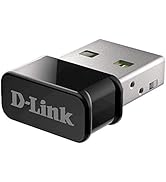
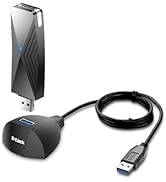
The D-Link DWA-181-US USB WiFi Adapter delivers dual-band AC1300 speeds with MU-MIMO support, enhancing your desktop or laptop’s wireless performance. Its nano-sized design fits discreetly into any USB port, while broad OS compatibility and advanced WPA3 encryption ensure secure, high-speed internet access for gaming, streaming, and multitasking across Windows, Mac, and Linux platforms.



| ASIN | B07YYL3RYJ |
| Best Sellers Rank | #145 in USB Computer Network Adapters |
| Brand | D-Link |
| Built-In Media | DWA-181 Adapter |
| Color | Black |
| Compatible Devices | Desktop, Laptop |
| Compatible Operating System Family | Linux, MacOS, Windows |
| Customer Reviews | 4.3 out of 5 stars 1,232 Reviews |
| Data Link Protocol | USB |
| Data Transfer Rate | 867 megabits_per_second |
| Global Trade Identification Number | 00790069448485 |
| Hardware Interface | USB |
| Item Dimensions L x W x H | 0.5"L x 0.19"W x 0.75"H |
| Item Type Name | D-Link USB WiFi Adapter Dual Band AC1300 Wireless Internet for Desktop PC Laptop Gaming MU-MIMO Windows Mac Linux Supported (DWA-181-US) |
| Item Weight | 1.72 g |
| Manufacturer | D-Link |
| Mfr Part Number | DWA-181-US |
| Model Number | DWA-181-US |
| Number of Items | 1 |
| Product Dimensions | 0.5"L x 0.19"W x 0.75"H |
| UPC | 790069448485 |
| Warranty Description | Limited Lifetime Warranty |
T**A
Works with Linux
I have a couple of old laptops that have Mint and MX linux installed. This wifi adapter was plug and play on both laptops. No need to install any drivers. I did notice a small tag on the adapter labeled FW ver. 2. I suppose this made the difference. Speed was as fast as my slow wifi capability.
A**Z
Plug and play with Ubuntu 22.04.5 LTS
My 6 years old Dell XPS 13 7390 developed a wifi rot(tm). It would drop the connection every few minutes. Unfortunately, the built-in wifi card is not replaceable because Dell decided that it should not be user replaceable part and for such and old laptop I didn't want to get it serviced which will require a motherboard replacement. I decided to try a plugin wireless adapter but I was worried about Linux compatibility. I was very happy to find that the DWA-181-US is fully supported on my Ubuntu 22.04 LTS distribution. All I had to do was plug it into the laptop (via a USB-C to USB-A adapter) and it came up immediately. All I had to do was turn off the built-in wifi and turn on the D-Link adapter, select my network and I was up and running in less than 2 minutes.
T**1
Exactly what it said it was
Small, easy to install, works with Windows, upgrades wifi speeds on PC's. I've bought several, and D-Link is a pretty good brand. No real issues except sometimes it has a little trouble with wifi networks where the 2Ghz and 5Ghz bands are named the same. I just need to look into settings I'm sure. I would 100% buy-again if I needed a small USB adapter.
E**A
It's decent. For the price and convenience it is well worth it.
You never know when a spare wifi adapter will come in handy. I had just built a new PC, used my Windows 10 install USB. Decided to upgrade it to Windows 11, and inexplicably my wifi adapter disappeared in my new desktop (more on that later). I had an old wifi adapter laying around, so I dug it out, and tried to get it going - problem was that it was so old that it wouldn't work on Windows 10/11, it had been designed for Windows XP and it just straight up said it was incompatible. Now I don't know if I could have come up with a workaround or not, but I decided to one-day this from Amazon for the 22 dollar asking price. The thing is nice and tiny, like about the size of 4 pennies stacked up. The speeds of the wifi adapter are adequate. I have a 300Mbps cable connection, that they kind of let me get around 350-375Mbps with, and my new desktop wifi adapter when working properly was giving me 350-375Mbps. (It came with it's own wifi antenna, so the speeds are quite good, as fast as I could get with a wired connection.) When I use this USB wifi adapter in the basement, I can get around 140-150Mbps. When I take it upstairs next to my laptop which gets around 320Mbps, the signal on this wifi adapter drops down to 72Mbps - nearly half the speed as the basement. There could be a number of factors that cause this, the signal bouncing better around the concrete basement, or just the wood of upstairs absorbs more of the energy, only an engineer could really explain exactly why. But the bottom line of that story is, the antenna / receiver or whatever can only get you so far in such a tiny form factor. The speeds will be fine for office work or some browsing, or even some gaming, but if you are looking for high performance then you should look at other options. If you are looking for affordable/small/convenient then I can definitely recommend this. I actually purchased two more of them, I definitely think you should have at least one as a backup for your primary PC in case the wifi adapter malfunctions or dies, which is something that can definitely happen. Oh, and by the way about my desktop wifi- there is a known issue with Windows 11 and the network adapters sometimes disappearing, I was finally able to restore mine, but not without a lot of researching and headaches.
S**T
Works as Intended.
Works as intended.
K**S
Signal strength weak
The speed is significantly slower than my phone, in the same location.
Y**.
Perfect for a Raspberry PI 3 with Ubuntu 22.04
Short story, on a Raspberry Pi 3 B (1.2) I used a TP-Link Wifi USB adapter that was limited to a 2.4Ghz band and the connection was not consistent. I decided to give a shot to this D-Link adapter and I'm glad I did it! Pros: - small form factor - compatible Windows and Linux (I didn't try on a Mac) - good connection/speed - can be used with Kali Cons: - a bit too expensive compare to no-name items (but it works well) Some tech details for people who want to buy this Wifi adapter for a Raspberry Pi on Ubuntu: - Ubuntu 22.04 LTS uses a 5.15 kernel (a the time I'm writing this) that does not include an hardware support for this Wifi adapter. You'll have to compile the driver manually. - Ubuntu 22.10 uses a 5.19 kernel that supports this Wifi adapter. Just plug it. - Ubuntu 22.10.2 LTS will be released soon with the 5.19 kernel and will support this Wifi adapter.
A**A
Doesn't work for Macbook Pro
Recently, my wifi card went out on my 2019 MacBook Pro (as of July 2025, I am running Sequoia 15.5). While I understand that a computer from 2019 is technically "old" in terms of technology, I don't feel like it's actually that old. It still runs great, I just cannot connect to wifi. After going through the grieving process of my wifi card going out (1st world problems), I decided it would be best to get a wifi adapter instead of replacing the logic board on my MacBook. This one was small, and the price was reasonable. It was advertised to work for Macs, so I gave it a try. It required me to download a driver from their website, but if I don't have wifi, how am I supposed to do that? Thankfully, I have a LAN cable I am able to plug my computer into and access the internet while trying to figure out this wifi situation. The drivers on the website are from 2013. Talk about ancient in the world of technology! I downloaded it anyway, hoping that it would work. I had to work around Apple trying to block the download because it couldn't verify if it had malware or not. After all that, the driver is too old and I cannot use this USB adapter for wifi. Then my husband asked if I had downloaded the correct driver for this USB. I then specifically Googled "D-Link AC1300 Mu-MIMO Wifi USB Adapter Driver Download," and it took me to a different page with drivers from 2020. I was hopeful that this would resolve the issue since the driver is newer than my MacBook; however, it did not. I was able to get through the download process, but at the end, it gave me another error message. It did download something onto my computer because there was a little icon at the top of my screen by my battery meter that said "no wif adapter plugged in" even though the adapter was plugged in. 🙄 I uninstalled the driver and put the USB back into the box. I will be returning it and attempting something else to resolve my wifi issue. If you have a MacBook from 2019 or newer, I would suggest saving your time and trying something else.
M**O
Perfeito
Perfeito
I**R
Good Product
Works as advertised
A**R
Tiene buen alcance y velocidad de transferencia.
Es compacto, fácil de instalar (plug & play). Tiene buena velocidad de transferencia.
S**E
It doesn’t work.
Don’t buy. You have to download a driver that doesn’t exist.
L**O
Ótimo produto.
Muito bom produto e funciona no Windows, mas na caixa não menciona os outros Sistemas Operacionais (Mac, Linux). A USB é 2.0.
Trustpilot
4 days ago
2 months ago