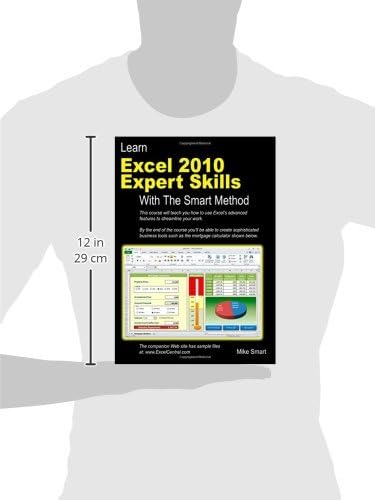


Learn Excel 2010 Expert Skills with The Smart Method: Courseware Tutorial teaching Advanced Techniques
Product ID: 1766169
Buy anything from 5,000+ international stores. One checkout price. No surprise fees. Join 2M+ shoppers on Desertcart.
Desertcart purchases this item on your behalf and handles shipping, customs, and support to Iceland.
Learn Excel 2010 Expert Skills with The Smart Method: Courseware Tutorial teaching Advanced Techniques [Mike Smart] on desertcart.com. *FREE* shipping on qualifying offers. Learn Excel 2010 Expert Skills with The Smart Method: Courseware Tutorial teaching Advanced Techniques Review: A total life and time saver! Best experience learning Excel I've had yet - This book is a lifesaver. I am a graduate student and I often use Excel for economics and statistics problems. I also use excel to keep track of my eBay sales. I can make what I know of excel work for me but it gets messy and cumbersome and a huge mess that only I can decipher. This book is helping me to build my toolkit, save time and understand the greater potential of Excel. I have gone through Excel workshops but they are so brief that the skills never sink in. Friends with more expert skills have tried to show me different features of Excel but I needed a more hand-on, independent approach. This book is great for that. I didn't go through the beginner's version of this series. Having some familiarity with excel, I decided to skip the Essential Skills book and move on to the things I need to know. So far this hasn't been a hindrance in my experience in this book. The Expert Skills book assumes you know how to navigate your way through excel, you can understand a basic formula, can create charts and know how to copy, paste and save and open a worksheet. If all that is foreign to you and Excel is completely virgin territory to you, I would probably start off with the Essential Skills book or some other beginner's guide to Excel. I really love the format of this book. The author has divided the book into different skill sets very well. Also, the text is very clear (readable and legible). The important information is in the middle of the page where he basically outlines the purpose of a particular skills and step-by-step directions. You know what you are doing and how to do it. Additionally, the author leaves the wordy reading in the wide margins. This is a great format because your learning isn't bogged down by text but if you want to read it, it is there for your further understanding. The book is divided into eight sessions: 1. Tables, Ranges and Databases 2. Data Integrity, Subtotals and Validations 3. Advanced Functions 4. Using Names and the Formula Auditing Tools 5. Pivot Tables 6. What if Analysis and Security 7. Working with the internet, other applications and workgroups 8. Forms and Macros The practice worksheets are downloadable from the author's website which is great. You don't have to worry about needing a CD-ROM. If you purchase a used copy, you don't need to worry about missing the practice material because it is a free, quick download. The author designed great practice worksheets with real-world scenarios so you can apply your skills. He ends each session with a practice lesson that provides you with a chance to test your new skills without the help of directions. Answers for all the lessons are provided either in the book or on the downloadable worksheets. I can't say enough about this book. I only wished that I had gotten my hands on it early. Worth the price and more. Review: Best textbook ever - I have used computers for over 30 years and am self-taught in every phase of computer use so I have read a ton of books, online help, and program embedded help over the years. This book is hands down the best training material I have ever used. This fellow Mike Smart has a fantastic system that can't be beat. He breaks each lesson into simply snippets that can be tackled one easy lesson at a time. That said, I usually plow through at least four or five at a sitting. I am using the book to teach an expert Excel class and it has saved me invaluable time putting together the course curriculum. The students love the class and are learning so much. I am learning so much. I thought I knew Excel but come to find out, there are a ton of tools I was not using or not using in the simplest manner. I wish I had studied this book years ago. You can't go wrong with this text, especially at the price. Worth every penny and more. After getting this book I decided to get the Essential Skills book also. At only $10 I figured there would be plenty of information in there that I could benefit from and I have not been disappointed. One of the best things about the book(s) is that Smart has made available free online workbooks that are used to learn his material. This way you don't have to waste your time with a ton of data input. You get straight to the heart of the matter, using Excel's many and varied tools. You will not be disappointed with this book if you seriously have the desire to learn.
| Best Sellers Rank | #5,141,222 in Books ( See Top 100 in Books ) #740 in Microsoft Excel Guides #1,143 in Spreadsheet Books #30,103 in Computer Science (Books) |
| Customer Reviews | 4.5 4.5 out of 5 stars (199) |
| Dimensions | 8.27 x 0.85 x 11.69 inches |
| Edition | 39628th |
| ISBN-10 | 0955459982 |
| ISBN-13 | 978-0955459986 |
| Item Weight | 2.14 pounds |
| Language | English |
| Print length | 376 pages |
| Publication date | October 19, 2011 |
| Publisher | The Smart Method |
S**O
A total life and time saver! Best experience learning Excel I've had yet
This book is a lifesaver. I am a graduate student and I often use Excel for economics and statistics problems. I also use excel to keep track of my eBay sales. I can make what I know of excel work for me but it gets messy and cumbersome and a huge mess that only I can decipher. This book is helping me to build my toolkit, save time and understand the greater potential of Excel. I have gone through Excel workshops but they are so brief that the skills never sink in. Friends with more expert skills have tried to show me different features of Excel but I needed a more hand-on, independent approach. This book is great for that. I didn't go through the beginner's version of this series. Having some familiarity with excel, I decided to skip the Essential Skills book and move on to the things I need to know. So far this hasn't been a hindrance in my experience in this book. The Expert Skills book assumes you know how to navigate your way through excel, you can understand a basic formula, can create charts and know how to copy, paste and save and open a worksheet. If all that is foreign to you and Excel is completely virgin territory to you, I would probably start off with the Essential Skills book or some other beginner's guide to Excel. I really love the format of this book. The author has divided the book into different skill sets very well. Also, the text is very clear (readable and legible). The important information is in the middle of the page where he basically outlines the purpose of a particular skills and step-by-step directions. You know what you are doing and how to do it. Additionally, the author leaves the wordy reading in the wide margins. This is a great format because your learning isn't bogged down by text but if you want to read it, it is there for your further understanding. The book is divided into eight sessions: 1. Tables, Ranges and Databases 2. Data Integrity, Subtotals and Validations 3. Advanced Functions 4. Using Names and the Formula Auditing Tools 5. Pivot Tables 6. What if Analysis and Security 7. Working with the internet, other applications and workgroups 8. Forms and Macros The practice worksheets are downloadable from the author's website which is great. You don't have to worry about needing a CD-ROM. If you purchase a used copy, you don't need to worry about missing the practice material because it is a free, quick download. The author designed great practice worksheets with real-world scenarios so you can apply your skills. He ends each session with a practice lesson that provides you with a chance to test your new skills without the help of directions. Answers for all the lessons are provided either in the book or on the downloadable worksheets. I can't say enough about this book. I only wished that I had gotten my hands on it early. Worth the price and more.
W**.
Best textbook ever
I have used computers for over 30 years and am self-taught in every phase of computer use so I have read a ton of books, online help, and program embedded help over the years. This book is hands down the best training material I have ever used. This fellow Mike Smart has a fantastic system that can't be beat. He breaks each lesson into simply snippets that can be tackled one easy lesson at a time. That said, I usually plow through at least four or five at a sitting. I am using the book to teach an expert Excel class and it has saved me invaluable time putting together the course curriculum. The students love the class and are learning so much. I am learning so much. I thought I knew Excel but come to find out, there are a ton of tools I was not using or not using in the simplest manner. I wish I had studied this book years ago. You can't go wrong with this text, especially at the price. Worth every penny and more. After getting this book I decided to get the Essential Skills book also. At only $10 I figured there would be plenty of information in there that I could benefit from and I have not been disappointed. One of the best things about the book(s) is that Smart has made available free online workbooks that are used to learn his material. This way you don't have to waste your time with a ton of data input. You get straight to the heart of the matter, using Excel's many and varied tools. You will not be disappointed with this book if you seriously have the desire to learn.
J**S
Best $$$ Ever Spent
I have been using Excel for over 25 years, from simple spreadsheets, to advanced numerical calculations (Engineering). In that time I have purchased more than my fair share of Excel Bibles, each time a new version came out. Well if you are about to do that STOP NOW. Buy this book instead. The lessons are well structured, clear and concise. It very obvious that Mr Smart (appropriate surname BTW) is knowledgeable, and his years of tutelage have helped him refine the lessons to the point where they are concise and effective. This book can be used in multiple ways. The best way is to treat the book like a self-paced tutorial/study. Each lesson is self contained and builds on the previous lesson. This book may also be used as a reference on how to use certain advanced Excel functions, with clear examples in a context that makes sense. If you want to waste your time and hem and haw whether you should buy this book, read other reviewers who go into excruciating details about the benefits. If you want to learn Excel and make professional looking spreadsheets, hit the buy button and stop wasting your time.
K**R
Expert Excel
Great learning book for Excel for those who want to take essential excel a step above. I recommend (if your are not too well versed with Excel to first start with this author's other book Essentials of Excel). Each element of learning the more advanced tools of Excel is achieved in 2 page lessons. With good step by step guidelines.
F**O
Finally I found a course-book that will help me to reach the level of excel I always wanted to have! Thank you Mr Smart!
H**Y
I have used Excel for many years for basic analytical purposes in the course of a career in engineering with only some brief training at the basic level. Two things prompted me to buy this book: a switch from the 2003 version of Office to the 2010 version (Excel became much more powerful from the 2007 edition) and taking on the task of treasurer for a local charitable organisation. There are two requirements to get the best out of this book: 1. You do need to have a reasonably good working knowledge of Excel basics (if not you would be best off starting with the 'essential skills' book in this series). There is an appendix in this book summarising the content of the earlier book. 2. You will not benefit much from sitting in an armchair and reading the book or trying from the outset to use it as a quick reference manual: it is all based on practical exercises (with files downloadable from Mike Smart's website) and you do need to be sitting at your PC working through the exercises to get the full benefit of this book. Strengths of the book: It is very well designed: the book is broken down into eight main sections with each section comprising a large number of bite-sized practical lessons, typically taking a few minutes each. Each section uses a standard page layout with a main text section describing the exercise and sidebars with additional 'Note', 'Tips' and 'Important' (notes and tips being optional additional information and important sidebars warning of possible pitfalls). A short introductory section clearly explains the design including typographical conventions used. The order of the main sections broadly covers the more commonly used features early on with more complex and/or less commonly used features later. In many cases the downloadable teaching files are modified during one lesson and then modified further in succeeding lessons. However multiple versions of the files are provided so that in many cases it would be possible to dive into a section halfway through the book and download the teaching file appropriate for that section. Having said that I think the greatest benefit is obtained by working through all sections in the printed order: I found that even in areas with which I was quite familiar I found useful tricks that I wasn't previously aware of. Once you have worked through the sections that are of interest the book then becomes a useful reference resource, though in some cases you might need to reload the teaching file for the section to remind yourself of the detailed procedures. The book includes a comprehensive index including function names to quickly find the lesson relevant to a particular topic. The outcome for me of working through this book is that I have discovered tools that I might never have found on my own and have been able to provide my charity committee with a greatly enhanced level of timely information on their finances. It has saved me many hours of time - strongly recommended.
B**H
This book is written and edited perfectly to fit lessons on two pages each. I stayed home one weekend and reviewed all the lessons with the downloaded exercises, and it taught me many features of Excel I didn't know about and gave tips on some that I already knew. Though I have been using Excel for over 15 years, from university classes to various jobs in accounting, I still didn't use Excel to a significant fraction of its potential until I read this book to learn the many awesome capabilities of Excel, including PivotTables. I recently heard an Excel instructor state that most university grads are actually way below expectations in Excel expertise even though it is probably the most widely used application in the work world, and I completely agree. I wish I read this book in university so I could perform above expectations of my employers and use time saving features and data validation built into excel rather than just use basic formulas on data ranges. I am an accountant and I highly recommend this book to anyone who uses Excel, even those who use Excel everyday and are confident they know enough will probably be amazed at some of the useful tips they never knew about. But the best way to get use out of it is to set aside several hours and commit yourself to the lessons, and then it will feel like attending a well organized workshop in your own home. The time spent studying this book will probably be compensated by the time saved using the skills learned in the book.
S**A
Ein toller Excel-Kurs für Fortgeschrittene, vor allem in Kombination mit dem (größtenteils kostenpflichtigen) Videomaterial das man sich auf der Webseite des Buches ansehen kann.
L**L
I have used Excel for many years for basic analytical purposes in the course of a career in engineering with only some brief training at the basic level. Two things prompted me to buy this book: a switch from the 2003 version of Office to the 2010 version (Excel became much more powerful from the 2007 edition) and taking on the task of treasurer for a local charitable organisation. There are two requirements to get the best out of this book: 1. You do need to have a reasonably good working knowledge of Excel basics (if not you would be best off starting with the 'essential skills' book in this series). There is an appendix in this book summarising the content of the earlier book. 2. You will not benefit much from sitting in an armchair and reading the book or trying from the outset to use it as a quick reference manual: it is all based on practical exercises (with files downloadable from Mike Smart's website) and you do need to be sitting at your PC working through the exercises to get the full benefit of this book. Strengths of the book: It is very well designed: the book is broken down into eight main sections with each section comprising a large number of bite-sized practical lessons, typically taking a few minutes each. Each section uses a standard page layout with a main text section describing the exercise and sidebars with additional 'Note', 'Tips' and 'Important' (notes and tips being optional additional information and important sidebars warning of possible pitfalls). A short introductory section clearly explains the design including typographical conventions used. The order of the main sections broadly covers the more commonly used features early on with more complex and/or less commonly used features later. In many cases the downloadable teaching files are modified during one lesson and then modified further in succeeding lessons. However multiple versions of the files are provided so that in many cases it would be possible to dive into a section halfway through the book and download the teaching file appropriate for that section. Having said that I think the greatest benefit is obtained by working through all sections in the printed order: I found that even in areas with which I was quite familiar I found useful tricks that I wasn't previously aware of. Once you have worked through the sections that are of interest the book then becomes a useful reference resource, though in some cases you might need to reload the teaching file for the section to remind yourself of the detailed procedures. The book includes a comprehensive index including function names to quickly find the lesson relevant to a particular topic. The outcome for me of working through this book is that I have discovered tools that I might never have found on my own and have been able to provide my charity committee with a greatly enhanced level of timely information on their finances. It has saved me many hours of time - strongly recommended.
Trustpilot
3 weeks ago
1 month ago