🎧 Level up your game with wireless surround sound mastery!
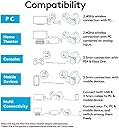
The Logitech G933 Artemis Spectrum is a premium wireless gaming headset featuring advanced Pro-G drivers for immersive 7.1 Dolby and DTS surround sound. It offers up to 12 hours of lag-free wireless play, multi-source audio mixing, and full RGB customization. Compatible across PC, consoles, and mobile devices, it’s designed for gamers who demand versatility, comfort, and high-fidelity audio in one sleek package.
| ASIN | B0148NPJ78 |
| Additional Features | Volume Control |
| Age Range Description | Adult |
| Antenna Location | Calling, Gaming |
| Audio Driver Type | Dynamic Driver |
| Battery Average Life | 12 hours |
| Battery Charge Time | 8 hours |
| Best Sellers Rank | #39,688 in Video Games ( See Top 100 in Video Games ) #200 in PlayStation 4 Headsets #2,041 in Computer Headsets |
| Bluetooth Range | 10 meters |
| Brand | Logitech G |
| Brand Name | Logitech G |
| Built-In Media | 3.5mm Analog Cable, 3.5mm to 2.5mm Audio Adapter, Custom Tags (Left/Right), Headphones, RCA to 3.5mm Cable, USB Data/Charging Cable, USB Powered Wireless Mix Adapter |
| Cable Features | Without Cable |
| Color | Black |
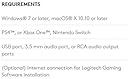
| Compatible Devices | PCs, Gaming Consoles (PS4, Xbox One), TVs |
| Connectivity Technology | Wireless |
| Control Method | Remote |
| Control Type | Call Control |
| Customer Reviews | 3.8 out of 5 stars 4,589 Reviews |
| Ear Placement | Over Ear |
| Earpiece Shape | over-ear |
| Enclosure Material | Plastic, Silicone, Fabric |
| Form Factor | Over Ear |
| Frequency Range | 20 Hz - 20,000 Hz |
| Global Trade Identification Number | 00097855114990, 10097855114997 |
| Headphone Folding Features | Over Ear |
| Headphone Jack | 3.5 mm Jack |
| Headphones Ear Placement | Over Ear |
| Impedance | 39 ohm |
| Item Weight | 1.8 pounds |
| Manufacturer | Logitech |
| Model Name | 981-000585 |
| Model Number | 981-000585 |
| Noise Control | Active Noise Cancellation |
| Number of Items | 1 |
| Sensitivity | 105 db |
| Specific Uses For Product | personal, gaming, business |
| Style Name | Artemis |
| Subject Character | no character |
| UPC | 097855114990 097855115027 |
| Unit Count | 1 Count |
| Water Resistance Level | Not Water Resistant |
| Wireless Technology | Bluetooth |
D**L
Excellent headset with good sound in multiple areas
Logitech has outdone themselves! These headphones are very comfortable to wear. The pads on the ears fit fully around my ears so there is no discomfort during long gaming sessions. The microphone quality is very good... At least that's what my teammates say, as I have yet to hear it. When making phone calls via Google Voice, the person at the other end of the call also states the sound quality is good. The microphone folds up into the headset when not in use and produces a audible tone when doing so, indicating the mic is being muted or un-muted. In gaming, the 7.1 surround does make a difference in telling which way sounds are coming from. I am able to identify where the bad guys are aurally, enabling me to have cross hairs waiting in their general direction before they are in view. The headset features a toggle switch for the power allowing me to easily tell when they are off or on. The previous incarnation, the G930, had a power button that needed to be held to turn off or on. This may be annoying to some, but on power up, they play a little 4 tone jingle indicating they are on. The volume knob on the headset also produces sound when adjusting the volume, a higher tone for up and a lower tone for down. The G buttons on the headset are, by default, bound to functions that change the way you experience the headset. They do require a fair bit of pressure to push. The G1 button cycles through the different lighting effects. G2 toggles surround on or off. G3 cycles through the equalizer presets. The RGB lighting is an interesting affair. The lights have multiple modes: Breathing (pulsing on and off), Color Cycle, Solid Color, and Cusom Lighting. The Custom Lighting mode allows you to turn on or off the Logitech Logo and side color strips, define a custom color to just be always on, and also adjust the speed and brightness of the Color Cycle and Breathing effects. Outside of a gaming party situation, I can't see them doing anything but decreasing your battery life while you use the headset, as you can't see the lights. It even says on the Logitech product page, that with no lighting you get up to 12 hours of battery. With lighting, only 8. Batteries only have a limited number of charging cycles, so better battery life without lighting = batteries that live a longer life. Mine have the lights turned off and will proabaly stay off. Outside of use, they do light up while charging. The Equalizer has several presets: FPS, MOBA, Flat, "Drop the Bass," Cinematic Gaming, and Communications. I can hear a difference when switching between the modes, but can't determine why one would be better than the others in specific situations. In Windows, these are identified as a 7.1 audio device, even without installing the Logitech Gaming Software. When I installed the software and clicked the Experience Surround Sound button, I literally got goosebumps while the demo was playing. The software has the ability to switch between "Dolby Surround Sound" and "DTS Headphone:X" modes. I am unable to tell a difference between the two, but I guess it's nice to be able to choose between those. Outside of games, the 7.1 audio is very good. Everything from TV shows and movies, to YouTube videos sounds excellent. I previously had a pair of Corsair headphones and they required special software to "enable" 7.1. This resulted in everything that wasn't gaming to sound like the audio source had been sliced and diced before I heard it. In fact, I needed to return the Corsair headset inside of a week of getting them, they were so bad. Not so with these. Everything sounds wonderful. There was a problem with the Logitech software when playing a new game, The Division, where using this headset would cause input lag on the keyboard. A big problem for a shooting game. Logitech has identified the issue and released a beta version of their software that resolves this issue and will be implementing the fix into their regular software the next time a new release is... released. Excellent support for a higher end product. The 10 foot braided charging cable that comes with the unit has an excellent feeling to it, and fits into the charging port of the headset very snugly. I'm currently using it with a Samsung USB wall charger. The previous generation, the G930 had the charging cable and USB dongle connection integrated into a single cord with a dock that the two sides of the cables wrapped around when not in use. This is both a good and bad change, depending on your view. The separate charging cables gives you the freedom to plug in wherever you want, while the previous one would only take up one USB port on the computer. The long cable gives me plenty of room to roam around my gaming area without fear of reaching the end of my tether. An interesting thing happens when you plug the headphones into the charging cable and then plug the cable into your PC. Windows will identify them as a USB Input Device and even istall drivers for it. Without the software though, I was unable to get them to do anything the computer recongnized as "input." My only complaint is the headband, if not worn in the correct position, does have a tendency to slide back on my head, pulling the ear cups away from the front of my ears. That may just be me having to learn to wear them in a less haphazard manor than the G930s. The G930s I had received about 3 years ago for a Christmas gift. The only reason I moved away from them to the Corsair, and then immediately back to the Logitech, is that they died on me. They just stopped producing sound. I determined it was a failure with the speakers in the headset themselves, as I was able to hear a slight hissing noise in the headset when playing audio and having everything volume wise cranked to max. I am hopeful that the G933s can avoid a similar fate. Long story short: OH MY GOD I LOVE THESE HEADPHONES!!! Edit: Logitech has released the update to their official software version fixing the keyboard lag issue. Edit 2: Turns out the USB device identified when plugging the headset into the PC is used to update the firmware on the headset. Very cool.
T**R
My best pair of Bluetooth headphones!
Okay, so I have had these headphones since May. I feel like these headphones are pretty good with the price and would recommend them unless you don't have the budget, as there are many other options with wireless. If you came here looking for a audio review, well not the right one. It sounds basically awesome for me and I don't know how to explain all the stuff other people are able to say when it comes to audio. The top part of the headphone where it goes onto the top of your head feels very comfortable, as well where you place your ears into (well until they heat up). It is heavy, because you can feel it on top of your head, but it doesn’t get to the point where it is just plain annoying. TIP: If your using your headset while resting your head on a pillow, if you don’t want to reach out and adjust the volume. Just move your head left or right, as the pillow will touch the volume control and move it with just the movement of your head. Whats included: Headset 3.5mm to 3.5mm with volume adjuster, mic mute, clip, I guess a mic switch between the ones on headphones and the cable, and buttons to pause and continue(Never use). An adapter from 3.5 to 2.5mm. A pretty long micro USB cord that is braided. A 3.5mm to RCA jacks(if you don’t know what it is, then search it up) that you could plug into a TV. Also the RCA jack itself has 3.5mm audio input that you can put into the back of it. And I just really don’t know why they included it, but ok. If you want to see it, go to the 6th slide. But I just use it to plug in my soundbar cable to my TV. Pros: Battery life seems to be pretty good. I don't have a full time length, as I get home from school and use it, as it all depends. When charging it charges very fast, so I can quickly unconnect and go wireless It does a pretty good job to block out noise if someone is talking to me, at a reasonable volume. I can still hear them, but just only a bit, to where I could respond. The place where you put your ear into folds, so easy with traveling. And even folds back, by just a bit. 4 buttons on the actual headphone (To also customize, which I have not done yet as I am a mac user) (Left Side) Plus an actual volume wheel (Left Side) RGB lightsync on the headphone which are on both sides, but I usually keep it off to help the battery life Logitech logo's on each side, it is on the part that is removable which is also RGB Adjustable height on both sides (But feels like left side can go further) Has a place in the side of the buttons to put the bluetooth receiver into to decrease the chance of losing it The placement and hiding of the mic is nice, as I can just retract it down and bring it back up when not needed. When the mic is fully down, you know it is active when you can hear yourself talk or breath, but it is really nice that if you move the mic up a couple inches you feel a little thing and then it mutes. Thats the feature I really like, so if you need to talk to someone without your friends hearing you, or if you just don’t want the people in the game to hear you, then when you need to talk to the people in game, just flick down. Then back down it is unmuted. It also has a red light when it is muted, so you know its muted. The mic, where you talk into can actually move out and you can position it however much you feel away from your mouth or just preference On the little bluetooth thing that goes into your PC or computer, it has a little green light on itself and it basically there to tell you wether the headphones are connected or not. There are basically 2 types of modes on it. When it BLINKS green it means the headset is UNCONNECTED. When the light stays SOLID green it means the headset is CONNECTED If you, for some reason don’t have a headphone jack on your computer or PC, then the bluetooth thing that connects to your computer or PC through the usb port, has a 3.5mm headphone jack on the back, so you can use the included 3.5mm to 3.5mm and plug it into there(Haven’t used that feature yet, only using the bluetooth thing and cord). Even though it is made of plastic, it is pretty sturdy. I have dropped it every once in a while and it has broken. The side of the headphones where you can remove part of it to expose where you can put the bluetooth thing or remove and replace battery. It can scratch if you drag something against it or your nail, but it isn’t visible if you look at it, unless you look at it closely, because it stays black when you scratch it and doesn’t change a different color. When the turn on switch is flipped on it has a little blue thing which means it is on, or when it is up. When turned down, it is just black. When not in use after, maybe a couple mins? It will go into standby mode and the bluetooth thing that goes into your PC and computer will start blinking. But when I get back I usually just move the volume adjuster up and down which will bring the headset back into ON mode, I don’t know about the G keys. Cons: When charging, the area where the RGB is, is flashing. And if you charge it at night, wherever, it is just annoying. If you use it on mac (me) it just beeps on certain things which get annoying and don't know how to turn it off Wish it had an actual bluetooth thing that could appear onto anything. Because I will sometimes use it with a phone, and have to use the *UGH* cord. At first, when I bought the headphones it takes somewhat time to actually get used to finding the mic when it is fully retracted. But after a decent amount of time with it, I am very used to it. So idk if it is much of a con If you listen with one ear in the headset and one out, if you move your head back a bit it will falloff. And if you plan on doing that, then you would need to move the part that rests on your head up a decent amount, so that when you lean your head back it won’t move !!! If there is anything else that I need to add, I will try and do it as quick as I can. I will also be adding pictures as soon as I can and upload them. !!!
S**C
Great headphones only during the honeymoon stage
Let me start off by saying that these headphones are very nice when they work. They sound good, the wireless range is decent, and the mic is clear. They are moderately comfortable as well. That's where the good stuff ends... The headphones were a gift from my brother. They worked well for a few months and then not so much. First, the battery life was pretty terrible. I came from a corsair headset which I rarely charged. These headphones are basically wired since you have to have them charging so often. I think the lights drain a fair amount of battery and that's why I turn them off. Unfortunately, they love to turn themselves back on for no apparent reason and kill my battery. Second, The mic would not be very reliable. My voice was clear and crisp when talking to others but the mic would randomly shut off. I would have to turn off the headphones, wait 5 seconds because of the dumb power-off delay, and turn them back on. during the off phase, the mic would pick up my voice and my friends could hear it but I couldn't hear them since the headphones were off. Another thing; the headset has a functionality where it will mute the mic when you lift it up and that worked well. However, when i lower the mic back it would not unmute. The button on the headset to unmute it didn't work either so every time I wanted to unmute my mic, I had to go into the windows settings. Super inconvenient. Third, the headset was very unreliable. I could be playing a game or watching a movie and it would randomly beep 5 times and turn off. It would refuse to turn back on so I'd have to pull out the battery and put it back in. Other times, it would without warning power down and back up for no reason. The volume knob has almost no detent so any movement or bump causes a change in volume. When the headphones are "off", bumping them would still change volume on the pc.... Lately logitech has been severely lacking in reliability. I have the harmony home hub, harmony elite remote, the G910 artemis spectrum, and the g933s. Every single one of these has failed on me and needed to be replaced or has major issues that make it impossible to rely on them. ALTERNATIVES: If you read this far I really recommend not buying these. I have 2 pairs of these and a set of the wired ones. None of them work properly. If you want something really good but twice the price, I recommend either seinheisers or astro a50s. If you want something a bit less expensive but good nonetheless, get some turtlebeaches.
N**E
Quality headphones, great purchase, full review after months of use.
I've been using these headphones for over 4 months so far with little to no issues so lets start with first impressions. It was tight around my head.. for a couple days. After retracting them a little and using them for a few days, it gets a lot more comfortable. Like a new pair of shoes. It's comfortable, it's not heavy and never feels like a weight on my head, it shows zero signs of wear, but to be fair i'm very careful with my electronics. Down the line to today, the sound quality is great, the surround sound is very nice but can't be compared to a studio or high class bose headset, made for pure sound quality. But watching movies with it is still very nice. Music can sound amazing, bump the bass up with the easy to use logitech software and your tunes are perfect. Gaming is flawless imo, sound is clear, and you know exactly where someone is running up behind you without looking. The microphone is better than what most people say, it's a good mic. It's not like having a Blue yeti (Which i normally use) but it's a good backup headset mic that your friends won't complain about, unless you have my issue which i'm stating at the end. On to battery life, it's not the best. It gets about what it says, and normally you should use without lighting seeing as you don't see it anyway. It could be worse though, and i can't complain too much about it. The logitech software is one of my favorite things as i have other logitech products and already used the software before. It's easy to use, it doesn't run anything else in the background or have any kind of bugs. You can always want for more features in software but as it is, it works for everything you'd want to do with the headset, no complaints. So on to the complaints. It CAN slide off your head IF you're not sitting up. It's not a headset you can lay down or lean back with easily, and you CAN rub the volume wheel. It's actually harder to rub than most people say, but if you're leaning back a lot and laying down, this isn't really the headset for you. It is bulky and it does get in the way of that. The usb connection is good, but doesn't go through brick walls well, so a good 25 feet is ok with nothing in between but walls especially bricks walls, nope. It doesn't like it. As for connection failures, i normally don't have a problem, but sometimes if my phone is near the usb stick, it does cut out for moments so i move my phone. The other thing I've noticed is that with my older laptop, the more used usb, ports and the 2.0 plugs don't work well. All my 3.0 pugs work fine on my newer computer though, so i'm not sure if it's just my old ports that don't make good connection anymore, or the usb stick for the headset doesn't like older 2.0 ports. But from my experience and testing it, microphone quality especially is not nearly as good on my 2.0 ports as they are on 3.0. My last issue and one I've only had happen a very few times, i'm thinking three, is that sometimes on powering up the headset, it is stuck at really low volume and quality, as if the connection wasn't made right. I turn it off and back on, and it's working fine as always. One last issue/problem solve. Make sure your usb stick isn't rubbing against anything. It's a large usb stick and it's hard to plug anything next to it in, if you have a usb ports next to it. I bought and recommend an external usb hub for cheap if you don't have any usb ports by themselves, and have to use all yours side by side. The connection does drop repeatedly for me when the stick isn't in correctly 100% Overall I've had no issues i couldn't quickly resolve, and nothing to complain about. These headphones are priced well imo, and i highly recommend especially if you have other logitech products. Take the bad reviews with a grain of salt, because it seems to me that the issues some people have had, are the same ones I've had that aren't end of the world problems. I hope this review helps someone in their purchase and i hope you have the same great experience I have.
V**H
Great... Until it isn't
Writing from the context of being a computer programmer and engineer who has owned this product since March: The headset itself works fine. It fits comfortable on my head and the padded ear cushions work well enough. Furthermore, the sound quality is good enough, in terms of both input and output. The retractable mic works well, and the battery life is great. And of course, the product looks nice enough. There are a few problems however. -While the headset itself is well designed, the software is not. Clearly, the software developers at logitech either are inexperienced or overall lazy. Most of the time, you can audibly hear the sound settings switching as the software drivers crash and reboot on Windows 10 for apparently no reason. It's very annoying. -Furthermore, eventually, the hardware, too, begins to show poor quality. In particular, you begin to hear the occasional static and white noise, especially when connected for charging. -Furthermore, the left side of the headset (presumably the location of the central control unit) often has better sound quality. And I mean, audibly noticeable better quality. Sometimes, the right side is much quieter than the left, moving the headset on your head, however, will fix this issue, for a time. The end result is, the hardware is likely poorly wired, resulting in an unstable connection between the two sides. -Lastly, of course, the logical answer to these problems is to contact their support. At first, things seem to be going well: I am told I will be granted a free replacement and I should await a tracking number. Two weeks later, I have yet to receive any update on this replacement. I contact their support again who, for the 2nd time (today; the first time was a week ago), told me that there were some "shipping issues" on their end, and that they don't have an ETA for my replacement, nor an ETA in terms of resolving the shipping issue. Furthermore, they refused to disclose how long the shipping issues have persisted, a short google search, however, reveals it's been a few months. TLDR: Good enough headset for the price. Works with the quality expected, until it doesn't -- and it eventually won't. Poor craftsmanship by the software and hardware devs at Logitech leave this product with some desired. And of course, the Logitech support appears to be about as bad as it gets. When/if I ever get my replacement product, I'll update this review. As of September 12th, 2017, it's been two weeks and my shipping ETA remains "Unknown". UPDATE: I have been contacted by their "Americas Operations and Global Special Care Services Lead", who notified me that my product will be sent to me via Express Shipping by this Thursday. (Sep 14th) While this doesn't excuse the long history of frustration their support line has caused me, it does warrant a revision of my review to one star higher -- 3 stars. Perhaps an improvement of their faulty software, as well as actually proper customer service that doesn't require me to contact them 5 times and fill out my information 10 times, would warrant a 4th or even 5th star. Update tldr: Customer service finally are sending the replacement. Still terrible customer service. Still terrible software. But, at least they will finally help me get my replacement -- only 2 weeks late (+ however long shipping takes).
J**E
Overall my best headset so far with some issues.
My best headset so far. I have owned this headset now for 5 and a half years, my wife bought it for me for Xmas that year, but I picked it myself after researching for a new headset. My previous headsets were G35 (owned 2). G430 (Gave them away when I got these) and I don't remember before that. At some point on I became a fan of Logitech headsets, before headsets I would use normal earphones for my gaming. If you enjoy gaming or any other type of multimedia on your pc you should get quality earphones or a quality headset. My main use is gaming but I enjoy music, movies & anime with these earphones. With this headset you can hear things you don't normally hear with normal audio devices. I am not an audiophile but I have heard and used various mid range and high range headsets and headphones, from my personal experience I would rate the following from audio: Bass: 8/10 (Decent Bass) Mid: 10/10 (Love the mids) Treble: 10/10 (very clear vocals and highs) As for headset functions: 7.1 Surround sound: It's an "emulated" surround sound, most headsets have "emulated" surround sound, if you want genuine surround sound you need a headset with sufficient sound drivers (mini speakers) for this function, at the time I bought these only Razer Tiamats the "True" surround sound experience. For my next headset I will be aiming for multiple drivers as a feature. RGB: It's alright, nothing to brag about, I really don't have people in my household awing over my rgb lighted computer rig, but I will say it matches with my Razer Chroma V2 Keyboard, Logitech G502 Spectrum RGB mouse and Gigabyte Aourus AD27QD RGB Monitor. As any gamer would agree, we really don't pay attention to our RGB lighting unless we are leave our rig for something, waiting for software to load, in between game matches or on the phone. Customizable sound: * 10 channel Equalizer (32,64,125,250,500,1k,2k,4k,8k,16k hertz) or Bass/Treble 12db +- slider (I always use Equalizers) * Volume control * Mic control * Sidetone control (I have never had to adjust this since setting to 0, it is a nice feature to have when you have multiple audio sources) Sound profile: * Can be saved to your computer (I never have) * Can be saved to onboard memory on the headset (contrary to razer, logitech lets you take your setting with you on your device which is a big plus because you don't need the software for your settings, this is great if you upgrade OS, new laptops, borrowed laptops, etc), I only have 1 profile created, I have never needed more, you can store up to 3 personal profiles. G-Buttons: * This headset has 3 programmable buttons in which you can adjust or set Audio settings, ventrillo actions, media keys, keystrokes, multi key macros, text blocks, mouse functions (if you have a compatible mouse), hotkey commands (like minimize your porn before people come in), computer shortcuts (yes you can run virus.exe) and a few wierd functions that logitech think are important like email, web browser, calculator, etc), I have never programmed any of my G buttons, then again I use my programmable keyboard and mouse for all that. Pros: NOTE: average use is 6 hrs a day (some days as low as 2 hrs while other days can go up to 12 hrs). * Very reliable build, the build on this thing is solid, I have never dropped it but contrary of all my previous headsets nothing has broken from wear and tear unlike my previous Logitech headsets which would snap near the ear hinges after a year or two. Volume roller good and going, power switch in perfect conditions, I almost never use the G buttons so I can't comment on that but the buttons are as solid as new. * I just replaced my earphones cushions this week with originals, the originals lasted 5 years, I would recommend changing them every 2-3 years with at least a wash a year, I washed them once in 5 years and brushed them out a couple times a year (with my fingers, lol), I do not sweat in my ears like some people so the washing rate my vary, I also have my computer in a dry environment. I consider my ears to be medium size and they fit with some space. The head cushion is still good and going. * This has been my most comfortable headset so far. * Wireless 2.4 Ghz, wireless has been great, please note that for best wireless reception you need to be at least 4 meters away from wireless 2.4 Ghz devices and microwaves. If you need that conversion in feet use google. The furthest you can be away from the wireless emitter is 4-5 meters with a couple walls or 12 meters with no walls (with minimal movement at the extreme of length), for whatever gaming purposes you shouldn't have any sound lag as long as you don't have your pc a room away. * Battery life has gone from 14 hrs down to 6 hrs, I have not bought a new battery because I am considering a new headset. * Clear comms. I have played multiple games with multiple clans and a lot of people using ventrillo, teamchat and in-game comms, my comms with this device is very clear on all platforms, it does capture background noise so for some people that might be a con, there were a few times my clanmates would ask about the crazy things they were hearing from my wife or tv in the background. * Comes with a good and long micro USB cable. * Noise cancellation is at 50-70%, if I have sound running I have to mute or take the headset off my ears to hear anything, I run device volume at 100% and control it independently on the software I'm using which is somewhere between 5-15% depending on the software. Cons: * The only con of this headset which can be a very huge one if you aren't tech savy is a hardware related bug. I have come into suspicion that it is due to the state of the battery since I did not have this problem until a few months ago. From time to time the headset will not connect to the USB Driver Receptor and you will hear popping sounds or just nothing, the rgb scheme of your led lights will also be off, you need to have firmware reloaded to reset the device, for those having these problems all you need to do is run the firmware upgrader found in C:\Program Files\Logitech Gaming Software\FWUpdate\G933, the file should be G933Update_v27.exe, run the tool and it will reupload the firmware to your headset, this tool needs to be run while it is connected to you USB cable, I usually have the headset off when I do this since it requires you to turn it off on back on if you have it on, one time it failed and I just ran the tool again and it fixed the issue. The total time to fix this should't take more than a couple minutes. Just press Windows key+R, paste in C:\Program Files\Logitech Gaming Software\FWUpdate\G933 and run the executable thats there. I found this solution around the Amazon reviews and logitech forums, thanks to the guys that wrote about it, I have no idea why logitech doesn't have this listed as an overall solution for this product in Q&A/FAQ/Troubleshooting. * You need to use the USB Driver for the best experience, 3.5 jack is the equivalent of buying and using an expensive piece of garbage. This is a PC headset. The earphones that come with my Samsung Galaxy S10 are as good as these without the USB Driver. NOTES: * The "auto sleep" issue was fixed in a firmware update close to the release date, you can now set it to "never". Other than the hardware Con on the list it has been a great and reliable headset for these last 5 and a half years. I will probably replace this headset by the end of the year or start of next year, though I estimate this headset could still run at least 3 more years if I replaced the battery within a year. As of now my considered upgrade options are: Logitech G935 ("Cheaper" wireless gaming headset) Sennheiser GSP 670 (Claimed "Audiophile" grade wireless gaming headset) SteelSeries Arctis Pro Wireless (Sennheiser GSP 670 competitor wireless gaming headset) Razer Nari Ultimate ("Hypersense" wireless gaming headset) Razer Tiamat 7.1 V2 (Multiple audio driver wired gaming headset)
E**N
Wonderful headphones - when they work.
First: these headphones sound very nice. Definitely the best gaming headphones I've owned so far with respect to sound quality. They are also extremely comfortable, which in my case is saying something since I have Dumbo ears and a funny-shaped head. The lighting is also pretty cool, even if I can't see it. Why did I give it three stars, though? Because it is absolutely freaking infuriating trying to get this thing to work. First, I had to download Logitech's gaming software suite. Okay...already had that for my mouse, but whatever. You'd think it would update automatically once I plugged the headphones in and it had to install...something. But, no, that's not how it worked. So, fine. I had to re-download the same version of the same thing I already had. Whatever. Except they still didn't work. So...okay, time to Google the problem. I found one post on some obscure forum that seemed to be having the same problem, and apparently it's an issue with Windows 10; they guy recommended downloading Razer Surround. So I did. And then it finally started working! Yay! Except why in the HELL do I have to download another company's program to make Logitech's product work? But fine, whatever, at least they work now. ... Except they don't. Not consistently. This morning I had to restart my computer because they wouldn't work again and Razer's software decided to be wonky and not start as well. (What is it with these "gaming" peripheral companies and their stuff not working?) Restarted, restarted, now it works again. Yay. But now for the next problem: the battery. Logitech helpfully has a battery indicator on their Gaming Software window, which is nice. What isn't nice is that there is no way to tell if the headphones are charging, and as of right now I'm sitting at one red bar with the things plugged in, not knowing if they're going to juice back up or just die on me. Exacerbating the problem is the fact that the headphones like exactly one USB port on the back of my motherboard - nothing else seems to work on my computer, and none of the powered ports on my TV give it that special something-something that it so clearly needs. So, in conclusion: Logitech, fix your crap. This is ridiculous. I really like Logitech products - I have the G600 MMO mouse which I absolutely love, and I had a Logitech keyboard for five years before the buttons finally started dying and I got a Corsair mechanical board. I've owned three other Logitech gaming mice at various times in my life and they've all worked flawlessly - so why in the hell can't these headphones stop being schizophrenic and actually work properly? I mean, really. I'm obviously not the only person having these issues. EDIT 12/4/15: Apparently it does have a charging indicator, both on the headphones themselves and on the Logitech Gaming program. I found this out by unplugging and replugging the micro USB cable into the port on my headphones about 1,476 times. Conclusion: I have a faulty charging port. Sigh. EDIT 10/6/16: I've been experiencing a problem for about six months now where the headphones will randomly stop outputting sound, which requires me to turn them off completely, wait a moment, and then turn them back on again to get sound back. This doesn't keep the problem from happening again, mind you - within 5 seconds to 5 minutes, the sound goes out. I'm done with these things, and I do not recommend them to anyone.
D**O
Great headset for games, music, and looking cool
This is a review of the Logitech G933 Wireless headset. Pros -Comfortable for 5-7 hours -Battery lasts ~10 hours - You can customize the side panels by buying other ones ( whenever a company decides to make some i have yet to find any) -Re-aquires signal like a radio. -Customizable LED -Lots of features -Good Bass for your music listening -Invisible microphone when you don't need it -Volume wheel gives you a nice little feedback tone when you turn it up or down Cons -Static hiss on power up ^I really only have one thing I don't like about these, if you put them on and then flip on the switch you get an uncomfortable, Kind of loud, static hiss. It's just like a split second but I don't appreciate it. That's all I dislike! First Impressions I've had this headset for almost a month and I love it. It comes with a 3.5mm cable with volume controls, a USB charging cable, a RCA to 3.5mm cable, and a 3.5mm to 2.5mm adapter. I was happy to see all these things ship with the headset, you basically don't need to worry about having to get anything else, it's great! The microphone is invisible! When I first got the headset in my hands it took me a few seconds to find where the microphone was, there is a insert in the headset and the mic folds into it, you can barely notice it, which is handy especially if you aren't going to be using it. The headset also has two panels, the one's with the "G" that are removable. They have two magnetic points that are attracted to two of the screws in the headset on each side. Under the left panel the Wireless USB dongle is inserted there, great for if you're going somewhere you can just put it inside the headset and you won't lose it. Behind the right panel you have the battery, which looks like you have to unscrew two screws to be able to get it out. Shouldn't need to though. The Wireless USB dongle also has a little 3.5mm jack on its end so you could plug the cable it comes with into that. Comfort This headset is really comfortable. I was able to wear it for about 5 hours the first time until i got off my computer. They were tight at first, they really clamped onto your head, they still do but not so hard. They don't fall off my head, I remember watching a video by Linus tech tips and they were saying it would fall off, oddly enough at first when I did it they did, but I adjusted them differently and now they don't fall off. The headset has a nice soft breathable material. It's not the imitation leather like the G930s. I game for longer periods at a time and only have had comfort problems about two or three times. Those I believe were very extended periods of time, my regular is about 5-7 hours, so it was more than 7 hours. Though you shouldn't be using them for longer anyways right? I'd say they do their job! Features These has more features than a casual gamer like myself will bother to mess with. Using the new software that if suppose to be for all your logitech devices (I may be wrong) you can adjust the LED color, it's RGB so you can really customize it. It also has the option to set light pattern. You can make it "breathe" which is where its fades in and out on a solid color, You can also make it cycle through all the colors with the breathing effect. Also of course you can set it to just a solid color of your choice. There are different presets based on what kind of game you're playing. I haven't played any of the games that with their presets yet so can't tell you much about that. You have different mixer presets as well such as Bass, or Flat, FPS, things like that. I mostly just use flat. You can also manually change things using the mixer with the software. You have your 7.1 surround sound as well as a different option which is surround, but based on some other settings, which I haven't messed with yet. One day I will. Sorry I couldn't go in depth in this, I'm sure someone else has/will. The customizable G keys can be used for many computer functions and are configured with the software. They have commands by default such as surround sound, LED function changer(solid, breathing, color cycling), and the preset mixer options. One thing to note is that the software isn't required to be able to do the preset changer and LED function changer. So you can do this on any computer or on your phone even. The only thing is that you can't see what preset on the mixer you're using. The headset doesn't need to be on to play sound through auxiliary, but you do have to switch it on if you want the LED lights to turn on and the mixer changer. Durability I have yet to drop these and don't plan on it happening. They seem flexible. I would say that they could handle the occasional drops. My only concern is the side plates breaking if they fall on a hard surface like tile or wood. Though they would have to fall just right for that to happen , perfect storm type of thing. Connection I love the connection on these, I don't see much of an improvement from the G930s in terms of range, I'd say they are pretty much equal. Though, I do like how they handle the signal. They aren't as prone to disconnecting or distorted signal due to microwaves. My G930s would lose signal if I was near the microwave, even if I was closer to the computer than the microwave was and 10 feet away from the microwave. Also when they do lose a signal, its almost like a radio. The headset won't turn off, it just goes quiet for a second or two and then the signal comes back (aslong as your not going even further from the computer, or standing next to the microwave. This is a big improvement if you're like me coming from the G930s as you know they'd turn off for like 5 seconds then turn on and try to get the signal back. Battery The battery has been able to last me a couple of my avg 5-7 hour sessions with LED lights on. Love it, other than that nothing to say.
B**R
Awesome
Haven't found another headset that even comes close to this one for its price range
W**S
Perfeito!!!
Ótimo fone, cumpre o que promete, Surround 7.1 muito bom, parece que você está em uma sala de cinema. Qualidade impecável. Instalando o app no PC fica melhor ainda. Recomendo. Podem comprar sem medo. Produto veio muito bem embalado e protegido. Nada a reclamar.
C**Z
Se escuchan excelente 👌
Suenan muy bien puedes conectarlos a cualquier dispositivo y están muy cómodos 10 de 10
N**N
Amazing headphones.
I've only had them for a couple of days and after some hiccups I have them working great. Too me a bit to get things setup the way I want them, but once I did the headphones sound amazing, I'm actually hearing stuff in games that I have never heard before. Music sounds awesome. I haven't tried any movies yet but I'm sure they will be just a good. Range is pretty good, I can go around 50 feet but there are a few walls to contend with, would be nice if Logitech released a wireless repeater (or can you just use any out there?) to allow you to plug it into an outlet to extend the range of these things (and all the other wireless stuff they sell). It would be nice to be able to take them to the other end of my home without them cutting out, with something like that I could even take them outside to work in the yard. Battery life seems good, specially after you turn off the lights (I have no need for them). Being able to plug the headphones in and use them if you run out of battery is nice. And its a user replaceable battery. The fit is nice though a bit snug but I got a big head and I expected that. But because of that fit, they do not slip on my head at all. I put them on and shook my head around and they didn't slip one little bit. The ear cups are pretty deep, though I can just feel the tips of my ears touching in inner part but besides that they go over my ears great which is what I was looking for. They do get a bit warm after a long time wearing them, no doubt this will be a bit worse in the summer, but again expected this as they are closed in headphones. Still getting used to the buttons and while it would have been nice to be able to remap all of them, you can at least remap the 3 G keys to what ever you want. They are a bit loud when you click on them but generally I other buttons on my keyboard for the same things. I remapped the media keys so that when I am away from my system I can pause the music if I need to. The included wires help add to the functionality of the headphones. There is a set of RCA to 3.5mm that lets you hook up audio from your tv/cable box and output it though the wireless USB key so that you can listen to your TV through them. The power cord is braided cable and is decently long, about 6 foot I think. The connector wire to use the headphones while recharging is also braided cable. Its only a single cable with volume control on the wire and ability to mute mic, there is volume control on the headphones themselves just under the buttons. Its also just a single connector with for both the mic and headset. The little doors that cover the battery and storage location for the wireless dongle (great idea btw logitech) are held on with magnets. I was expecting clips, there are pros and cons to each though. Some nit picking, but not enough to bring it down from 5 stars. Logitech should include a Y split for the mic/headset for the cable. Its not that expensive, I had to order one as a "just in case" kind of thing. The G on the side of the headphones glows while its recharging, would be nice to be able to turn that off if you happen to have these in your bedroom while recharging. (though its nice that it "pulses" while its charging and once its full the G stays lit up solid). But charging is pretty fast so maybe while getting ready in the morning you can plug them in when you get up and depending on how long you take they could be done recharging by then. Being able to turn off the little beeping when adjusting the volume would be nice, I personally dislike it, but its not too loud so not too annoying. Bit heavy, but again this is expected, I'm sure I will get used to them as I have always used very light wired headphones before this. Other then that, I love these headphones. Just being able to walk around without getting caught up in any wires is really nice. And got them on sale for $140 CDN so an amazing deal also.
P**H
Should have included Bluetooth feature for mobile devices
Great gaming headphone for pc
Trustpilot
2 weeks ago
2 weeks ago