Buy anything from 5,000+ international stores. One checkout price. No surprise fees. Join 2M+ shoppers on Desertcart.
Desertcart purchases this item on your behalf and handles shipping, customs, and support to Iceland.
🖥️ Unlock your PC’s hidden screen — no monitor needed, all performance unleashed!
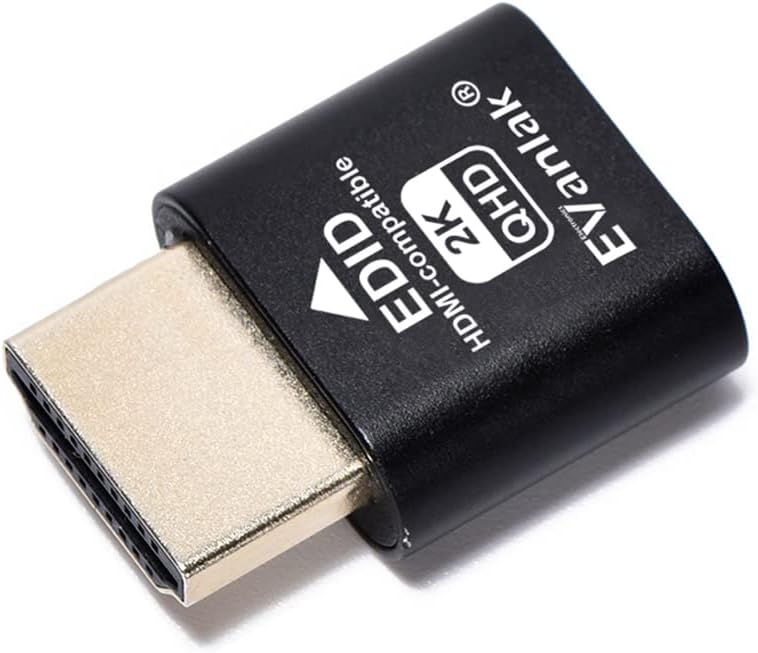
The EVanlak HDMI Dummy Plug is a premium aluminum headless display emulator that creates a virtual 1920x1080@60Hz monitor, enabling seamless remote desktop access and keeping your GPU active without a physical screen. Ideal for remote work, cryptocurrency mining, and VR setups, it supports multiple resolutions and refresh rates, plugs directly into any PC HDMI port, and requires zero software configuration.


| ASIN | B07YKGGQTJ |
| Best Sellers Rank | #172 in DVI-HDMI Adapters |
| Brand | EVanlak |
| Color | E1080-1PC |
| Compatible Devices | PC |
| Connector Type | HDMI |
| Customer Reviews | 4.6 out of 5 stars 910 Reviews |
| Finish | Hdmi |
| Item Dimensions | 0.98 x 0.78 x 0.31 inches |
| Item Weight | 0.1 Grams |
| Item dimensions L x W x H | 0.98 x 0.78 x 0.31 inches |
| Manufacturer | EVanlak |
| Mfr Part Number | 1920*1080 |
| Model Number | 1920*1080 |
| Number of Items | 1 |
| Number of Ports | 1 |
| Package Quantity | 1 |
| Power Plug Type | No Plug |
| Specific Uses For Product | Monitor,Monitor1920x1080 |
| UPC | 752498099454 |
| Unit Count | 1 Count |
B**R
Works perfectly.
I have an old Dell that I use as a Plex server that is running Ubuntu Linux. I have been struggling with getting VNC remote access to work properly because there was a huge delay. I found a forum post that mentioned it being a video issue with the way Linux works and they suggested putting a HDMI dummy plug on it. This has solved all of my problems. I am now able to place the unit on a shelf with only power and network going to it and haven't had a single issue remotely connecting to it.
J**S
Small yet AWESOME product
My stepson uses my desktop for gaming on his Oculus Quest 2 VR headset and we only have 1 HDMI cord on the TV in the living room so when I would get on my PS3 I would have to swap the HDMI from the desktop to the PS3 which would mess up the virtual desktop app on his headset, that's when I did research on a fix for his issue and came across this thing. I plugged it in my graphics card on the desktop as soon as it came in and got him to test his VR headset out with the virtual desktop app, he said it worked perfect and was surprised it did. It fixed his issue and made it to where I can get on my PS3 any time I want without messing up his VR gaming.
G**E
works perfectly for my use case, however it is detected as 1080p, not 2K
Works as it should, however it is detected as 1080p, not 2K. This is completely fine for my purpose, but be aware if you're purchasing.
N**E
Improve my VR set up
So this was for my VR PC set up. One of the problems is that the PC will not start up unless it’s connected to some kind of monitor or television. And I travel a lot so this Eliminate the TV I was carrying around. With my software that allows me to remotely access on the pc on the same network and then being able to login and use the set up immediately with my VR headset without having the need for a monitor or television. And somehow it actually spent up the performance of my PC. I can’t explain that one
E**A
Worked for My Linux Remote Desktops
I have two Ubuntu machines I use as servers and this helped resolve the issue of always needing a monitor attached to the machines in order to remote desktop into them. Plugged in the HDMI EDID and boom! I'm always able to connect, worked first try!
D**C
Simple & Effective
Frankly, I didn't expect it to work. It works great! Simple solution that yields improved processing speed. Hooray!
"**"
Got my computer booting without a monitor
Built a home server and had to move it away from my monitor and noticed it wouldn't boot up unless a monitor was attached. This HDMI plug worked perfectly to get it to boot up. Now I don't have to drag a monitor over every time I reboot my server.
C**V
Seems to work, but I have one issue.
Upon plugging the device into my video card it worked as a virtual monitor for my system. The problem I'm having is there were no instructions on how to change the desired resolution. It defaults to too high of a resolution and is causing me issues. If someone is able to explain to me how to change the desire resolution of the monitor emulator while in Windows it would be much appreciated. I have several applications that base their working resolution on the attached display, not the resolution setting in Windows, so being able to set a display resolution is crucial for me. Until I can change the default resolution I will continue to give it 3 stars.
F**A
Para los que no tenemos monitor conectado al PC
Tengo un mini PC sin monitor, al que accedo de manera remota y el formato y resolución de pantalla cambiaba haciendo imposible interactuar con él. UN amigo me habló de este producto y por ello me decidí a adquirir este producto. Al conectarlo a la clavija HDMI, emula y hace creer al PC que tiene un monitor conectado, evitando el cambio de resolución. Excelente relación calidad precio y perfecta funcionalidad.
M**W
Unverzichtbar für Headless Server und Remote-Arbeiter!
Als IT-Profi und Heimserver-Enthusiast bin ich begeistert von den EVanlak HDMI Headless Display Emulatoren. Diese kleinen, aber mächtigen Geräte haben meine Remote-Arbeit und Server-Verwaltung revolutioniert. Hier sind die Gründe, warum ich sie jedem empfehle, der mit Headless-Systemen arbeitet: 1. Zuverlässige Leistung: Diese Dummy Plugs simulieren zuverlässig einen angeschlossenen Monitor mit 1920x1080 Auflösung bei 60Hz. Meine Remote-Desktop-Verbindungen sind stabil und die Bildqualität ist hervorragend. 2. Hochwertige Verarbeitung: Die Aluminiumgehäuse sind robust und sorgen für eine gute Wärmeableitung. Die Verarbeitung ist erstklassig und vermittelt ein Gefühl von Langlebigkeit. 3. Plug-and-Play: Die Installation könnte nicht einfacher sein. Einfach einstecken und los geht's - keine zusätzliche Software oder Konfiguration erforderlich. 4. Vielseitig einsetzbar: Ob für meinen Heimserver, Remote-Workstations oder sogar für Krypto-Mining-Rigs - diese Dummy Plugs funktionieren in verschiedensten Szenarien tadellos. 5. Energieeffizient: Im Vergleich zum Anschließen eines echten Monitors sparen diese Plugs Energie und reduzieren die Wärmeentwicklung in meinem Serverraum. 6. Kompatibilität: Sie funktionieren einwandfrei mit verschiedenen Betriebssystemen wie Windows, Linux und macOS. Ich hatte bisher keinerlei Kompatibilitätsprobleme. 7. Platzsparend: In beengten Serverräumen oder Heimlaboren sind diese kompakten Plugs ideal, da sie keinen zusätzlichen Platz benötigen. 8. 3er-Pack Vorteil: Das Set mit drei Stück ist perfekt für Multimonitor-Setups oder wenn man mehrere Geräte ausstatten möchte. 9. Stabile Verbindung: Die Stecker sitzen fest in den HDMI-Ports und sorgen für eine zuverlässige Verbindung ohne Wackelkontakte. 10. Kosteneffektiv: Im Vergleich zu echten Monitoren oder komplexeren Lösungen sind diese Dummy Plugs eine äußerst kostengünstige Option für Headless-Setups. Fazit: Die EVanlak HDMI Headless Display Emulatoren sind ein Muss für jeden, der mit Headless-Servern oder Remote-Desktops arbeitet. Sie lösen elegant das Problem der GPU-Erkennung und ermöglichen reibungslose Remote-Verbindungen ohne den Bedarf eines physischen Monitors. Seit ich diese Dummy Plugs verwende, konnte ich meine Arbeitsabläufe optimieren und die Verwaltung meiner Headless-Systeme vereinfachen. Die Bildqualität und Leistung sind beeindruckend, und die robuste Bauweise gibt mir das Vertrauen, dass sie lange halten werden. Ob Sie ein IT-Profi sind, der mehrere Server verwaltet, ein Heimanwender mit einem NAS-System oder ein Remote-Arbeiter, der auf leistungsstarke Workstations zugreifen muss - diese HDMI-Emulatoren werden Ihre Arbeit erheblich erleichtern. Für den Preis und die gebotene Leistung sind die EVanlak HDMI Plugs eine ausgezeichnete Investition. Sie haben meine Erwartungen übertroffen und ich kann sie ohne Einschränkung empfehlen. Ein unverzichtbares Werkzeug für jeden, der mit Headless-Systemen arbeitet!
J**S
Super!
Just works.
G**R
⭐️⭐️⭐️⭐️⭐️ Keeps My PC Awake - Simple Fix That Just Works
I bought this HDMI dummy plug to keep my PC awake even when the monitor’s turned off - and it worked perfectly. No more sleep interruptions or remote desktop disconnects. It tricks the system into thinking a display is connected, which is exactly what I needed. Beyond that, it’s useful for: - Remote access setups (e.g. TeamViewer, Parsec, AnyDesk) - enables full resolution and GPU acceleration. - Headless mining rigs or servers - keeps the GPU active for performance monitoring or rendering. - Streaming or capture cards - ensures a stable video signal when no physical monitor is present. - Multi-monitor emulation - handy for virtual desktops or testing display layouts. Solid build, plug-and-play, and a great little tool for anyone running headless or semi-headless systems.
B**R
Works as advertised
Works just fine, and most importantly showed up as a 1080p monitor as default which was important for my intended use of the device.
Trustpilot
1 month ago
1 week ago