Buy anything from 5,000+ international stores. One checkout price. No surprise fees. Join 2M+ shoppers on Desertcart.
Desertcart purchases this item on your behalf and handles shipping, customs, and support to Iceland.
🔌 Power your smart lifestyle with effortless control and double the convenience!
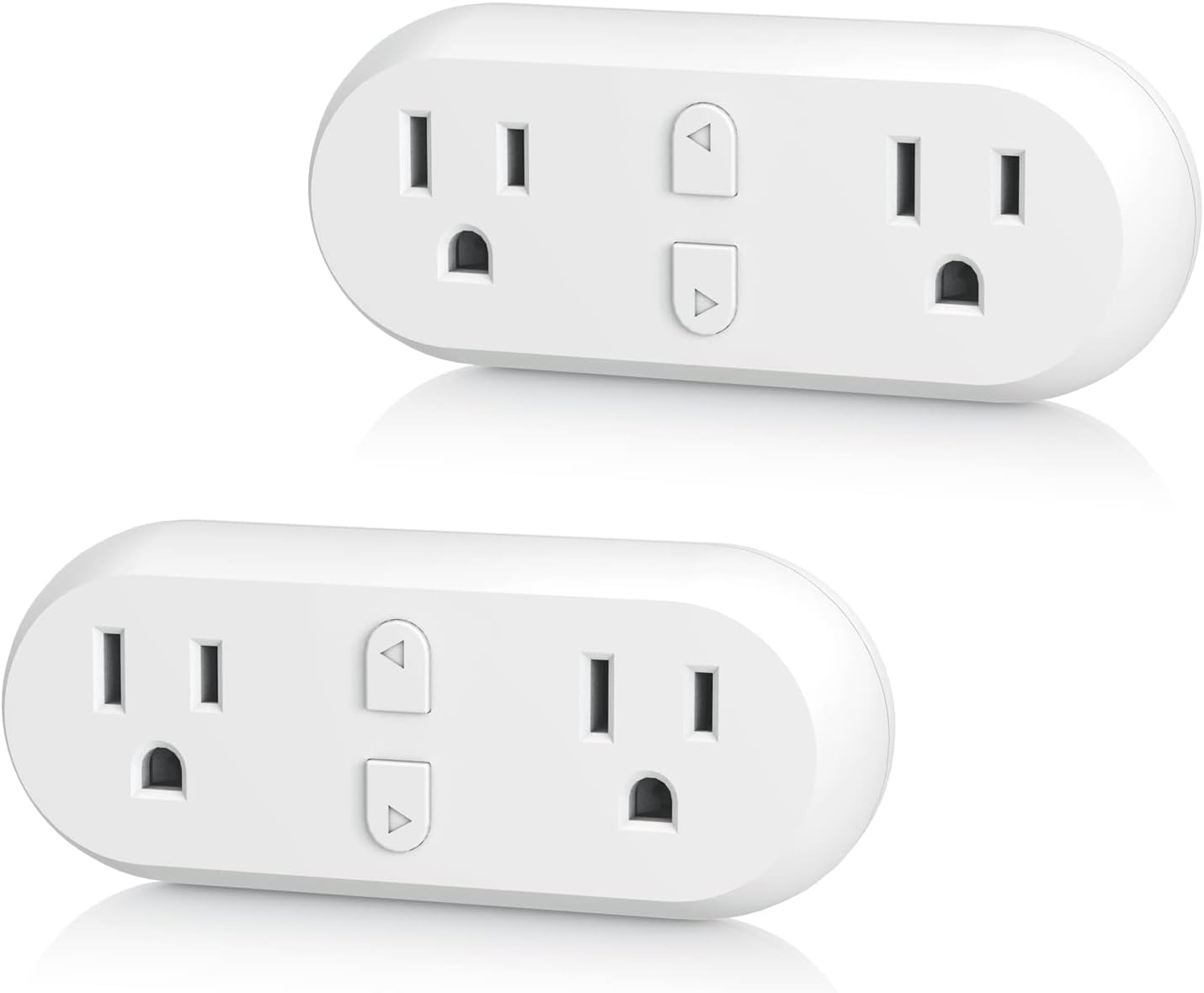
The HBN Smart Plug 15A is a dual-outlet WiFi-enabled smart plug that supports up to 15 amps (1875 watts) per socket. Compatible with Alexa and Google Home, it offers remote control via the HBN app, customizable timers, and schedules without needing a hub. ETL-certified for safety, it operates on 2.4GHz WiFi and comes in a convenient 2-pack, making it ideal for modern smart homes seeking reliable, easy-to-use automation.


| ASIN | B07XZJ412P |
| Actuator Type | Remote Control |
| Best Sellers Rank | #13,748 in Tools & Home Improvement ( See Top 100 in Tools & Home Improvement ) #66 in Electrical Outlet Switches |
| Brand | HBN |
| Brand Name | HBN |
| Circuit Type | parallel |
| Color | White |
| Connectivity Protocol | Wi-Fi |
| Connector Type | Plug In |
| Contact Material | Brass |
| Contact Type | Normally Open and Closed |
| Control Method | Voice |
| Controller Type | Amazon Alexa, Google Assistant, vera |
| Current Rating | 15 Amps |
| Customer Reviews | 4.1 out of 5 stars 17,369 Reviews |
| Global Trade Identification Number | 00857333007486 |
| Included Components | smart plug |
| International Protection Rating | IP20 |
| Item Dimensions | 4.41 x 2.11 x 1.76 inches |
| Lower Temperature Rating | 14 Degrees Fahrenheit |
| Manufacturer | HBN |
| Material Type | Polycarbonate |
| Model | U153T |
| Mounting Type | Plug-In Mount |
| Number of Items | 2 |
| Number of Positions | 2 |
| Operating Voltage | 125 Volts (AC) |
| Operation Mode | Remote Control |
| Specification Met | ETL |
| Switch Type | Push Button |
| Terminal | Solder |
| UPC | 857333007486 |
| Unit Count | 2.0 Count |
| Upper Temperature Rating | 122 Degrees Fahrenheit |
| Warranty Description | 15 months warranty |
| Wattage | 1875 watts |
A**F
Super Easy to Use and Works Perfectly!
I’m really impressed with the HBN Smart Plug 15A WiFi Outlet. Setup was incredibly easy—just plug it in, connect through the app, and it was ready to go in minutes. Even if you’re not tech-savvy, this is one of the simplest smart plugs to get up and running. It responds quickly, works flawlessly with my routines, and the connection stays stable. I love being able to turn things on and off remotely and set schedules without any hassle. The plug itself feels sturdy and well-made, and the 15A capacity is great for heavier appliances. If you want a smart plug that’s easy, reliable, and user-friendly, this one is a winner! Highly recommend. 🏡✨
L**G
Functional gadgets
They help within the home, my kids turn me on to them, just loving them.
R**N
Great Internet Connected Switches
Bear with me, and I’ll explain four stars when in the specifics I rate as three stars. For a Internet / Bluetooth integrated home automation switch that does not require any mainstream voice activated device; these are fabulous. 2.4GHz WiFi, a smartphone or tablet on the same network, and your good to go. These work great, the app is simple enough to use or as complex as you may require. I now have eight of these, with six in use, and two that I haven’t found a spot for yet (bought in the 2/pack option as it is the most economical at the time). My initial purchase, with NetGear wireless router was easy to set up with the Tulia app. But this was an old router and we were having other issues, so I replaced it with a Linksys. This is where my issues with this product begin. You CANNOT just change network connection devices, the plugs have to be removed from the old one and added to the new one. Also, the first four I bought worked with the Tulia app, the second purchase of four more will not. I had to change to the companies other app, SmartLife. Same layout, same features, just a different name in the surface; yet, obviously, different programmatically. As I had named each plug, and each individual socket, changing apps and routers was a giant pain. Honestly, this didn’t take a long time, but it’s 30-45 minutes wasted for lack of thought. And longer wasted renaming and setting back up the schedules I had created. Once configured, these things are awesome! 1 outside for Christmas Lights (at the time I’m writing this) 1 in the front room for the tree 2 in the living room for standup lamps on opposite sides of the room 1 in the bedroom for night stand lamps 1 in the back bedroom for decorations All of the Christmas lights are in a group, with a schedule to come on twenty minutes before sunset (local time by location) and go off at 2230. My wife night stand lamp comes on and goes off at a set time, so she doesn’t have to turn on the overhead light when going to bed. The living room lights are set to come on thirty minutes before sunset, and off 2230. And a second schedule to come on before we get up in the morning, and go off after we leave for work. Plus, these are on different schedules for the weekend vs week days. These are perfect for giving the house a lived in look of people being home, even when we’re not. We don’t usually stay out late, so we come in to a lit home. Now that things are set up, I can control the switch or individual socket from anywhere in the world that I have internet service. Or they’ll run their schedule for the days set. *My MAJOR Gripe* The switch in the master bedroom has two lamps, both with low wattage LED bulbs. They will not both stay on at the same time. I don’t know if this is due to an overload and auto shutoff safety feature, or I have a bad switch. But I can turn both on, and a few minutes later they shut off. Turn one on, and it stays on until scheduled off time or manually turned off.
L**O
Great little units that fit perfectly in sockets...
Easy setup and works as stated, would highly recommend!
D**K
Sporadic functionality
I landed on this product for three reasons: 1) the price, 2) the reviews, 3) the fact that some smart plugs came with 2 outlets. I bought four of the 2-outlet type, and 4 of the single outlet type. I also bought a 2-outlet outdoor smart plug. All 3 orders are on their way back to Amazon as I type this out. I've been an IT network engineer for almost 30 years, so I'm very technical. I bought these products to be able to turn on/off my Christmas decorations outside, as well as 12 window candle lights that have been working just fine with RF switch plugs. I wanted a solution whereby I could just hit a button on my phone and turn all candle lights and outside lights off at once, rather than going room-to-room hitting a button on a remote. I also wanted to be able to see if the lights were on while I'm not at home, so a cloud app was a necessity (I'm able to monitor the temperature of my upstairs and downstairs HVAC systems this way, as well as my outdoor cameras, which I love!). My WiFi router is currently operating in dual-mode (a.k.a Smart Connect). That is to say that it broadcasts a SSID for both 2.4Ghz b/g/n and 5Ghz a/n/ac 802.11 spectrums. So if something only transmits/receives in 2.4Ghz, like these smart plugs, it will accept those connections. I have a wireless AP in my closet downstairs, and a separate AP upstairs. All wireless devices in my house have no issues with signal strength at 5Ghz, so naturally 2.4Ghz is never a problem since that signal strength reaches further. My transmit power is also set to 100% for both spectrums. The set up for these devices is pretty straightforward. The instructions for all devices were identical and not very easy to read, so I just watched videos online. The app did not have a selection for my outdoor smart plug, so I had to take a guess on that one (again a video helped). Now here's where things got unpredictable and sporadic. Units that were farthest away from my AP, but in doors, seemed to connect very easily and stay connected. 2 units in rooms neighboring the closet (where the AP is) constantly showed "offline". These were clearly defective because I moved them into a room where it had clear line of sight, 10 feet from the 2nd AP, and they still showed "offline". The outdoor unit, which sat only 15 feet from the closet, just outside my front door, barely was able to initialize much less stay on the network and respond when I tried to interact with it. Some devices showed "offline" but would then come "online" when I walked into the room. I ended up spending at least an hour or two trying to get these devices to consistently show online, but just gave up in the end. I didn't bother with support, because I already wasted enough time on something that should not be that complicated. Seriously! They make thermostats, refrigerators, cameras and garage door openers that communicate better over 2.4Ghz or even 5Ghz, and can be accessed from home or across the country. But for some reason they can't do that for these smart plugs!!?? These were made cheap for cheap reasons. Buy these if you only have 1 or 2 devices, keep your AP on some table out in the open near those devices, and only operate them from your phone while in your home and maybe you'll get what you pay for!
N**E
Great
This is the second one I bought very convenient when you need something on a timer!!
T**S
Need more
Love these.. need more
T**A
Hard to connect
These things were very hard to connect. I spent a few hours of trials and errors. I tried to connect using the HBN Smart App on my iPhone, but couldn’t connect. I even turned off the 5GHz band on my router. So installed the Smart Life App on an iPad instead and was able to connect using the AP mode. I tried to do the same thing with the iPhone, but couldn’t add the device, not sure why. Once the devices were added, controlling them work very well. The Smart Life app on the iPhone also showed the devices once they were added via the iPad. Integration with Alexa is simple by just adding the Smart Life skill to Alexa and link your Smart Life account with Alexa. The HBN Smart app on the iPad couldn’t connect the device either. So I recommend using the Smart Life app instead. I wouldn’t recommend this if you are not tech savvy. The timer function works well, but you have to schedule a time to turn off and the the time to turn on separately. Instruction how I connect is below. 1. Installed Smart Life App on iPad and register for an account. 2. Open the app and go to add device, and follow instruction: type in your 2.4Ghz Wi-Fi SSID and password 3. Plug the Smart plug into wall outlet, wait a few seconds, then press and hold the power button for about 5 seconds. The light will flash quickly ( a bit hard to tell). Now, press the power button and hold again for 5 seconds. The light should flash slowly. 4. In the App, once you reach the screen where it ask whether the light blinks fast or slow, choose Slow. 5. Now it will ask you to connect to your device, so click on Connection in the app, or just go directly to your WiFi setting on your iPad. There should be a new SSID for “SmartPlugxxxx”. Connect to that and go back to your App. 6. Once you go back to your app, it should automatically try to discover the device and will list the Smartplug. Click on it to add. 7. When I went back to the app Home Screen, I saw the device added, but the app continued to work on something and I couldn’t do anything else. So I close out the app and restart it. It worked fine after that. 8. You can link your account with Alexa from the app. Click on “Me” button at the bottom, and under Third Party Services, click on Alexa and follow instruction. I hope this can help someone else. I am still not sure why I can’t add the devices via my phone.
Trustpilot
4 days ago
2 weeks ago