We remain fully operational. Our teams are working around the clock to ensure your deliveries continue safely.

DOWNLOAD THE APP


Customer Services
Copyright © 2025 Desertcart Holdings Limited
DOWNLOAD THE APP

🚗 See More, Drive Safer, Stay Connected — The Ultimate 4K Mirror Dash Cam Experience
The WOLFBOX G840S is a cutting-edge 12" 4K UHD mirror dash cam featuring dual front (4K) and rear (1080p) cameras with wide-angle lenses, advanced night vision, and a large IPS touchscreen. It offers real-time GPS tracking and 5.8GHz WiFi connectivity for seamless smartphone integration via the WOLFBOX app. Designed for enhanced safety, it includes 24-hour parking monitoring and parking assistance, all housed in a sleek, easy-to-install rearview mirror form factor with a 32GB memory card included.


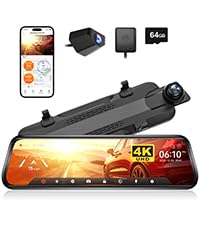


| ASIN | B0811Q28N6 |
| Are Batteries Included | No |
| Auto Part Orientation | Front & Rear |
| Auto Part Position | Front Inside |
| Battery Cell Type | Lithium Polymer |
| Best Sellers Rank | #786 in Electronics ( See Top 100 in Electronics ) #1 in Car In-Mirror Mounted Video Players |
| Brand | WOLFBOX |
| Built-In Media | 1080P Backup Camera with screws and 3M tape, 11 feet Car Charger, 32GB Card(in the dash cam card slot), 4K Mirror Dash Cam, External GPS antenna |
| Color | Black |
| Compatible Devices | Car, Bus, Minivan, Truck |
| Compatible with Vehicle Type | Car |
| Connectivity Technology | USB |
| Control Method | Touch |
| Customer Reviews | 4.3 out of 5 stars 14,198 Reviews |
| Display Type | LCD |
| Field Of View | 170 Degrees |
| Flash Memory Type | card |
| Frame Rate | 30 FPS |
| Included Memory Card Size | 32 GB |
| Item Dimensions D x W x H | 18.9"D x 13.78"W x 10.24"H |
| Item Type Name | WOLFBOX Mirror Dash Cam Backup Camera,12" IPS Full Touch Screen,1296P HD Dual Lens Smart Rear View Mirror for Cars & Trucks, Sony IMX335 HDR Stream Media with Night Vision & LDWS, Free 32GB TF Card |
| Item Weight | 830 Grams |
| Manufacturer | WOLFBOX |
| Maximum Aperture | 1.8 f |
| Memory Slots Available | 1 |
| Mfr Part Number | G840 |
| Model Name | G840S |
| Model Number | G840 |
| Mounting Type | Rearview Mirror Mount |
| Other Special Features of the Product | Built-In Display, Built-In GPS, Built-In Speaker,Built-In Supercapacitor, Compact Design,G-Sensor,Loop Recording, Internal Memory,Night Vision,Touch Screen, Parking Monitor,Reverse Assist,Mute Function |
| Real Angle of View | 140 Degrees |
| Screen Size | 12 |
| Special Feature | Built-In Display, Built-In GPS, Built-In Speaker,Built-In Supercapacitor, Compact Design,G-Sensor,Loop Recording, Internal Memory,Night Vision,Touch Screen, Parking Monitor,Reverse Assist,Mute Function Special Feature Built-In Display, Built-In GPS, Built-In Speaker,Built-In Supercapacitor, Compact Design,G-Sensor,Loop Recording, Internal Memory,Night Vision,Touch Screen, Parking Monitor,Reverse Assist,Mute Function See more |
| Supported Standards | TS |
| UPC | 708111275712 |
| Vehicle Service Type | Car |
| Video Capture Resolution | 2160p |
| Warranty Description | 1 |
V**.
Truly the best bang for the buck for a mirror dash cam.
Can’t beat it for price + features. I gotta say, I’ve had quite a few dash cams and even installed some in my son‘s car but this one has the best bang for the buck. Very easy to install- it’s not intimidating to put this in your car at all with the instructions and videos that are online. Since I’ve had a couple of other dash cams, what surprised me the most about this one was the feature set. The app has the ability to save your videos and preview them on your phone or on the dash cam itself. It’s laid out very easy to understand and you get a lot of little bonuses with the features. (GPS, WIFI transfer) The quality is excellent, sharp and crisp video. I’d say the only “negatives” are that the rearview camera resolution lower resolution. But it’s not a dealbreaker, it’s pretty standard that all rear cameras are not 4K in many dash cams. They are actually a hell of a lot worse on the dash cams I’ve tried before I bought Wolfbox’s. And the only other item is mirror itself is very shiny and I suggest getting the anti-glare Matte screen protector. I mean it’s a mirror, it has to be super shiny, (so you could still use it if you power down). But for my specific use, I need to keep it on constantly so I bought the matte protector. It’s also a very low cost and works perfectly. To top it off I bought the Wolfbox hardwire kit that goes into the OBC port. This made life is so much easier and was really a 10 minute install. Zero complaints, it works as advertised. And it’s an stress-free install with popping in one plug, hiding wiring and you’re done. All in all I’m very satisfied with my Wolfbox purchases. Maybe in a few months I’ll have a few usage comments but this was a great investment for my car.
S**9
A great dash cam with some minor issues
This is the best dash cams I've owned the quality of the video and ease of use is pretty darn good. ease of installation is really dependent on the type of vehicle you own and the type of installation you want to do. Do you want all the wires neatly tucked away and hidden or do you want to use the sticky cable retention pieces that are in the box and make it easier. And obviously you can always pay a professional to install. I have three things that I would like to see improved on newer models / 2.0 1. The power button needs to have some kind of isolating rubber around it or be fixed in place. I have 2 different units and all both of them the button vibrates if the road is rough and gets picked up by the two microphones that are on both sides of the power button. The fix is just put a piece of tape over the power button not tight enough to depress it but enough to stop it from moving around. Wolfbox customer service sent me a replacement unit but it did the same thing the power button is a little loose and gets picked up by the microphones. 2. Wolfbox phone app, I have Android so I can't speak to the experience on iOS however for some reason it doesn't allow me to edit the video in the software it keeps saying that this function is not supported when I go to save. It also creates two file locations. one file of the video will be found in the wolfbox app, another one in my Google photos file. However I can't access the Google photos one as it is blank and says cannot be played until I delete the one in the wolfbox app then the one in the Google photos app works fine and can be played then. If I delete the one in the Google photos app first it deletes the one in the wolfbox app kind of confusing but I figured it out. Also sometimes playback in the wolfbox app is laggy. 3. This isn't in regards to the camera specifically but to the OEM wolfbox mounts. I have the Jeep one but reading reviews the one that attaches to the window Puck does the same thing. The plastic is pretty thin that mounts to the back of the camera unit it allows vibration into the unit and that can slightly be seen on playback. Overall this is the best camera system I've used it's really nice.. I know some of the stuff I say to the above is some nitpicks I also would like to see the 10-in have the OEM Mount support. I have a 12-in unit and in a jeep my sun visors will hit the unit because it's so wide. I probably would have purchased the 10-in fir the jeep if it could be mounted to the OEM brackets from Wolfbox but for some reason they cannot. I would definitely buy again I've already bought two of them hopefully in a revision they fixed some of the minor issues that I have come across. I also like to see the tri camera unut not be so expensive I really would have liked to get the tri bumper but not for an extra $250 and all it's adding is one camera the front bumper. Also in closing I've been in contact with wolfbox customer service support. Their customer service is probably some of the best I've ever experienced they reply on weekends during the night during the day like they must have somebody on 24-hour customer support. They provided possible solutions to the issues. Some of the suggestions work some of them did not however the unit is still an amazing dash cam it's aesthetically pleasing and an extremely well-functional.
K**C
An excellent dash/mirror cam, with some minor issues
I installed this on a 2021 Cherokee. The wire to the camera snugged in at the top of the windshield by the headliner, and mostly fit on the right side of the windshield. Under the dash with black gorilla tape and to the ignition-on 12V outlet and I was good to go. It is really hard to tell from outside the vehicle that I have this in place. I didn't consider the GPS feature something I needed long term but I did try it out. and it seemed accurate in terms of speed and direction. I did not wire up the rear camera, as that would be much more involved and I didn't particularly see the need for it. Even in a disputed accident the front camera will show you were doing nothing wrong when you get rear-ended or hit from the side. After the screen saver for the front camera kicks in and darkens it, the mirror is dark gray but reflects well enough to be useful day or night. Even during the day, with a tinted rear window and sunglasses, I can see behind me. Since getting this 20 days ago I've driven 3200 miles with it. I will say a number of good things about this camera. The resolution during daylight is outstanding and sharp. At night it is still quite good, but like most cameras, there is much glare from headlights. Getting a license number under many circumstances would be tough in many cases. The night image goes contrasty monochrome most of the time at night, but if your headlights illuminate a sign, or a double yellow line, you get some color there. It really records the roadway well, even in blowing snow and fog. The manufacturer makes some effort to personally answer questions if you do, as invited, email them. The manual is not in very good English, and it doesn't answer some basic questions about how to use it. I emailed them and some effort was made to answer my questions. And that alone is a rare bit of effort from the mfg. I asked, however, about issues (I'll get to those) with their player and got a boilerplate non-response, prefaced with a weird "bless you" introduction I'm more accustomed to from Liberian scammers. My most recent questions were essentially ignored; I asked how to use their player (see below) and they recommended I use their player. Thanks. Not helpful. Their player is awkward and glitchy. And they give you no instructions on how to use it. If you click on the player's "about" tab to try to learn how it works, you get information on the manufacturer and all its products, not the player. It locked up my windows 10 machine several times. I couldn't find my still photos or a couple events I recorded. The videos are in "TS" format, something my laptop cannot play as currently configured. So I looked around on the internet and downloaded a free "TS" format video viewer called "VLC Media Player," and it works great. Time stamped 3 minute videos are there, still photos are there, and things I "locked" are saved as "events." This third party free program fixed my biggest frustration with the product. I still have a question about the product I don't know the answer to. If an "event" happens, like an accident in front of me, and within 10 seconds or so I push the "lock" button, does it back up some? So I don't lose something happening in the last 3 seconds of the 3 minute section containing the accident but just before the one running when I hit the lock button? I installed a 128 GB card so nothing is going to be quickly overwritten anyway. So overall, for the price, I am very pleased with it. Daytime video and stills are really good. A still of a three car snowy pile-up is attached to this review. The GPS gizmo worked fine, but I'm not sure I always want my speed recorded and the vehicle already has a compass and two speedometers built in. So I won't be using that. Due to the oddness of the instructions, which don't cover some basic things, you do have to do some figuring out on your own. It wasn't hard though. If this one has a decent lifespan I'd gladly get another down the road. I'll probably get another for a second car too. Supplement.... Been using this for around 3 years now. It still works as new. I did buy a second one for another car and it works fine too. All it all, it has been excellent within the relatively small limitations given in the review.
R**.
Worth every penny
I have to say, Wolfbox never came onto my radar until I bought this thing. I love the functionality of it. I love the very high definition front camera, shooting at 4K, you can tell the exact make and model car, you can read the license plate. Even at low light/night driving. Also, some of my vehicles don't have the best visibility from the rear mirror. This thing has a stand-alone rear camera that you can mount inside or outside the car. In my opinion, this is one of the best upgrades you can get for your car. Also, it's not as expensive as I would expect this to be. Great product. Highly recommended.
P**I
5 stars... and with a couple of reservations
First of all, this product is and does exactly what they claim it does. The 12" view display is VERY sharp and clear (with a couple of reservations I will address later), the wide angle lenses show everything and more, the GPS is accurate, and the rear-facing camera works very well, especially if you hook up the wire to the backup light so the unit displays the (adjustable) backup lines. Very useful in parking lots! The variety of settings and adjustments are impressive and useful. All-in-all, a really nice product. Now... here's some things I feel you should know.... First, I'm no expert in dashcams. I actually tried an inexpensive windshield mounted one, and it was okay, but I thought it used up too much windshield "square footage" and was a little distracting next to the rear view mirror - the only place I could fit it. Which led me to the units that fit on the existing rearview mirror. MUCH better for what I wanted. I originally just wanted the forward-looking camera and resulting recording, but the GPS was so easy to install, so I did that. Then, after some thought, I wanted to install the rear-looking camera. If you have a sedan with a trunk, this will be very easy. I don't have that. I have a 2009 Ford Escape, a smallish SUV style with a full hatchback as well as a window that opens. Lots of pivot points and moving parts. To get to the license plate light (the recommended routing and placement for the camera), I would have to nearly destroy the inside plastic panel covering the tailgate to route the wiring. And there was no good place inside the glass. So where? It ended up on the outside top driver's side corner of the hatch in line with the luggage rack frame - for a little protection. Not happy with that, but it works, and it's not the manufacturer's fault. Just beware if you have something other than a sedan. You may have to get creative. Another issue is nighttime rear view. The flare from the camera at night is fierce, and not at all useful for viewing out on the highway. In a lighted parking lot, it's fine. Great, even. Also, rain and snow. Just okay, but nothing unexpected or a design fault. It is what it is. Now, one other thing, and it's not a design fault, it's a part of what this device is... Think about it... You strap on this gadget that has a camera pointed straight forward onto your rear view mirror. It has a polished glass surface that is excellent for use as a rear view mirror all on it's own. And what's the first thing you do? You adjust the mirror, angling it down and towards you so you can center the reflection of the rear window in the mirror and see it by just glancing over, correct? And now that camera is pointed up and to the right, not straight ahead. It's a very wide angle lens, and this is not really a problem, but I fixed it by making a small wedge out of foam and inserted it between the unit and the mirror it's mounted on. Now the camera is pointed straight AND the reflection in the mirror is correct AND the rear-facing camera's image generally matches the real reflection. This is important on dark and cloudy days. I know this all sounds like problems and issues, but they are really not. I'm a fussbudget when it comes to stuff like this. This is a really good unit and does it all. I like it a lot.
I**N
Great quality mirror dash cam with flexible install options
Very impressed with the video quality — both front and rear footage look sharp and clear, even in challenging lighting. I ended up mounting the rear camera next to my existing backup camera, which worked perfectly and keeps it well protected while still giving a great view behind the car. The mirror display is bright and responsive, and overall the build quality feels solid and premium. The only minor downside is that with my setup I can’t open the sun visor fully, but that’s more of an installation tradeoff than a product flaw. Overall, excellent value and I’d definitely recommend it.
N**H
Basic features difficult to access/use
** Feel free to read my whole review, but I've just taken it down to one star because the system has completely stopped working. Sometimes I can get the screen on, but it doesn't recognize the memory card and won't record even if I can get it powered up, so... ** Note: I include power consumption/current draw info at the end of my review. I wrote this review two hours ago as a three star. Then I went and tried to install the rear view camera. Now it's a two star review. I'll explain below. So, I'm six months into owning my dash cam. I like it, but it has recently caused me problems. The install of the basic camera was very simple, but I only plugged in the device/front cam itself, not the rear cameras or GPS. I really like having it, and have even provided video of a car hitting a motorcycle thanks to having this guy in my truck, BUT there are some problems. 1) In the last month and a half the screen has started turning itself on while the truck is parked, which increases the power consumption considerably and has killed my new $250 battery several times already, and left me without the use of my truck several times. Not happy. I just had to go spend $55 on jumper cables to get my truck going today because I really needed to get across town and pick something up. This wasn't a problem the first 4.5 months of ownership, but now if I leave my truck sitting for a few days, it's dead. Totally dead. ** Update: during the colder seasons the screen would turn itself on almost constantly, within one to ten seconds of me pushing the button to turn it off, independent of if the vehicle is parked or driving ** 2) Many may wonder, why not use the power saving mode of parking monitor? Well, you have to buy a different accessory for that to work, item B081TY3H7T. It's a device that plugs into the fuse slots inside your fuse panel, grabbing one battery power source and one ignition switch powered source. Since nobody can tell me how this device communicates to the camera that the vehicle is off rather than just being a power adapter, and the product description itself doesn't even tell me what makes it any different than using the power source provided with the camera, then I'm not buying it. If I spend that $20 and the feature still doesn't work, then I'm just out another $20 and more time. I also don't want to increase the amount of wiring needed in the truck to make this product work. Parking mode seems like a feature that should have been build into the device functionality anyway, just like the GPS functionality should have been. 3) The GPS feature fails, like all the time. About a third of the time the GPS shows as speed of 0 shown in red text, as you can see in the pictures ** update, the gps function fails almost all the time now, working only about 5% of the time **. The second photo you can see my speedometer not at zero, but the camera has the red error rather than an actual vehicle speed. So, if I get a ticket there's a very high chance my speedometer feature won't be captured accurately on the camera so I cannot defend myself in court. Also, you have to mount an external GPS device to get any feedback of vehicle speed and direction, and to my understanding this also sets the power off feature so the camera knows when you park and doesn't run 24/7 with the vehicle off. Again, it is unclear if the GPS device or the $20 additional accessory from item 2 actually creates the power off functionality. This should be more clear. I also can't find any instructions online about how to orient the GPS unit, or if it needs to be mounted upside down, like some do. 4) The rear view camera installation.... In concept, simple, right? Plug and play? Almost. The device does not have the ability to flip the rearview camera image, so you HAVE to mount the camera with the sticky base pointing up. No option otherwise. There are zero provisions for having to install the camera with the sticky side down, which is required for installation on a truck, because there's no body panel hanging over the truck bed to stick this thing to. There are two mounting brackets included, but they are poorly designed in the sense that you can't actually functionally use them. One is a two-piece design, hinged in the middle, and it could be used to mount the camera under a vertical panel of some kind, but you'd have to have the bracket at a 90 degree angle to do so, sticking out from the truck body, meaning the panel you're mounting to has a black metal square stuck to it just over the camera as well, all of which looks terrible and will likely vibrate loose. They could have designed the bracket to be hidden behind the camera, but the mounting screw tabs on the bracket define exactly how you have to use it. The other single piece bracket is like that, hidden behind the camera, but the mounting screw tabs are too close to the flat portion of the bracket, so the cord coming out of the back of the camera pushes the camera up, making the view from the cameras perspective not useful. Additionally, the included cable for the camera/backup light is 20 ft long, but it's not long enough to reach the rear bumper on my truck (2001 silverado extended cab). If you plan to route the cable under the trim and around the cab to do a proper installation, the cable is about 15 feet too short. 33 ft extension cable is B082RZNJFY, $15, and the 50 ft extension cable is B0814ZHHST, $17. All of this to say, I have to find a way to make a custom mount for this to work on my truck. The only place I can see that will actually work and look halfway decent is if I actually screw one of these brackets into my tailgate handle so I can hang the camera below it, giving up about a 1/3 of my tailgate handle, looking ridiculous, and having to route this cable through the moving action of my tailgate hinges. Down to two star review because of this lack of design and functional quality. They offer the ability to mirror the image, just not flip it to mount the camera the other way. How ridiculous. 5) The navigation of saved files is not intuitive, at all. You also cannot fast forward or rewind in a given video file, you have to watch it start to finish without interruption, so you'll want to make certain that your files are configured to be 1 minute long, not two or three. I set the cameras and GPS unit up on my bench to test the power consumption and even after giving the device time to recognize no movement, it did not power off and continued to consume as much power as it did before. 6) The G-sensor, which is advertised as being built into the camera, doesn't seem very effective. I set the camera on a washing machine and jolted the machine pretty aggressively without getting a response from the camera or any notification. I'm not sure what the parameters are for this feature to work, but the GPS unit was plugged in as well, and the camera had been sitting idle for several minutes with the screen off. 7) With a 32GB card and just using the single front camera set to 1080P, you only get about five hours of record time. That may seem like a lot, but think about if your camera runs while your vehicle is off, or you forget to save the file after an accident, or you hit the lock button, but the file with the recorded incident actually had just ended before you pushed the button, but you didn't know that until more than five hours later and now the file is overwritten? All of these have happened in my time using this camera. I had someone break into my shed and steal my generator while the truck cam was pointing that direction, but it was overwritten before I woke up the next morning. I would suggest getting a larger card, or a camera that actually works in parking mode or motion detection mode (if your future camera has this feature). Parking mode does not work on this product. The good: Screen resolution is pretty good. Audio is pretty good. The ability to review on the screen is handy, though honestly it would be easier to use and navigate if it paired with your phone like some other dash cams on the market. The bad: Aside from being a simple camera and microphone setup it fails in literally every single feature. Every one of them. Power consumption from 13.5v power supply: Unable to test in powered down mode or parking mode, because I can't get them to work - Front cam only, no GPS, screen off - 185 mA Front cam only, no GPS, screen on bright/dim - 405 mA/268 mA Front cam only, GPS plugged in, screen off - 200 mA Front cam only, GPS plugged in, screen on bright/dim - 435 mA/285 mA Both cams, no GPS, screen off - 305 mA Both cams, no GPS, screen on bright/dim - 550 mA/400 mA Both cams, GPS plugged in, screen off - 325 mA Both cams, GPS plugged in, screen on bright/dim - 640 mA/450 mA
J**M
Good Not Great
The Wolfbox G840S is a great improvement in visibility and function over a standard rearview mirror and dashcam. There are many functions this unit offers that make it a standout in terms of it's use in your vehicle. Nighttime visibility is much improved and the ability to adjust the camera to show a wider view is outstanding. Having both a front and rear facing camera ensures that you capture any activity around your vehicle that may be used later in case of an accident, theft or vandalism giving one a degree of comfort that you will be able to show what happened. There are, however, several downsides to the device which you should be aware of. Installation is straighforward but depending on your vehicle it can take a considerable amount of time to route the wiring correctly so it does not show. You are likely to be left with a bunch of extra wire up by the rear view mirror that you will need to find a way to deal with. I was able to hide mine inside the overhead light unit. Others may be able to do so under the headliner but each install will be different. I powered my unit by tapping into the OBDII plug and purchased a separate cable/plug for this purpose. It worked well to ensure the proper on/off functionality and provides a clean installation. The unit does take a few seconds to start up so people who are starting and stopping their vehicle frequently may find the delay annoying. In my install the way I mounted the rear camera resulted in the image being upside down and mirrored from what I should see. This required going into settings and making the necessary changes. However, you must setup the wi-fi functions first to do this and (although the instructions do not tell you this!) you need to power cycle the device for the settings button to be functional. You must do this every time to access the settings menu which seems strange. In regards to the wi-fi set up I am unclear what the purpose is other than to transfer the footage from the unit to your phone. Seems like this could be just as easily accomplished by removing the SD card and plugging into a reader on your computer or mobile device. Which leads me to my last concern which is that my unit did not come with the required SD card. I had already installed the unit when I realized it had no SD card as stated in the listing. This meant that I had to contact the seller, request a replacement SD card and wait for it to arrive. Because of this I had to remove the mirror dash cam and wait for the SD card since this unit won't really function without it. All in all this is a good piece of equipment and an upgrade for those with dash cams that are several years old. It cleans up some wiring and offers improved functionality. I wish that the delivery had included all the parts I needed and instructions were more clear. And I think that the seller should be more realistic about how much time installation will take. I imagine many folks would prefer to pay to have someone install this rather than spend several hours doing it themselves.
Trustpilot
3 days ago
1 month ago