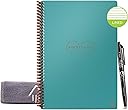
♻️ Write. Wipe. Repeat. The future of note-taking is here.
The Rocketbook Reusable Digital Notebook is a revolutionary A5 smart notepad featuring 36 erasable pages compatible with Pilot Frixion pens. It integrates advanced AI technology for searching and transcribing handwritten notes, and supports instant cloud uploads to popular platforms like Google Docs and Dropbox. Designed with a durable teal microfiber cover and made in the USA, it offers a sustainable, stylish, and highly functional solution for professionals aiming to reduce paper waste while staying digitally organized.


| ASIN | B07WFVWZG5 |
| Best Sellers Rank | 95,792 in Stationery & Office Supplies ( See Top 100 in Stationery & Office Supplies ) 1,034 in Wirebound Notebooks |
| Binding | Spiral-bound |
| Brand | Rocketbook |
| Brand Name | Rocketbook |
| Colour | Teal |
| Cover Material | Cardboard |
| Cover material | Cardboard |
| Customer Reviews | 4.3 out of 5 stars 21,014 Reviews |
| Global Trade Identification Number | 00855510007656 |
| Item Length | 6 Inches |
| Item Weight | 0.18 Kilograms |
| Item Width | 8.8 Inches |
| Manufacturer | Rocket Innovations, Inc. |
| Number of Items | 1 |
| Paper Size | 6 x 8.8 inches |
| Pattern | Notebook |
| Ruling Type | Lined |
| Sheet size | 6 x 8.8 inches |
| Special Features | Soft Cover |
| Specific Uses For Product | Note Taking, Organization, Productivity |
| Style | Reusable |
| Theme | Book |
| UPC | 855510007656 |
| Unit Count | 1.0 count |
S**Y
I love it
This is brilliant. I can't write fast on a tablet without my handwriting looking ugly so I use this for brainstorming ideas. This would also be great for meetings. It is a great way to save paper and organise notes, the pages are a type of plastic and feels nice to write on. You can use any fixion pen, whic can rub out with the rubber on the back of the pen or wipe off a whole page with the cloth. Be sure to have a small spray bottle on you if you are getting to your last few pages and think you may run out during a class as the cloth needs to be damp to wipe the pages clean The app is easy to use. You can back up noted to various clouds like Gdrive etc. I really like that you can use hangtags on either side of title and that will become the file name. You can convert handwriting to text and you can use tags, search key words This would make a great present for someone who loves stationery. I have no complaints. Worst the money as it will last forever.
L**N
Excellent for course work, smooth surface feels a bit strange though
I bought the Rocketbook Core which comes with standard lined pages. Each pages are smooth and shiny and the tight spiral bound makes it feel secure. I bought this mainly for course work for which it is excellent for. Every module I write it out, scan and move to the next page. It comes with a surprising amount of pages (for a reusable book) and there is more than enough if you want one book to cover multiple uses. (course work, daily lists, notes, ideas, shopping lists etc) Pages wipe clear very easily, though I recommend you swipe in one direction only or you end up smudging the ink on the cloth all over the page. Also worth rinsing it out after every page. I do however find the smooth surface odd to write on, I miss the 'grip' of a fountain pen on the paper. Scanning with the app is very easy. Remember to set up the app first with where you want each symbol to save to. You can choose the note app and which file you want to save it in. On loading the app to save a page press the photo button and line up the camera to the page and hold. It will automatically take it ready to save in the pre-designated file, just hit next. (remember to put a marker on the correct symbol on the bottom of the page first). TIP: If you write the heading with two hashtags either side ## (page heading) ## it will automatically save the digital page with this file name. If you write a lot of things that you dont want to keep or only need a digital back up of, this is well worth it. The price does seem steep at first though you are also paying for the use of the app and auto saving feature to your desired notetaking app. I use this with MS OneNote though you can also use it with DropBox, Evernote and others.
P**1
Versatile Notebook
Great product for writing and note taking, including ability for re usability - quick wipe of page and can reuse. The inks do need a wee while to dry or you may get some splodges on opposing pages. A wide variety of pens and colours available, including highlighters. The folders are quite firm, would prefer more pliable and more pockets in the sleeve. I have actually place two rocketbooks in a cover from opposing sides. These are a bit on the pricy side but hope they will be long lasting
J**Y
Environmentally friendly - great way of storing notes etc.
New and Great way of writing and keeping notes. It's easy to you and Great for students as can be reusable. Great for the environment definitely a greener way no pepper waste. Great value for money and you can purchase storage case to keep it safe 👍
N**A
Very impressive!
Having recently returned to uni, I was looking for a way to take notes by hand without amassing mountains of paper over the course of my degree - and this fits the bill perfectly! I love being able to take notes by hand, using colours and highlighters etc. and it is so easy to scan them in using the app. I made an Evernote account to use to store all of my notes, and that was also quick and easy, so I can now scan my notes from my phone and have them saved straight into specific folders or 'Notebooks' in my account. It really couldn't be easier. I have cleaned and reused the pages multiple times already with no trouble, and everyone that's seen it has been very impressed by the idea as well! I like that I can carry just one slim notebook to uni with me but then have all of my notes organised by subject when I need to refer back to them! And with them being stored online I don't have to worry about losing all of my notes for a class if a notebook gets lost, wet etc. I have only knocked a couple of stars of on 'Sturdiness' and 'Durability' because after being in my backpack for a few hours over the day the notebook can come out looking a little curved or warped. I guess this is just because it is so slim, and so far it has been able to be flattened out again easily, so hopeful it doesn't become more of an issue down the line. I will definitely be looking to get one or two more in different sizes for different uses, and really can't recommend this enough, particularly for anyone looking to reduce their consumption of paper! Next I just need Pilot to make Frixion pens that are refillable & non-plastic...
S**S
Great idea! Not for Lefties!
The Rocketbook offers excellent value. It's a budget-friendly solution, especially for those who can't afford high-end tablets or devices like the reMarkable for note-taking. It delivers on its promise of reusable, cloud-connected notes. However, as a left-handed user, I found it quite challenging. The ink smudges easily when writing with the left hand, requiring frequent rewrites and causing frustration. This makes the Rocketbook less practical for lefties who need a reliable, smudge-free experience. Another point worth noting is the drying process. When wiping the ink away, you need to allow the page to fully dry before moving on to the next one. If you don't, the page takes much longer to dry, potentially delaying your note-taking session. Overall, while the Rocketbook is a cost-effective tool with impressive features, left-handed users may find it less user-friendly. Hence, the 3-star rating.
S**S
Expensive but amazing tech and really useful for note taking
So let's first talk about the price. £35 for a 36 page note books sounds crazy, but, in this case it is so worth it. Imagine how much money you would spend on pads over a 5 year period. I bough one of thse books for notes at work 5 years ago and it is still going strong, in fact it is going so strong I have now bought another for my new job (I bought a red cover previously where I wanted a more professional black cover this time) Writing is a breeze and although the "paper" does not feel 100% natural, it does not feel bad and does give a pleasing feedback when using the required Pilot Frixion pen (1 included with the pad) Once notes are completed you can put an X through and image at the bottom and it will automatically sent the document to a location of your choice (set initially in the menu) the scan will be just like the original but digital and if you have emails on your phone, your mobile will become your personal notes archive. When done, wet a rag, and erase all the notes ready for the next batch. Amazing product
S**T
A great product.
I'm always jotting things down, working through a computer algorithm on paper or writing some notes or some graphic designs, information I'm receiving during a telephone conversation and so on. For me that all works best on a traditional pen and pad. But the trouble with traditional notepads is they get messy very quickly after corrections, plus you might want more than one for different purposes. I find an A5 pad the right kinda size, not too big or small but there are A4 and A6 versions too. Now it's arrived and it works well, it's a bit over priced. But I use notepads all the time so it's something that I will get use out of. The pen flows nicely and it's just like writing on traditional paper (smooth paper not fibrous). Apparently 10 to 15 seconds for it to bond with the special paper then it will not smudge at all even after some vigorous rubbing (I tried). When you're home you could tidy up your corrections or erase pages completely, which is very easy with the supplied cloth (dampened). No residue what-so ever is left so it's like a new pad once again. You have 36 pages to use so you could keep some things permanently in the notepad. It comes with a black pen, but other colours are available. I downloaded the RocketBook app to my phone, set my email address because I want my notes sent via email (you can also use various cloud services like DropBox). You click the camera phone icon on the app and it recognises the page (and nothing else, not even the notepad ring binder or a background). It shows you what will be scanned by over-laying a green section on the page, processes and sends to the place of choice in PDF Format. You put a cross through one of the icons at the bottom of the page to idicate where you want the file sent. The scans are very good (unless in poor light I guess, but you can scan later in better light) with very smooth curves as used in handwriting and drawing (4K on my phone). The software has OCR and search facilities, although probably best to print key words unless your handwriting is very neat. As well as key words I use the heading feature so you don't have to type in a filename, just scan and the PDF gets sent automatically. You simply write some hashtags around the filename you require, so write on the notepad ## FILENAME ## So basically you can use it as a traditional notepad that never runs out, that can be edited, wiped and over-written without something like Tippex for a standard paper notepad which you can't really write over, or the Tippex tape-like solution that puts a white film across edits. Or you can very quickly get ideas, notes and drawings down, tidy up and then send as a PDF to view on phone tablet or computer as more of an organized work flow.
S**E
Perfekt
Habe es für meine Umschulung gekauft und bereue es nicht, das schreiben im Heft/Buch ist total angenehm. Ebenfalls das abfotografieren und verschicken ist kinderleicht. Zum entfernen habe ich eine kleine Sprühflasche mit Wasser.
P**.
Super cool!
Excelente material! Funciona perfecto
R**O
Fantastico !!!!!
Mi ha rivoluzionato il metodo di lavoro e la gestione della mia formazione. Posso digitalizzare velocemente e archiviare con l'utilizzo dei tag i pdf per argomenti. Ora sto valutando l'acquisto dell'A4 !!!!
N**I
Surprised
I thought this was a bit of a gimmick before actually using it and making proper use of it! The way it connects to apps is genius! I highly recommend this product! Next step is integrating AI into the app!
G**A
J’adore
Ce cahier est super, on note on scanne grâce à l’appli, et on efface facilement avec un chiffon humide.
Trustpilot
3 weeks ago
1 week ago