Desertcart purchases this item on your behalf and handles shipping, customs, and support to Iceland.
🎧 Drive Your Sound, Own the Road
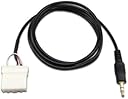
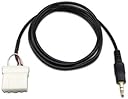
The Goliton AUX 3.5mm Cable Replacement offers a 2-meter long, matte-finished auxiliary connection designed exclusively for 2006 and newer Mazda vehicles with external CD changer ports. It enables seamless audio streaming from MP3 players and smartphones, requiring simple plug-and-play installation by disconnecting any existing external devices.
| Asin | B006FFCONA |
| Best Sellers Rank | #910 in Car Audio & Video Input Adapters |
| Brand | Goliton |
| Color | black |
| Compatible Devices | Cellular Phones, MP3 Player |
| Connector Type | Auxiliary |
| Customer Reviews | 4.3 4.3 out of 5 stars (1,607) 4.3 out of 5 stars |
| Finish | Matte |
| Item Dimensions | 4.72 x 3.94 x 0.39 inches |
| Item Weight | 9.07 g |
| Manufacturer | Goliton |
| Mfr Part Number | E-EMTU-MAUX |
| Model Number | E-EMTU-MAUX |
| Number Of Items | 1 |
| Number Of Ports | 2 |
| Package Quantity | 1 |
| Power Plug Type | No Plug |
| Specific Uses For Product | Mp3 Phone |
| Unit Count | 1 Count |
User
Why did I wait so long?
Note: This review is for a 2006 Mazda 3s.I can't believe how many years I used lousy FM transmitters to play audio from my i-devices. This cable is well worth the money but there are few things you should know.1. The cableThe cable is about what you would expect. It is made of 3 wires with a stereo plug on one end and a proprietary connector on the other. No frills. It is about 2 ft. long, and a little stiff. You wouldn't want to let this cable fall to the floorboard of your car and step on it. It probably won't take serious abuse. So if your car is a miniature chaos universe, this cable probably will have a short life. I took the precautionary step of adding a little super glue to the back of the white connector, so the wires don't come loose. I don't know if this is an absolute requirement, but 15 minutes now is better than buying another cable in the future.The stereo connector is fairly standard, soft rubber around a stereo plug. I have a fairly tough case on my iphone, and this plug was blocked by the size of my case's stereo hole. I used a sharp pocket knife to whittle the rubber down until it fit. Not a negative for the cable, more a negative for my phone case.2. InstallInstall on my Mazda was easy. I won't explain it here. If you can shop on Amazon you can go to YouTube and figure out how to remove your stereo. If you have satellite radio or a CD changer, you may be sacrificing their functionality to use this cable. I had neither, so it was not an issue. I ran the cable behind my AC controls and out the ash tray. I drilled a hole in the tray itself and pulled the cable through. I now can tuck it away nice and neat, when I need to. The ash tray plastic is hard, so a drill bit rated for metal is the way to go.3. FunctionTo use the cable, pres the "Media" button on the stereo. Push play on your device and enjoy your music. The the cable WILL NOT allow you to control your device. That should be obvious, since there are only 3 wires inside the cable and over half of the ports in the white connector are empty. Changing songs will be done on the device as well as controlling the "master volume" for the device. I turn the volume all the way up on my device and do the finer adjustments using the stereo itself.4. QualitySo long as you are playing high bitrate MP3's the audio quality is comparable to a CD. If you have an Android device, maybe you can play FLAC files? If you can, the audio quality would be almost equal to a CD. Either way it is better than using an FM modulator. I play both music and podcasts and they both are infinitely better than the old transmitter days.So that's it. A simple cable, that is a much cheaper option than buying a new stereo. Buy it.
User
Cable works well, but 2008 Mazda MX5 installation was tricky
As others have noted, there is a YT video that shows how to install this in a Mazda MX5 (Miata). If you Google for "gta Miata" you'll find it -- it's entitled "GTA Car Kits - Mazda MX-5 Miata 2006-2008 iPod, iPhone, iPad, mp3 and AUX adapter installation". However, I found some differences/ problem when installing on my car (2008 GT, with the Bose audio system factory-installed).1. The video states that you must remove a plastic part from under the steering wheel, then remove a metal plate, then remove a 10mm bolt to release the unit. That bolt wasn't on my car, so none of that was necessary.2. So all I had to do was remove the plastic side panels then remove 2 Phillips screws (as shown on the video).3. Then I could pull the whole unit out. BUT when I did that, the antenna cable - which (unknown to me) was tightly tied down behind the unit, with almost no "free" cable -- got disconnected from the back of the radio, so I lost the radio signal. And there was no way I could have re-inserted the cable into the back of the radio -- the cable was tied down, no way to pull it forward to put it into the radio before sliding the unit back in. LUCKILY I had a spare male to female 3.5mm extender cable, so I was able to use that.....snapped the female end onto the antenna cable, and then I had a lot of free cable to play with, so I could put the male part of the extender into the radio. Then I tucked the rest of the extender, as neatly as I could, way back under the dash, and slid the unit back in. Works perfectly. But my advice is - if you have a factory-installed unit, consider having an extender cable on hand before you begin !!!OK, that said: the aux cable works perfectly. I snapped it into the back of the radio, and ran the excess cable under the unit as I slid it back in. Turned out that there was a little space under the front edge of the unit after it was back in place, so there was no need to cut anything in order to make room for the cable. Plugged the jack into my phone's headset socket, and when I pressed the Aux button on the Bose audio unit, I get great-quality audio through my car audio system. Terrific.One small downside (not the fault of the cable, I don't think) - as others have noted, if you simultaneously charge the phone via a USB cable from the "cigar outlet", it works but you get a nasty interference noise coming from the speakers. Not a problem for general audio (which doesn't burn up the battery too much) but it'll be a problem if you want to use navigation with voice directions, because that requires GPS, and that will eat the battery. EDIT: I bought a ground loop isolator from Amazon, for about $10, and that took care of the noise - now I have crystal-clear audio, even when charging via the USB....
User
Mazda 6 2008 - easy install, great sound
I'll list the good, the bad, and some installation tips.The price of the product is unbeatable, especially since as we've seen with the iphone 5, your iphone integration unit can quickley become obsolete. Just a simple line-in. Works for everything. The sound quality is pretty good. I think a cd sounds better but that's to be expected. But there is no audio feedback from the engine, even when using a basic audio cable extension.The only negative I had was that the cable is a tad short - but that really depends on where you want it coming out. I ran mine through the center armrest box. The cable stretched the whole way, but only had about 4 inches of slack once it entered the bottom of the armrest. If you run yours through your glove compartment or just out the side of the center console (near your legs) you'll be fine. I didn't notice a sound quality difference when I added an extension to mine coming through the armrest.As for installation tips, these will only apply to the 2008 Mazda 6, though I'm sure other Mazda6s of that generation will be similar. Here's a list of tips.1) Use the GTA car kits video on youtube as a guide.2) When taking off the 4 front-facing screws that hold in the radio, make sure you get the correct bottom 2 screws. Because I'm tall, I didn't see the actual 2 lower screws and instead unscrewed 2 screws that were holding in the large plastic piece that makes up the armrest. After yanking on the radio for a while and questioning my strength and manhood, I found the correct screws.3) That being said, if you partially remove that large plastic piece (same piece that makes up the armrest) it actually makes threading the cable much easier. You'll need to remove 5 additional screws (besides the 2 I mistakenly removed). 1 one each side near the driver's and passenger's legs. 1 in the middle near the hand brake, and 2 inside the armrest. Also, disconnect the armrest power outlet. You don't need to take it all the way out, just loose enough at the front so you can thead the audio cable down from the back of the radio.4) At the bottom of the armrest box you'll need to make the hole bigger to help the cable fit through. The holes are actually a little plastic drain. Just punch out a little bit of the plastic with a lockblade and thread the cable through.5) To make sure my short cable won't ever fall back down inside, I zip-tied the 4 inches of slack that I had to the little plastic drain at the bottom of the armrest box. It's solid.It sounds complicated but it isn't, trust me. If you are even a little mechanically inclined (like, you set up a Big Lot's bookshelf once) you'll be totally fine. It sounds like there's some improvisation and ghetto-rigging involved, but it's very straightforward. It doesn't take long and it's well worth the effort and money savings. The hardest part is threading the cable down from the radio. Just get a flashlight, stand on your head if you have to, and look for a clear path.
User
Buy it. But buy a ground loop with it too.
Bought this a few weeks ago. Wired into my stereo and fished through the car to have it come out of the center console. Worked great. First issue was a slight buzz or static sound when the charger's connected at the same time as the aux. Second was that the aux cord that connects to the stereo is actually a little flimsy. After a few weeks the music would play out of one speaker or another or not at all or perfectly depending on how the aux is connected to the phone. Can only blame myself for maybe being too careless with the cord. Looked online over the buzzing and you can buy something called a ground loop to rid yourself of the buzzing while charging. You plug the ground loop like you would your phone and have another aux cord run from the loop to the phone. Think of it as an extension between two aux cords. Aux is included with ground loop btw so good deal. Ordered that as well as another aux to stereo cord since mine had broken and figured that I can leave the ground loop and aux to stereo cord in my console and run another aux which I'll consider a disposable one from the console to my phone. That was if I mess up the aux again I can just get another aux and connect it back to the ground loop and avoid having to take apart my stereo again. It's a good product. You just have to do your best to make it last for you. 10/10 would recommend.
User
Works well, easier to install than I thought.
I had read other reviews saying the wires could/would come loose in the white connector, and I noticed the metal contacts where a bit loose (easily shifted 2 or 3mm), so I did the little superglue maneuver on the white connector before even testing to see if the connection was good.Tearing the dash down on my 2006 Mazda5 manual transmission with 6-disc CD player was MUCH easier than I anticipated. I watched one of the youtube videos from the series listed in other reviews, and found it helpful, although it was for an automatic transmission Mazda5, which is a bit different than a MT. I am not familiar with taking apart a car dash and was nervous, so I ended up googling and found some PDFs by car radio makers detailing a dissassembly of a manual transmission Mazda5. The PDFs ended up quite helpful, as they showed me where all the clips were and where to pry without breaking the fascia.Back to the product....It clipped on very easily, and worked perfectly from the start--just had to hit the "Media" button on the stereo and my iPhone was hooked up, playing at good volume-range with no engine static.The length of the cord is good--longer than I expected. (Sorry, I can't measure it because it's already installed....)I contemplated taking a star off for the BIG headphone adapter plug. You would have to drill a big hole in the dash to feed it through. It would have been nice to either have a smaller plug, or to ship with the wires to the white adapter NOT attached, and just a diagram of which hole to plug each wire clip into, so you could feed the wire through a tiny hole in the dash and then attach the white adapter. But I ended up just running it out at the bottom of the dash, by the carpet. Doesn't look "professional," perhaps, but it's out of the way and not an eye-sore.A great product, particularly for the price!!
User
Simple and Effective Solution
I installed this cord in my 2006 (manufactured Jan '06) Mazda 3 and it works great. The audio volume is a not as amplified as I expected, but it is still louder and better quality than my smart phone output. The steering wheel controls work fine (i.e. you can operate the volume controls, the mute button and the mode from the steering wheel). The mode has to be set to "MEDIA" on my console (but it reads "AUX" on the display). I routed the cord out near the floor on the passenger's side as there was no better location in my car without cutting holes (see submitted image). I used a wire hanger to help snake it through. It seems to be fine in that location and there is enough cord (see image). I didn't do anything to the connector terminal (so hopefully it won't flake out like some have reported), but I did duck tape the cord to the back of the unit to act as a strain relief and prevent movement to that connector (see image). I don't understand the superglue thing and I would advise against it. I'm not really into doing car modifications but this was really easy to install and a must in my opinion (to have aux input in the car). I figured out how to pull the radio unit out from a video on youtube. This is not only a cheap option but a very simple and effective one.
User
Put tunes I like back in my car
Works very well in my 2007 MS 6. My car has a DVD player with 6 disc changer so I was able to plug into the radio's AUX receptacle and still retain all functions of my DVD player. I also purchased the recommended filter but did not need it. Don't forget to select AUX to listen after installation.Set your cell phone to station you want and plugged into this cable from the car's radio before turning on the car radio OR be sure car radio volume is turned way down when plugging in this cable into your phone. (Then turn your phone volume back up). With car radio volume turned up, you will incur loud pops in your cars speakers when plugging this cable into your phone. It's very irritating but worse may damage your car's speakers.My Bose radio sounds great with this Internet connection. Remember, the volume in the car radio is determined by the volume level set in your cell phone. Low volume set in cell phone, maybe no sound in your car or amplification-hum or distortion in your car speakers with cell phone volume turned down. Tuning to a different station is tedious, (a passengers job) and running into dead zones breaks things up but is still better then available over the air stations in our area and is free depending on your phone plan. I'm finally enjoying my radio because of this adapter cable. Thanks to ever thought it up and produced it for sale.
User
It's cheap in price. But it works and is reliable!
I have a 2006 Mazda3 manual transmission.I didn't want to pay hundreds of dollars to plug in my ipod or phone directly into my car's radio. I saw this a bought it because it was so cheap. I figured if it works, great! otherwise... I wasn't going to loose much on it. But it works great. I've had it for over 3 months and have been listening to my phone through this 3 hours a day on my commute to and from work. The installation is so simple. youtube shows you easily the 4 screws you need to take out. Litterally. It's only 4 screws. The radio in mazda's slides right out so you can reach behind to plug this cable in. The cord is long enough to reach just about anywhere in the car if you run the cable down towards the transmission and in between the two front seats to the center console.I installed it by drilling a hole near the cup holders and fastening a female-female plug into the plastic. Then plug this cord into the underside of the plug and I keep a 3.5mm male-male cable in my car. I like this setup because it looks pretty slick and if I don't want a cable dangling out of my car I just unplug my male-male cable and it's gone.The radio has a "Media" button (like FM/AM or CD) and once the cable got plugged in the radio recognized it with no issues or difficulties at all. I plugged it in and it just worked.Best purchase I've made for my car ever.
User
Parfait pour Mazda 5 de 2007
Le câble est livré dans un sachet. Il s'adapte parfaitement sur le connecteur libre de l'autoradio d'origine de ma Mazda 5 de 2007. Le démontage de l'autoradio se fait a l'aide d'un tournevis cruciforme et ne prends que 5 min. Tuto disponible sur Youtube.Le son du téléphone devient alors accessible sur l'entrée Média (Aux) aussi bien en musique (Spotify) que téléphone (son de l'appel dans les hauts parleurs). Mon tél est un Oppo Reno 2 (Android)
User
Funciona perfectamente
Funciona bien. Mi coche es un mazda 3 sportsedan del 2007 y no he tenido ningún problema. Además en Youtube hay vídeos donde explican como instalarlo tu mismo. El problema es que es un poco trabajoso porque hay que desmontar algunas cosas del salpicadero del coche pero eso no es culpa del cable. Además la longitud del cable está muy bien permitiéndote colocar el móvil en el asiento del conductor tranquilamente.
User
安い!じゅうぶん!簡単シンプル!
アクセラ BK5Pにて装着しました。MEDIAボタンを押しAUXの表記もされ、音質も問題なく、、AUXのみの為、配線のわずらわしさもなくスマートです。敗戦は中央のドリンクホルダーの四角の場所から出しました。灰皿から出すか悩みましたがこちらにしました。他社製品、純正品より安いのでオススメです!
User
Perfect for Mazda3
Did exactly what was advertised. My Mazda3 now has aux functionality. Great adition.
User
Felaktig produkt
Fick helt fel produkt.
Trustpilot
2 months ago
3 weeks ago