We remain fully operational. Our teams are working around the clock to ensure your deliveries continue safely.

DOWNLOAD THE APP


Customer Services
Copyright © 2025 Desertcart Holdings Limited
DOWNLOAD THE APP
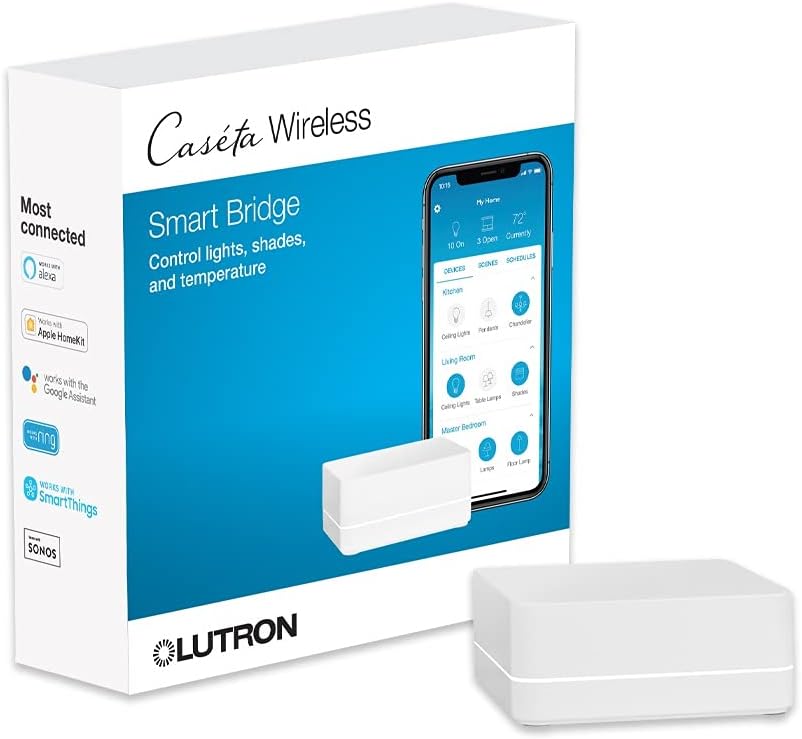
Buy anything from 5,000+ international stores. One checkout price. No surprise fees. Join 2M+ shoppers on Desertcart.
Desertcart purchases this item on your behalf and handles shipping, customs, and support to Iceland.
🏠 Elevate your space — smart control that keeps you ahead of the curve!
The Lutron Caséta Smart Hub is a powerful, easy-to-install smart home controller that supports up to 75 devices, enabling seamless voice and app control of lights, fans, shades, and more. Compatible with Alexa, Apple HomeKit, Google Assistant, and leading smart home brands, it uses Clear Connect technology for reliable, interference-free operation. Perfect for professionals seeking a sleek, scalable smart home solution with fast response times and broad ecosystem integration.


| ASIN | B00XPW67ZM |
| Actuator Type | N.A |
| Best Sellers Rank | #7,496 in Tools & Home Improvement ( See Top 100 in Tools & Home Improvement ) #9 in Home Automation Hubs & Controllers |
| Brand | Lutron |
| Brand Name | Lutron |
| Circuit Type | N.A. |
| Connectivity Protocol | N.A |
| Connector Type | Plug In |
| Contact Material | Brass |
| Contact Type | Normally Closed |
| Control Method | Voice |
| Controller Type | Amazon Alexa |
| Current Rating | 0.3 Amps |
| Customer Reviews | 4.6 out of 5 stars 1,927 Reviews |
| Global Trade Identification Number | 00784276099332 |
| Included Components | (1) Caseta Wireless smart bridge |
| International Protection Rating | N.A. |
| Item Dimensions | 1.44 x 2.94 x 4.69 inches |
| Item Weight | 8 ounces |
| Lower Temperature Rating | 32 Degrees Fahrenheit |
| Manufacturer | Lutron Electronics Company, Inc. |
| Material Type | Plastic |
| Model | L-BDG2-WH |
| Mounting Type | N.A |
| Number of Items | 1 |
| Number of Positions | 1 |
| Operating Voltage | 120 Volts |
| Operation Mode | ON-OFF |
| Specification Met | UL |
| Switch Type | Smart Hub |
| Terminal | N.a |
| UPC | 784276099332 |
| Unit Count | 1.0 Count |
| Upper Temperature Rating | 104 Degrees Fahrenheit |
A**W
Excellent bridge.
Got this to replace a Wink bridge after they, rather abruptly and rudely, swapped to a pay model. Unboxed, connected to my router (patch cable included) and downloaded the app while the unit powered on. Used the app to create an account, pressed the button on the back when prompted and my iPhone connected within seconds. At this point the firmware update installed and within minutes it was ready to go. I attempted to add my first dimmer and nothing happened. I tried a few times and with different switches still nothing. The app prompted that I might need to reset the switch since it had been connected with Wink. The method on the switch didn't work and I googled my issue. Instead of using the three taps on the "on" button hold and three taps I found tapping off five times and holding until the lights flash, then tapping five more time (each set of five in half a second or so) forced a factory reset. This worked for me. Once the switch connects the app asks where it is located (kitchen, bedroom, bath, etc) and what kind (pendant, ceiling fan, etc) and automatically groups them based off this info. I had all my 12 switches programed and operating with half an hour. Alexa integration was easy, Lutron is not a default app and you'll need to find it, once done it was only a matter of logging in. I found the voice controls react much faster than Wink, lights go on/off almost immediately where Wink took a couple seconds. Overall voice control feels way more professional and streamlined while Wink seemed more like a DIY patchwork. The app is very basic and straight forward although it is customizable. Controls mimic the style of the physical switches you tap the switch you want to control and a "switch" pops up and slide your finger up/down for dimmers and tap on/off, I like the Wink style of a group of circles with title much better and it allowed me to easily control multiple switches.
M**Y
Just works! Well!
I think Lutron Caseta is hands-down, the best to light control hub and switch out there. Install These my customers, have one for myself. No lag, app is easy to use, lots of options for different switches and loads. Also works on shades and integrate with many different things like Apple iOS Home, Alexa etc.
"**"
Simple Configuration
We have Lutron smart switches controlling our two exterior lights. I wanted to integrate these switches with my Home Assistant setup and my electrician recommended this hub. Setting up the hub was extremely easy and I would have been happy even if the Home Assistant integration didn't work. That integration was just as easy and I had automations set up quickly. We now have the lights come on after sunset at different brightness levels and off before sunrise. Excellent!
E**D
Excellent replacement for Wink Hub to control Lutron Caseta devices
When Wink announced in May 2020 that they would no longer allow use of their wireless hub unless a monthly subscription fee was paid, I scrambled to come up with a solution to keep my smart home devices up and running. I found the Lutron Caseta Wireless Smart Bridge to be the perfect solution to control all of my Caseta switches. I took advantage off an Amazon Warehouse offer and picked one up for about $20 off the price of a brand new one. The device arrived today and setup could not have been easier. First, I simply factory reset each of my Caseta switches/dimmers and then deleted all of these Wink associated devices from the Alexa app. Then I just followed the prompts in the Lutron app to re-enroll and name all of my Caseta switches to work with the new bridge and Alexa. All were automatically added to Alexa without needing to do any discovery at all. I find the Lutron Caseta Wireless Smart Bridge to be fast and reliable. Response to voice commands given to Alexa to turn lights on or off are quick as are toggling lights on and off using the Lutron app. When I was using the Wink Hub I used to have an odd problem with a group of three recessed ceiling lights. I'd say, " Alexa, turn on living room lights" and usually only one or two of the lights in this group would turn on, almost never all three. Oddly, the problem apparently had something to do with the Wink Hub, because since switching to the Caseta Wireless Smart Bridge, all lights in the group now turn on and off reliably. Yea! Rah! Rah! It is a shame Wink decided to go to the "dark side" (charging a monthly fee for a device I bought with their promise of "no monthly fees") but I'm pleased to be rid of them now. I do believe Lutron will continue to support their Caseta Smart Bridge for many years to come as it is directly tied to smart home switches and devices they sell now and others they will likely offer in the future.
S**Y
Good but expensive compared to equLs
Works very well. A bit more expensive. Kind of wish I saw the leviton brand of this first as it was about $30 cheaper
E**E
Save energy. Works with HomeKit
I use the Lutron Castea system in conjunction with Apple HomeKit. They integrate seamlessly and easily while the combination allows a multitude of features. In addition, the Casseta Homebase network frees-up bandwidth on the 2.4Ghz band of my WiFi mesh network that would otherwise be taken-up by smart switches from any of the other vendors such as Kasa. Our four-story 3000sq.ft. townhouse functions nicely with a single Homebase connected via Ethernet to a Deco mesh node on the second floor. At first, I glossed over such features as adding remote switches and programming scenes via the Caseta app. Now I find they add tremendously to my home. For example, I have a Pico on the dining room table that adjusts all the lighting in and near the dining room for an evening meal with one touch. Same for the home theater; same for our primary bedroom at bedtime. I added a pico in the hallway using just a double gang faceplate on an existing single gang switch without any wiring at all. Now I can initiate the primary bedroom evening lighting scene - or turn on all the bedroom lights full strength - before I enter the room. There is even a pico with a built-in nightlight. If you have outdoor temporary lights, perhaps for the holidays, there are weatherproof outdoor switches you can program. All our permanent outdoor lighting is on the Caseta network for security and, of course, you can program switches for when a room is occupied via HomeKit. We also use the system for electrostatic air cleaners that help to keep our home dust and allergen free, turning them off when people are around and running them in vacant areas at night and when no one is home. As a bonus, energy bills have diminished a bit despite living in data center land. Take that AI.
H**N
Great
Great product
K**S
Easy Setup, Small Footprint, Solid App
The Caseta Smart Hub has a small footprint and was very easy to set up—under 15 minutes. It works seamlessly with the Pico remote and plug. The 6-ft power cord is adequate, although a longer cord would have worked better for our setup. The iPhone app is well designed and easy to use.
Trustpilot
2 months ago
2 weeks ago