Buy anything from 5,000+ international stores. One checkout price. No surprise fees. Join 2M+ shoppers on Desertcart.
Desertcart purchases this item on your behalf and handles shipping, customs, and support to Iceland.
💾 Unlock the past, one floppy at a time!
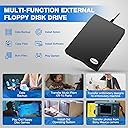
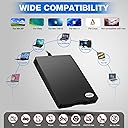
The Chuanganzhuo ACM-008 is a sleek, external 3.5-inch USB floppy disk drive designed exclusively for Windows PCs. With 1.44 MB storage support and USB 1.1 interface, it offers plug-and-play convenience to access decades-old floppy disks. Its ultra-thin, lightweight design makes it perfect for professionals eager to retrieve and preserve vintage data with ease.


| ASIN | B00WSW1YXA |
| Additional Features | Dust Resistant, Portable |
| Best Sellers Rank | #17 in Floppy & Tape Drives |
| Brand | Chuanganzhuo |
| Cache Memory Installed Size | 1.44 |
| Color | Black |
| Compatible Devices | Desktop, Laptop |
| Connectivity Technology | USB |
| Customer Reviews | 4.3 out of 5 stars 2,548 Reviews |
| Data Transfer Rate | 12 Megabytes Per Second |
| Digital Storage Capacity | 1.44 MB |
| Enclosure Material | Plastic |
| Form Factor | 3.5-inch |
| Hard Disk Description | HDD 4200 rpm |
| Hard Disk Form Factor | 3.5 Inches |
| Hard Disk Interface | USB 1.1 |
| Hard-Drive Size | 1.44 MB |
| Hardware Connectivity | USB 2.0 Type A |
| Hardware Platform | PC |
| Installation Type | External Hard Drive |
| Item Dimensions L x W x Thickness | 7"L x 5.2"W x 1.2"Th |
| Item Weight | 0.6 Pounds |
| Manufacturer | Chuanganzhuo |
| Mfr Part Number | CAZED-008 |
| Model Name | ACM-008 |
| Model Number | ACM-008 |
| Number of Items | 1 |
| Read Speed | 1.5 Megabytes Per Second |
| Special Feature | Dust Resistant, Portable |
| UPC | 889269573926 |
| Unit Count | 1.0 Count |
| Warranty Description | 2 Year Warranty |
J**Y
Doesnt Work with Win11 *updated review*
Wont read any floppy disks. * updates, originally, I went right for blaming this product, but it wasn't its fault. I was trying to perform a task this wasn't designed for. Notes: PC 3.5-inch HD floppies (1.44 MB) use MFM encoding, 512-byte sectors, 2:1 interleave, and 300 RPM rotation standardized for MS-DOS/Windows. Apple IIGS 800K disks employ GCR encoding (more efficient but proprietary), 512-byte logical sectors with 4:1 interleave, variable rotation speeds (zoned), and unique track headers/sync patterns. I wanted to create floppy disks for the Apple machine, but didn't stop and think before I acted, and physical hardware limitations are what got in my way. This device works great for MFM but not GCR. That was my mistake.
S**N
Simple, Easy and Cost Effective Floppy Drive Solution
This was only going to be a one or two time use purchase, so I didn't want or need anything too expensive. This item had decent reviews and was one of the cheaper options, so I thought I'd go for it. Bottom line is, it works just fine. Connecting it to my laptop via a USB hub wasn't a problem, although I did use a powered USB port just in case. It read the floppies I needed it to and all went well. When you connect it, it's not obvious Windows (Windows 10 Pro 64 bit) has recognized it. Nothing happens. A new drive letter does not appear in Windows Explorer. Even putting a floppy in the drive doesn't make it respond in any noticeable way. To get things going I moused over the "Safely remove hardware and eject media" icon on the task bar and selected Open Devices and Printers. The floppy drive appears in the Devices section as TEACV0.0. I right clicked on this icon and the drive came to life. From the pop-up menu I selected Browse Files -> Floppy Disk Drive (A:) and I was off to the races. A familiar Windows Explorer window appeared with a directory listing of what was on the floppy disc I'd just inserted. From there it was a simple case of copy and paste to another disc. Easy. I have several old 3.5" IDE floppy disc drives in a box somewhere. I could have found a way to plumb one of those into my modern setup, but for $11.95, my time was better spent buying this USB solution. I'll probably never use it again which is a shame because it works great and there's nothing wrong with it. It's a simple, plug 'n' play solution that was cheap enough to make it a no brainer purchase. Recommended.
N**N
144 disk drive
Work good for a couple of months then poof
W**L
Wow! I viewed a windows 95 BMP file
I used this device on windows 11. It was found right away under file Explorer and this pc. At first I got discouraged because I forgot hard floppy disks had locks on them. My tab was slid to lock position and windows 11 wasn't reading it until I unlocked it then immediately I was able to see the file name created back in 1995. It's an image I made on paint on windows 95. I couldn't view it however from windows 11 photos or paint. I got message saying unsupported file so I googled what to do about it. AI on Google suggested GIMP software which is free. I downloaded GIMP to my pc and was immediately able to view my old image! In the GIMP software I was able to save as and I could then view it with windows 11 photos. I was also able to save in a file of my choosing and now windows 11 opens it everytime. Good device. Definitely worth the purchase!
D**R
It's a USB floppy drive, and it works as one.
Look, this isn't complicated. You want to access some floppies and your modern motherboard doesn't have a header to install one. You buy a USB solution, and Windows supports it natively, and it works. In my case, I need one for at work. I'm a museum drone and we have innumerable caches of 3.5" floppies, both in collections and from previous staff. This has worked for all I've tried it with. Note: your experience will vary with the format of the disks. If you are trying to read Mac format disks, you will need software which can read it. If you are trying to read Atari format, you will need software which can read it. So on and so forth. Windows can only natively understand IBM formats, although it should be backwards compatible so your modern Windows PC should be able to read a single-sided 360kb disk from the early 80s. Note 2: Your floppies may not be good anymore. The data will degrade, and the physical structure of the media will degrade. Older floppies tend to have a greater lifespan, newer floppies were made more cheaply (same with newer laser-read media) and don't last as long. Although, I was surprised to see an off brand floppy from the mid 2000s still read. No complaints. It's a good drive. Plug it in and you're good to go. I only wish there were easy solutions for 5.25" disks (there's a kit for that, but it isn't particularly cheap). Or reasonably priced USB drives to read Zip disks (original drives are becoming way too expensive). Those are my two next challenges at work.
L**A
Worked for About 45 Mins
Read several disks just fine at first. After about 45 mins, began to consistently get an error saying "The request is not supported." Trying to open the drive without a disk just as a test (should show a message of "Please insert disk")? Not supported. Opening the drive when a known-good disk is inserted? Not supported. Opening a drive with an untested disk? Not supported. A few times, at the very beginning of the failure, the disk would open but if you tried to access/copy any of the files? Suddenly not supported and file explorer would crash. Supposed to be plug and play, and at first it was... for about 45 minutes before it failed and just gave nothing but that one same error. After over an hour of unplugging, plugging back in, restarted, removing/re-inserting disks, testing with known-good disks that the same drive previously read just fine... nothing. I've had the box open for about 2 hours and it only worked for about 45 mins of that time. The rest has been trying to baby this thing to try and figure out how to fix it.
H**.
Tale of Five Floppy Drives
I was trying to recover data from floppies to my Windows 10 Home machine. I ended up trying five different devices and am posting my review to let you know my results. First, all five devices worked PERFECTLY on my Windows 7 Pro laptop. However, when plugging in to my Windows 10 machine, three of them would only sit and spin with the drive light on, even though they were recognized as drives by Win10. After a little looking, I found that the devices that worked on my Windows 10 machine identified themselves and used the driver for the Y-E Data USB floppy, while the devices that just sat and spun identified themselves and used the driver for a TEAC floppy drive. So there must be a little difference in the internal configuration of the drive that is causing the issue. I tried 5 devices and found that the Tendak USB Floppy Disk Drive worked perfectly, as did the Esynic USB Floppy Drive . Both identified as Y-E Data USB floppy drives. When they were plugged in, they worked smoothly and quietly. It was a toss-up which one to choose to keep, but I eventually went with the Tendak because it seemed slightly quieter and faster, but that was really subjective. The Tendak also had more information such as a warranty card and information on how to contact support, while the Esynic box was empty. As far as quality of the drive, they seemed identical. If I had needed more than one drive, I would have kept them both. For me, initially the Sabrent External USB 1.44 MB 2x Floppy Disk Drive (FL-UDRV) seemed the nicest. The box was glossy with information covering it, you'd expect to see this sitting on a shelf in a big box store. (All other drives came in plain brown boxes). There were touches of quality in how the drive was packed, the box was made to fit it with a area for the cable to fit in and a dust cover over the USB end to keep it clean. It came with a beautiful guide to using the floppy, including information like the write-protect switch and not removing a floppy while the drive light is on, that newer users would not be familiar with. They also had a support phone number, and the person who answered seemed to be an American. Unfortunately, this was one of the devices that would not work on my Windows 10 machine. It identified as a TEAC USB Floppy drive, and when plugged in it simply had the drive light turn on and continuously seek for data. It worked perfectly in my Windows 7 machine, and was very fast and smooth. The support representative was not aware of any issue that would prevent it from working on my machine, and it does work on other people's Windows 10 machines. If I hadn't needed it working on my Windows 10 machine as well, I would have kept this one in a heartbeat. From other reviews, it appears that it works on other people's Windows 10 machines, so I'd recommend you at least try it. The last two devices were both from Chuanganzhuo. 3.5" USB External Floppy Disk Drive Portable 1.44 MB FDD for PC Windows 2000/XP/Vista/7/8/10,for Mac,No Extra Driver Required,Plug and Play,Black and the 3.5" USB External Floppy Disk Drive Portable 1.44 MB FDD for PC Windows 2000/XP/Vista/Windows 7/8/10 +Dustproof Scratch-Resistant External Bag Case,No External Driver,Plug and Play . Both devices worked fine on Windows 7 Pro, but on Windows 10 Home they immediately had the drive light up and started a very loud seek process that never finished. These devices were louder than any other drive I tested, but did work just fine under Windows 7. Both used the TEAC USB Floppy driver as well. My conclusion: If you are lucky enough to be one of those whose computers will use the Sabrent External USB 1.44 MB 2x Floppy Disk Drive (FL-UDRV) , get that drive. It is quality. If you can't, either the Tendak USB Floppy Disk Drive or the Esynic USB Floppy Drive will probably make you happy.
J**G
outstanding addition to my collection
I have had a bunch of old floppy disks sitting in the basement for many years, with no way of looking at them on the computer. I finally decided to buy an external 3 1/2" drive. This one had good reviews and it was less than twenty bucks, so I figured what do I have to lose? It came overnight and I just tried it. Every disk that I put in works perfectly! They are mostly word documents so they load up very quickly. When changing disks, you do need to either refresh the page, as the manufacturer says, or just go back to where your computer says "drive A" and open it up again and you will show everything that is on that disk. This is a very well made component and I am very glad I made this purchase. Thank you Michael, CEO of Chuanganzhua Brand for sending me such an outstanding product.
S**A
Go for it
Very handy, compact , user friendly
B**O
Bom produto
O produto e de boa qualidade e atendeu as minhas expectativas.
D**.
looks quality and value for the money.
easy to use just plug in and the drive did the rest.
N**N
Good Product
good
C**E
Muy útil
Muy útil y fácil de usar siguiendo las instrucciones.
Trustpilot
3 weeks ago
2 months ago