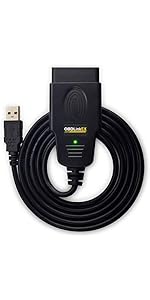
🔍 Diagnose smarter, drive safer — your car’s health in your pocket!
The OBDLink LX Bluetooth 3.0 OBD2 Adapter transforms your Android phone or Windows PC into a high-speed automotive diagnostic tool. Compatible with over 1996+ US vehicles and MotoScan motorcycles, it offers wireless Bluetooth connectivity with hackerproof security. It includes OBDLink and OBDwiz software and supports popular third-party apps like Torque. Safe to leave plugged in, it comes with a 3-year warranty, making it a must-have for proactive vehicle management.


| ASIN | B00H9S71LW |
| Best Sellers Rank | #9,152 in Automotive ( See Top 100 in Automotive ) #70 in Code Readers & Scan Tools |
| Brand | OBDLink |
| Brand Name | OBDLink |
| Customer Reviews | 4.6 out of 5 stars 7,507 Reviews |
| Global Trade Identification Number | 00897155000142 |
| Included Components | Compliance insert, Quick Start Guide, Scanner, Warranty Card |
| Item Dimensions L x W x H | 1.97"L x 1.77"W x 0.91"H |
| Item Type Name | ScanTool LX Bluetooth: Professional Grade OBD-II Automotive Scan Tool for Windows and Android – DIY Car and Truck Data and Diagnostics |
| Item Weight | 1.1 Ounces |
| Language | English |
| Manufacturer | OBD Solutions |
| Manufacturer Warranty Description | 3 year repair-or-replace manufacturer warranty |
| Operating System | Android and Windows |
| Power Source | 12V DC (Vehicle Power) |
| Product Dimensions | 1.97"L x 1.77"W x 0.91"H |
| UPC | 897155000142 |
C**Y
Outstanding - Works on 1997 Ford F-350
This is very easy to use. It is compatible with many obd reader apps - but i find it works best with OBDLink's app. I had to pay $15 extra on the app for enhanced "PIDs". It seems very accurate and best of all - you can see engine oil and transmission oil temps that you wouldn't otherwise know! I used it to pull a code on my truck saying I needed a new Camshaft Position Sensor. This reader is definitely worth the $90 they ask!
J**J
Pretty Good
Updated review because the software was released to the Kindle market. It's a good little device. It is fast and works great, but it's at the higher end of the price scale. It powers down and kicks out a lot of info but the added bells and whistles aren't really 'do die for' necessary over a quality scanner in a lower price bracket. I dig it, but it's a little spendy. Can't do 4.5 stars for the price ding but 5 is fair considering the quality and output. OLD Review: Pros FIRST because my one complaint kinda annoys me. Pros: It works great and fired right up with some apps. Paired quickly on bluetooth and got codes quickly. Lights and info are very straight forward and it is fairly simple to use. BUT....The app that is in the instructions (The OBDLink app) isn't on the Kindle app site. The device is here on AMAZON with AMAZON all over the packaging and Amazon appears in the instructions...but...no love for Kindle. There are other apps that work just fine but the OBDLink app intended for it that's in the paperwork and instructions isn't available for the Kindle. Kinda miffed about that... If you have an Android phone or tablet that is NOT a Kindle, you'll be fine. It also comes with a code to put it on a Windows laptop. I would like to love it, but right in the instructions it says "Thank you for your purchase. If you like it yadda yadda ...."post your review on AMAZON!" (Just....ignore the fact that Amazon makes Kindle but this app is for Android and Microsoft but Kindle blocks it even though the instructions have the word AMAZON in them.)
B**N
Good
OBDLink LX Bluetooth Adapter – Delivered July 12 This thing is fast and reliable. Works flawlessly with Torque and Motoscan. Way better than generic Bluetooth dongles. Stays connected and gives solid data. Worth every penny.
C**.
Best obd2 dongle
Works great for my torque app, fast data reads and connects quickly
M**E
Works very well after some initial pairing issues. Price was right. Beware of Torque app.
Works very well. Price was right. Got mine for roughly $50 to replace a 1st generation Automatic that would never pair with my phone. Initially had nothing but inexplicable "incorrect passcode or PIN" errors trying to pair this one. Also saw the intermittent popup asking to confirm some random PIN code. Was very irritating, but I'd seen such behavior before on Android, which has flaky Bluetooth in my experience. Turned off the car kit to cut down on interference (unscientific, but seemed like common sense), rebooted the phone (always worth a shot). Pressed the pair button on the adapter (something the Automatic was lacking), tapped the entry for the adapter to pair and suddenly it jumped from Available to Paired. Phew! Note that I had also tried pairing it with a different phone (same model and OS version) and it worked the first time. No telling what could be hosed up with BT on the primary phone, but it doesn't have any trouble connecting to other BT devices. Or maybe I just got lucky on the other phone. The app worked the first time, warning that I needed to turn on the ignition to see the "ECU". Torque Pro app also works well with this adapter, which is why I bought it in the first place. Knew I didn't want anything more to do with the Automatic app. Moment of truth came with getting back in the car after passing initial tests. Sure enough, Torque connected right back up to the adapter and displayed real time information from the engine. One note on using this with Torque: make sure to exit the app on return or it seems it will perpetually try to re-connect to the adapter. Seems to fiddle with BT at various intervals, causing at least some other devices to disconnect and re-connect. Odd as Torque is configured to leave BT alone. But then there's some odd warning about HTC/Samsung devices in its settings, so who knows? Can't blame that on the adapter, but it's always something with these things. *** Update *** That didn't take long. Lost the entry in BT settings entirely (how in hell does that happen?) Getting random pairing requests with random numbers while driving down the road. Really don't know who/what to blame at this point. Not going around in circles forever like I see some other reviewers doing. As far as I'm concerned, none of these things are ready for Prime Time. *** Update *** Well, at least it re-paired painlessly. This is only day one, so will see how it goes after a week. Was very upset when it dropped out of the BT settings as it took a lot of "work" (Googling, going around in circles) to get it to show up there in the first place. That was the ballgame and it appeared the adapter had snatched defeat from the jaws of victory. No idea if it matters, but was using the Torque app, not the included one. Doubt that was the issue though. Both apps recovered as soon as I re-paired the adapter. Going to deduct a star every time it does this, because there's no way in hell a consumer should be expected to babysit a little piece of plastic that was supposed to make their lives easier, save them money, etc. My time is expensive and this thing is taking up too much of it. *** Update *** The problem appears to be software related. For example, if Torque is not closed (and it never closes automatically) and you wander too close to your adapter, the software attempts to authenticate. If it fails (e.g. if you walk back out of range), the adapter removes the pairing. Sometimes it is easy to re-pair, other times it can be a real pain fending off seemingly endless "incorrect PIN" errors. Pretty laughable as I never entered a PIN at all in those cases. https://www.scantool.net/forum/index.php?topic=9819.0 *** Update *** Have been careful to back out of Torque Pro on return and it has behaved (meaning not disappearing from the BT device list and reconnecting reliably each time I start the car) for over a week. Overall quite happy after the initial hiccups.
A**M
Works amazing + lots of integration for racing digital display functions!
This thing rocks!
G**T
Good quality. A step above the cheap bluetooth OBD adapters.
Good quality. A step above the cheap bluetooth OBD adapters. Have purchased several of the cheaper OBD2 adapters over the years and have always run into small problems with them not always being compatible or having some small issue. Finally spent the money to upgrade to this one. It has worked well with everything I've thrown at it so far. It now lives in my Jeep center console just in case. Good build quality with better plastic quality. Able to diagnose your check engine light and change settings on my Jeep Wrangler. Easy to install and lights are visible / readable. Good accurate tool to help with your vehicle interface.
A**U
A must have vehicle scanning tool that will save you a lot of car repair money!
This is the tool to get if you need an OBDII scanner. There is plenty of selections out there, but for an Android user like me, this is a perfect tool to work with. For Android, you can download the free OBDLink scan tool, but I haven't quite figured out how well the app supports multiple-vehicle profile. If you have multiple car sharing this one little tool, you can purchase Torque app on Google Play. Torque allows you to set up the vehicle profile once, and be done with it for life. A couple things to keep in mind on what the tool can do for you. You can definitely use it to scan for faulty engine code, so you don't have to make a trip to O'Reilly's/AutoZone/AAP for engine code scan. In addition, you can reset the engine codes, and verify the issue after driving for 30 min or less. If you plan to get your car state-inspected, you will definitely need to drive your car for about 30 min, so you don't automatically fail the test. Other neat feature includes real-time monitoring of the vehicle data, including but not limited to engine temperature. In fact, because of this tool, I was able to detect abnormal engine temperature while driving and took corrective measures (adding for engine coolants) before the car breaks down on freeway. In all seriousness, within a week later, it detected a failed upstream oxygen sensor. Since I knew what went wrong, I was able to buy an oxygen sensor online and figured out the repair on my own. After that, the same vehicle passed Texas State Inspection. In all, I gained the knowledge on how to replace oxygen sensor and not have to throw money at a local mechanics. This is a small investment that will save you a ton of headache later on. A must have indeed!
Trustpilot
3 weeks ago
1 month ago