
DOWNLOAD THE APP


Customer Services
Copyright © 2025 Desertcart Holdings Limited
DOWNLOAD THE APP

🖤 Elevate your gaming rig with b-Voguish — where style meets powerhouse performance!
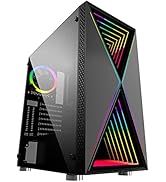
The Bgears b-Voguish Gaming PC Case is a premium mid-tower chassis featuring 5mm thick hinged tempered glass panels for stunning visibility and easy access. It supports a wide range of motherboard sizes from E-ATX to mini-ITX, accommodates large GPUs up to 370mm, and CPU coolers up to 160mm. Designed for optimal airflow, it offers up to 9 fan slots and multiple water-cooling radiator mounts. The dual-chamber layout enhances cooling and cable management, complemented by removable magnetic dust filters. USB 3.0 and USB 2.0 ports ensure modern connectivity. Fans are sold separately, allowing customization to your cooling needs.







| ASIN | B07T4W3BMH |
| Best Sellers Rank | #521 in Computer Cases |
| Brand | Bgears |
| Color | Black |
| Customer Reviews | 4.3 4.3 out of 5 stars (1,666) |
| Date First Available | June 14, 2019 |
| Item Dimensions LxWxH | 8.07 x 15.94 x 19.37 inches |
| Item Weight | 11 pounds |
| Item model number | BG01893 |
| Manufacturer | Bluegears |
| Number of USB 2.0 Ports | 2 |
| Number of USB 3.0 Ports | 1 |
| Product Dimensions | 8.07 x 15.94 x 19.37 inches |
| Series | b-Voguish |
K**T
Quality and Spacious
Wow. This case has gone beyond my expectations and is an absolute steal. The tempered glass front and side panel are prestine, and they don't feel cheap at all. The screws that come with the case are also high quality. Screwing in the SSD or the Hard Drive were a breeze. The mounting on the power supply was no trouble at all. The cable management on this case is extremely easy because there are plenty of places to zip tie cables togethe. Not to mention, the bottom shroud hides the cables insanely well also. There is room for 9 fans, so I went ahead and installed fans in all the slots. With so much room in this case there are endless ways to customize and add cables without the worry of running out of room. If you're looking for a great case, get this one. Your build will not only be clean, but look amazing through this case. I would 100% reccomend this to anyone building a new system.
A**A
The case is perfect in everyway
It's perfect for what I was after,
C**.
Easy to use and looks great
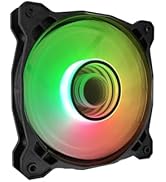
This is the easiest and most spacious case I've built a computer in. It doesn't look too big from the outside, but it has ample space for cable management and accessories and it feels very solid. There's a fair amount of space above and below the motherboard, making it easy to access the screws and plug in cables. The massive cable cutout next to the motherboard is very nice too. It has ventilation on all sides with a filter on the top and bottom and I can immediately tell that it has much better airflow than my old case, partly thanks to the 6 included fans (my old case had 4). The included RGB fans look great behind the tempered glass. The fan controller is nice (supports 10 aRGB fans + 2 RGB accessories), although it uses 6 pin fans and the speed can only be controlled by the remote control (as far as I can tell). It does support a hardware switch to change colors, but that isn't included (you could wire the reset switch to be the color selector instead). There is also a motherboard sync port which seems to be a 3 pin RGB input for color control, but again, the cable isn't included. The 2 led accessory ports seem to be standard 5V RGB headers, but you need small RGB to standard RGB adapters. The accessory bag is pretty nice, it has an assortment of different screws, including radiator screws, along with a buzzer, and blank expansion plate. I wish it included the RGB adapters for the fan controller because they're somewhat hard to come by, but I was glad to see so much variety in the included parts. Finally, the case comes with no documentation and there doesn't seem to be a manual online either. It's fairly straightforward, but it was a little hard to tell what screws are meant for what, and there are no details about the features on the fan controller. Overall, for the case, plus 6 aRGB fans and a 10+2 fan controller, it's an amazing deal. While I wish it came with a manual, I'm very happy with the purchase and would definitely buy it again
S**E
Decent Quality, but...
For the price, this is a great value. The tempered glass looks nice, and the case is pretty well made. The metal is a bit on the thin side but that shouldn't matter as long as you're not forcefully pressing against it. It doesn't come with a manual but the parts it comes with are mostly self-explanatory if you're familiar with cases. You will need to either use a low profile CPU fan or liquid cool your CPU, since the case is too thin to accommodate vertical CPU fans/heatsinks. Also, the front glass will eventually accumulate dust on it, but it unsnaps pretty easily to clean. Another important point if you decide to get the one with preinstalled fans (and fan controller) is that the fan controller requires an ARGB (JRAINBOW) connector on the motherboard. My MSI motherboard doesn't have that, so I can't control the fan speed or color from software, and have to use the little remote control that comes with the case. It works, but I'd prefer software control from within Windows rather than a remote that can be lost or misplaced. Overall, it's decent quality for the price point, but I'd recommend getting the model without fans included, and spending a bit more on 3rd party fans and controllers that you know will work with your particular motherboard.
R**M
Awesome
Looks pretty cool fans are easy to set up yeah it's awesome
F**O
Best bang for buck case. Perfect size, comes with SIX beautiful ARGB fans, lovely tempered glass.
I absolutely LOVE this case now that I have the lighting working with my motherboard. It was an absolute STEAL for how nice it is and the fans and controller it comes with! This case comes with SIX fans attached to an ARGB fan controller. There are 3 ways to control the lighting: 1: Use the included remote to cycle colours and presets. 2: Connect a button to the 2-pin connector to cycle through presets. This is not included, but you can easily attach the case's "RESET" button to this connector and use it to cycle. 3: Connect the fan controller to one of your your motherboards ARGB headers. Many people have been confused about how to do this, so let me explain: The case does does not come with a cable for this, but I was able to contact Bbears and they sent me one for the cost of shipping. It's a proprietary 3-pin cable to ARGB adapter. Simply connect this between the "motherboard sync" connector on the fan controller and any ARGB header on your motherboard. Then, tap the "On" button on the remote to switch it from presets to motherboard control of the fan lighting. The presets look beautiful on their own unless you have other lighted components you need to sync with. The photos and video in this review are using schemes I made using OpenRGB and AuraCreator The fans must be connected to the included fan controller. They do not have standard fan and RGB headers.
U**S
el gabiete esta bien pero no trae los ventiladores
B**E
good looking case not overly expensive amazing quality
É**S
I'm quite impressed by how above it weight (litteraly in that case) it punches. I've built my fair share of computer using far cheaper cases and far more expensive cases. It blows anything under a hundred bucks in terms of functionnality and ease of installation while almost holding up to my Fractal design. I just wanted to buy a cheap case for a computer that had to be in plain sight so I also wanted something that would look good and it's perfect for that. The good : - Easy to build in. It was a brease. Large space at the back for the cables, large cut out and mostly good placement for the rubber grommet. - Looks good. - Plenty of mounting hardware. Albeit no case fans so make sur you have that. - Fun to build in - Spacious, there's place for a 240mm rad at the top with enough clearance to run the cables, I had also enough space for a bigger hard drive cage to use it as a NAS. The bad : - Build quality is subpar. Paint chip off at the edges, feels awfully light when you take it out the box. Break out pci-e cover (they do include a replacement which I like). - It's a big case for it's class. Wider and taller. Makes it easier to work with but it's taking a lot of space. - No instruction, guidelines or whatsoever. You're on your own. Not a problem if you ever build a computer before but make sure you watch a couple of videos if you haven't. - Front panel is weird to remove and requires to much force I'm willing to put on such a slim tempered glass panel All in all, I'm pretty satisfied and all the negatives are outweighted by the fun I had to build with it and the low price.
ا**د
بدون مراوح
J**C
Très bon article
Trustpilot
1 week ago
1 month ago