We remain fully operational. Our teams are working around the clock to ensure your deliveries continue safely.

DOWNLOAD THE APP


Customer Services
Copyright © 2025 Desertcart Holdings Limited
DOWNLOAD THE APP

🎨 Unlock your digital masterpiece with precision, color, and speed!
The XPPen Artist13.3 Pro is a professional-grade 13.3-inch fully laminated drawing tablet featuring 8192 levels of pen pressure, 60° tilt recognition, and a vibrant 123% sRGB color gamut. Equipped with 8 customizable shortcut keys and a multifunctional Red Dial, it offers an ergonomic, lag-free drawing experience compatible with major OS and creative software. Designed for serious artists and digital creators seeking precision and vivid color fidelity in a portable, wired setup.






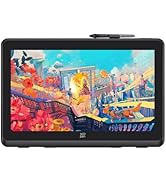







| ASIN | B07VPHR6GD |
| Best Sellers Rank | #6 in Computer Graphics Tablets |
| Customer Reviews | 4.5 4.5 out of 5 stars (11,175) |
| Date First Available | July 24, 2019 |
| Is Discontinued By Manufacturer | No |
| Item Weight | 4.4 pounds |
| Item model number | Artist 13.3Pro |
| Manufacturer | XP-PEN |
| Product Dimensions | 9.84 x 15.37 x 0.04 inches |
C**E
Call chat support when you set up
I had a pretty hard time figuring this out at first. I'm pretty new to digital tablet art so I was taking it slow and reading the manual and I still couldn't figure out what to do. So I went to their website and under support I think it showed me how to connect to a USB on laptop or a computer. The hdmi cord goes from tablet to your monitor hdmi port. Then I finally saw my desktop on my new tablet and was amazed at what was happening finally. So in desktop I use pentablet tools mouse mode. Turn on a good art app like sketchbook or anything and then turn mouse mode off. The pen was jittery and crapoy and I was immediately not liking this tablet lol. I chatted with a support person. They said did I download the driver software for the pentablet and all that good stuff. I said yes but I wasn't sure which one to install so I have two different pen tablet folders in my Mavic mini. She was not happy about that haha. She's like, that's your problem. Trash or uninstall the one that says this (can't remember) it's one of the pen tablet folders. So I did now reboot computer a d tablet. I did. And guess what the pen works perfectly now. Use the hand glove it helps alot and your hand slides over glass better too. I'm stoked man. This tablet is amazing for a few hundred bucks. I paid more to get 3 years of insurance so hopefully don't have to use that. It's very well designed, made and very very good no lag in pen that I can see. You move the tip on the glass and the paint or pencil stroke keeps up with your moves pretty darn good. I still need to get used to drawing on yhis but it's awesome for traveling. Even has different plugs for different countries I think. The screen is fully laminated and so it works excellent without pen tip lag the colors are beautiful or ugly depending on how you mix the paints in your app, lol. Don't start a beginner on a crappy tablet, it's just totally hard to draw and will discourage them from doing digital art. Get one like this or this tablet. It's perfect for beginning artists because it works like a pencil or pastel or paintbrush to paper or canvas. My old tablet had the pen kag and redraw would take forever. It was a nightmare. So I never used it. This tablet will get used for sure, it's that good!!! Take care and keep making art live.....
M**N
Great value
I don’t know what to say other than this thing is a lot of fun. My daughter (8) loves to draw and has been asking for something like this. I bought it so she can finally translate her talent directly to a digital canvas. After buying I read through the negative reviews and said great what did I end up actually buying. I decided to surprise her and get this tablet connected to an old laptop of mine. Despite what the reviews say, it wasn’t that hard to set up. If you ever spent any time installing a printer, program, or driver it was basically the same thing. I downloaded the driver for this machine (Win 10) from the manufacturers site. Installed the driver, connected the cables to the pc, plugged into the tablet, powered it up and it immediately recognized. The website promises free software but I urge you to ignore that. The software is all junk. I wasted 30 minutes on that so you don’t have to make the same mistake. Download Krita if you don’t plan to use this with Photoshop or something similar. It seems to be the best free software followed by GIMP. A quick google search will point you in the right direction. Within a few minutes of screwing around I made the image attached in Krita. I am not an artist by any means but I had a lot of fun messing with this. The pen is responsive, has two customizable buttons and does great with the screen and pressure changes. It also has 8 customizable buttons and a scroll wheel. Overall in the short time I spent with this I am satisfied. Tomorrow I will probably install in on my desktop to see how it pairs with Windows 11. If I run into issues I will update this and also again later after some time using it. This is a fairly sturdy unit for the price. Same goes for the pen and stand. Mine is the 15.6 and it is pretty large in person. Much bigger than I expected. I would buy again though. Note that - A pc is required and this is not a tablet in the traditional sense. -There is no battery -It is dependent on a WIRED connection to the computer you are using. -it does not have built in software or any interface. Literally mirrors your computer screen but you can draw on it. Set your expectations and you should really wnjoy this.
P**T
Aclaro que no es una tableta para todos los públicos. Aquellos que estén acostumbrados a una Wacom van a notar sus diferencias. No es tan precisa como un producto de Wacom pero si una alternativa barata para todo aquel que quiera introducirse de forma amateur o como hobby. No se le puede pedir más.. viene con soporte instalado, protector de pantalla, dos lápices que no necesitan batería, montón de botones personalizables, guante tipo smudgeguard, adaptador de usb a usb-c... ¡¡si viene hasta un destornillador!! Relación calidad precio óptima. Si comparas con otras marcas te estarías acercando a los tres mil euros.
K**T
I’ve drawn digitally for 8 years now and this is my first screentablet and I love it so much! It works so well!! ❤️❤️❤️
P**O
perfeito, só tive algumas dificuldades para montar
B**S
Ik heb deze gekocht voor grafisch design en ik heb er alleen goede woorden voor. Het scherm is mooi, helder, 2k resolutie en 24 inch groot wat in mijn ogen toch echt een minimale vereiste is wil je fijn kunnen werken op zo een tekentablet. XP-Pen is inmiddels een echte topmerk voor een fractie van de prijs van een Wacom tablet. Ik ben inmiddels een super tevreden XP-PEN tablet gebruiker.
M**A
Tableta gráfica que aún sigue funcionando perfectamente después de tanto tiempo hecha la compra. Es útil, práctica y un buen aparato para comenzar a iniciarse en el diseño gráfico.
Trustpilot
3 weeks ago
1 week ago