Desertcart purchases this item on your behalf and handles shipping, customs, and support to Iceland.
🎧 Light up your set, sync every beat, and own the night with SoundSwitch Micro DMX!
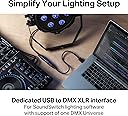
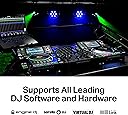
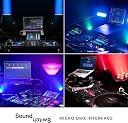
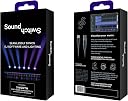
The SoundSwitch Micro DMX Interface is an ultra-compact USB to DMX controller that empowers DJs and lighting pros to create dynamic, music-synced light shows. Featuring live BPM detection, a blue LED status indicator, and support for one DMX universe with up to 128 fixtures, it includes a 3-month SoundSwitch software subscription to automate and customize lighting scenes effortlessly. Perfect for professionals seeking a sleek, powerful lighting solution that elevates any performance.
| ASIN | B07T7YSNG3 |
| Best Sellers Rank | #1,181 in Musical Instruments ( See Top 100 in Musical Instruments ) #10 in Stage Lighting Accessories |
| Brand | SoundSwitch |
| Built-In Media | SoundSwitch Micro DMX Interface; Welcome Note; Sticker |
| Color | Black |
| Compatible Devices | Personal Computer |
| Customer Reviews | 4.0 out of 5 stars 1,236 Reviews |
| Global Trade Identification Number | 00694318024300 |
| Item Dimensions | 16.65 x 0.79 x 0.87 inches |
| Item Package Quantity | 1 |
| Item Type Name | Micro DMX Interface - Ultra-Compact USB to DMX Interface with 3-Month Free SoundSwitch Software Access |
| Item Weight | 0.02 kg |
| Item dimensions L x W x H | 16.65 x 0.79 x 0.87 inches |
| Manufacturer | inMusic Brands Inc. |
| Mfr Part Number | DMXMICROINTERFACE |
| Model Number | DMXMICROINTERFACE |
| Number of Items | 1 |
| Package Quantity | 1 |
| UPC | 694318024300 |
| Unit Count | 1 Count |
| Warranty Description | 1 year manufacturer. |
H**N
A great way to get into DJ lighting
I got this to try out DJ lighting using SoundSwitch, as a less-expensive point of entry than buying the Control One. It's been great for my purposes so far. The device itself has been flawless -- my computer sees it and it sends DMX signals without issues. Of course, this is also part of a software ecosystem (via SoundSwitch -- I haven't actually tested whether it works with other DMX software). Overall I think SoundSwitch does a great job at creating interesting light shows that run automatically (i.e. without needing a person controlling the lights or a dedicated light board). It takes a bit of work to get each new type of fixture set up, especially for more complex fixtures that have motion or built-in pre-programmed functions. Once you have your fixtures set up, the built-in automation for creating track-specific light shows is great. There is definitely a learning curve to it, and unfortunately the online resources, while helpful, aren't super-easy to find and aren't collected in a single location. I've found YouTube videos and the SoundSwitch facebook group to be the best sources of information, enough that in a couple of weeks' free time I was able to get everything working that I wanted to.
M**V
A must have for DJs
This software and interface have exceeded my expectations. I'm just a DJ enthusiast who bought a moving head stage light fixture and wanted to learn how to do DMX light shows. I like tinkering. I went down the DMX rabbit hole and decided to go with this micro DMX interface just to start it off. Once I figured out how to get the auto loops going with Serato, I was already impressed. Then with further tinkering, I learned how to autoscript my crates for more accurate and custom shows. I am absolutely addicted and hooked. I spent an hour or so DJing tonight and having a good time. Time just flew. Lighting just makes DJing funner. I highly recommend SoundSwitch.
M**H
Great system
Some range limitations but glad I got it
T**J
Complicated setup, decent results
The product sounds like a dream come true for small club and mobile DJ use. Unfortunately, it takes a ton of configuration and the final results don't look quite like those advertised. Setup took hours due to a Windows services issue preventing connection to virtual DJ, a poorly written Chauvet Gigbar Flex DMX profile, and no profile available for my Amazon moving head wash lights. As a part time I.T. guy, even I was scratching my head. It relies on the Apple Bonjour software to work on a PC, go figure... Once it finally "worked", it causes occasional music hiccups in Virtual DJ Pro if STEMS are turned on, and worse, sometimes just freezes, crashes, or stops working all together for no obvious reason. The computer has plenty of ram and CPU capacity available, so it seems to just be a big that doesn't allow the light control engine to run at the same time as a song is analyzed for STEMS control when first loaded. Tech support replied to my inquiries, but it takes several days for them to reply asking for additional details, and several more days for an answer. Totally unacceptable for subscription software. Worst of all, the actual light show kinda sucks. If you like RGB lights flashing to the beat, but no chases, dimming, color fading, UV light use, etc, maybe it's for you. In my experience though, master/slave linking sound reactive mode on my Chauvet lights makes for a MUCH better light show than this software. Is it cool seeing all the lights using synchronized color? Yes. But you better have some ambient lighting because the occasional total blackout or all strobe is just obnoxious.
S**E
DMX lighting made easy
This is the smartest thing SoundSwitch could have done. Making an affordable dongle to introduce such a remarkable software for DMX. Previously they had sold this software with a i/o box and listed for $499. I skipped right past it at that price. The star here is the software it is really all I need. Let me explain as an experienced event DJ, I use movers, wash & other effects lights. Ive always wanted more control for my light show. Especially during event formalities. *There is nothing worse then a perfect picture or happy birthday ruined by flashing red or blue dots. This software is so innovative it stops all lights when music stops. Unlike putting a gigbar or any light in sound mode that still flashes when people clap or sing. This software takes all my lights and creates an amazing show not just flashing to beats but static looks running patterns and random. Oh and with full control over all of that at a click! of the mouse. This software is compatable for tons of namebrand an off brand lighting. The dongle it self is so simple to use just plug USB into laptop, NOTE: best thing is you can run DJ software and SoundSwitch software on same laptop no interferences. You can connect dongle to a long DMX cable or a wireless transmitter (donnor). The more time consuming stuff happens in software. By selecting your lights and matching channels. Nothing too hard to worry over. Ok about software yup its 7.99us a month. Which i prefer for now, i dont dj every month so just unsubscribe for a month or two. Eventually I will buy lifetime subscription.
D**Z
didnt like that you have to pay for subscription
The SoundSwitch Micro DMX Interface is a solid entry-level tool for DJs and small lighting setups, but it comes with a few trade-offs worth considering. On the plus side, the ultra-compact design is a big win. It’s lightweight, easy to carry, and doesn’t take up much space in a DJ bag or laptop setup. Setup is fairly straightforward, especially if you’re already in the SoundSwitch ecosystem. The included 3-month software access is a nice bonus and gives you enough time to really test out automated light shows, beat grids, and integration with DJ software like Serato or VirtualDJ. When everything is dialed in, the automation features can make your light show look polished without needing a dedicated lighting tech. That said, it’s not without limitations. The Micro version feels a bit stripped down compared to larger interfaces—most notably, it only outputs a single DMX universe, which can be restrictive if you’re running a more complex lighting rig. Build quality is decent but leans toward the “basic” side, and the USB connection can feel a bit fragile if you’re constantly plugging and unplugging it at gigs. Also, the SoundSwitch software, while powerful, has a learning curve, especially for beginners who aren’t familiar with DMX programming. Overall, the SoundSwitch Micro DMX Interface is a good choice for mobile DJs or small venues looking to step up their lighting game without a huge investment. Just be aware that if your setup grows, you might outgrow this interface fairly quickly.
C**R
Works Great - Be aware of the video card issues
I'm a mobile wedding DJ. I have a large library that I didn't want to have to program individually. I also don't DJ more than a few events a year so didn't want something super expensive. It took me a while to get use to the software, but once I did, it worked well. Support from the company was exceptional when I had questions. My one negative about the product is that the software doesn't support computers with Intel based video cards. Which negates the use of a LOT of machines. Luckily, I had a desktop that I wasn't using any longer that had an NVidia card that was supported. But, I had to move all of my DJing tools over to that in order to utilize SoundSwitch properly. So, a little more painful than I anticipated, but once it was all squared away, it worked extremely well for my first wedding and I received a lot of compliments from the wedding party. I will for sure be using this going forward with my sets.
G**Y
Everything I hoped for. Literally.
Soooooo I've been dj'ing since 2002 in clubs, festivals, bars, whatever. I recently got a new weekly residency in a large venue and needed a lighting solution as the venue's light rig is, well, lacking. Enter SoundSwitch. I bought some cheap Chinese DMX lights (peep EasyDancing lights) and after watching a handful of tutorials, purchased Soundswitch to run them. It. Is. Perfect. As long as your songs are mapped correctly (and if they're not, what are you doing using dj software?) within your dj software of choice, SoundSwitch does the rest. I've only had this thing for about 3 hours, but it's already light years (no pun intended) better than what I was doing before. I will now constantly upgrade my lights and add more to it and focus on making bad ass light displays. Thanks, SoundSwitch! UPDATE : Still using this, still rocking. I'm controlling my own light rig + venue's light rig at the same time with SoundSwitch and have zero problems. Being able to boot dj software, then soundswitch, pick an autoloop bank and go has made my life so much easier and I could not be happier. Bravo!
L**O
ABBONAMENTO OBBLIGATORIO
Mettetevi comodi perché con sto coso ce ne sta da parlare... avoglia!!! Allora, prima di tutto... che cavolo è? A cosa serve? che ci faccio? come funziona?. Bene! cercherò di rispondere a tutte queste domande. Il SoundSwitch DMX Micro Interface è, come dice il nome, un cavo che funge da interfaccia Compatta USB-DMX per il controllo delle luci da discoteca. Il protocollo DMX è appunto uno dei modi che si utilizzano per configurare i giochi di luce in maniera fantastica e professionale. Quindi primo "TIP" è: se non hai luci da programmare e/o non vuoi perdere tempo a configurare giochi di luci su faresti da discoteca, questo prodotto non ti serve. Se invece potrebbe interessarti sappi che: il modo più fantastico di utilizzo è con le console con a bordo il software di gestione "Engine DJ" (attualmente le console stand-alone DENON e NUMARK), che ha integrata anche una gestione professionale delle luci che potresti "pilotare" proprio con questo cavetto. Altra possibilità è usarlo comunque con altri controller DMX anche su pc (Windows o Mac). Per la gestione/configurazione dei giochi di luce E' NECESSARIO utilizzare il software Soundswitch, liberamente scaricabile dal sito del produttore ma che necessita OBBLIGATORIAMENTE di abbonamento per poterlo utilizzare; acquistando questo cavo avete tre mesi gratuiti di utilizzo per poter capire se facia il caso vostro e se vi piace... dopodiché € 7,99 al mese e passa la paura... attenzione... niente abbonamento niente divertimento (non potete utilizzarlo, se non i set che avete già approntato); quindi secondo TIP: se pensate di non pagare ogni mese l'abbonamento, utilizzate i tre mesi gratuiti per configurare tutti i giochi di luci e le periferiche, ma tenete a mente che senza un abbonamento attivo non potrete fare alcuna modifica. Come funziona? Il software Soundswitch è fatto molto bene (anche se parecchio complicato per chi è alle prime armi); prima di tutto occorre individuare ed associare tutte le periferiche in vostro possesso relative ai "giochi di luce" (faretti, laser, strobo, luci multifunzione, macchine del fumo etc. etc.) Il database è infinito e, comunque, permette di segnalare la periferica ove non fosse presente. Ora... non voglio addentrarmi nel panorama DMX altrimenti mi dilungherei troppo, ma l'importante è sapere che ogni periferica dotata di protocollo DMX ha un determinato numero di canali... bene! una volta individuata nel database la periferica in vostro possesso, occorre assegnarli il numero di "posti" a seconda del numero dei canali che essa dispone (sicuramente è più facile a farlo che a spiegarlo). Una volta che avete terminato l'assegnazione dei canali di tutte le vostre luci, potete scegliere i vari programmi (gli scenari); questa operazione può essere fatta manualmente o con programmi predefiniti. Si può assegnare ad ogni singolo brano lo scenario preferito o, se si vuole, anche alla cartella o al DJ SET. Alla fine vi posso assicurare che il risultato è eccezionale; avrete dei giochi di luce da veri professionisti. Ora la domanda è: ne vale la pena? se siete dei professionisti che durante i loro DJ SET utilizzano proprie luci, ASSOLUTAMENTE SI! la differenza che c'è tra i giochi di luce impostati con questa interfaccia e quelli della classica modalità sound è la stessa che c'è a guidare una 500 Abarth ed una Ferrari. IL risultato è veramente fantastico; andatevi a vedere su YouTube il sito di SOundswitc per capire cosa sto dicendo. AL contrario: sei un professionista che lavora nei club dove la gestione delle luci non è di tua competenza? Beh ne puoi fare assolutamente a meno. Sei una persona che ha due faretti di numero e una strobo? Anche qui magari ti prepari i giochi di luce con i tre mesi di abbonamento gratuito poi quando devi aggiornare i brani puoi ogni tanti pagarti la mensilità (l'abbonamento si disdice a riattiva come si vuole). CONCLUSIONI Lo spettacolo di luci che potete fare con questo corsetto è fantastico quanto difficile da spiegare. Ripeto che lascerete tutti a bocca aperta; se poi siete possessori di console DENON o NUMARK tutto quanto sarà ancora più facilmente ed immediatamente gestibile. CONTRO serve un abbonamento e configurare i giochi di luce in maniera "seria" non è cosa da poco... occorre una buona dose di pazienza e perderci parecchio tempo. Consigliato solo a chi ha necessità di gestire personalmente i giochi di luce o chi, come me, vuole divertirsi anche con le luci mentre mixa.
C**L
Not compatible
Not compatible with light key software
D**H
cant say enough good things about this
Absolutely in love with sound switch and their customer support is top notch. First of all , their software is easy to learn and the layout is great , i have had no issues learning from videos and forum posts all i needed to know to operate everything and messing around with the settings is fun ! with this you can become the lighting guy and the DJ ! hassle free! I had an issue with my free 3 month trial not working and when i reached out to support i was surprised how fast they were able to help me resolve my issue, super friendly team over there ! Works with all of my fixtures , and they even updated one of mine that wasn't fully supported within 24 hours and now it is.
M**R
Nach einer guten Einarbeitungsphase super easy zu bedienen und vor allem günstig!
Super günstige Möglichkeit eine optisch hochwertige Lichtshow über DMX realisieren zu können. Die Software ist nach paar Einarbeitungsstunden gut zu verstehen und nimmt einem an vielen Stellen viel Arbeit ab. Außerdem hat sie wesentliche Funktionen und Lichtshows gleich standardmäßig integriert, so dass es direkt nach der Einrichtung der DMX Adressierung los gehen kann. Wenn ein Fixture fehlt, kann man den Support anschreiben und man hat innerhalb von 24h sein gewünschtes Fixture in der Datenbank. Super fixer und guter Support! Außerdem kann das Programm im Hintergrund laufen und über einen beliebigen MIDI-Controller gesteuert werden. Es Lassen sich zum Beispiel verschiedene FX-Effekte oder Sounds am Mixer mit einer passenden Lichtfarbe kombinieren, so dass man sich voll auf sein DJ-Job konzentrieren kann.
A**4
Ideal para iniciarse en iluminación
Ideal para iniciarse en el mundo DMX, hacer automatizaciones, escenas, patrones programados, sincronizar la música por temas o BPM.... Muy completo para iniciarse, aunque no lo veo un competidor directo de opciones más profesionales de Avolites o Ma Software
Trustpilot
1 month ago
2 weeks ago